Address Search
This example demonstrates how to create a Flutter app that performs address searches and displays the results on a map using Maps SDK for Flutter.
How it works
The example app demonstrates the following features:
- Search for a specific address by country, city, street, and house number.
- Highlight and center the map on the searched address.
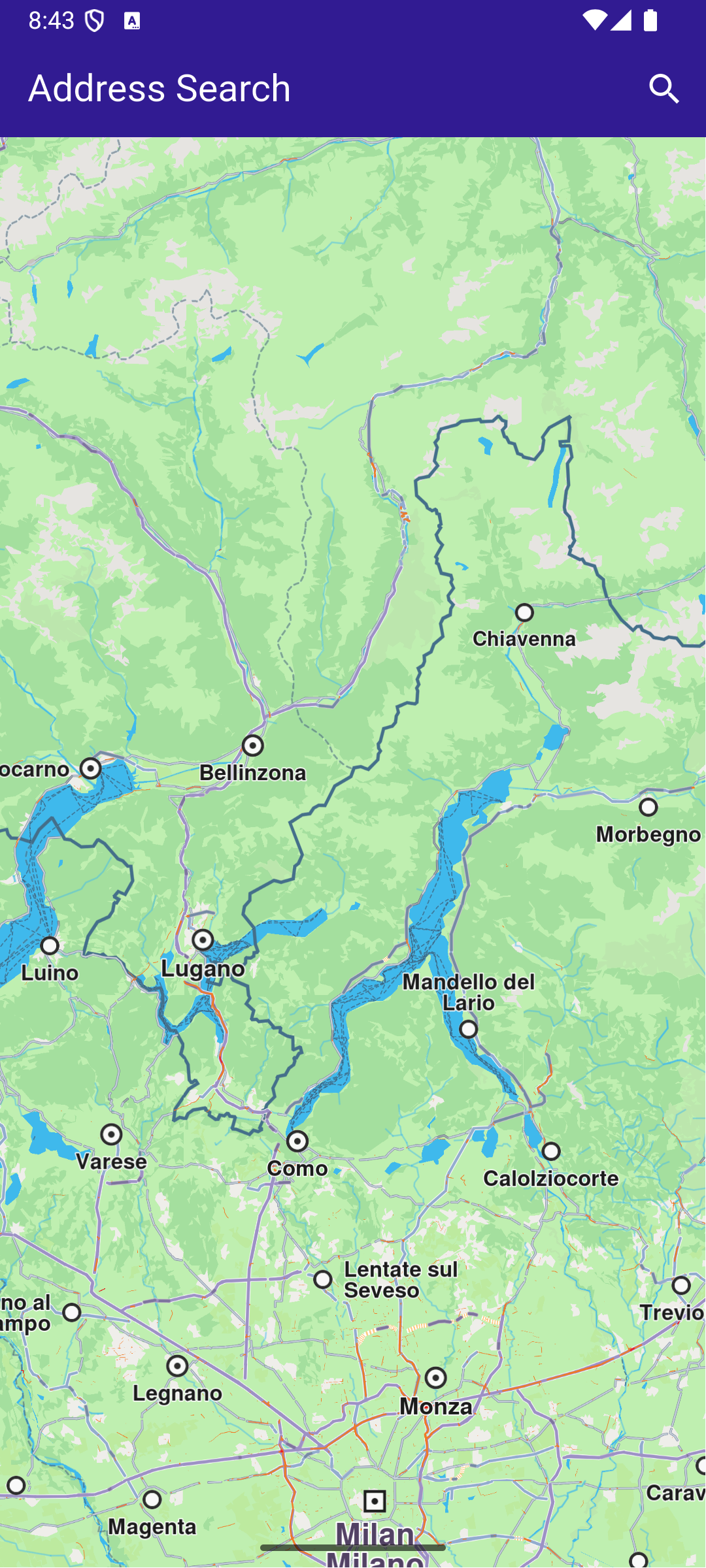
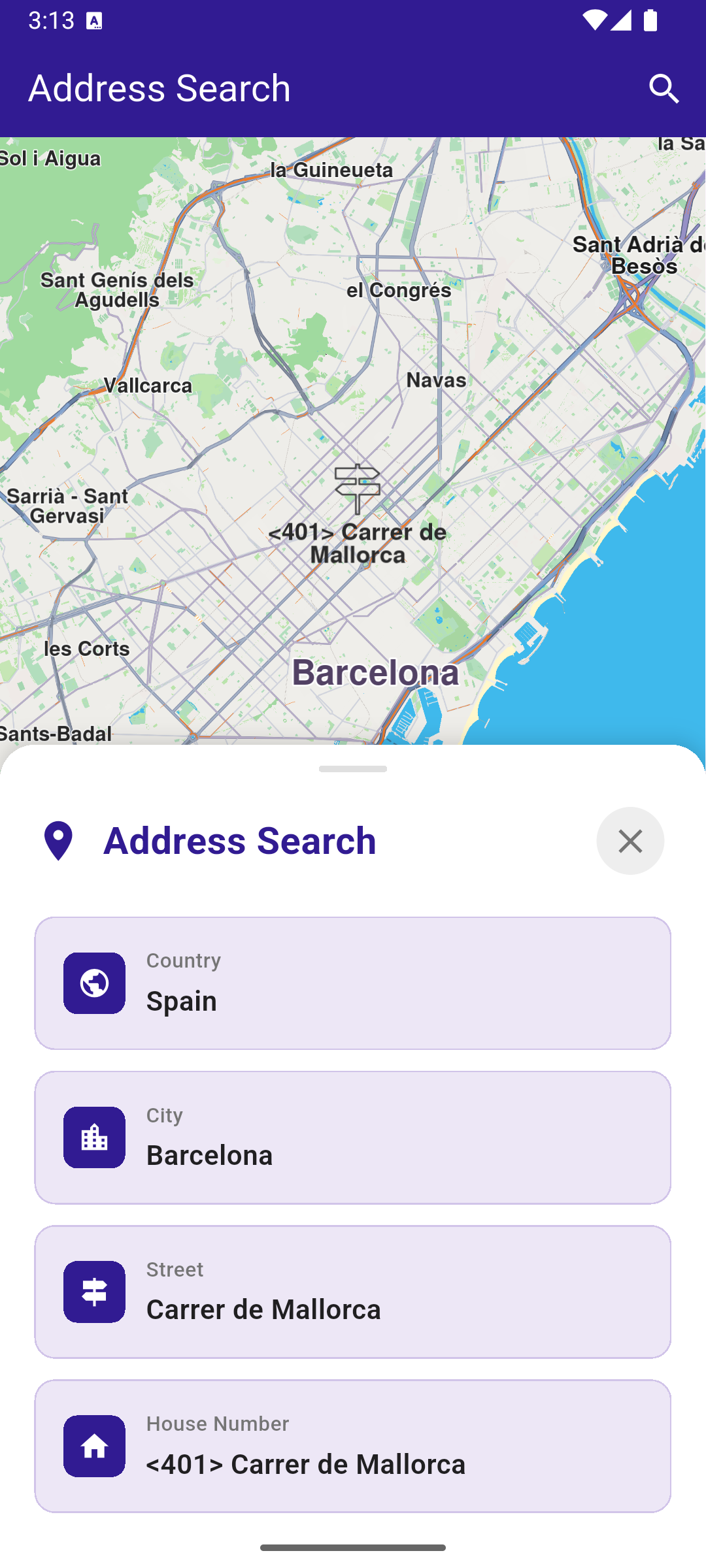
UI and Map Integration
This code sets up the basic structure of the app, including the map and the app bar. It also provides a search button in the app bar for initiating the address search.
class MyApp extends StatelessWidget {
  const MyApp({super.key});

  @override
  Widget build(BuildContext context) {
    return const MaterialApp(
      debugShowCheckedModeBanner: false,
      title: 'Address Search',
      home: MyHomePage(),
    );
  }
}

class MyHomePage extends StatefulWidget {
  const MyHomePage({super.key});

  @override
  State<MyHomePage> createState() => _MyHomePageState();
}

class _MyHomePageState extends State<MyHomePage> {
  late GemMapController _mapController;

  String? _country;
  String? _city;
  String? _street;
  String? _houseNumber;
  bool _isPanelVisible = false;

  @override
  void dispose() {
    GemKit.release();
    super.dispose();
  }

  @override
  Widget build(BuildContext context) {
    return Scaffold(
      appBar: AppBar(
        backgroundColor: Colors.deepPurple[900],
        title: const Text('Address Search', style: TextStyle(color: Colors.white)),
        actions: [
          IconButton(
            onPressed: () {
              _onSearchButtonPressed(context).then((value) {
                if (context.mounted) {
                  ScaffoldMessenger.of(context).clearSnackBars();
                }
              });
            },
            icon: const Icon(Icons.search, color: Colors.white),
          ),
        ],
      ),
      body: Stack(
        children: [
          GemMap(key: ValueKey("GemMap"), onMapCreated: _onMapCreated, appAuthorization: projectApiToken),
          if (_isPanelVisible) _buildBottomPanel(),
        ],
      ),
    );
  }

  // The callback for when map is ready to use
  void _onMapCreated(GemMapController controller) {
    // Save controller for further usage
    _mapController = controller;
  }
Address Search and Map Interaction
This code enables the app to search for addresses by different levels of detail (country, city, street, house number) and highlights the searched location on the map. The map is centered on the found address, with an optional animation.
  Future<void> _onSearchButtonPressed(BuildContext context) async {
    setState(() {
      _country = null;
      _city = null;
      _street = null;
      _houseNumber = null;
      _isPanelVisible = true;
    });

    // Predefined landmark for Spain.
    final countryLandmark = GuidedAddressSearchService.getCountryLevelItem('ESP')!;
    print('[example] Country: ${countryLandmark.name}');
    setState(() => _country = countryLandmark.name);

    // Use the address search to get a landmark for a city in Spain (e.g., Barcelona).
    final cityLandmark = await _searchAddress(
      landmark: countryLandmark,
      detailLevel: AddressDetailLevel.city,
      text: 'Barcelona',
    );
    if (cityLandmark == null) return;

    print('[example] City: ${cityLandmark.name}');
    setState(() => _city = cityLandmark.name);

    // Use the address search to get a predefined street's landmark in the city (e.g., Carrer de Mallorca).
    final streetLandmark = await _searchAddress(
      landmark: cityLandmark,
      detailLevel: AddressDetailLevel.street,
      text: 'Carrer de Mallorca',
    );
    if (streetLandmark == null) return;

    print('[example] Street: ${streetLandmark.name}');
    setState(() => _street = streetLandmark.name);

    // Use the address search to get a predefined house number's landmark on the street (e.g., House Number 401).
    final houseNumberLandmark = await _searchAddress(
      landmark: streetLandmark,
      detailLevel: AddressDetailLevel.houseNumber,
      text: '401',
    );
    if (houseNumberLandmark == null) return;

    print('[example] House number: ${houseNumberLandmark.name}');
    setState(() => _houseNumber = houseNumberLandmark.name);

    // Center the map on the final result.
    _presentLandmark(houseNumberLandmark);
  }

  void _presentLandmark(Landmark landmark) {
    // Highlight the landmark on the map.
    _mapController.activateHighlight([landmark]);

    // Create an animation (optional).
    final animation = GemAnimation(type: AnimationType.linear);

    // Calculate the screen position for the landmark (optional).
    // We do this to place the landmark above the bottom panel, instead of in the center of the screen.
    final screenPosition = Point<int>(
      (_mapController.viewport.height / 4).toInt(),
      (_mapController.viewport.width / 2).toInt(),
    );

    // Use the map controller to center on coordinates.
    _mapController.centerOnCoordinates(
      landmark.coordinates,
      animation: animation,
      zoomLevel: 50,
      screenPosition: screenPosition,
    );
  }

  // Address search method.
  Future<Landmark?> _searchAddress({
    required Landmark landmark,
    required AddressDetailLevel detailLevel,
    required String text,
  }) async {
    final completer = Completer<Landmark?>();

    // Calling the address search SDK method.
    // (err, results) - is a callback function that gets called when the search is finished.
    // err is an error enum, results is a list of landmarks.
    GuidedAddressSearchService.search(text, landmark, detailLevel, (err, results) {
      // If there is an error, the method will return a null list.
      if (err != GemError.success && err != GemError.reducedResult || results.isEmpty) {
        completer.complete(null);
        return;
      }

      completer.complete(results.first);
    });

    return completer.future;
  }
Bottom Panel for Search Results
This code builds a bottom panel that displays the search results for each address component (country, city, street and house number). Each result is shown with an icon and a label. The panel can be dismissed by dragging it down or by tapping the close button.
  // Build the bottom panel showing search results
  Widget _buildBottomPanel() {
    return Positioned(
      left: 0,
      right: 0,
      bottom: 0,
      child: GestureDetector(
        onVerticalDragEnd: (details) {
          // Close panel when dragged down with sufficient velocity
          if (details.velocity.pixelsPerSecond.dy > 200) {
            setState(() => _isPanelVisible = false);
          }
        },
        child: Container(
          decoration: BoxDecoration(
            color: Colors.white,
            borderRadius: const BorderRadius.vertical(top: Radius.circular(20)),
            boxShadow: [
              BoxShadow(color: Colors.black.withValues(alpha: 0.15), blurRadius: 10, offset: const Offset(0, -2)),
            ],
          ),
          child: Column(
            mainAxisSize: MainAxisSize.min,
            children: [
              // Handle bar (drag indicator)
              Container(
                margin: const EdgeInsets.only(top: 12, bottom: 16),
                width: 40,
                height: 4,
                decoration: BoxDecoration(color: Colors.grey[300], borderRadius: BorderRadius.circular(2)),
              ),
              // Header with close button
              Padding(
                padding: const EdgeInsets.symmetric(horizontal: 20),
                child: Row(
                  children: [
                    Icon(Icons.location_on, color: Colors.deepPurple[900], size: 28),
                    const SizedBox(width: 12),
                    Text(
                      'Address Search',
                      style: TextStyle(fontSize: 22, fontWeight: FontWeight.bold, color: Colors.deepPurple[900]),
                    ),
                    const Spacer(),
                    IconButton(
                      onPressed: () => setState(() => _isPanelVisible = false),
                      icon: Icon(Icons.close, color: Colors.grey[600]),
                      style: IconButton.styleFrom(backgroundColor: Colors.grey[200], padding: const EdgeInsets.all(8)),
                    ),
                  ],
                ),
              ),
              const SizedBox(height: 20),
              // Address details
              Padding(
                padding: const EdgeInsets.symmetric(horizontal: 20),
                child: Column(
                  children: [
                    _buildAddressRow(
                      icon: Icons.public,
                      label: 'Country',
                      value: _country,
                      isLoading: _country == null,
                    ),
                    _buildAddressRow(
                      icon: Icons.location_city,
                      label: 'City',
                      value: _city,
                      isLoading: _city == null && _country != null,
                    ),
                    _buildAddressRow(
                      icon: Icons.signpost,
                      label: 'Street',
                      value: _street,
                      isLoading: _street == null && _city != null,
                    ),
                    _buildAddressRow(
                      icon: Icons.home,
                      label: 'House Number',
                      value: _houseNumber,
                      isLoading: _houseNumber == null && _street != null,
                    ),
                  ],
                ),
              ),
              const SizedBox(height: 20),
            ],
          ),
        ),
      ),
    );
  }

  // Build individual address row
  Widget _buildAddressRow({required IconData icon, required String label, String? value, bool isLoading = false}) {
    if (value == null && !isLoading) return const SizedBox.shrink();

    return Container(
      margin: const EdgeInsets.only(bottom: 12),
      padding: const EdgeInsets.all(16),
      decoration: BoxDecoration(
        color: Colors.deepPurple[50],
        borderRadius: BorderRadius.circular(12),
        border: Border.all(color: Colors.deepPurple[100]!),
      ),
      child: Row(
        children: [
          Container(
            padding: const EdgeInsets.all(8),
            decoration: BoxDecoration(color: Colors.deepPurple[900], borderRadius: BorderRadius.circular(8)),
            child: Icon(icon, color: Colors.white, size: 20),
          ),
          const SizedBox(width: 12),
          Expanded(
            child: Column(
              crossAxisAlignment: CrossAxisAlignment.start,
              children: [
                Text(
                  label,
                  style: TextStyle(fontSize: 12, color: Colors.grey[600], fontWeight: FontWeight.w500),
                ),
                const SizedBox(height: 4),
                if (isLoading)
                  SizedBox(
                    height: 16,
                    width: 100,
                    child: LinearProgressIndicator(
                      color: Colors.deepPurple[900],
                      backgroundColor: Colors.deepPurple[100],
                    ),
                  )
                else
                  Text(
                    value ?? '',
                    style: const TextStyle(fontSize: 16, fontWeight: FontWeight.w600, color: Colors.black87),
                  ),
              ],
            ),
          ),
        ],
      ),
    );
  }