Lane Instruction
This example demonstrates how to build a Flutter app that calculates routes and displays lane instructions using the Maps SDK for Flutter.
How it works
The example app demonstrates the following features:
- Initializes GemKit and calculates a route between landmarks.
- Allows users to simulate navigation along the calculated route.
- Displays lane instructions with real-time lane guidance.
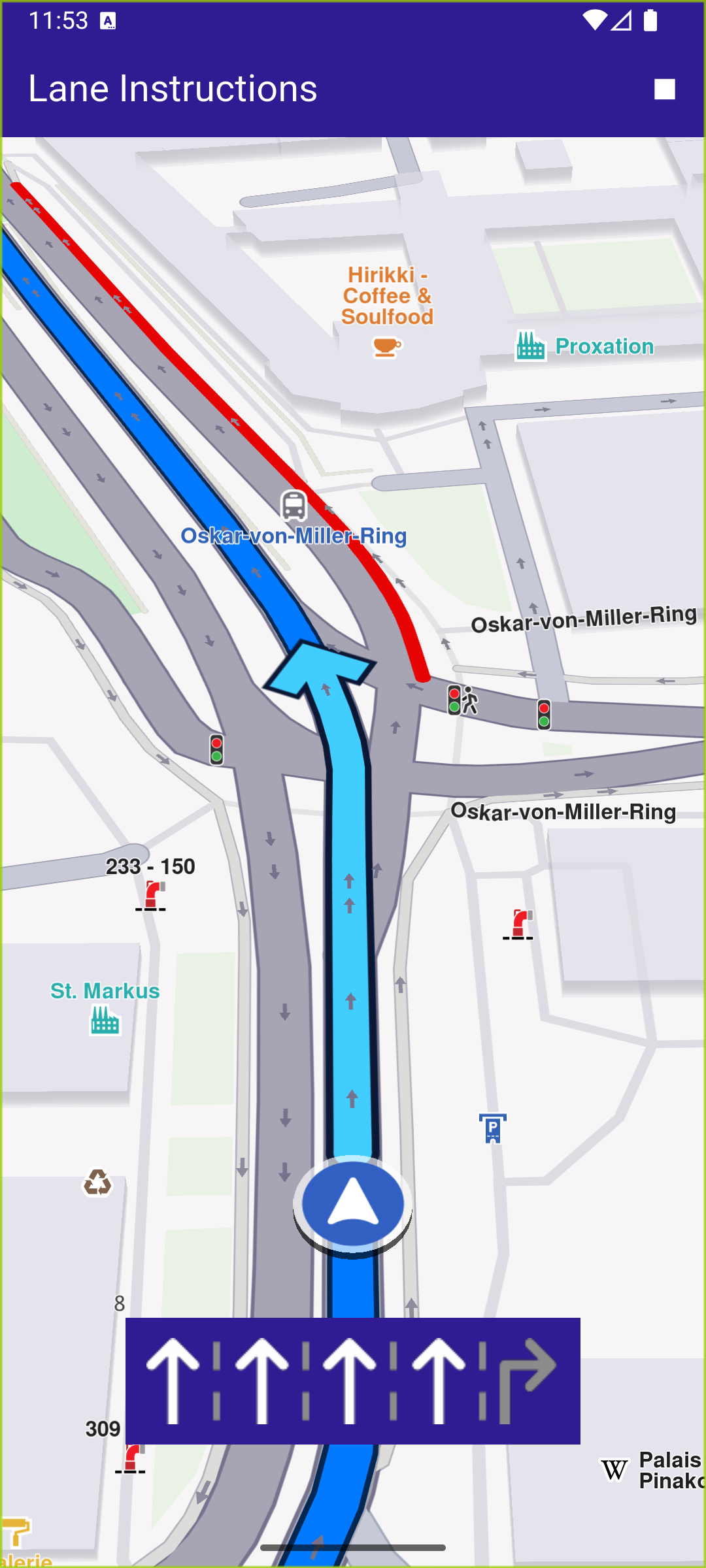
Lane instruction image displayed
UI and Map Integration
The following code demonstrates how to build a user interface featuring a GemMap widget and an app bar with a route and navigation button.
main.dartView on Github
const projectApiToken = String.fromEnvironment('YOUR_API_TOKEN_HERE');

void main() {
  runApp(const MyApp());
}

class MyApp extends StatelessWidget {
  const MyApp({super.key});

  @override
  Widget build(BuildContext context) {
    return const MaterialApp(
      debugShowCheckedModeBanner: false,
      title: 'Lane Instructions',
      home: MyHomePage(),
    );
  }
}

class MyHomePage extends StatefulWidget {
  const MyHomePage({super.key});

  @override
  State<MyHomePage> createState() => _MyHomePageState();
}

class _MyHomePageState extends State<MyHomePage> {
  late GemMapController _mapController;
  late NavigationInstruction currentInstruction;

  bool _areRoutesBuilt = false;
  bool _isSimulationActive = false;

  // We use the progress listener to cancel the route calculation.
  TaskHandler? _routingHandler;

  // We use the progress listener to cancel the navigation.
  TaskHandler? _navigationHandler;

  @override
  void dispose() {
    GemKit.release();
    super.dispose();
  }

  @override
  Widget build(BuildContext context) {
    return Scaffold(
      appBar: AppBar(
        title: const Text(
          "Lane Instructions",
          style: TextStyle(color: Colors.white),
        ),
        backgroundColor: Colors.deepPurple[900],
        actions: [
          if (!_isSimulationActive && _areRoutesBuilt)
            IconButton(
              onPressed: _startSimulation,
              icon: const Icon(Icons.play_arrow, color: Colors.white),
            ),
          if (_isSimulationActive)
            IconButton(
              onPressed: _stopSimulation,
              icon: const Icon(Icons.stop, color: Colors.white),
            ),
          if (!_areRoutesBuilt)
            IconButton(
              onPressed: () => _onBuildRouteButtonPressed(context),
              icon: const Icon(Icons.route, color: Colors.white),
            ),
        ],
      ),
      body: Stack(
        children: [
          GemMap(
            key: ValueKey("GemMap"),
            onMapCreated: _onMapCreated,
            appAuthorization: projectApiToken,
          ),
          if (_isSimulationActive && currentInstruction.laneImg.isValid)
            Align(
              alignment: Alignment.bottomCenter,
              child: Padding(
                padding: EdgeInsets.only(
                  bottom: MediaQuery.of(context).padding.bottom + 40,
                ),
                child: Container(
                  color: Colors.deepPurple[900],
                  padding: const EdgeInsets.all(12.0),
                  margin: const EdgeInsets.all(8.0),
                  // Call getLaneImage on instruction
                  child: Image.memory(
                    currentInstruction.laneImg
                        .getRenderableImage(
                          size: Size(100, 50),
                          format: ImageFileFormat.png,
                          allowResize: true,
                        )!
                        .bytes,
                    gaplessPlayback: true,
                  ),
                ),
              ),
            ),
        ],
      ),
      resizeToAvoidBottomInset: false,
    );
  }

  void _onMapCreated(GemMapController controller) {
    _mapController = controller;
  }
Route Calculation and Simulation
The calculateRoute method calculates a route between two landmarks and displays it on the map.
main.dartView on Github
  void _onBuildRouteButtonPressed(BuildContext context) {
    // Define the departure.
    final departureLandmark = Landmark.withLatLng(
      latitude: 48.15021176018896,
      longitude: 11.558610476998183,
    );

    // Define the destination.
    final destinationLandmark = Landmark.withLatLng(
      latitude: 48.13993582693814,
      longitude: 11.604079110086362,
    );

    // Define the route preferences.
    final routePreferences = RoutePreferences();
    _showSnackBar(context, message: 'The route is calculating.');

    // Calling the calculateRoute SDK method.
    // (err, results) - is a callback function that gets called when the route computing is finished.
    // err is an error enum, results is a list of routes.
    _routingHandler = RoutingService.calculateRoute(
      [departureLandmark, destinationLandmark],
      routePreferences,
      (err, routes) async {
        // If the route calculation is finished, we don't have a progress listener anymore.
        _routingHandler = null;

        ScaffoldMessenger.of(context).clearSnackBars();

        // If there aren't any errors, we display the routes.
        if (err == GemError.success) {
          // Get the routes collection from map preferences.
          final routesMap = _mapController.preferences.routes;

          // Display the routes on map.
          for (final route in routes) {
            routesMap.add(
              route,
              route == routes.first,
              label: getMapLabel(route),
            );
          }

          // Center the camera on routes.
          _mapController.centerOnRoutes(routes: routes);
        }
        setState(() {
          _areRoutesBuilt = true;
        });
      },
    );
  }
Navigation Simulation
The startSimulation method triggers a simulated navigation session, updating the UI with lane instructions.
main.dartView on Github
  void _startSimulation() {
    final routes = _mapController.preferences.routes;

    _mapController.preferences.routes.clearAllButMainRoute();

    if (routes.mainRoute == null) {
      _showSnackBar(context, message: "No main route available");
      return;
    }

    _navigationHandler = NavigationService.startSimulation(
      routes.mainRoute!,
      onNavigationInstruction: (instruction, events) {
        setState(() {
          _isSimulationActive = true;
        });
        currentInstruction = instruction;
      },
      onError: (error) {
        // If the navigation has ended or if and error occurred while navigating, remove routes.
        setState(() {
          _isSimulationActive = false;
          _cancelRoute();
        });

        if (error != GemError.cancel) {
          _stopSimulation();
        }
        return;
      },
    );
UI Components
Lane Instruction Display shows current lane instructions based on the navigation data.
main.dartView on Github
            Align(
              alignment: Alignment.bottomCenter,
              child: Padding(
                padding: EdgeInsets.only(
                  bottom: MediaQuery.of(context).padding.bottom + 40,
                ),
                child: Container(
                  color: Colors.deepPurple[900],
                  padding: const EdgeInsets.all(12.0),
                  margin: const EdgeInsets.all(8.0),
                  // Call getLaneImage on instruction
                  child: Image.memory(
                    currentInstruction.laneImg
                        .getRenderableImage(
                          size: Size(100, 50),
                          format: ImageFileFormat.png,
                          allowResize: true,
                        )!
                        .bytes,
                    gaplessPlayback: true,
                  ),
                ),
              ),
            ),