
Add Markers

Last updated: July 15, 2026 | 4 minutes read

This example demonstrates how to create a Flutter app that displays a large number of markers on a map using Maps SDK for Flutter.

Saving Assets​

Before running the app, ensure that you save the necessary files (marker icons) into the assets directory.

Update your pubspec.yaml file to include these assets:

flutter:
assets:
- assets/

How it works​

The example app demonstrates the following features:

  • Display a large number of markers on the map.
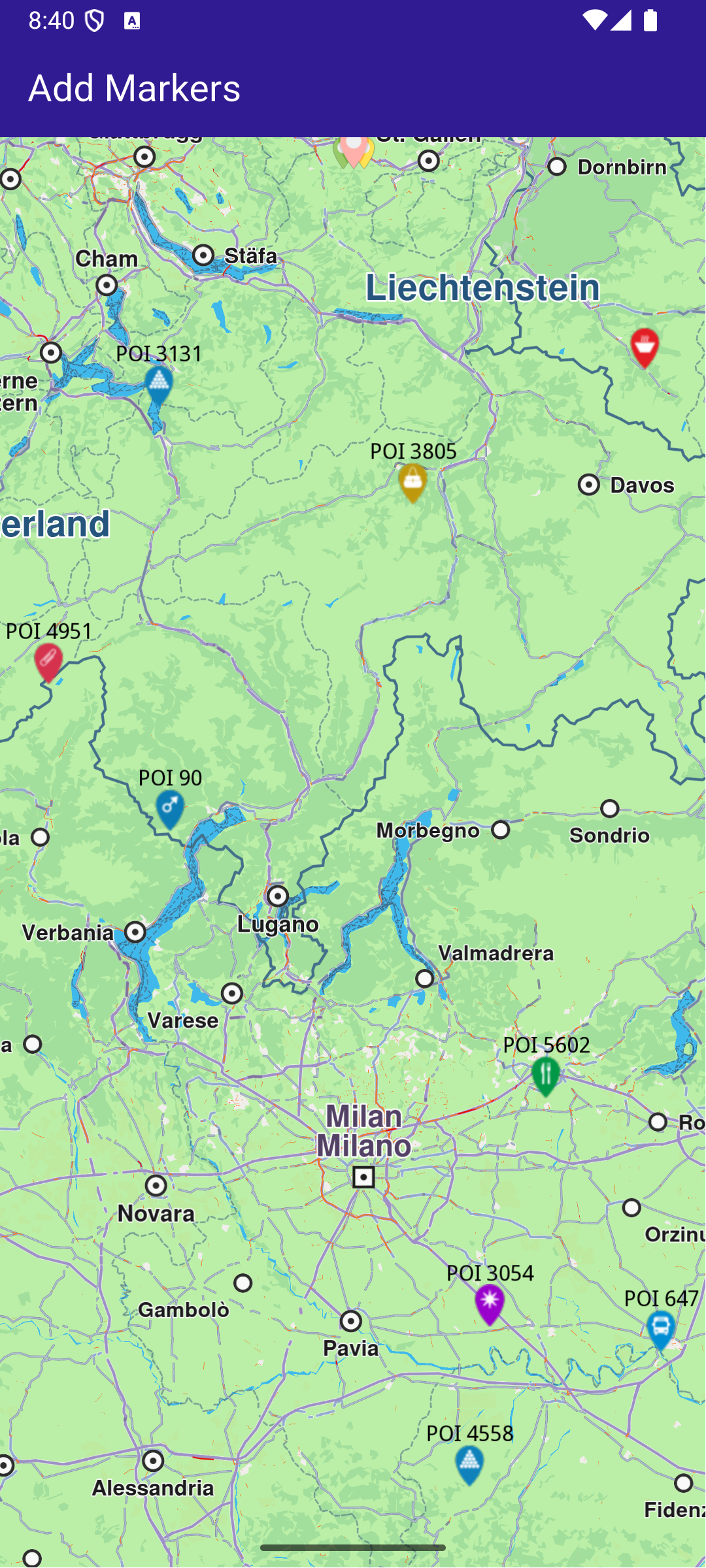
GemMap widget

UI and Map Integration​

This code sets up the basic structure of the app, including the map and the app bar, and initializes the map when it is created.

class MyApp extends StatelessWidget {
const MyApp({super.key});


Widget build(BuildContext context) {
return const MaterialApp(
debugShowCheckedModeBanner: false,
title: 'Add Markers',
home: MyHomePage(),
);
}
}

class MyHomePage extends StatefulWidget {
const MyHomePage({super.key});


State<MyHomePage> createState() => _MyHomePageState();
}

class _MyHomePageState extends State<MyHomePage> {
late GemMapController _mapController;

void dispose() {
GemKit.release();
super.dispose();
}


Widget build(BuildContext context) {
return Scaffold(
appBar: AppBar(
backgroundColor: Colors.deepPurple[900],
title: const Text('Add Markers', style: TextStyle(color: Colors.white)),
),
body: GemMap(
key: ValueKey("GemMap"),
onMapCreated: _onMapCreated,
appAuthorization: projectApiToken,
),
);
}

// The callback for when map is ready to use.
Future<void> _onMapCreated(GemMapController controller) async {
// Save controller for further usage.
_mapController = controller;

await addMarkers();
}

Adding and displaying Markers​

This code creates and adds a large number of markers to the map, generating random coordinates across Europe for demonstration purposes. It loads PNG images from assets to be used as marker icons.

Future<void> addMarkers() async {
final listPngs = await loadPngs();

// Save the image for the group icon.
final ByteData imageData = await rootBundle.load(
'assets/pois/GroupIcon.png',
);
final Uint8List imageBytes = imageData.buffer.asUint8List();

Random random = Random();
double minLat = 35.0; // Southernmost point of Europe
double maxLat = 71.0; // Northernmost point of Europe
double minLon = -10.0; // Westernmost point of Europe
double maxLon = 40.0; // Easternmost point of Europe

List<MarkerWithRenderSettings> markers = [];

for (int i = 0; i < 8000; ++i) {
// Generate random coordinates to display some markers.
double randomLat = minLat + random.nextDouble() * (maxLat - minLat);
double randomLon = minLon + random.nextDouble() * (maxLon - minLon);

final marker = MarkerJson(
coords: [Coordinates(latitude: randomLat, longitude: randomLon)],
name: "POI $i",
);

// Choose a random POI icon for the marker and set the label size.
final renderSettings = MarkerRenderSettings(
image: GemImage(
image: listPngs[random.nextInt(listPngs.length)],
format: ImageFileFormat.png,
),
labelTextSize: 2.0,
);

// Create a MarkerWithRenderSettings object.
final markerWithRenderSettings = MarkerWithRenderSettings(
marker,
renderSettings,
);

// Add the marker to the list of markers.
markers.add(markerWithRenderSettings);
}

// Create the settings for the collections.
final settings = MarkerCollectionRenderSettings();

// Set the label size.
settings.labelGroupTextSize = 2;

// The zoom level at which the markers will be grouped together.
settings.pointsGroupingZoomLevel = 35;

// Set the image of the collection.
settings.image = GemImage(image: imageBytes, format: ImageFileFormat.png);
// To delete the list you can use this method: _mapController.preferences.markers.clear();

// Add the markers and the settings on the map.
_mapController.preferences.markers.addList(
list: markers,
settings: settings,
name: "Markers",
);
}

// Load all the images from assets and transform them to Uint8List.
Future<List<Uint8List>> loadPngs() async {
List<Uint8List> pngs = [];
for (int i = 83; i < 183; ++i) {
try {
final ByteData imageData = await rootBundle.load(
'assets/pois/poi$i.png',
);
final Uint8List png = imageData.buffer.asUint8List();
pngs.add(png);
} catch (e) {
throw ("Error loading png $i");
}
}
return pngs;
}