Advanced Follow Position
This example demonstrates how to create a Flutter app that showcases advanced options for follow position functionality.
How it works
The example app demonstrates the following features:
- Calculate a route and simulate movement along it.
- Follow the simulated position on the map with customizable options.
- Get information about the current follow position state.
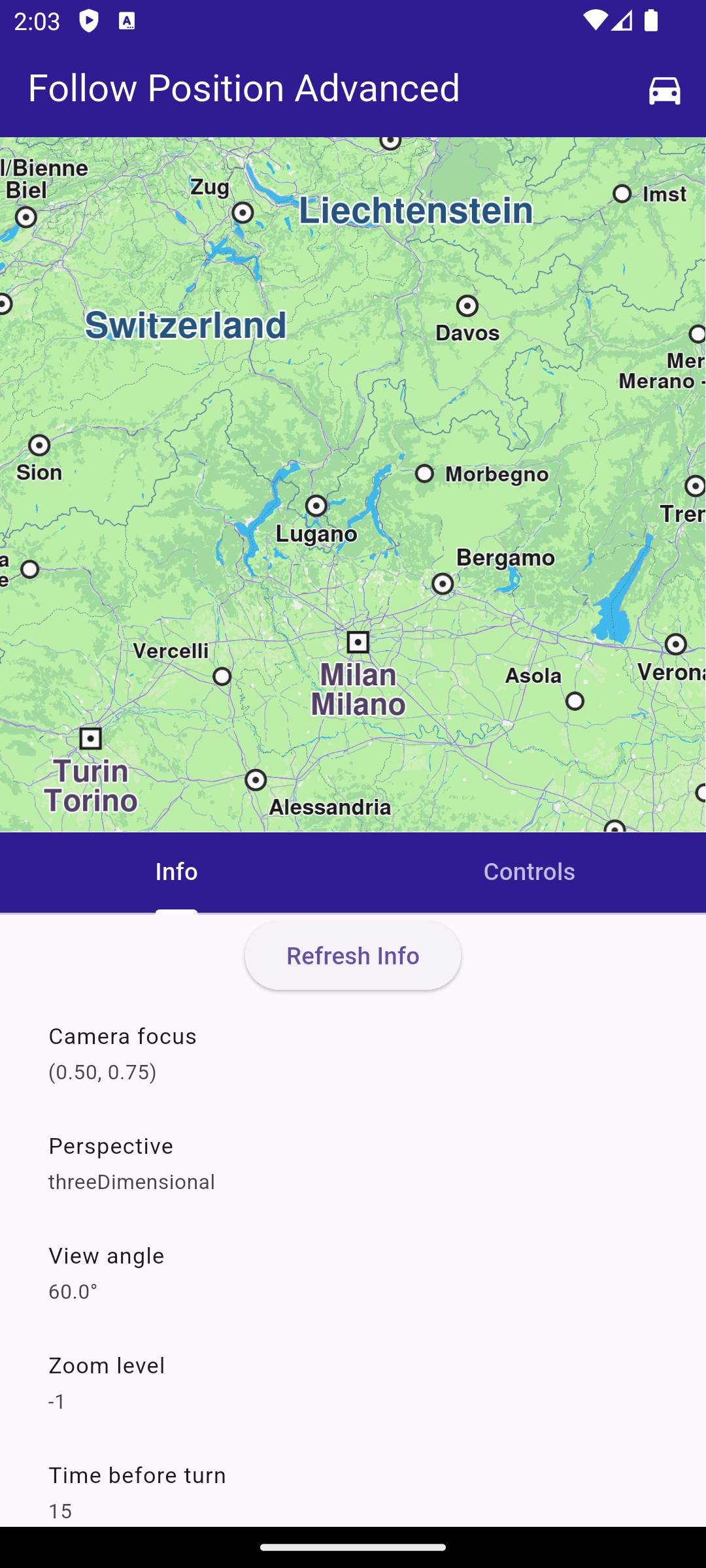
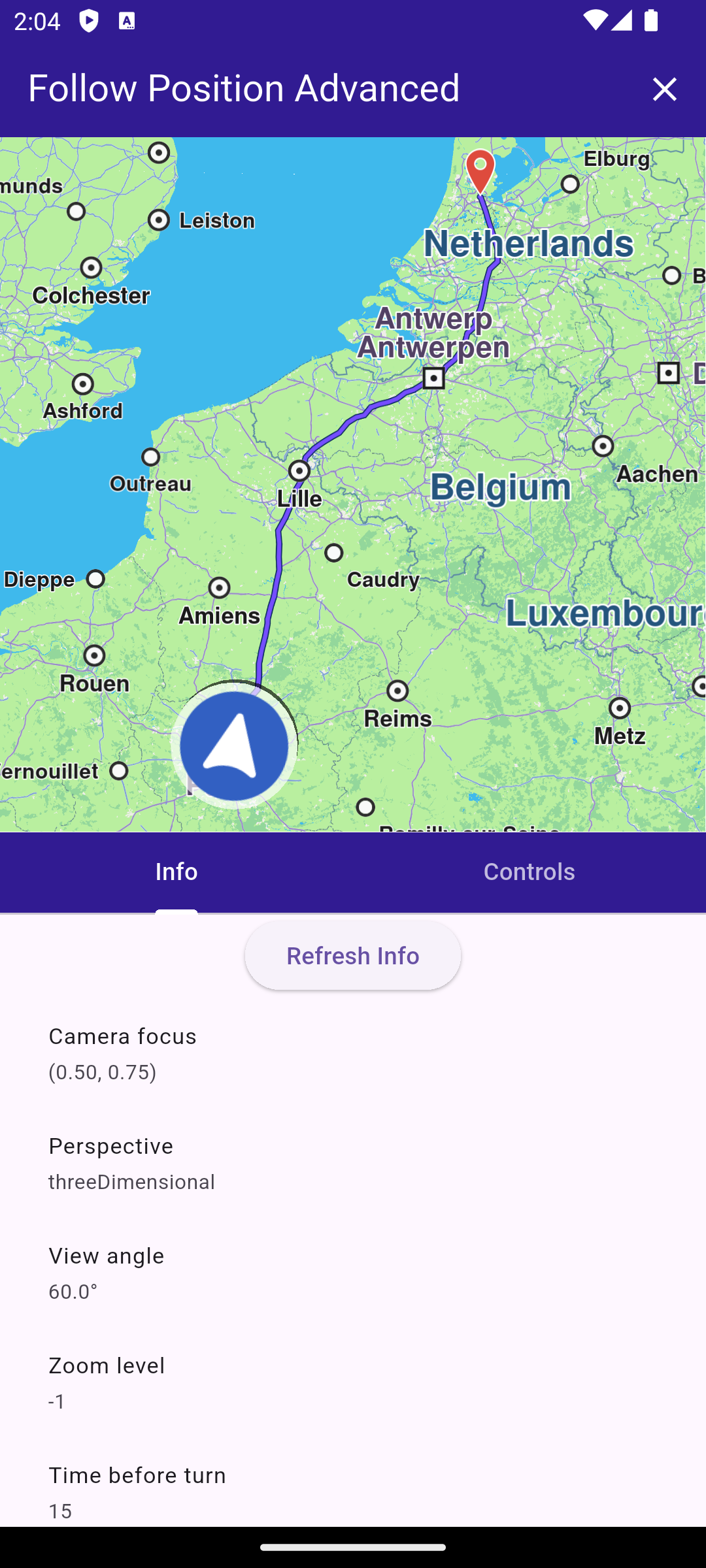
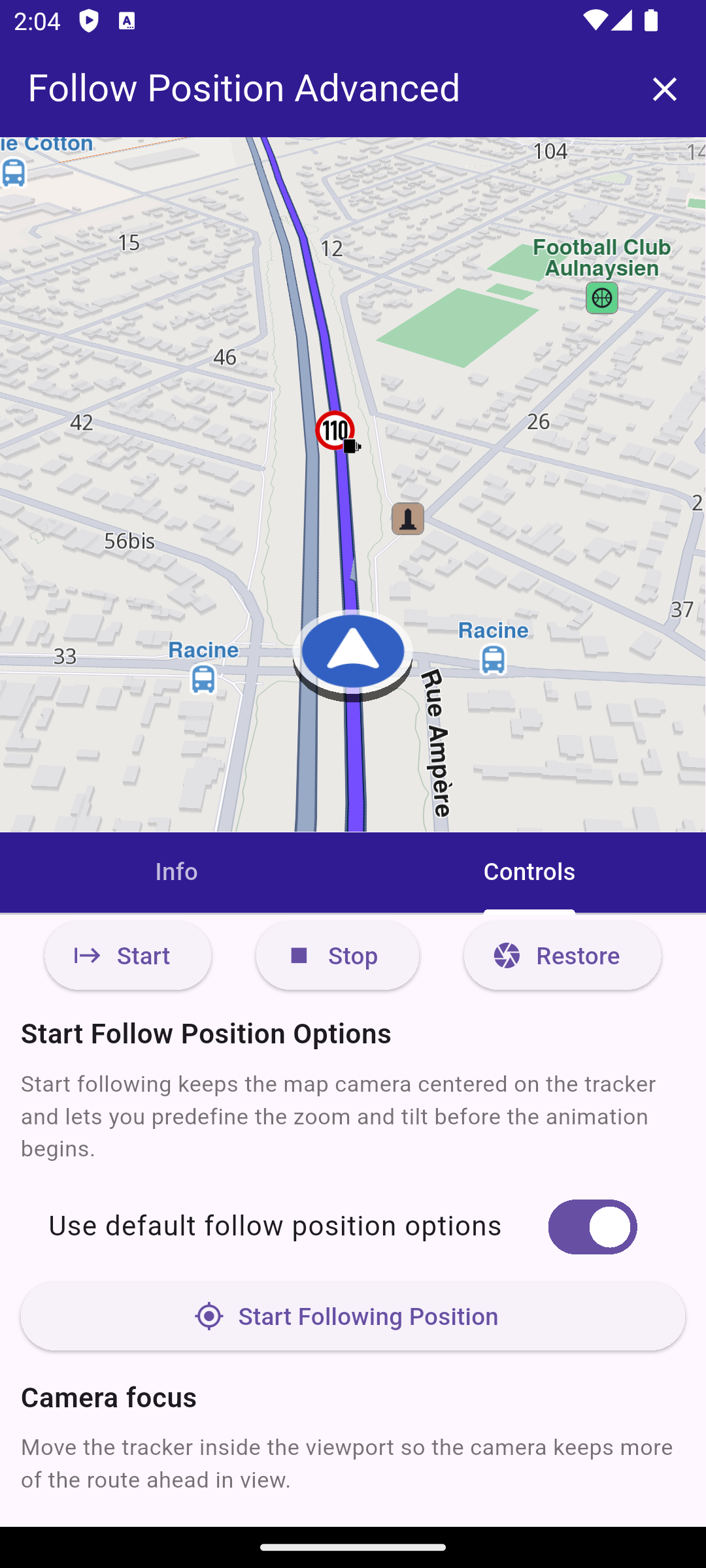
UI and Map Integration
void main() async {
  WidgetsFlutterBinding.ensureInitialized();
  await GemKit.initialize(appAuthorization: projectApiToken);
  runApp(const MyApp());
}

class MyApp extends StatelessWidget {
  const MyApp({super.key});

  @override
  Widget build(BuildContext context) {
    return const MaterialApp(title: 'Follow Position Advanced', debugShowCheckedModeBanner: false, home: MyHomePage());
  }
}

class MyHomePage extends StatefulWidget {
  const MyHomePage({super.key});

  @override
  State<MyHomePage> createState() => _MyHomePageState();
}

class _MyHomePageState extends State<MyHomePage> {
  final FollowPositionController _controller = FollowPositionController();
  TaskHandler? _routingTask;
  TaskHandler? _simulationTask;
  bool _hasMapRoute = false;
  GemMapController? _mapController;

  @override
  void dispose() {
    _controller.dispose();
    GemKit.release();
    super.dispose();
  }

  @override
  Widget build(BuildContext context) {
    return AnimatedBuilder(
      animation: _controller,
      builder: (context, _) {
        return LayoutBuilder(
          builder: (context, constraints) {
            final bool isLandscape = constraints.maxWidth > constraints.maxHeight;
            final double sidePanelWidth = min(360, constraints.maxWidth * 0.5);
            final Widget bodyContent = isLandscape ? _buildLandscapeLayout(sidePanelWidth) : _buildPortraitLayout();

            return Scaffold(
              appBar: AppBar(
                backgroundColor: Colors.deepPurple[900],
                title: const Text('Follow Position Advanced', style: TextStyle(color: Colors.white)),
                actions: [
                  if (!_hasMapRoute && _routingTask == null && _simulationTask == null)
                    IconButton(
                      icon: const Icon(Icons.directions_car, color: Colors.white),
                      onPressed: _calculateAndNavigate,
                    ),
                  if (_hasMapRoute)
                    IconButton(
                      icon: const Icon(Icons.clear, color: Colors.white),
                      onPressed: _hasMapRoute ? _cancelRoutingAndNavigation : null,
                    ),
                ],
              ),
              body: Column(children: [Expanded(child: bodyContent)]),
            );
          },
        );
      },
    );
  }

  void _onMapCreated(GemMapController controller) async {
    _mapController = controller;
    _controller.attachMapController(controller);
    await _controller.refreshInfo();
  }

  Widget _buildLandscapeLayout(double sidePanelWidth) {
    return Row(
      children: [
        Expanded(
          child: GemMap(key: const ValueKey('GemMap'), onMapCreated: _onMapCreated, appAuthorization: projectApiToken),
        ),
        SizedBox(width: sidePanelWidth, child: _buildPanelTabs()),
      ],
    );
  }

  Widget _buildPortraitLayout() {
    return SafeArea(
      child: Column(
        crossAxisAlignment: CrossAxisAlignment.stretch,
        children: [
          Expanded(
            child: GemMap(
              key: const ValueKey('GemMap'),
              onMapCreated: _onMapCreated,
              appAuthorization: projectApiToken,
            ),
          ),
          Expanded(child: _buildPanelTabs()),
        ],
      ),
    );
  }

  Widget _buildPanelTabs() {
    return DefaultTabController(
      length: 2,
      child: Column(
        crossAxisAlignment: CrossAxisAlignment.stretch,
        children: [
          Material(
            color: Colors.deepPurple[900],
            child: TabBar(
              tabs: const [
                Tab(text: 'Info'),
                Tab(text: 'Controls'),
              ],
              indicatorColor: Colors.white,
              labelColor: Colors.white,
              unselectedLabelColor: Colors.white70,
            ),
          ),
          Expanded(
            child: TabBarView(
              children: [
                FollowPositionInfoPanel(controller: _controller),
                FollowPositionControlsPanel(controller: _controller),
              ],
            ),
          ),
        ],
      ),
    );
  }
}
This code sets up the main application UI, including an app bar and a body that contains a map and a panel with tabs for information and controls related to follow position functionality.
Navigate on Simulated Route
  void _cancelRoutingAndNavigation() {
    if (_routingTask != null) {
      RoutingService.cancelRoute(_routingTask!);
      _routingTask = null;
    }

    if (_simulationTask != null) {
      NavigationService.cancelNavigation(_simulationTask!);
      _simulationTask = null;
    }

    _mapController?.preferences.routes.clear();

    setState(() {
      _hasMapRoute = false;
    });
  }

  Future<void> _calculateAndNavigate() async {
    if (_routingTask != null || _simulationTask != null) {
      return;
    }

    final departure = Landmark.withCoordinates(Coordinates(latitude: 48.85682, longitude: 2.34375)); // Paris
    final destination = Landmark.withCoordinates(Coordinates(latitude: 52.370216, longitude: 4.895168)); // Amsterdam

    final prefs = RoutePreferences(transportMode: RouteTransportMode.car, routeType: RouteType.fastest);

    setState(() {
      _routingTask = RoutingService.calculateRoute([departure, destination], prefs, (err, routes) {
        _routingTask = null;
        if (err == GemError.success && routes.isNotEmpty) {
          final route = routes.first;
          _mapController?.preferences.routes.add(route, true);
          _mapController?.centerOnArea(route.geographicArea);
          setState(() {
            _hasMapRoute = true;
          });

          _simulationTask = NavigationService.startSimulation(
            route,
            onNavigationInstruction: (instruction, events) {},
            onDestinationReached: (landmark) {},
            onError: (err) {
              ScaffoldMessenger.of(context).showSnackBar(SnackBar(content: Text('Simulation error: $err')));
            },
            speedMultiplier: 2,
          );

          if (_simulationTask != null) {
            _mapController?.startFollowingPosition();
          }
        } else {
          ScaffoldMessenger.of(context).showSnackBar(SnackBar(content: Text('Routing error: $err')));
        }
      });
    });
  }
Follow Position Controller
class FollowPositionInfo {
  FollowPositionInfo({
    required this.cameraFocus,
    required this.perspective,
    required this.timeBeforeTurnPresentation,
    required this.touchHandlerExitAllow,
    required this.touchHandlerModifyPersistent,
    required this.touchHandlerModifyHorizontalAngleLimits,
    required this.touchHandlerModifyVerticalAngleLimits,
    required this.touchHandlerModifyDistanceLimits,
    required this.viewAngle,
    required this.zoomLevel,
    required this.accuracyCircleVisibility,
    required this.isTrackObjectFollowingMapRotation,
    required this.mapRotationMode,
    required this.mapRotationAngle,
    required this.isFollowingPosition,
    required this.isFollowingPositionTouchHandlerModified,
    required this.isDefaultFollowingPosition,
    required this.isCameraMoving,
    required this.accuracyCircleColor,
    required this.positionTrackerScale,
  });

  final Point<double> cameraFocus;
  final MapViewPerspective perspective;
  final int timeBeforeTurnPresentation;
  final bool touchHandlerExitAllow;
  final bool touchHandlerModifyPersistent;
  final (double, double) touchHandlerModifyHorizontalAngleLimits;
  final (double, double) touchHandlerModifyVerticalAngleLimits;
  final (double, double) touchHandlerModifyDistanceLimits;
  final double viewAngle;
  final int zoomLevel;
  final bool accuracyCircleVisibility;
  final bool isTrackObjectFollowingMapRotation;
  final FollowPositionMapRotationMode mapRotationMode;
  final double mapRotationAngle;
  final bool isFollowingPosition;
  final bool isFollowingPositionTouchHandlerModified;
  final bool isDefaultFollowingPosition;
  final bool isCameraMoving;
  final Color accuracyCircleColor;
  final double positionTrackerScale;

  static FollowPositionInfo empty() {
    return FollowPositionInfo(
      cameraFocus: const Point<double>(0.5, 0.5),
      perspective: MapViewPerspective.twoDimensional,
      timeBeforeTurnPresentation: -1,
      touchHandlerExitAllow: true,
      touchHandlerModifyPersistent: false,
      touchHandlerModifyHorizontalAngleLimits: (0, 0),
      touchHandlerModifyVerticalAngleLimits: (0, 0),
      touchHandlerModifyDistanceLimits: (50, 100),
      viewAngle: 0,
      zoomLevel: -1,
      accuracyCircleVisibility: false,
      isTrackObjectFollowingMapRotation: true,
      mapRotationMode: FollowPositionMapRotationMode.positionHeading,
      mapRotationAngle: 0,
      isFollowingPosition: false,
      isFollowingPositionTouchHandlerModified: false,
      isDefaultFollowingPosition: false,
      isCameraMoving: false,
      accuracyCircleColor: Colors.blue,
      positionTrackerScale: 1,
    );
  }
}

class FollowPositionController extends ChangeNotifier {
  GemMapController? _mapController;
  FollowPositionInfo _info = FollowPositionInfo.empty();

  FollowPositionInfo get info => _info;

  double cameraFocusX = 0.5;
  double cameraFocusY = 0.5;
  MapViewPerspective perspective = MapViewPerspective.twoDimensional;
  bool animatePerspective = true;
  double viewAngle = 45;
  bool animateViewAngle = true;
  bool autoZoom = false;
  int zoomLevel = 50;
  int zoomDuration = 0;

  FollowPositionMapRotationMode mapRotationMode = FollowPositionMapRotationMode.positionHeading;
  double mapAngle = 0;
  bool objectFollowMap = true;

  bool touchHandlerExitAllow = true;
  bool touchHandlerModifyPersistent = false;
  RangeValues horizontalAngleLimits = const RangeValues(0, 0);
  RangeValues verticalAngleLimits = const RangeValues(0, 0);
  RangeValues distanceLimits = const RangeValues(50, 200);
  bool distanceMaxUnlimited = true;

  bool useDefaultTurnPresentationTime = true;
  double turnPresentationSeconds = 5;

  bool useDefaultStartFollowPosition = true;
  int startZoomLevel = 40;
  double startViewAngle = 45;

  double positionTrackerScale = 1;

  void updateValues(VoidCallback updates) {
    updates();
    notifyListeners();
  }

  void attachMapController(GemMapController controller) {
    _mapController = controller;
    notifyListeners();
  }

  Future<void> refreshInfo() async {
    if (_mapController == null) {
      _info = FollowPositionInfo.empty();
      notifyListeners();
      return;
    }

    final prefs = _mapController!.preferences.followPositionPreferences;
    final (rotationMode, rotationAngle) = prefs.mapRotationMode;

    final MapSceneObject tracker = MapSceneObject.getDefPositionTracker();

    debugPrint('[FollowPositionController] calling all getters to refresh info');
    _info = FollowPositionInfo(
      cameraFocus: prefs.cameraFocus,
      perspective: prefs.perspective,
      timeBeforeTurnPresentation: prefs.timeBeforeTurnPresentation,
      touchHandlerExitAllow: prefs.touchHandlerExitAllow,
      touchHandlerModifyPersistent: prefs.touchHandlerModifyPersistent,
      touchHandlerModifyHorizontalAngleLimits: prefs.touchHandlerModifyHorizontalAngleLimits,
      touchHandlerModifyVerticalAngleLimits: prefs.touchHandlerModifyVerticalAngleLimits,
      touchHandlerModifyDistanceLimits: prefs.touchHandlerModifyDistanceLimits,
      viewAngle: prefs.viewAngle,
      zoomLevel: prefs.zoomLevel,
      accuracyCircleVisibility: prefs.accuracyCircleVisibility,
      isTrackObjectFollowingMapRotation: prefs.isTrackObjectFollowingMapRotation,
      mapRotationMode: rotationMode,
      mapRotationAngle: rotationAngle,
      isFollowingPosition: _mapController!.isFollowingPosition,
      isFollowingPositionTouchHandlerModified: _mapController!.isFollowingPositionTouchHandlerModified,
      isDefaultFollowingPosition: _mapController!.isDefaultFollowingPosition,
      isCameraMoving: _mapController!.isCameraMoving,
      accuracyCircleColor: MapSceneObject.defPositionTrackerAccuracyCircleColor,
      positionTrackerScale: tracker.scale,
    );

    notifyListeners();
  }

  Future<void> startFollowingPosition() async {
    if (_mapController == null) {
      return;
    }

    final animation = GemAnimation(type: AnimationType.linear);
    final zoomLevel = useDefaultStartFollowPosition ? -1 : startZoomLevel;
    final viewAngle = useDefaultStartFollowPosition ? null : startViewAngle;

    debugPrint(
      '[FollowPositionController] startFollowingPosition with zoomLevel=$zoomLevel and viewAngle=$viewAngle animation: type=${animation.type} duration=${animation.duration}',
    );
    _mapController!.startFollowingPosition(animation: animation, zoomLevel: zoomLevel, viewAngle: viewAngle);

    await refreshInfo();
  }

  void stopFollowingPosition({bool restoreCameraMode = false}) {
    if (_mapController == null) {
      return;
    }

    debugPrint('[FollowPositionController] stopFollowingPosition');
    _mapController!.stopFollowingPosition(restoreCameraMode: restoreCameraMode);
    refreshInfo();
  }

  void restoreFollowingPosition() {
    if (_mapController == null) {
      return;
    }

    debugPrint('[FollowPositionController] restoreFollowingPosition');
    _mapController!.restoreFollowingPosition(animation: GemAnimation(type: AnimationType.linear, duration: 600));
    refreshInfo();
  }

  void applyCameraFocus() {
    if (_mapController == null) {
      return;
    }

    final prefs = _mapController!.preferences.followPositionPreferences;
    debugPrint(
      '[FollowPositionController] applyCameraFocus: cameraFocus=(${cameraFocusX.toStringAsFixed(3)}, ${cameraFocusY.toStringAsFixed(3)})',
    );
    prefs.setCameraFocus(Point<double>(cameraFocusX, cameraFocusY));
    refreshInfo();
  }

  void applyPerspective() {
    if (_mapController == null) {
      return;
    }

    final prefs = _mapController!.preferences.followPositionPreferences;
    final animation = animatePerspective ? GemAnimation(type: AnimationType.linear, duration: 350) : null;
    debugPrint(
      '[FollowPositionController] applyPerspective: perspective=$perspective animate=$animatePerspective animationDuration=${animation?.duration}',
    );
    prefs.setPerspective(perspective, animation: animation);
    refreshInfo();
  }

  void applyViewAngle() {
    if (_mapController == null) {
      return;
    }

    final prefs = _mapController!.preferences.followPositionPreferences;
    debugPrint('[FollowPositionController] applyViewAngle: viewAngle=$viewAngle animate=$animateViewAngle');
    prefs.setViewAngle(viewAngle, animated: animateViewAngle);
    refreshInfo();
  }

  void applyZoomLevel() {
    if (_mapController == null) {
      return;
    }

    final prefs = _mapController!.preferences.followPositionPreferences;
    debugPrint(
      '[FollowPositionController] applyZoomLevel: zoomLevel=${autoZoom ? -1 : zoomLevel} autoZoom=$autoZoom duration=$zoomDuration',
    );
    prefs.setZoomLevel(autoZoom ? -1 : zoomLevel, duration: zoomDuration);
    refreshInfo();
  }

  void applyMapRotationMode() {
    if (_mapController == null) {
      return;
    }

    final prefs = _mapController!.preferences.followPositionPreferences;
    debugPrint(
      '[FollowPositionController] applyMapRotationMode: mapRotationMode=$mapRotationMode mapAngle=$mapAngle objectFollowMap=$objectFollowMap',
    );
    prefs.setMapRotationMode(mapRotationMode, mapAngle: mapAngle, objectFollowMap: objectFollowMap);
    refreshInfo();
  }

  void applyTurnPresentationTime() {
    if (_mapController == null) {
      return;
    }

    final prefs = _mapController!.preferences.followPositionPreferences;
    final value = useDefaultTurnPresentationTime ? -1 : turnPresentationSeconds.round();
    debugPrint(
      '[FollowPositionController] applyTurnPresentationTime: value=$value useDefault=$useDefaultTurnPresentationTime',
    );
    prefs.timeBeforeTurnPresentation = value;
    refreshInfo();
  }

  void applyTouchHandlerExitAllow() {
    if (_mapController == null) {
      return;
    }

    final prefs = _mapController!.preferences.followPositionPreferences;
    debugPrint('[FollowPositionController] applyTouchHandlerExitAllow: touchHandlerExitAllow=$touchHandlerExitAllow');
    prefs.touchHandlerExitAllow = touchHandlerExitAllow;
    refreshInfo();
  }

  void applyTouchHandlerModifyPersistent() {
    if (_mapController == null) {
      return;
    }

    final prefs = _mapController!.preferences.followPositionPreferences;
    debugPrint(
      '[FollowPositionController] applyTouchHandlerModifyPersistent: touchHandlerModifyPersistent=$touchHandlerModifyPersistent',
    );
    prefs.touchHandlerModifyPersistent = touchHandlerModifyPersistent;
    refreshInfo();
  }

  void applyHorizontalAngleLimits() {
    if (_mapController == null) {
      return;
    }

    final prefs = _mapController!.preferences.followPositionPreferences;
    debugPrint(
      '[FollowPositionController] applyHorizontalAngleLimits: start=${horizontalAngleLimits.start} end=${horizontalAngleLimits.end}',
    );
    prefs.touchHandlerModifyHorizontalAngleLimits = (horizontalAngleLimits.start, horizontalAngleLimits.end);
    refreshInfo();
  }

  void applyVerticalAngleLimits() {
    if (_mapController == null) {
      return;
    }

    final prefs = _mapController!.preferences.followPositionPreferences;
    debugPrint(
      '[FollowPositionController] applyVerticalAngleLimits: start=${verticalAngleLimits.start} end=${verticalAngleLimits.end}',
    );
    prefs.touchHandlerModifyVerticalAngleLimits = (verticalAngleLimits.start, verticalAngleLimits.end);
    refreshInfo();
  }

  void applyDistanceLimits() {
    if (_mapController == null) {
      return;
    }

    final prefs = _mapController!.preferences.followPositionPreferences;
    final maxDistance = distanceLimits.end;
    debugPrint(
      '[FollowPositionController] applyDistanceLimits: start=${distanceLimits.start} end=$maxDistance distanceMaxUnlimited=$distanceMaxUnlimited',
    );
    prefs.touchHandlerModifyDistanceLimits = (distanceLimits.start, maxDistance);
    refreshInfo();
  }

  void applyPositionTrackerScale() {
    final tracker = MapSceneObject.getDefPositionTracker();
    tracker.scale = positionTrackerScale;
    refreshInfo();
  }
}
This code defines a controller class that manages the follow position settings and state. It provides methods to update and apply various follow position preferences, as well as to start and stop following the device's position.
Controls Panel
class FollowPositionControlsPanel extends StatelessWidget {
const FollowPositionControlsPanel({super.key, required this.controller});
final FollowPositionController controller;
@override
Widget build(BuildContext context) {
return ListenableBuilder(
listenable: controller,
builder: (context, _) {
return Column(
children: [
Row(
mainAxisAlignment: MainAxisAlignment.spaceEvenly,
children: [
_actionButton(icon: Icons.start, label: 'Start', onPressed: controller.startFollowingPosition),
_actionButton(icon: Icons.stop, label: 'Stop', onPressed: controller.stopFollowingPosition),
_actionButton(icon: Icons.camera, label: 'Restore', onPressed: controller.restoreFollowingPosition),
],
),
Expanded(
child: ListView(
padding: const EdgeInsets.all(12),
children: [
_sectionHeader('Start Follow Position Options'),
_sectionDescription(
'Start following keeps the map camera centered on the tracker and lets you predefine the zoom and tilt before the animation begins.',
),
SwitchListTile(
title: const Text('Use default follow position options'),
value: controller.useDefaultStartFollowPosition,
onChanged: (value) => controller.updateValues(() {
controller.useDefaultStartFollowPosition = value;
}),
),
if (!controller.useDefaultStartFollowPosition)
_sliderTile(
label: 'Zoom level',
value: controller.startZoomLevel.toDouble(),
min: 0,
max: 100,
onChanged: (value) => controller.updateValues(() {
controller.startZoomLevel = value.round();
}),
valueLabel: controller.startZoomLevel.toString(),
),
if (!controller.useDefaultStartFollowPosition)
_sliderTile(
label: 'View angle',
value: controller.startViewAngle,
min: 0,
max: 90,
onChanged: (value) => controller.updateValues(() {
controller.startViewAngle = value;
}),
valueLabel: '${controller.startViewAngle.toStringAsFixed(0)}°',
),
_actionButton(
label: 'Start Following Position',
icon: Icons.my_location,
onPressed: controller.startFollowingPosition,
),
const SizedBox(height: 12),
_sectionHeader('Camera focus'),
_sectionDescription(
'Move the tracker inside the viewport so the camera keeps more of the route ahead in view.',
),
_sliderTile(
label: 'Focus X',
value: controller.cameraFocusX,
min: 0,
max: 1,
onChanged: (value) => controller.updateValues(() {
controller.cameraFocusX = value;
}),
valueLabel: controller.cameraFocusX.toStringAsFixed(2),
),
_sliderTile(
label: 'Focus Y',
value: controller.cameraFocusY,
min: 0,
max: 1,
onChanged: (value) => controller.updateValues(() {
controller.cameraFocusY = value;
}),
valueLabel: controller.cameraFocusY.toStringAsFixed(2),
),
_applyButton('Apply focus', controller.applyCameraFocus),
const SizedBox(height: 12),
_sectionHeader('Perspective'),
_sectionDescription('Swap between 2D bird-eye or 3D perspective views to change.'),
DropdownButton<MapViewPerspective>(
value: controller.perspective,
isExpanded: true,
items: MapViewPerspective.values
.map((value) => DropdownMenuItem(value: value, child: Text(value.name)))
.toList(),
onChanged: (value) => controller.updateValues(() {
if (value != null) {
controller.perspective = value;
}
}),
),
SwitchListTile(
title: const Text('Animate perspective'),
value: controller.animatePerspective,
onChanged: (value) => controller.updateValues(() {
controller.animatePerspective = value;
}),
),
_applyButton('Apply perspective', controller.applyPerspective),
const SizedBox(height: 12),
_sectionHeader('View angle'),
_sectionDescription(
'Tilt the camera from top-down to angled to show more horizon when following a route.',
),
_sliderTile(
label: 'View angle',
value: controller.viewAngle,
min: 0,
max: 90,
onChanged: (value) => controller.updateValues(() {
controller.viewAngle = value;
}),
valueLabel: '${controller.viewAngle.toStringAsFixed(0)}°',
),
SwitchListTile(
title: const Text('Animate view angle'),
value: controller.animateViewAngle,
onChanged: (value) => controller.updateValues(() {
controller.animateViewAngle = value;
}),
),
_applyButton('Apply view angle', controller.applyViewAngle),
const SizedBox(height: 12),
_sectionHeader('Zoom'),
_sectionDescription('Control the follow camera zoom level.'),
SwitchListTile(
title: const Text('Auto zoom'),
value: controller.autoZoom,
onChanged: (value) => controller.updateValues(() {
controller.autoZoom = value;
}),
),
if (!controller.autoZoom)
_sliderTile(
label: 'Zoom level',
value: controller.zoomLevel.toDouble(),
min: 0,
max: 100,
onChanged: (value) => controller.updateValues(() {
controller.zoomLevel = value.round();
}),
valueLabel: controller.zoomLevel.toString(),
),
_sliderTile(
label: 'Zoom animation (ms)',
value: controller.zoomDuration.toDouble(),
min: 0,
max: 2000,
onChanged: (value) => controller.updateValues(() {
controller.zoomDuration = value.round();
}),
valueLabel: controller.zoomDuration.toString(),
),
_applyButton('Apply zoom', controller.applyZoomLevel),
const SizedBox(height: 12),
_sectionHeader('Map rotation'),
_sectionDescription(
'Choose whether the map rotates with your heading, the compass, or stays fixed at a custom angle.',
),
DropdownButton<FollowPositionMapRotationMode>(
value: controller.mapRotationMode,
isExpanded: true,
items: FollowPositionMapRotationMode.values
.map((value) => DropdownMenuItem(value: value, child: Text(value.name)))
.toList(),
onChanged: (value) => controller.updateValues(() {
if (value != null) {
controller.mapRotationMode = value;
}
}),
),
if (controller.mapRotationMode == FollowPositionMapRotationMode.fixed)
_sliderTile(
label: 'Fixed map angle',
value: controller.mapAngle,
min: 0,
max: 360,
onChanged: (value) => controller.updateValues(() {
controller.mapAngle = value;
}),
valueLabel: '${controller.mapAngle.toStringAsFixed(0)}°',
),
SwitchListTile(
title: const Text('Tracker follows map rotation'),
value: controller.objectFollowMap,
onChanged: (value) => controller.updateValues(() {
controller.objectFollowMap = value;
}),
),
_applyButton('Apply rotation', controller.applyMapRotationMode),
const SizedBox(height: 12),
_sectionHeader('Touch handler'),
_sectionDescription(
'Decide if touch gestures kick you out of follow mode and how much pan/tilt/distance adjustments persist.',
),
SwitchListTile(
title: const Text('Allow exit by touch'),
value: controller.touchHandlerExitAllow,
onChanged: (value) => controller.updateValues(() {
controller.touchHandlerExitAllow = value;
}),
),
_applyButton('Apply touch exit', controller.applyTouchHandlerExitAllow),
SwitchListTile(
title: const Text('Persist touch adjustments'),
value: controller.touchHandlerModifyPersistent,
onChanged: (value) => controller.updateValues(() {
controller.touchHandlerModifyPersistent = value;
}),
),
_applyButton('Apply persistence', controller.applyTouchHandlerModifyPersistent),
_rangeSliderTile(
label: 'Horizontal angle limits',
values: controller.horizontalAngleLimits,
min: 0,
max: 180,
onChanged: (values) => controller.updateValues(() {
controller.horizontalAngleLimits = values;
}),
),
_applyButton('Apply horizontal limits', controller.applyHorizontalAngleLimits),
_rangeSliderTile(
label: 'Vertical angle limits',
values: controller.verticalAngleLimits,
min: 0,
max: 90,
onChanged: (values) => controller.updateValues(() {
controller.verticalAngleLimits = values;
}),
),
_applyButton('Apply vertical limits', controller.applyVerticalAngleLimits),
SwitchListTile(
title: const Text('Unlimited distance max'),
value: controller.distanceMaxUnlimited,
onChanged: (value) => controller.updateValues(() {
controller.distanceMaxUnlimited = value;
}),
),
_rangeSliderTile(
label: 'Distance limits (m)',
values: controller.distanceLimits,
min: 0,
max: 1000,
onChanged: (values) => controller.updateValues(() {
controller.distanceLimits = values;
}),
),
_applyButton('Apply distance limits', controller.applyDistanceLimits),
const SizedBox(height: 12),
_sectionHeader('Turn presentation'),
_sectionDescription(
'Sets how many seconds before an upcoming turn the map camera should start presenting the turn animation.',
),
SwitchListTile(
title: const Text('Use SDK default'),
value: controller.useDefaultTurnPresentationTime,
onChanged: (value) => controller.updateValues(() {
controller.useDefaultTurnPresentationTime = value;
}),
),
if (!controller.useDefaultTurnPresentationTime)
_sliderTile(
label: 'Seconds before turn',
value: controller.turnPresentationSeconds,
min: 0,
max: 30,
onChanged: (value) => controller.updateValues(() {
controller.turnPresentationSeconds = value;
}),
valueLabel: '${controller.turnPresentationSeconds.toStringAsFixed(0)} s',
),
_applyButton('Apply turn time', controller.applyTurnPresentationTime),
const SizedBox(height: 12),
_sectionHeader('Position tracker'),
_sectionDescription('Scale the tracker icon, independent of map zoom level.'),
_sliderTile(
label: 'Tracker scale',
value: controller.positionTrackerScale,
min: 0.2,
max: 2,
onChanged: (value) => controller.updateValues(() {
controller.positionTrackerScale = value;
}),
valueLabel: controller.positionTrackerScale.toStringAsFixed(2),
),
_applyButton('Apply tracker scale', controller.applyPositionTrackerScale),
],
),
),
],
);
},
);
}
Widget _sectionHeader(String text) {
return Padding(
padding: const EdgeInsets.only(bottom: 8),
child: Text(text, style: const TextStyle(fontSize: 16, fontWeight: FontWeight.w600)),
);
}
Widget _sectionDescription(String text) {
return Padding(
padding: const EdgeInsets.only(bottom: 8),
child: Text(text, style: const TextStyle(fontSize: 13, color: Colors.black54)),
);
}
Widget _sliderTile({
required String label,
required double value,
required double min,
required double max,
required ValueChanged<double>? onChanged,
required String valueLabel,
}) {
return Padding(
padding: const EdgeInsets.all(16.0),
child: Column(
crossAxisAlignment: CrossAxisAlignment.start,
children: [
Text('$label: $valueLabel'),
Slider(value: value.clamp(min, max), min: min, max: max, onChanged: onChanged),
],
),
);
}
Widget _rangeSliderTile({
required String label,
required RangeValues values,
required double min,
required double max,
required ValueChanged<RangeValues>? onChanged,
}) {
return Padding(
padding: const EdgeInsets.symmetric(horizontal: 16.0),
child: Column(
crossAxisAlignment: CrossAxisAlignment.start,
children: [
Text('$label: ${values.start.toStringAsFixed(1)} → ${values.end.toStringAsFixed(1)}'),
RangeSlider(
values: RangeValues(values.start.clamp(min, max), values.end.clamp(min, max)),
min: min,
max: max,
onChanged: onChanged,
),
],
),
);
}
Widget _applyButton(String label, VoidCallback onPressed) {
return Padding(
padding: const EdgeInsets.symmetric(horizontal: 16.0),
child: Align(
alignment: Alignment.centerLeft,
child: ElevatedButton(onPressed: onPressed, child: Text(label)),
),
);
}
Widget _actionButton({String? label, required IconData icon, required VoidCallback? onPressed}) {
if (label == null) {
return ElevatedButton(onPressed: onPressed, child: Icon(icon));
} else {
return ElevatedButton.icon(onPressed: onPressed, icon: Icon(icon), label: Text(label));
}
}
}
This code defines a controls panel widget that provides a user interface for adjusting various follow position settings. It includes buttons to start, stop, and restore following position, as well as sliders, switches, and dropdowns for modifying preferences.
Info Panel
class FollowPositionInfoPanel extends StatelessWidget {
  const FollowPositionInfoPanel({super.key, required this.controller});

  final FollowPositionController controller;

  @override
  Widget build(BuildContext context) {
    final info = controller.info;

    return Column(
      children: [
        ElevatedButton(onPressed: () => controller.refreshInfo(), child: const Text('Refresh Info')),
        Expanded(
          child: ListView(
            padding: const EdgeInsets.symmetric(horizontal: 12),
            children: [
              _infoTile(
                'Camera focus',
                '(${info.cameraFocus.x.toStringAsFixed(2)}, ${info.cameraFocus.y.toStringAsFixed(2)})',
              ),
              _infoTile('Perspective', info.perspective.name),
              _infoTile('View angle', '${info.viewAngle.toStringAsFixed(1)}°'),
              _infoTile('Zoom level', info.zoomLevel.toString()),
              _infoTile('Time before turn', info.timeBeforeTurnPresentation.toString()),
              const Divider(),
              _infoTile('Map rotation mode', info.mapRotationMode.name),
              _infoTile('Map rotation angle', '${info.mapRotationAngle.toStringAsFixed(1)}°'),
              _infoTile('Tracker follows map', info.isTrackObjectFollowingMapRotation.toString()),
              const Divider(),
              _infoTile('Accuracy circle visible', info.accuracyCircleVisibility.toString()),
              _infoTile('Accuracy circle color', info.accuracyCircleColor.toString()),
              _infoTile('Tracker scale', info.positionTrackerScale.toStringAsFixed(2)),
              const Divider(),
              _infoTile('Touch exit allow', info.touchHandlerExitAllow.toString()),
              _infoTile('Touch modify persistent', info.touchHandlerModifyPersistent.toString()),
              _infoTile('Horizontal angle limits', _formatRange(info.touchHandlerModifyHorizontalAngleLimits)),
              _infoTile('Vertical angle limits', _formatRange(info.touchHandlerModifyVerticalAngleLimits)),
              _infoTile('Distance limits', _formatRange(info.touchHandlerModifyDistanceLimits, unit: 'm')),
              const Divider(),
              _infoTile('Is following position', info.isFollowingPosition.toString()),
              _infoTile('Is default follow', info.isDefaultFollowingPosition.toString()),
              _infoTile('Touch modified follow', info.isFollowingPositionTouchHandlerModified.toString()),
              _infoTile('Is camera moving', info.isCameraMoving.toString()),
              const Divider(),
            ],
          ),
        ),
      ],
    );
  }

  Widget _infoTile(String label, String value) {
    return ListTile(dense: true, title: Text(label), subtitle: Text(value));
  }

  String _formatRange((double, double) range, {String unit = '°'}) {
    final start = range.$1.toStringAsFixed(1);
    final end = range.$2.isInfinite ? '∞' : range.$2.toStringAsFixed(1);
    return '$start $unit → $end $unit';
  }
}
This code defines an info panel widget that displays the current follow position settings and state. It includes a button to refresh the information and presents various properties in a list format.