Get started with routing
This guide explains how to calculate routes, customize routing preferences, retrieve turn-by-turn instructions, and access detailed route information including terrain profiles and traffic events.
Here’s a quick overview of what you can do with routing:
- Calculate routes from a start point to a destination.
- Include intermediary waypoints for multi-stop routes.
- Compute range routes to determine areas reachable within a specific range.
- Plan routes over predefined tracks.
- Customize routes with preferences like route types, restrictions, and more.
- Retrieve maneuvers and turn-by-turn instructions.
- Access detailed route profiles for further analysis.
Calculate routes
Calculate a navigable route between a start point and destination. The route can be used for navigation or simulation.
// Define the departure.
final departureLandmark =
    Landmark.withLatLng(latitude: 48.85682, longitude: 2.34375);

// Define the destination.
final destinationLandmark =
    Landmark.withLatLng(latitude: 50.84644, longitude: 4.34587);

// Define the route preferences (all default).
final routePreferences = RoutePreferences();

TaskHandler? taskHandler = RoutingService.calculateRoute(
    [departureLandmark, destinationLandmark], routePreferences,
    (err, routes) {
        if (err == GemError.success) {
            showSnackbar("Number of routes: ${routes.length}");
        } else if (err == GemError.cancel) {
            showSnackbar("Route computation canceled");
        } else {
            showSnackbar("Error: $err");
        }
    });
The RoutingService.calculateRoute method returns null only when the computation fails to initiate. In such cases, calling RouteService.cancelRoute(taskHandler) is not possible. Error details are delivered through the onComplete function.
The callback function's err parameter can return these values:
| Value | Significance |
|---|---|
GemError.success | successfully completed |
GemError.cancel | cancelled by the user |
GemError.waypointAccess | couldn't be found with the current preferences |
GemError.connectionRequired | if allowOnlineCalculation = false in the routing preferences and the calculation can't be done on the client side due to missing data |
GemError.expired | calculation can't be done on client side due to missing necessary data and the client world map data version is no longer supported by the online routing service |
GemError.routeTooLong | routing was executed on the online service and the operation took too much time to complete (usually more than 1 min, depending on the server overload state) |
GemError.invalidated | the offline map data changed ( offline map downloaded, erased, updated ) during the calculation |
GemError.noMemory | routing engine couldn't allocate the necessary memory for the calculation |
Follow the calculation status
Pass the optional onStatusChanged callback to be notified whenever the calculation state changes, which is useful for reflecting progress in the UI while onComplete still delivers the final result:
TaskHandler? taskHandler = RoutingService.calculateRoute(
    [departureLandmark, destinationLandmark], routePreferences,
    (err, routes) {
        // Final result
    },
    onStatusChanged: (RouteStatus status) {
        showSnackbar("Route status: $status");
    });
The RouteStatus enum defines these states:
| Enum Case | Description |
|---|---|
uninitialized | The routing service has not been initialized. |
calculating | A route calculation is in progress. |
waitingInternetConnection | Waiting for an internet connection to complete routing. |
ready | Route calculation finished successfully and the result is available. |
error | An error occurred during route calculation. |
Whether the engine emits a given state depends on how the calculation proceeds. Treat the callback as progress reporting and keep onComplete as the authoritative result: the error table above lists what it reports and under which conditions.
Cancel an ongoing route computation if needed:
RoutingService.cancelRoute(taskHandler);
When the route is canceled, the callback returns err = GemError.cancel.
Retrieve time and distance information
Access estimated time of arrival (ETA), distance, and traffic details for computed routes.
Get time and distance information using the Route.getTimeDistance method:
TimeDistance td = route.getTimeDistance(activePart: false);

final totalDistance = td.totalDistanceM;
// same with:
//final totalDistance = td.unrestrictedDistanceM + td.restrictedDistanceM;

final totalDuration = td.totalTimeS;
// same with:
//final totalDuration = td.unrestrictedTimeS + td.restrictedTimeS;

// by default activePart = true
TimeDistance remainTd = route.getTimeDistance(activePart: true);

final totalRemainDistance = remainTd.totalDistanceM;
final totalRemainDuration = remainTd.totalTimeS;
Set activePart to false to compute time and distance for the entire route, or true (default) for only the remaining portion.
Unrestricted refers to public property routes, while restricted refers to private property routes. Time is measured in seconds and distance in meters.
Access traffic events
Retrieve traffic event details for the route:
List<RouteTrafficEvent> trafficEvents = route.trafficEvents;

for (final event in trafficEvents) {
    RouteTransportMode transportMode = event.affectedTransportModes;
    String description = event.description;
    TrafficEventClass eventClass = event.eventClass;
    TrafficEventSeverity eventSeverity = event.eventSeverity;
    Coordinates from = event.from;
    Coordinates to = event.to;
    bool isRoadBlock = event.isRoadblock;
}
See the Traffic Events guide for detailed information.
Display routes on the map
Routes are not automatically displayed after calculation. Visualize routes on the map using the display methods.
Refer to the display routes on maps guide for visualization and customization options.
Get the Terrain Profile
When computing the route we can choose to also build the TerrainProfile for the route.
In order to do that RoutePreferences must specify we want to also generate the BuildTerrainProfile:
final routePreferences = RoutePreferences(
  buildTerrainProfile: const BuildTerrainProfile(enable: true),
);
Set BuildTerrainProfile with enable flag to true in the preferences for calculateRoute to retrieve terrain profile data.
Access elevation and terrain data from the profile:
RouteTerrainProfile? terrainProfile = route.terrainProfile;

if (terrainProfile != null) {
  double minElevation = terrainProfile.minElevation;
  double maxElevation = terrainProfile.maxElevation;
  int minElevDist = terrainProfile.minElevationDistance;
  int maxElevDist = terrainProfile.maxElevationDistance;
  double totalUp = terrainProfile.totalUp;
  double totalDown = terrainProfile.totalDown;

  // elevation at 100m from the route start
  double elevation = terrainProfile.getElevation(100);

  for (final section in terrainProfile.roadTypeSections) {
    RoadType roadType = section.type;
    int startDistance = section.startDistanceM;
  }

  for (final section in terrainProfile.surfaceSections) {
    SurfaceType surfaceType = section.type;
    int startDistance = section.startDistanceM;
  }

  for (final section in terrainProfile.climbSections) {
    Grade grade = section.grade;
    double slope = section.slope;
    int startDistanceM = section.startDistanceM;
    int endDistanceM = section.endDistanceM;
  }

  List<double> categs = [-16, -10, -7, -4, -1, 1, 4, 7, 10, 16];

  List<SteepSection> steepSections = terrainProfile.getSteepSections(categs);
  for (final section in steepSections) {
    int categ = section.categ;
    int startDistanceM = section.startDistanceM;
  }
}
RoadType values: motorways, stateRoad, road, street, cycleway, path, singleTrack.
SurfaceType values: asphalt, paved, unpaved, unknown.
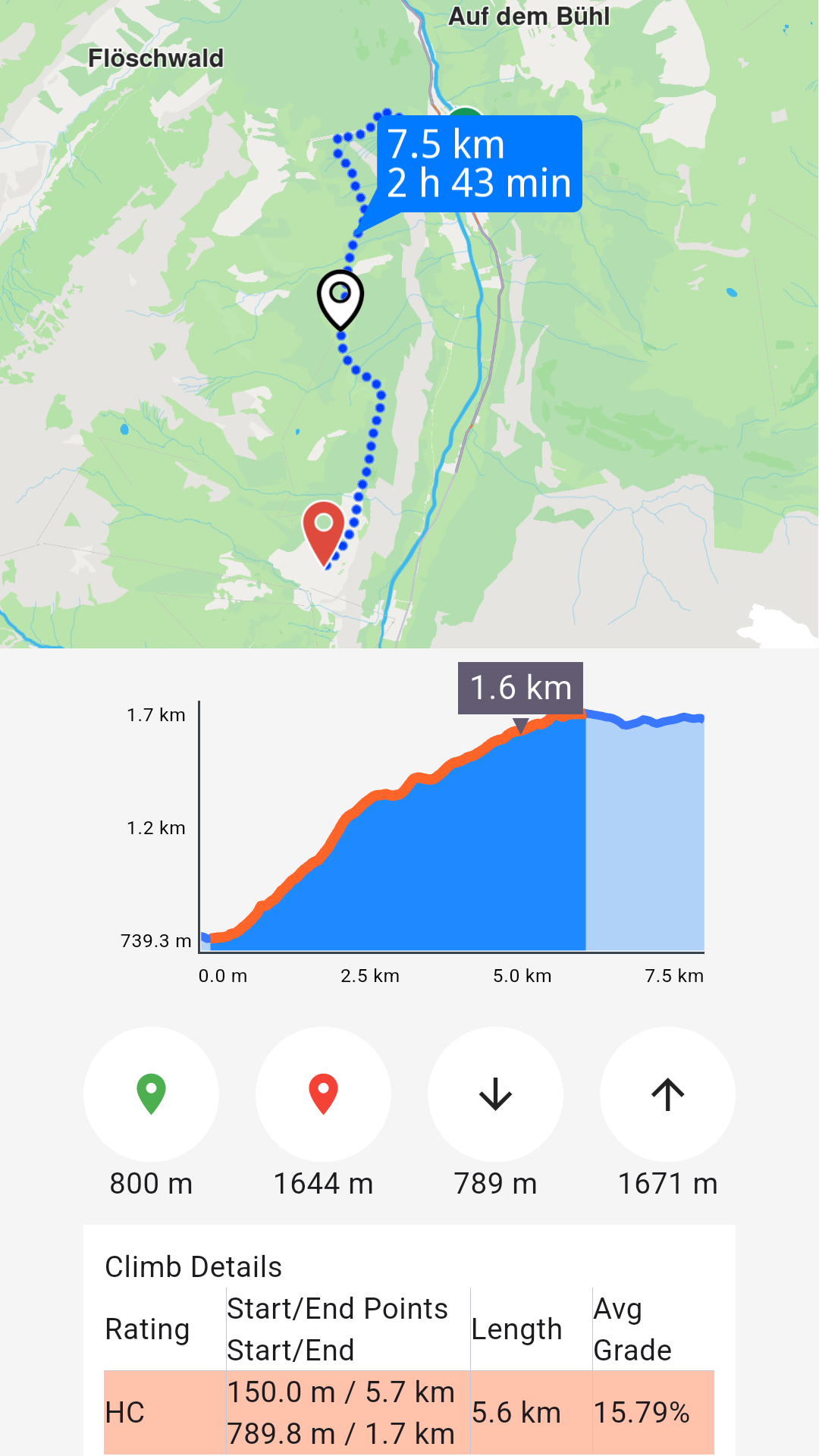
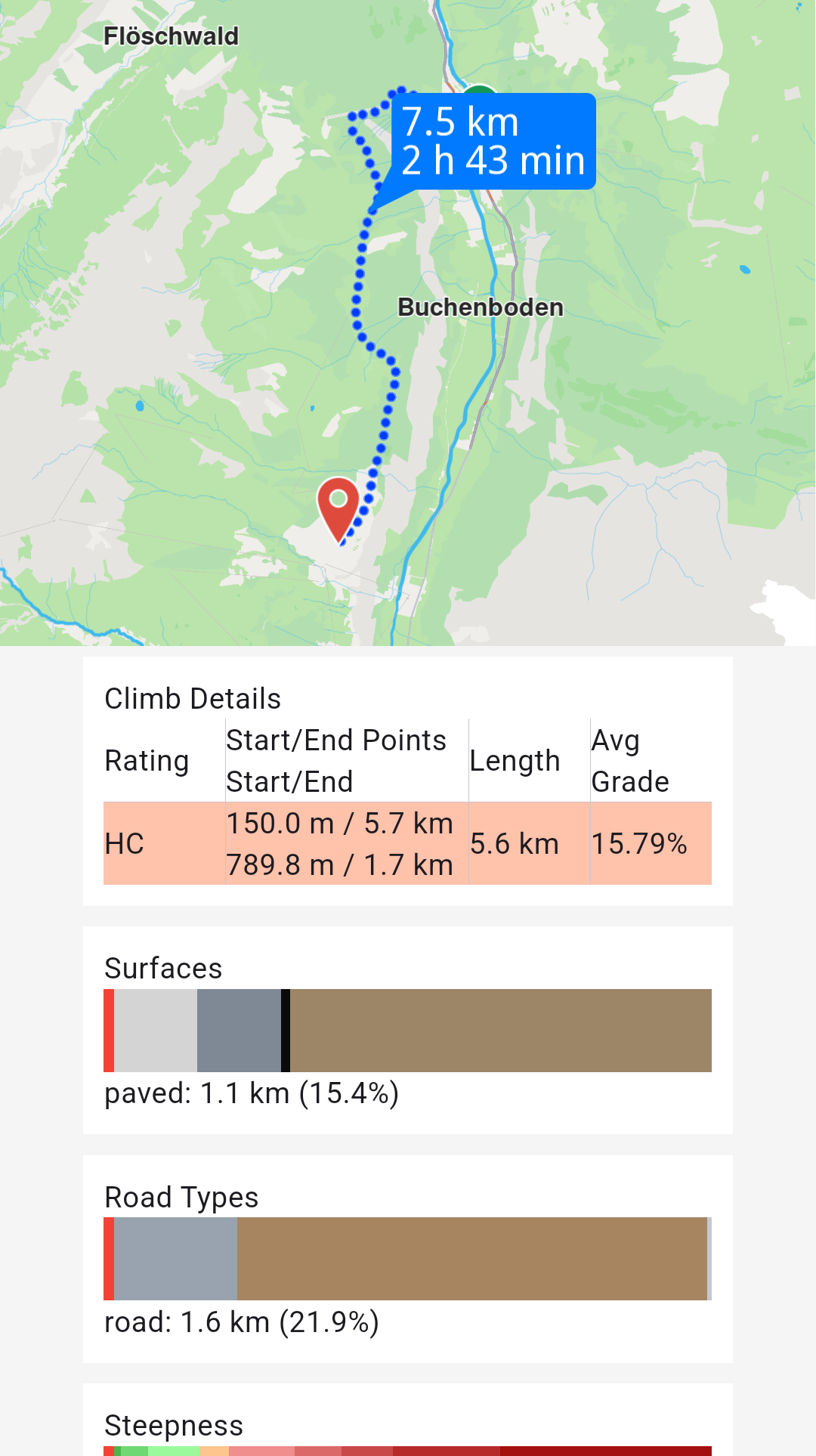
See the Route Profile example for detailed information.
Retrieve route instructions
Access detailed turn-by-turn instructions and segment information for computed routes.
Each segment represents the route portion between consecutive waypoints and includes its own set of instructions. A route with five waypoints contains four segments, each with distinct instructions.
For public transit routes, segments represent either pedestrian paths or transit sections.
Key RouteInstruction properties:
| Field | Type | Explanation |
|---|---|---|
| traveledTimeDistance | TimeDistance | Time and distance from the beginning of the route. |
| remainingTravelTimeDistance | TimeDistance | Time and distance to the end of the route. |
| coordinates | Coordinates | The coordinates indicating the location of the instruction. |
| remainTravelTimeDistToNextWaypoint | TimeDistance | Time and distance until the next waypoint. |
| timeDistanceToNextTurn | TimeDistance | Time and distance until the next instruction. |
| turnDetails | TurnDetails | Get full details for the turn. |
| turnInstruction | String | Get textual description for the turn. |
| roadInfo | List<RoadInfo> | Get road information. |
| hasFollowRoadInfo | bool | Check is the road has follow road information. |
| followRoadInstruction | String | Get textual description for the follow road information. |
| countryCodeISO | String | Get ISO 3166-1 alpha-3 country code for the navigation instruction. |
| exitDetails | String | Get the exit route instruction text. |
| signpostInstruction | String | Get textual description for the signpost information. |
| signpostDetails | SignpostDetails | Get extended signpost details. |
| roadInfoImg | RoadInfoImg | Get customizable road image. The user is responsible to check if the image is valid. |
| turnImg | Img | Get turn image. The user is responsible to check if the image is valid. |
| realisticNextTurnImg | AbstractGeometryImg | Get customizable image for the realistic turn information. The user is resposible to check if the image is valid. |
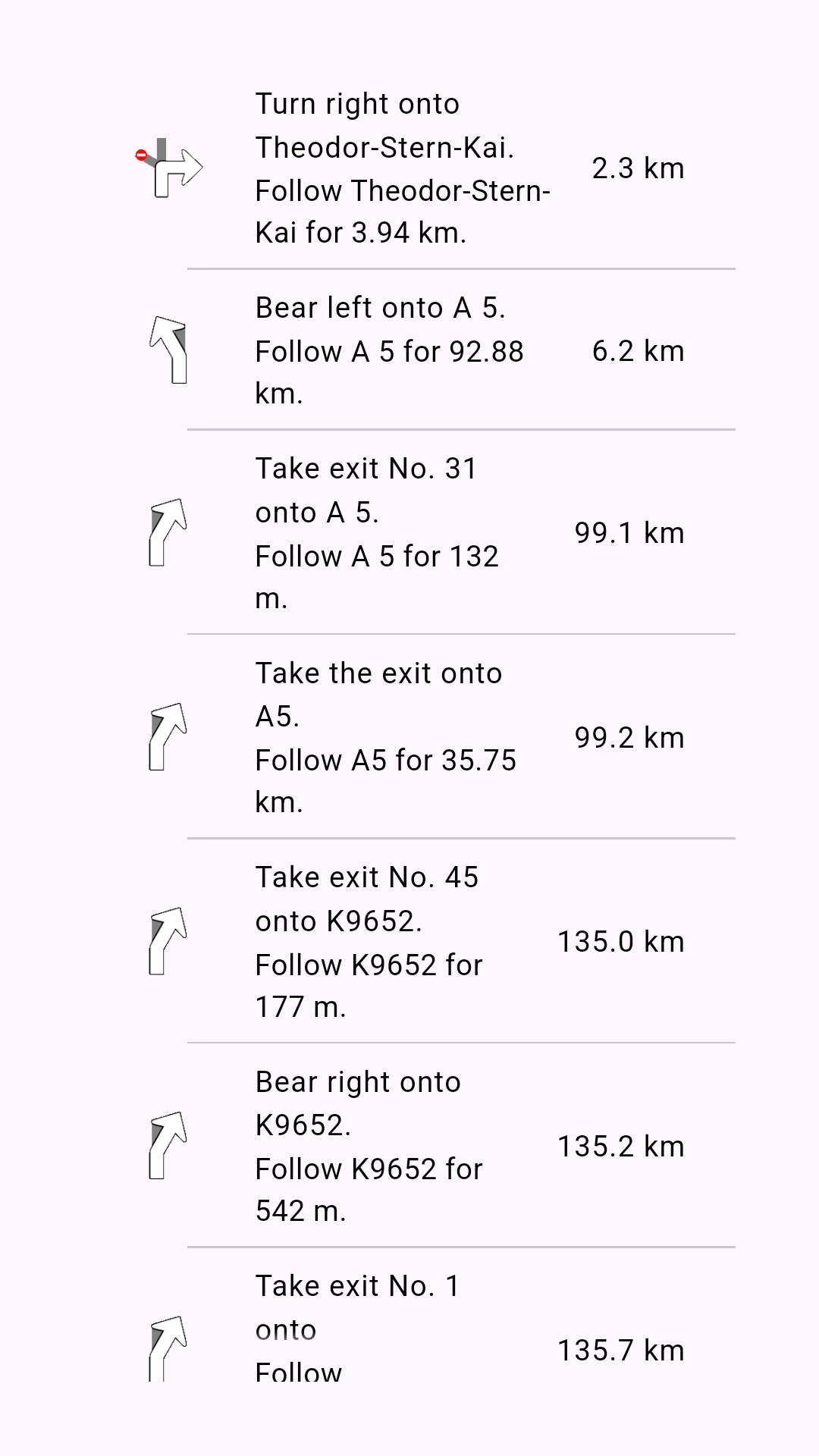
Access instruction data using these RouteInstruction methods:
turnInstruction: Bear left onto A 5followRoadInstruction: Follow A 5 for 132mtraveledTimeDistance.totalDistanceM: 6.2km (after formatting)turnDetails.abstractGeometryImg.getRenderableImageBytes(renderSettings: AbstractGeometryImageRenderSettings(),size: Size(100, 100)): Instruction image or null when invalid