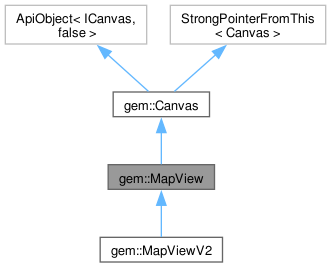
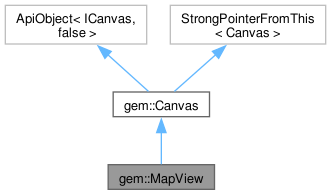
MapView object - displays a map. More...
Public Member Functions | |
| StrongPointer< MapCamera > | getCamera () const noexcept |
| Retrieves the camera associated with this MapView. | |
| MapViewPreferencesRef | preferences () noexcept |
| Get access to this view preferences. | |
| MapView & | skipAnimation (bool bJumpToDestination=true) noexcept |
| Stop the current animation. | |
| bool | isAnimationInProgress () const noexcept |
| Check if there is an animation in progress. | |
| MapView & | setCamera (StrongPointer< MapCamera > camera) noexcept |
| Set the given camera. | |
| int | maxZoomLevel () const noexcept |
| Get the maximum zoom level. | |
| double | getMaxSlippyZoomLevel () const noexcept |
| Get the maximum slippy zoom level. | |
| int | setZoomLevel (int zoomLevel, int duration=0, Xy xy=Xy()) noexcept |
| Set a new zoom level centered on the specified screen position. | |
| bool | canZoom (int zoomLevel, Xy xy=Xy()) noexcept |
| Check if it is possible to zoom at a specified zoom level. | |
| void | setMinZoomLevel (int zl) noexcept |
| Set the configured min zoom level. | |
| void | setMaxZoomLevel (int zl) noexcept |
| Set the configured max zoom level. | |
| int | getMinZoomLevel () const noexcept |
| Get the configured min zoom level. | |
| int | getMaxZoomLevel () const noexcept |
| Get the configured max zoom level. | |
| double | setSlippyZoomLevel (double zoomLevel, int duration=0, Xy xy=Xy()) noexcept |
| Set a new zoom level based on slippy tile level. | |
| int | getZoomLevel () const noexcept |
| Get zoom level. | |
| double | getSlippyZoomLevel () const noexcept |
| Get slippy zoom level. | |
| MapView & | startFollowingPosition (Animation animation=Animation(), int zoomLevel=-1, double viewAngle=(std::numeric_limits< double >::max)(), StrongPointer< MapSceneObject > positionObj=StrongPointer< MapSceneObject >(), CameraTrackMethod trackMethod=CameraTrackMethod()) noexcept |
| Start following the current position. | |
| MapView & | stopFollowingPosition (bool restoreCameraMode=false) noexcept |
| Stop following the current position. | |
| MapView & | restoreFollowingPosition (Animation animation=Animation()) noexcept |
| Restore following position from a manually adjusted mode to default auto-zoom mode. | |
| bool | isFollowingPosition (bool bAlsoFlyToPosition=true) const noexcept |
| Test if following the current position mode. | |
| bool | isFollowingPositionTouchHandlerModified () const noexcept |
| Test if following the current position is modified by the touch handler. | |
| bool | isDefaultFollowingPosition () const noexcept |
| Test if following the current position is in default auto-zoom mode. | |
| MapView & | activateHighlight (const LandmarkList &landmarks, const HighlightRenderSettings &renderSettings=HighlightRenderSettings(), short highlightId=0) noexcept |
| Enable highlighting for the given landmark list. | |
| MapView & | activateHighlight (const OverlayItemList &overlays, const HighlightRenderSettings &renderSettings=HighlightRenderSettings(), short highlightId=0) noexcept |
| Enable the highlighting for the given overlay list. | |
| MapView & | deactivateHighlight (short highlightId=0) noexcept |
| Disable highlighting. | |
| MapView & | deactivateAllHighlights () noexcept |
| Disable all highlights. | |
| RectangleGeographicArea | getHighlightArea (int highlightId=0) const noexcept |
| Get highlighted geographic area. | |
| LandmarkList | getHighlight (int highlightId) const noexcept |
| Get highlighted geographic area. | |
| MapView & | centerOnCoordinates (const Coordinates &coords, int zoomLevel=-1, Xy xy=Xy(), Animation animation=Animation(), double mapAngle=(std::numeric_limits< double >::max)(), double viewAngle=(std::numeric_limits< double >::max)()) noexcept |
| Center the WGS coordinates on screen coordinates. | |
| MapView & | centerOnCoordinates (const Coordinates &coords, Animation animation) noexcept |
| Center the WGS coordinates on screen coordinates with animation. | |
| MapView & | centerOnArea (const GeographicArea &area, int zoomLevel=-1, Xy xy=Xy(), Animation animation=Animation()) noexcept |
| Center the on the given WGS area. | |
| MapView & | centerOnArea (const GeographicArea &area, int zoomLevel, Rect viewRectangle, Animation animation=Animation()) noexcept |
| Center the on the given WGS area. | |
| MapView & | centerOnRouteInstruction (const RouteInstruction &instruction, int zoomLevel=-1, Xy xy=Xy(), Animation animation=Animation(), double viewAngle=(std::numeric_limits< double >::max)()) noexcept |
| Center on the given route instruction and displays the associated turn arrow in the map view. | |
| MapView & | centerOnRouteTrafficEvent (const RouteTrafficEvent &traffic, int zoomLevel=-1, Rect viewRectangle=Rect(), Animation animation=Animation(), double viewAngle=(std::numeric_limits< double >::max)()) noexcept |
| Center on the given traffic event. | |
| MapView & | centerOnLocation (const Landmark &location, Rect viewRectangle=Rect(), Animation animation=Animation()) noexcept |
| Center on the given landmark location. | |
| MapView & | centerOnRoute (const Route &route, Rect viewRectangle=Rect(), Animation animation=Animation()) noexcept |
| Center on the given route. | |
| MapView & | centerOnRoute (const Route &route, int startDist, int endDist, Rect viewRectangle=Rect(), Animation animation=Animation()) noexcept |
| Center On the given route parts. | |
| MapView & | centerOnRoutes (const RouteList &routesList, ERouteDisplayMode displayMode=RDM_Full, const Rect &viewRectangle=Rect(), Animation animation=Animation()) noexcept |
| Center on the given routes collection. | |
| MapView & | centerOnMapRoutes (ERouteDisplayMode displayMode=RDM_Full, const Rect &viewRectangle=Rect(), Animation animation=Animation()) noexcept |
| Center on the existing routes collection. | |
| Rect | getOptimalRoutesCenterViewport (const RouteList &routesList, const Rect &viewRectangle=Rect()) const noexcept |
| Gets the highlighted items optimal center viewport given the user custom input. | |
| Rect | getOptimalHighlightCenterViewport (const Rect &viewRectangle=Rect()) const noexcept |
| Gets the optimal highlight center viewport given the user custom input. | |
| Coordinates | getCursorWgsPosition () const noexcept |
| Get the cursor WGS coordinates. | |
| const LandmarkListRef | cursorSelectionLandmarks () const noexcept |
| Retrieves a reference to a list of landmarks under the current cursor location. | |
| const LandmarkListRef | cursorSelectionStreets () const noexcept |
| Retrieves a reference to a list of streets under the current cursor location. | |
| const OverlayItemListRef | cursorSelectionOverlayItems () const noexcept |
| Retrieves a reference to a list of overlay items under the current cursor location. | |
| const TrafficEventListRef | cursorSelectionTrafficEvents () const noexcept |
| Retrieves a reference to a list of traffic events under the current cursor location. | |
| const RouteListRef | cursorSelectionRoutes () const noexcept |
| Retrieves a reference to a list of routes under the current cursor location. | |
| const MarkerMatchListRef | cursorSelectionMarkers () const noexcept |
| Retrieves a reference to a list of markers under the current cursor location. | |
| const PathRef | cursorSelectionPath () const noexcept |
| Retrieves the path under the current cursor location. | |
| StrongPointer< MapSceneObject > | cursorSelectionSceneObject () const noexcept |
| Retrieves the scene object under the current cursor selection. | |
| int | highlightHoveredMapLabel (const Xy &pt, bool selectMapObjects) const noexcept |
| Highlight the hovered map label under the given screen coordinates. | |
| LandmarkList | getNearestLocations (const Coordinates &coordinates, const IntList &lmkStores={}, int radius=0) const noexcept |
| Retrieve the set of landmarks on the specified coordinates. | |
| Xy | getCursorScreenPosition () const noexcept |
| Get the cursor screen position. | |
| MapView & | setCursorScreenPosition (Xy xy) noexcept |
| Set the cursor screen position. | |
| MapView & | alignNorthUp (Animation animation=Animation()) |
| Set the map north-up oriented. | |
| Coordinates | transformScreenToWgs (Xy xy) const noexcept |
| Convert a screen coordinate to a WGS coordinate. | |
| RectangleGeographicAreaList | transformScreenToWgs (Rect const &rectangle) const noexcept |
| Converts a screen rectangle to WGS areas list. | |
| Xy | transformWgsToScreen (const Coordinates &coords) const noexcept |
| Convert a WGS84 coordinate to a screen coordinate. | |
| double | getAltitude (const Coordinates &coords) const noexcept |
| Get altitude at the given coordinates. | |
| std::pair< int, int > | getVisibleRouteInterval (const Route &route, Rect clipRect=Rect()) const noexcept |
| Get the clipped part of the given route as a pair (startDistance, endDistance). | |
| bool | checkObjectVisibility (const MapSceneObject &obj, Rect viewport=Rect()) const noexcept |
| Check if the given scene object visible in the given viewport. | |
| StyleLayerInfoList | getStyleLayerInfo (const Coordinates &coords) const noexcept |
| Get style layers information at the given coordinates. | |
| StyleLegendList | getStyleLegend () const noexcept |
| Get style legend list ( for layers which have legends ). | |
| bool | isCameraMoving () const noexcept |
| Check if view camera is moving. | |
| MapView & | setClippingArea (const RectF &area) noexcept |
| Sets the view clipping rectangle in parent screen ratio. | |
| MapView & | scroll (float dx, float dy) noexcept |
| Scroll map. | |
| MapView & | fling (float velocityX, float velocityY) noexcept |
| Fling / swipe map. | |
| TransferStatisticsRef | getTransferStatistics (EViewOnlineServiceType serviceType) const noexcept |
| Get data transfer statistics for a given service. | |
| MapViewExtensionsRef | extensions () noexcept |
| Get access to MapViewExtensions. | |
| IMapDebugDetails * | features () noexcept |
| Obtain the map view features object. | |
| IMapDebugDetails * | getFeature () noexcept |
| double | getHeadingInDegrees () const noexcept |
| return the camera heading in degrees, with respect to Earth | |
| double | getPitchInDegrees () const noexcept |
| return the camera pitch in degrees, with respect to Earth | |
| double | getScale () const noexcept |
| Get the map view current scale ( meters for 1 mm ). | |
| bool | hasTerrainTopography () const noexcept |
| Check if map view contains terrain topography information. | |
| void | setWatermarkText (const String &line1, const String &line2, float fScaleFactor=1.0, EWatermarkPosition pos=EWPCenter) noexcept |
| Set custom watermark texts to show to the final user. | |
| StrongPointer< Screen > | getScreen () const noexcept |
| Get the parent screen. | |
| Rect | getViewport () const noexcept |
| Get view viewport in parent screen coordinates. | |
| RectF | getViewportF () const noexcept |
| Get screen viewport in parent screen ratio. | |
| bool | handleKeyboardEvent (EKey key, EKeyAction action) noexcept |
| Handles a keyboard event. | |
| Canvas & | resize (const RectF &screenRatio) noexcept |
| Resize the view. | |
| int | captureAsImage (const String &filePath, Rect const &rect=Rect(), EImageFileFormat format=IFF_Jpeg) const noexcept |
| Make a screen region capture of the current map in JPEG format. | |
| int | captureAsImage (DataBuffer &buffer, Rect const &rect=Rect(), EImageFileFormat format=IFF_Jpeg) const noexcept |
| Make a screen region capture of the current map in JPEG format. | |
| Image | captureAsImage (Rect const &rect=Rect()) const noexcept |
| Make a screen region capture of the current map in JPEG format. | |
| bool | isView () const noexcept |
| Deprecated. | |
| bool | isMapView () const noexcept |
| Check if canvas is a MapView object. | |
| void | detach () noexcept |
| Detach canvas from rendering process. | |
Static Public Member Functions | |
| static StrongPointer< MapView > | produce (StrongPointer< Screen > screen, const RectF &screenRatio, MapViewListener listener=MapViewListener(), StrongPointer< MapCamera > camera=StrongPointer< MapCamera >()) |
| Create a view object on the given screen. | |
| static StrongPointer< MapView > | produce (OpenGLContext context, MapViewListener listener=MapViewListener()) |
| Create a view object in the simplest mode possible. | |
| static StrongPointer< Canvas > | produce (StrongPointer< Screen > screen, const RectF &screenRatio, CanvasListener listener) noexcept |
| Create a canvas object on the given screen. | |
Protected Types | |
| using | Base = ApiObject<ICanvas, false> |
| Base. | |
Detailed Description
MapView object - displays a map.
MapView supports a wide range of operations like resize, zoom, rotate, animated fly to specific position or select map objects. The map appearance is fully customizable. By using the attached preferences() it is possible to specify for each map what map objects to be visible and when; it is possible to change the colors, widths and other properties of the map objects; or to specify which landmarks should be visible on map. Multiple MapView objects can be created using the same Screen or a different one.
Implements share-read / write Api object over IMapView.
Member Function Documentation
◆ activateHighlight() [1/2]
|
inlinenoexcept |
Enable highlighting for the given landmark list.
- Parameters
-
[in] landmarks Landmark [in] renderSettings Specifies the way the provided landmarks are displayed on the map [in] highlightId The highlighted collection id ( optional ). If a highlighted collection with this id already exists, it will be replaced
Highlighted collections will be displayed in ascending order sorted by highlightId
If functions fails, GEM_ERROR will contain the error
- Returns
- Reference to the current MapView object.
◆ activateHighlight() [2/2]
|
inlinenoexcept |
Enable the highlighting for the given overlay list.
- Parameters
-
[in] overlays Overlays [in] renderSettings Specifies the way the provided landmarks are displayed on the map [in] highlightId The highlighted collection id ( optional ). If a highlighted collection with this id already exists, it will be replaced
Highlighted collections will be displayed in ascending order sorted by highlightId
If functions fails, GEM_ERROR will contain the error
- Returns
- Reference to the current MapView object.
◆ alignNorthUp()
Set the map north-up oriented.
- Parameters
-
[in] animation
- Returns
- A reference to the current MapView object, allowing for method chaining.
◆ canZoom()
Check if it is possible to zoom at a specified zoom level.
- Parameters
-
[in] zoomLevel Zoom level. [in] xy Screen coordinates under which map should keep position. The coordinates are relative to the view's parent screen.
- Returns
- True if the zoom is possible; false if is not possible.
◆ captureAsImage() [1/3]
|
inlinenoexceptinherited |
Make a screen region capture of the current map in JPEG format.
No cursor/on-screen info is included.
- Parameters
-
[in] filePath File path. [in] rect The screen rectangle to capture. If ( 0, 0, 0, 0) is provided then the entire map screen is captured. [in] format The image format, default Jpeg
- Returns
- 0 if successful, otherwise an error code
◆ captureAsImage() [2/3]
|
inlinenoexceptinherited |
Make a screen region capture of the current map in JPEG format.
No cursor/on-screen info is included.
- Parameters
-
[in] buffer The buffer in which the capture is made. [in] rect The screen rectangle to capture. If ( 0, 0, 0, 0) is provided then the entire map screen is captured. [in] format The image format, default Jpeg
- Returns
- 0 if successful, otherwise an error code
◆ captureAsImage() [3/3]
Make a screen region capture of the current map in JPEG format.
No cursor/on-screen info is included.
- Parameters
-
[in] rect The screen rectangle to capture. If ( 0, 0, 0, 0) is provided then the entire map screen is captured.
- Returns
- The captured image
◆ centerOnArea() [1/2]
|
inlinenoexcept |
Center the on the given WGS area.
- Parameters
-
[in] area Geographic area [in] zoomLevel Zoom level. When -1 is used, the zoom level is automatically selected so that the entire area is visible on the map. [in] viewRectangle Rectangle portion of the view where area should be centered. The coordinates are relative to view's parent screen. If rectangle exceeds view's viewport, it will be clipped to fit into it. [in] animation Specifies the animation to be used by the operation.
- Returns
- Reference to the current MapView object.
◆ centerOnArea() [2/2]
|
inlinenoexcept |
Center the on the given WGS area.
- Parameters
-
[in] area Geographic area [in] zoomLevel Zoom level. When -1 is used, the zoom level is automatically selected so that the entire area is visible on the map. [in] xy Screen coordinate where area should be centered. The coordinates are relative to the view's parent screen. [in] animation Specifies the animation to be used by the operation.
- Returns
- Reference to the current MapView object.
◆ centerOnCoordinates() [1/2]
|
inlinenoexcept |
Center the WGS coordinates on screen coordinates with animation.
- Parameters
-
[in] coords Coordinates [in] animation Specifies the animation to be used by the operation.
- Returns
- Reference to the current MapView object.
◆ centerOnCoordinates() [2/2]
|
inlinenoexcept |
Center the WGS coordinates on screen coordinates.
- Parameters
-
[in] coords Coordinates [in] zoomLevel Zoom level (Use -1 for automatic selection) [in] xy Screen position where the coordinates should project ( default uses the specified cursor coordinates ). The coordinates are relative to the view's parent screen. [in] animation Specifies the animation to be used by the operation. [in] mapAngle Map rotation angle in the range [0.0, 360.0] degrees (Use std::numeric_limits<double>::max() for automatic selection). [in] viewAngle MapView angle in the range [-90.0, 90.0] degrees (Use std::numeric_limits<double>::max() for automatic selection).
- Returns
- Reference to the current MapView object.
◆ centerOnLocation()
|
inlinenoexcept |
Center on the given landmark location.
- Parameters
-
[in] location Landmark location [in] viewRectangle Rectangle portion of the view where location should be centered. The coordinates are relative to the view's parent screen. If rectangle exceeds view's viewport, it will be clipped to fit into it. [in] animation Specifies the animation to be used by the operation.
The best location presentation will be selected:
if location has a contour, a center on contour area will be done, otherwise a center on location coordinates
- Returns
- Reference to the current MapView object.
◆ centerOnMapRoutes()
|
inlinenoexcept |
Center on the existing routes collection.
The zoom level is automatically selected.
- Parameters
-
[in] displayMode Route display mode [in] viewRectangle Rectangle portion of the view where routes should be centered. The coordinates are relative to the view's parent screen. If rectangle exceeds view's viewport, it will be clipped to fit into it.
Leave empty to allow SDK to compute an optimal viewport
Use getOptimalRoutesCenterViewport to adjust a custom viewport for optimal routes presentation
- Parameters
-
[in] animation Specifies the animation to be used by the operation.
- Returns
- Reference to the current MapView object.
◆ centerOnRoute() [1/2]
|
inlinenoexcept |
Center On the given route parts.
The zoom level is automatically selected so that the entire route part between start distance and end distance is visible on the map
- Parameters
-
[in] route Route to be shown. [in] startDist start distance from route begin [in] endDist end distance from route begin [in] viewRectangle Rectangle portion of the view where route should be centered. The coordinates are relative to the view's parent screen. If rectangle exceeds view's viewport, it will be clipped to fit into it.
Leave empty to allow SDK to compute an optimal viewport
Use getOptimalRoutesCenterViewport to adjust a custom viewport for optimal routes presentation
- Parameters
-
[in] animation Specifies the animation to be used by the operation.
- Returns
- Reference to the current MapView object.
◆ centerOnRoute() [2/2]
|
inlinenoexcept |
Center on the given route.
The zoom level is automatically selected so that the entire route is visible on the map.
- Parameters
-
[in] route Route to be shown. [in] viewRectangle Rectangle portion of the view where route should be centered. The coordinates are relative to the view's parent screen. If rectangle exceeds view's viewport, it will be clipped to fit into it. [in] animation Specifies the animation to be used by the operation.
- Returns
- Reference to the current MapView object.
◆ centerOnRouteInstruction()
|
inlinenoexcept |
Center on the given route instruction and displays the associated turn arrow in the map view.
The route instruction turn arrow is visible on map.
- Parameters
-
[in] instruction Routing instruction. If RouteInstruction is not valid ( e.g. a default object ) then the previous displayed turn arrow is erased [in] zoomLevel Zoom level (Use -1 for automatic selection) [in] xy Screen coordinate where area should be centered. The coordinates are relative to the view's parent screen. [in] animation Specifies the animation to be used by the operation. [in] viewAngle Specifies the map pitch angle
- Returns
- Reference to the current MapView object.
◆ centerOnRoutes()
|
inlinenoexcept |
Center on the given routes collection.
Routes from the list WILL NOT be visible on the map. They must be added to preferences().routes() prior to this call. The zoom level is automatically selected.
- Parameters
-
[in] routesList Route list to be centered on. [in] displayMode Route display mode [in] viewRectangle Rectangle portion of the view where routes should be centered. The coordinates are relative to the view's parent screen. If rectangle exceeds view's viewport, it will be clipped to fit into it.
Leave empty to allow SDK to compute an optimal viewport
Use getOptimalRoutesCenterViewport to adjust a custom viewport for optimal routes presentation
- Parameters
-
[in] animation Specifies the animation to be used by the operation.
- Returns
- Reference to the current MapView object.
◆ centerOnRouteTrafficEvent()
|
inlinenoexcept |
Center on the given traffic event.
- Parameters
-
[in] traffic Route traffic event [in] zoomLevel Zoom level (Use -1 for automatic selection) [in] viewRectangle Rectangle portion of the view where route traffic event should be centered. The coordinates are relative to the view's parent screen. If rectangle exceeds view's viewport, it will be clipped to fit into it. [in] animation Specifies the animation to be used by the operation. [in] viewAngle Specifies the map pitch angle
- Returns
- Reference to the current MapView object.
◆ checkObjectVisibility()
|
inlinenoexcept |
Check if the given scene object visible in the given viewport.
- Parameters
-
[in] obj The scene object to test [in] viewport Viewport rectangle in screen coordinates. If no viewport is given, the whole screen is used
- Returns
- True if the object is visible within the viewport, false otherwise.
◆ cursorSelectionLandmarks()
|
inlinenoexcept |
Retrieves a reference to a list of landmarks under the current cursor location.
This method returns a list of landmarks that are directly beneath the cursor on the map. It can be used to identify landmarks that a user might be pointing to or interested in.
- Returns
- A reference to a list of Landmark objects under the cursor. If no landmarks are found, the list will be empty.
◆ cursorSelectionMarkers()
|
inlinenoexcept |
Retrieves a reference to a list of markers under the current cursor location.
Markers are typically used to indicate specific points of interest on the map. This method allows for identifying which markers, if any, are under the cursor, enabling interactions such as displaying additional information about the marker.
- Returns
- A reference to a list of MarkerMatch objects under the cursor. If no markers are found, the list will be empty.
◆ cursorSelectionOverlayItems()
|
inlinenoexcept |
Retrieves a reference to a list of overlay items under the current cursor location.
Overlay items can include various custom or additional map elements added on top of the base map layer. This method allows for the detection and interaction with these elements based on cursor position.
- Returns
- A reference to a list of OverlayItem objects under the cursor. If no overlay items are found, the list will be empty.
◆ cursorSelectionPath()
|
inlinenoexcept |
Retrieves the path under the current cursor location.
Paths can represent routes, trails, or other linear features on the map. This method identifies the path that is directly beneath the cursor, allowing for interactions such as path selection or displaying path details.
- Returns
- A reference to the Path object under the cursor. If no path is found, this will be a null reference.
◆ cursorSelectionRoutes()
|
inlinenoexcept |
Retrieves a reference to a list of routes under the current cursor location.
This method is used to determine which routes, if any, are under the cursor's current map position. It's particularly useful for route planning and navigation applications where users may need to select or interact with specific routes.
- Returns
- A reference to a list of Route objects under the cursor. If no routes are found, the list will be empty.
◆ cursorSelectionSceneObject()
|
inlinenoexcept |
Retrieves the scene object under the current cursor selection.
Scene objects can include 3D models, custom drawings, or other complex visual elements added to the map. This method determines which scene object, if any, is under the cursor, facilitating interactions like selection or manipulation.
- Returns
- A strong pointer to the MapSceneObject under the cursor. If no scene object is found, this will return an empty pointer.
◆ cursorSelectionStreets()
|
inlinenoexcept |
Retrieves a reference to a list of streets under the current cursor location.
This method provides information about streets located directly under the cursor on the map. Useful for applications that require the user to select or identify streets.
- Returns
- A reference to a list of Street objects under the cursor. If no streets are found, the list will be empty.
◆ cursorSelectionTrafficEvents()
|
inlinenoexcept |
Retrieves a reference to a list of traffic events under the current cursor location.
Traffic events can include incidents like accidents, roadworks, or traffic jams. This method is useful for applications that provide real-time traffic information and require user interaction with traffic events.
- Returns
- A reference to a list of TrafficEvent objects under the cursor. If no traffic events are found, the list will be empty.
◆ deactivateAllHighlights()
|
inlinenoexcept |
Disable all highlights.
If functions fails, GEM_ERROR will contain the error
- Returns
- Reference to the current MapView object.
◆ deactivateHighlight()
|
inlinenoexcept |
Disable highlighting.
- Parameters
-
[in] highlightId The highlighted collection id ( optional )
If functions fails, GEM_ERROR will contain the error ( e.g. error::KInvalidInput if given highlightId doesn't exist )
- Returns
- Reference to the current MapView object.
◆ detach()
|
inlinenoexceptinherited |
Detach canvas from rendering process.
If OpenGL context is not available anymore during canvas destruction, this method should be called when the context is still valid in order to do all needed cleanups
◆ extensions()
|
inlinenoexcept |
Get access to MapViewExtensions.
- Returns
- A reference to the MapViewExtensions object, providing additional functionalities and extensions specific to the MapView.
◆ features()
|
inlinenoexcept |
Obtain the map view features object.
- Returns
- A pointer to the map view features ( experimental )
◆ fling()
|
inlinenoexcept |
Fling / swipe map.
- Parameters
-
[in] velocityX Horizontal velocity in screen units
A positive value will move the map to the screen right, a negative value will move the map to the screen left
- Parameters
-
[in] velocityY Vertical velocity in screen units
A positive value will move the map to the screen bottom, a negative value will move the map to the screen top
- Returns
- A reference to the current MapView object, allowing for method chaining.
◆ getAltitude()
|
inlinenoexcept |
Get altitude at the given coordinates.
- Parameters
-
[in] coords WGS Coordinates
- Returns
- Altitude as meters from sea level if capability exist, otherwise returns 0
Use hasTerrainTopography() to check if the map view has the capability to return an altitude at coordinates
◆ getCamera()
|
inlinenoexcept |
◆ getCursorScreenPosition()
|
inlinenoexcept |
Get the cursor screen position.
The coordinates are relative to the view's parent screen.
- Returns
- The current screen coordinates (Xy) of the cursor, relative to the view's parent screen.
◆ getCursorWgsPosition()
|
inlinenoexcept |
Get the cursor WGS coordinates.
- Returns
- cursor coords
◆ getFeature()
|
inlinenoexcept |
- Deprecated
- use features() instead
- Returns
- A pointer to the map view features
◆ getHeadingInDegrees()
|
inlinenoexcept |
return the camera heading in degrees, with respect to Earth
- Returns
- The heading angle of the camera in degrees, where 0 degrees indicates north.
◆ getHighlight()
|
inlinenoexcept |
Get highlighted geographic area.
- Parameters
-
[in] highlightId An identifier for the highlight
- Returns
- A LandmarkList containing all landmarks within the highlighted area.
◆ getHighlightArea()
|
inlinenoexcept |
Get highlighted geographic area.
- Parameters
-
[in] highlightId An identifier for the highlight whose area is to be retrieved, with a default value of 0.
- Returns
- A RectangleGeographicArea object representing the geographic bounds of the highlighted area.
◆ getMaxSlippyZoomLevel()
|
inlinenoexcept |
Get the maximum slippy zoom level.
Bigger zoom factor means closer to the map.
- Returns
- The maximum slippy zoom level as a double.
◆ getMaxZoomLevel()
|
inlinenoexcept |
Get the configured max zoom level.
- Returns
- The minimum zoom level configured for the map view.
◆ getMinZoomLevel()
|
inlinenoexcept |
Get the configured min zoom level.
- Returns
- The minimum zoom level configured for the map view.
◆ getNearestLocations()
|
inlinenoexcept |
Retrieve the set of landmarks on the specified coordinates.
This is a quick synchronous reverse geocoding method.
- Parameters
-
[in] coordinates Coordinates [in] lmkStores A list of landmark store types where to search for locations, see ELandmarkStoreType.
Supported landmark stores are LST_MapAddress, LST_MapPoi, LST_MapCity, LST_MapRoads
If empty, all supported landmark stores will be searched
- Parameters
-
[in] radius The search radius in meters, If 0, an optimal default value will be internally used
- Returns
- A LandmarkList containing the nearest locations to the specified coordinates. If no landmarks are found, the list will be empty.
◆ getOptimalHighlightCenterViewport()
|
inlinenoexcept |
Gets the optimal highlight center viewport given the user custom input.
The returned viewport is adjusted so all highlight information will be visible
User can use this as input to centerOnArea viewRectangle parameter
- Parameters
-
[in] viewRectangle Rectangle portion of the view where highlight should be centered. If empty, the whole viewport is used. If rectangle exceeds view's viewport, it will be clipped to fit into it.
- Returns
- The adjusted viewport. The coordinates are relative to the view's parent screen.
◆ getOptimalRoutesCenterViewport()
|
inlinenoexcept |
Gets the highlighted items optimal center viewport given the user custom input.
The returned viewport is adjusted so all highlighted information will be visible
User can use this as input to centerOnArea viewRectangle parameter
- Parameters
-
[in] routesList Route list to be shown. [in] viewRectangle Rectangle portion of the view where routes should be centered. If empty, the whole viewport is used. If rectangle exceeds view's viewport, it will be clipped to fit into it.
- Returns
- The adjusted viewport. The coordinates are relative to the view's parent screen.
◆ getPitchInDegrees()
|
inlinenoexcept |
return the camera pitch in degrees, with respect to Earth
- Returns
- The pitch angle of the camera in degrees
◆ getScale()
|
inlinenoexcept |
Get the map view current scale ( meters for 1 mm ).
- Returns
- The scale of the map view
◆ getScreen()
|
inlinenoexceptinherited |
Get the parent screen.
- Returns
- The parent screen
◆ getSlippyZoomLevel()
|
inlinenoexcept |
Get slippy zoom level.
- Returns
- The current slippy zoom level
◆ getStyleLayerInfo()
|
inlinenoexcept |
Get style layers information at the given coordinates.
- Parameters
-
[in] coords The geographic coordinates where style layer information is requested.
- Returns
- A list of StyleLayerInfo objects for the specified coordinates.
◆ getStyleLegend()
|
inlinenoexcept |
Get style legend list ( for layers which have legends ).
- Returns
- A list of StyleLegend objects
◆ getTransferStatistics()
|
inlinenoexcept |
Get data transfer statistics for a given service.
- Parameters
-
[in] serviceType The type of the online service for which data transfer statistics are requested.
- Returns
- A reference to the TransferStatistics object containing data transfer information for the specified service.
◆ getViewport()
|
inlinenoexceptinherited |
Get view viewport in parent screen coordinates.
origin is always 0, 0
- Returns
- The view viewport
◆ getViewportF()
|
inlinenoexceptinherited |
Get screen viewport in parent screen ratio.
origin is always 0, 0
- Returns
- The view viewport
◆ getVisibleRouteInterval()
|
inlinenoexcept |
Get the clipped part of the given route as a pair (startDistance, endDistance).
- Parameters
-
[in] route Target route [in] clipRect Clipping rectangle in screen coordinates. If no clip rectangle is given, the whole screen is used
- Returns
- A pair of integers representing the start and end distances of the visible portion of the route.
◆ getZoomLevel()
|
inlinenoexcept |
Get zoom level.
- Returns
- The current zoom level
◆ handleKeyboardEvent()
|
inlinenoexceptinherited |
Handles a keyboard event.
- Parameters
-
key Type of key that was interacted with. action Type of action that was performed on key.
- Returns
- True if the canvas used the key action, in which case the UI should stop forwarding the key to other UI elements
◆ hasTerrainTopography()
|
inlinenoexcept |
Check if map view contains terrain topography information.
If true, transformScreenToWgs() function returns coordinates with terrain altitude set
The map view has terrain topography if the map style includes the terrain elevation layer and data is available on queried location
- Returns
- True if the map view contains terrain topography information, false otherwise.
◆ highlightHoveredMapLabel()
|
inlinenoexcept |
Highlight the hovered map label under the given screen coordinates.
- Parameters
-
[in] pt The hovered screen point
To turn off the hover highlight call the function with (0, 0) screen position
- Parameters
-
[in] selectMapObjects
If true and a label is hovered, map objects attached to label are returned via IMapViewListener::onHoveredMapLabelHighlighted
If false, no call to IMapViewListener::onHoveredMapLabelHighlighted is issued
- Returns
- The operation error code
Returns error::KNotFound if no label was found
A recommended implementation is to call highlightHoveredMapLabel ( ..., selectMapObjects = false ) in order to check if a label is hovered ( and eventually update tracking device cursor shape etc ) and if the cursor position is stationary for a reasonable time period ( e.g. 500 ms ) call highlightHoveredMapLabel( ..., selectMapObjects = true ) to retrieve the hovered map object data
◆ isAnimationInProgress()
|
inlinenoexcept |
Check if there is an animation in progress.
- Returns
- True if an animation is running; false otherwise.
◆ isCameraMoving()
|
inlinenoexcept |
Check if view camera is moving.
- Returns
- True if the camera is moving, false otherwise.
◆ isDefaultFollowingPosition()
|
inlinenoexcept |
Test if following the current position is in default auto-zoom mode.
- Returns
- True if the map is in the default auto-zoom follow position mode, false if it has been manually adjusted or is not in follow position mode.
◆ isFollowingPosition()
|
inlinenoexcept |
Test if following the current position mode.
- Parameters
-
[in] bAlsoFlyToPosition If true, considers the map to be in follow position mode even when animating towards a position ("flying"). If false, the map is considered to be in follow position mode only when it is actively tracking the current position without any ongoing animation.
- Returns
- True if the map is currently following the current position
◆ isFollowingPositionTouchHandlerModified()
|
inlinenoexcept |
Test if following the current position is modified by the touch handler.
In this mode, the camera follows the position tracker from a fixed relative position manually adjusted / set by the user using touch input
- Returns
- True if the follow position mode has been manually adjusted by the user, false if it remains in its default state.
◆ isMapView()
|
inlinenoexceptinherited |
◆ isView()
|
inlinenoexceptinherited |
◆ maxZoomLevel()
|
inlinenoexcept |
Get the maximum zoom level.
Bigger zoom factor means closer to the map.
- Returns
- The maximum zoom level as an integer.
◆ preferences()
|
inlinenoexcept |
Get access to this view preferences.
- Returns
- A reference to the MapViewPreferences object associated with this view.
◆ produce() [1/3]
|
inlinestaticnoexceptinherited |
Create a canvas object on the given screen.
- Parameters
-
[in] screen The view's parent screen (reference to it held internally) [in] screenRatio The viewport expressed in parent screen ratio [in] listener The canvas listener
- Returns
- The canvas object
◆ produce() [2/3]
|
inlinestatic |
Create a view object in the simplest mode possible.
- Note
- Internally a default camera is created and a default screen with automatic rendering rule.
- Parameters
-
[in] context The view's OpenGL context [in] listener The view listener
- Returns
- A StrongPointer to the newly created MapView object, configured to use the provided OpenGL context and listener.
◆ produce() [3/3]
|
inlinestatic |
Create a view object on the given screen.
- Parameters
-
[in] screen The view's parent screen (reference to it held internally) [in] screenRatio The viewport expressed in parent screen ratio [in] listener The view listener [in] camera The camera for the view, if not given, one is created and assigned to it (reference to it held internally)
- Returns
- A StrongPointer to the newly created MapView object
◆ resize()
Resize the view.
- Parameters
-
[in] screenRatio The new viewport expressed in parent screen ratio
- Returns
- The view object
◆ restoreFollowingPosition()
|
inlinenoexcept |
Restore following position from a manually adjusted mode to default auto-zoom mode.
- Parameters
-
[in] animation Specifies the animation to be used by the operation.
- Returns
- Reference to the current MapView object.
◆ scroll()
|
inlinenoexcept |
Scroll map.
- Parameters
-
[in] dx Horizontal dx in screen units
A positive value will move the map to the screen right, a negative value will move the map to the screen left
- Parameters
-
[in] dy Vertical dy in screen units
A positive value will move the map to the screen bottom, a negative value will move the map to the screen top
- Returns
- A reference to the current MapView object, allowing for method chaining.
◆ setCamera()
|
inlinenoexcept |
◆ setClippingArea()
Sets the view clipping rectangle in parent screen ratio.
- Parameters
-
[in] area The clipping rectangle to set, expressed as a fraction of the parent screen's size (for example, 0.5 for half the screen's width or height). This rectangle defines the visible portion of the MapView.
To reset the clipping area to whole view area call setClippingArea( getViewportF() )
- Returns
- A reference to the current MapView object, allowing for method chaining.
◆ setCursorScreenPosition()
Set the cursor screen position.
- Parameters
-
[in] xy Position relative to parent screen. The coordinates are relative to the view's parent screen.
Use this function to trigger a map view selection ( Poi, landmark, overlay, route, path, marker ) at the given screen coordinates
If map view selection changes, a notification is sent via IMapViewListener::onCursorSelectionUpdated
The current view selection can be queried via cursorSelection... () functions
- Returns
- A reference to the current MapView object, allowing for method chaining.
◆ setMaxZoomLevel()
|
inlinenoexcept |
Set the configured max zoom level.
- Parameters
-
[in] zl The maximum zoom level to be set.
◆ setMinZoomLevel()
|
inlinenoexcept |
Set the configured min zoom level.
- Parameters
-
[in] zl The minimum zoom level to be set.
◆ setSlippyZoomLevel()
|
inlinenoexcept |
Set a new zoom level based on slippy tile level.
When "follow position" is active, the current position will be used as the reference point for the operation. Otherwise, the screen center will be used. This may be between 0 and MaxSlippyZoomLevel().
- Parameters
-
[in] zoomLevel Slippy Zoom level [in] duration The animation duration in milliseconds (0 means no animation) [in] xy Screen coordinates under which map should keep position. The coordinates are relative to the view's parent screen.
- Returns
- The previous zoom level
◆ setWatermarkText()
|
inlinenoexcept |
Set custom watermark texts to show to the final user.
- Parameters
-
[in] line1 The first line to show [in] line2 The second line to show - this rrai a smaller font [in] fScaleFactor The scale factor [in] pos The watermark position
◆ setZoomLevel()
Set a new zoom level centered on the specified screen position.
This may be between 0 and getMaxZoomLevel().
- Parameters
-
[in] zoomLevel Zoom level. [in] duration The animation duration in milliseconds (0 means no animation) [in] xy Screen coordinates under which map should keep position. The coordinates are relative to the view's parent screen.
- Returns
- On success, the previous zoom level. On error, the error code
◆ skipAnimation()
|
inlinenoexcept |
Stop the current animation.
When this will be finished the animation will be completed with error code error::KCancel.
- Parameters
-
[in] bJumpToDestination - true if we want to jump to the destination when stopping animation; otherwise stop immediately
- Returns
- Reference to the current MapView object.
◆ startFollowingPosition()
|
inlinenoexcept |
Start following the current position.
Requires automatic map rendering. Disables the cursor if enabled.
- Parameters
-
[in] animation Specifies the animation to be used by the operation. [in] zoomLevel Zoom level where the animation stops( Use -1 for automatic selection) [in] viewAngle Map view angle ( see setViewAngle ). Default is std::numeric_limits<double>::max() meaning use default specified [in] positionObj the reference object to follow. [in] trackMethod Track Mode
- Returns
- Reference to the current MapView object.
◆ stopFollowingPosition()
|
inlinenoexcept |
Stop following the current position.
- Parameters
-
[in] restoreCameraMode Restore default camera zoom level and view angle in follow position mode
- Returns
- Reference to the current MapView object.
◆ transformScreenToWgs() [1/2]
|
inlinenoexcept |
Converts a screen rectangle to WGS areas list.
- Parameters
-
[in] rectangle Screen rectangle. The input rectangle will be clipped against viewport.
If default empty provided, the whole viewport is transformed
- Returns
- WGS84 areas list
◆ transformScreenToWgs() [2/2]
|
inlinenoexcept |
Convert a screen coordinate to a WGS coordinate.
- Parameters
-
[in] xy Screen coord. The coordinates are relative to the view's parent screen.
- Returns
- WGS384 coords
◆ transformWgsToScreen()
|
inlinenoexcept |
Convert a WGS84 coordinate to a screen coordinate.
- Parameters
-
[in] coords WGS Coordinates
- Returns
- The screen coordinates relative to view parent screen
Copyright (C) 2021-2026 Magic Lane International B.V.