# Display landmarks
Last updated:
October 18, 2026
\| 4 minutes read
Learn how to filter, add, and highlight landmarks on the map.
## Filter landmarks by category[](#filter-landmarks-by-category "Direct link to Filter landmarks by category")
Use `LandmarkStoreContextCollection` from `MapViewPreferencesContext` to control which store/category combinations are visible.
```swift
guard let stores = mapViewController.getPreferences().getLandmarkStoreCollection() else {
return
}
// Remove all currently displayed generic POI categories.
let genericCategories = GenericCategoriesContext()
let genericStoreId = genericCategories.getLandmarkStoreId()
_ = stores.removeAllStoreCategories(genericStoreId)
// Display only gas stations from generic categories.
_ = stores.addStoreCategoryId(genericStoreId, categoryId: Int32(GenericCategoryType.gasStation.rawValue))
```
## Add custom landmarks[](#add-custom-landmarks "Direct link to Add custom landmarks")
Create a custom landmark, add it to a landmark store, then make that store visible.
```swift
let customStore = LandmarkStoreContext(name: "custom-landmarks")
let landmark = LandmarkObject.landmark(
withName: "Charging stop",
location: CoordinatesObject.coordinates(withLatitude: 52.3780, longitude: 4.9008)
)
landmark.setLandmarkDescription("Fast charging station")
_ = customStore.addLandmark(landmark)
if let stores = mapViewController.getPreferences().getLandmarkStoreCollection() {
_ = stores.addAllStoreCategories(customStore.getId())
}
```
info
Initializing a `LandmarkStoreContext` will create a file inside the app's sandboxed file system if it doesn't already exist.
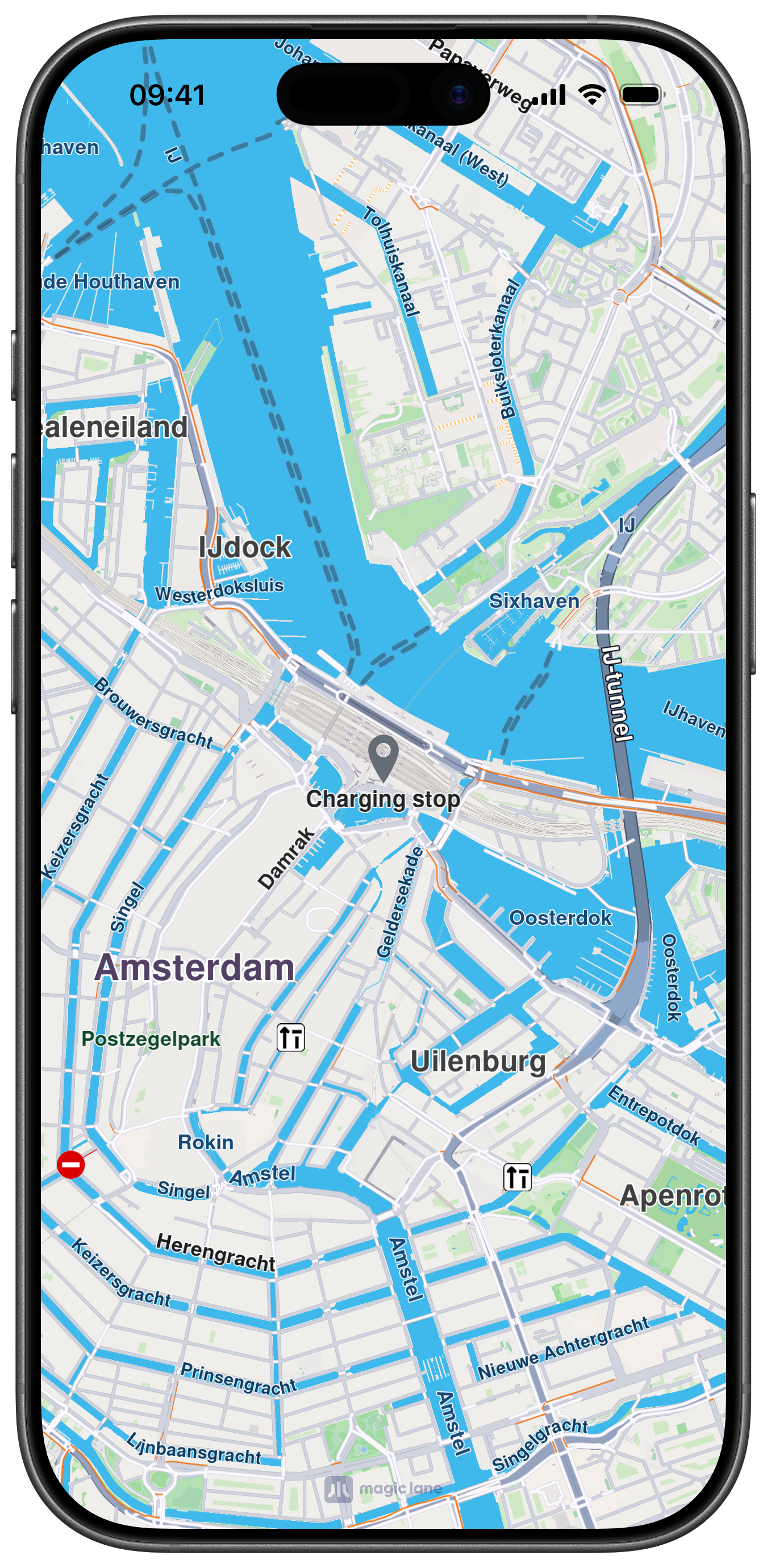
**Displayed Custom Landmark**
Registering a landmark store from an external file is also possible with `LandmarkStoreContextService`:
```swift
func registerFromURL(url: URL) {
let name = "LandmarkStoreFromURL"
let landmarkStoreService = LandmarkStoreContextService()
let identifier = landmarkStoreService.registerLandmarkStoreContext(name, path: url.relativePath)
if identifier > 0 {
let landmarkStore = landmarkStoreService.getLandmarkStoreContext(withIdentifier: Int32(identifier))
// Use landmarkStore as needed, for example to add landmarks or retrieve data
}
}
```
## Highlight landmarks[](#highlight-landmarks "Direct link to Highlight landmarks")
Highlights allow you to customize landmarks, making them more visible and providing render settings options. By default, highlighted landmarks are not selectable but can be made selectable if necessary.
Highlighting a landmark allows you to:
* Customize its appearance
* Temporarily isolate it from standard interactions (default behavior, can be modified)
Tip
Landmarks retrieved through search can be highlighted to enhance their prominence and customize their appearance. Custom landmarks can also be highlighted, but must be added to a `LandmarkStore` first.
```swift
let settings = HighlightRenderSettings()
settings.showPin = true
settings.imageSize = 7
settings.options = Int32(
HighlightOption.showLandmark.rawValue |
HighlightOption.overlap.rawValue |
HighlightOption.noFading.rawValue
)
mapViewController.presentHighlights([landmark], settings: settings, highlightId: 2)
```
### Highlight options[](#highlight-options "Direct link to Highlight options")
The `HighlightOption` enum provides options to customize highlighted landmark behavior:
| Option | iOS enum case | Description |
| -------------- | ------------------------------ | ------------------------------------------------------------------------------------------------------------------------------------------------------- |
| `showLandmark` | `HighlightOption.showLandmark` | Shows the landmark icon and text. Enabled by default. |
| `showContour` | `HighlightOption.showContour` | Shows the landmark contour area when available. Enabled by default. |
| `group` | `HighlightOption.group` | Groups landmarks in close proximity. Available only with `showLandmark`. Disabled by default. |
| `overlap` | `HighlightOption.overlap` | Overlaps highlight over existing map data. Available only with `showLandmark`. Disabled by default. |
| `noFading` | `HighlightOption.noFading` | Disables highlight fading in/out. Available only with `showLandmark`. Disabled by default. |
| `bubble` | `HighlightOption.bubble` | Displays highlights in a bubble with custom icon placement. Available only with `showLandmark`. Automatically invalidates `group`. Disabled by default. |
| `selectable` | `HighlightOption.selectable` | Makes highlights selectable from cursor/touch selection flow. Available only with `showLandmark`. Disabled by default. |
danger
When showing bubble highlights, if the whole bubble does not fit on the screen, it will not be displayed at all. Make sure to truncate the text if the text length is very long.
danger
For a landmark contour to be displayed, the landmark must have a valid contour area. Landmarks with a polygon representation on OpenStreetMap will have a contour area. Make sure the landmarks you want to highlight with contours have valid contour data with `isContourGeograficAreaEmpty()`
### Remove highlights[](#remove-highlights "Direct link to Remove highlights")
```swift
// remove highlights with a specific ID
mapViewController.removeHighlight(2)
// remove all highlights
mapViewController.removeHighlights()
```
## Remove landmark categories from map[](#remove-landmark-categories-from-map "Direct link to Remove landmark categories from map")
```swift
let genericStoreId = GenericCategoriesContext().getLandmarkStoreId()
_ = mapViewController.getPreferences()
.getLandmarkStoreCollection()?
.removeAllStoreCategories(genericStoreId)
```
## Relevant examples demonstrating landmarks related features[](#relevant-examples-demonstrating-landmarks-related-features "Direct link to Relevant examples demonstrating landmarks related features")
* [Map Selection](/docs/ios/examples/maps-3dscene/map-selection.md)
* [Search On Map](/docs/ios/examples/places-search/search-on-map.md)