Overlays
An overlay is an additional map layer with data stored on Magic Lane servers, accessible in both online and offline modes. Overlays can be default or user-defined, and they support category hierarchies and downloadable offline data.
Core classes:
OverlayInfoObject— dataset metadata and category treeOverlayCategoryObject— category node in the hierarchyOverlayItemObject— single item on the mapOverlayCollectionObject— all available datasetsOverlayServiceContext— enable/disable and offline control
Overlays require map content to be downloaded for offline use. Most overlay features require an active map view with a style that supports the overlay. See details in the offline content management guide.
OverlayInfoObject
OverlayInfoObject describes one overlay dataset. You retrieve instances from OverlayCollectionObject.
| Method | Return type | Description |
|---|---|---|
getUid() | Int | Unique overlay ID |
getName() | String | Overlay name |
getImage(_:) | UIImage? | Overlay icon at the given height |
getCategories() | [OverlayCategoryObject] | Root category list |
getCategory(_:) | OverlayCategoryObject? | Category by ID |
hasCategories(_:) | Bool | Checks if a category has subcategories |
Usage
Use OverlayInfoObject to:
- Access categories within an overlay
- Get the overlay
uidfor filtering search results - Toggle overlay visibility on the map
- Display overlay information in the UI
let service = OverlayServiceContext()

if let collection = service.getAvailableOverlays() {
    for overlay in collection.getOverlays() {
        print("\(overlay.getUid()): \(overlay.getName())")

        for category in overlay.getCategories() {
            print("  Category: \(category.getName())")
        }
    }
}
OverlayCategoryObject
OverlayCategoryObject represents a node in an overlay's category hierarchy. Categories can be nested to any depth.
| Method | Return type | Description |
|---|---|---|
getUid() | Int | Category ID within the overlay |
getOverlayUid() | Int | Parent overlay ID |
getName() | String | Category name |
getImage() | ImageObject? | Category icon |
getSubcategories() | [OverlayCategoryObject] | Direct subcategories |
hasSubcategories() | Bool | Subcategory existence check |
Usage
Use the category uid to:
- Filter search results
- Filter and manage overlay items that trigger alerts in
AlarmContext
Traverse the category tree
func printCategories(_ categories: [OverlayCategoryObject], depth: Int = 0) {
    let indent = String(repeating: "  ", count: depth)
    for cat in categories {
        print("\(indent)\(cat.getName()) (uid: \(cat.getUid()))")
        if cat.hasSubcategories() {
            printCategories(cat.getSubcategories(), depth: depth + 1)
        }
    }
}

if let collection = service.getAvailableOverlays() {
    for overlay in collection.getOverlays() {
        printCategories(overlay.getCategories())
    }
}
OverlayItemObject
OverlayItemObject represents a single item within an overlay. Items are returned by map cursor selection, search operations, or alarm callbacks.
Do not confuse the uid of OverlayInfoObject, OverlayCategoryObject, and OverlayItemObject — each serves a distinct purpose.
getCategoryId() returns the root category ID, not necessarily the direct parent category. Use getOverlayInfo()?.getCategory(_:) to resolve the full category object.
Check if an OverlayItemObject belongs to an OverlayInfoObject using getOverlayUid(), or retrieve the full OverlayInfoObject via getOverlayInfo().
Core item data
| Method | Return type | Description |
|---|---|---|
getUid() | Int | Unique item ID within the overlay |
getOverlayUid() | Int | Parent overlay UID |
getCategoryId() | Int | Root category ID (0 = no category) |
getName() | String | Item name |
getCoordinates() | CoordinatesObject? | Item position |
getOverlayInfo() | OverlayInfoObject? | Parent overlay dataset metadata |
Images
| Method | Description |
|---|---|
getAspectRatioImage(_:) | Renders item icon at given height (cached after first call) |
getAspectRatioImage(_:scale:ppi:) | Renders with explicit scale and PPI |
getImage(_:) | Renders item icon at given CGSize (cached after first call) |
getImage(_:scale:ppi:) | Renders with explicit scale and PPI |
resetCacheImage() | Clears the cached rendered image |
Preview data
| Method | Return type | Description |
|---|---|---|
getPreviewUrl() | URL? | Web URL for a browser-based detail view |
getPreviewData(_:) | String | Raw preview payload in the given PreviewDataType format (e.g. .json) |
search(inPreviewDataSafetyCameraParameterType:) | NSValue? | Typed lookup for safety camera overlay fields |
search(inPreviewDataSocialReportParameterType:) | NSValue? | Typed lookup for social report overlay fields |
Extended preview data (async)
Some predefined overlays expose dynamic data that must be downloaded before it is available.
| Method | Description |
|---|---|
hasPreviewExtendedData() | Checks if dynamic preview data is available for this item |
getPreviewExtendedDataWithCompletionHandler(_:) | Async fetch; populates a SearchableParameterListObject |
cancelGetPreviewExtendedDataWithCompletionHandler(_:) | Cancels an in-progress fetch |
if item.hasPreviewExtendedData() {
    item.getPreviewExtendedData { parameterList in
        // parameterList is a SearchableParameterListObject
        print("Extended data received")
    }
}
Usage
Select OverlayItemObject instances from the map or receive them from AlarmContext on approach. Display overlay item fields and information in the UI.
OverlayCollectionObject
OverlayCollectionObject holds all overlay datasets available in the SDK.
| Method | Return type | Description |
|---|---|---|
size() | Int | Number of available overlay datasets |
getOverlayAt(_:) | OverlayInfoObject? | Overlay at the given index |
getOverlayByUid(_:) | OverlayInfoObject? | Overlay by UID |
getOverlays() | [OverlayInfoObject] | All overlay datasets |
Overlay service operations
Use OverlayServiceContext to toggle overlay and category visibility. Enabling or disabling affects all registered consumers — map views, alarm services, and search.
| Method | Return type | Description |
|---|---|---|
getAvailableOverlays() | OverlayCollectionObject? | All available overlay datasets |
enableOverlay(_:) | SDKErrorCode | Enables the full overlay |
enableOverlay(_:category:) | SDKErrorCode | Enables a single category |
disableOverlay(_:) | SDKErrorCode | Disables the full overlay |
disableOverlay(_:category:) | SDKErrorCode | Disables a single category |
isOverlayEnabled(_:) | Bool | Checks if the overlay is active |
isOverlayEnabled(_:category:) | Bool | Checks if a specific category is active |
Enable and disable overlays
let service = OverlayServiceContext()
let safetyId = Int32(CommonOverlayIdentifier.safety.rawValue)

// Enable overlay
let enableResult = service.enableOverlay(safetyId)

// Disable overlay
let disableResult = service.disableOverlay(safetyId)

// Check if overlay is enabled
let isEnabled = service.isOverlayEnabled(safetyId)
The enableOverlay(_:category:), disableOverlay(_:category:), and isOverlayEnabled(_:category:) variants also accept a category UID to target a specific category within the overlay.
Enable a specific category
let service = OverlayServiceContext()
let overlayId = Int32(CommonOverlayIdentifier.publicTransport.rawValue)
let categoryId = service.getAvailableOverlays()?.getOverlayByUid(overlayId)?.getCategories().first?.getUid() ?? 0

service.enableOverlay(overlayId, category: categoryId)
Offline support
The offline data grabber automatically fetches overlay data for every road map content download.
| Method | Return type | Description |
|---|---|---|
enableOverlayOfflineDataGrabber(_:) | SDKErrorCode | Enables auto-download of overlay data with offline maps |
disableOverlayOfflineDataGrabber(_:) | SDKErrorCode | Disables auto-download |
isOverlayOfflineDataGrabberEnabled(_:) | Bool | Checks if grabber is active |
isOverlayOfflineDataGrabberSupported(_:) | Bool | Checks if grabber is supported for this overlay |
grabOverlayOfflineData(_:completionHandler:) | void | Manually triggers offline data grab over all downloaded map areas |
cancelGrabOverlayOfflineData(_:) | void | Cancels an in-progress grab |
let safetyId = Int32(CommonOverlayIdentifier.safety.rawValue)

if service.isOverlayOfflineDataGrabberSupported(safetyId) {

    service.enableOverlayOfflineDataGrabber(safetyId)

    service.grabOverlayOfflineData(safetyId) { success in
        print("EV charging offline data grab succeeded: \(success)")
    }
}
Predefined overlays
CommonOverlayIdentifier defines the UIDs for built-in overlays:
| Constant | Description |
|---|---|
CommonOverlayIdentifierSafety | Speed cameras, red light controls |
CommonOverlayIdentifierPublicTransport | Bus stops, transit stations |
CommonOverlayIdentifierSocialLabels | Social label annotations |
CommonOverlayIdentifierSocialReports | User-submitted social reports |
CommonOverlayIdentifierEVCharging | EV charging stations |
Safety overlay
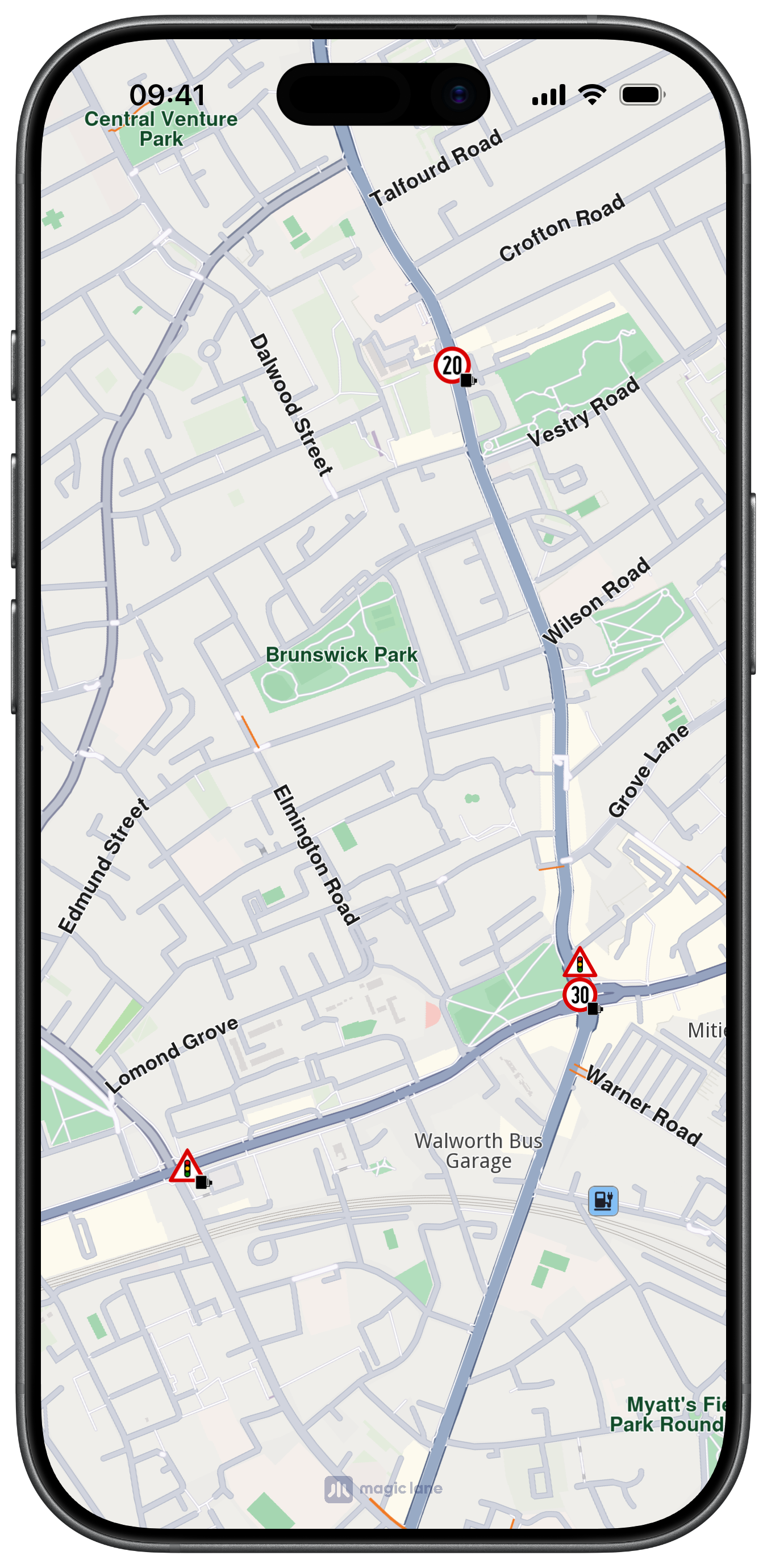
Safety overlays represent speed limit cameras, red light controls, and similar items.
Use search(inPreviewDataSafetyCameraParameterType:) with SafetyCameraParameterType:
| Parameter | Description |
|---|---|
SafetyCameraParameterTypeSpeedUnit | Speed limit unit (e.g. km/h, mph) |
SafetyCameraParameterTypeSpeedVal | Speed limit value |
SafetyCameraParameterTypeTowards | Direction angle |
SafetyCameraParameterTypeDriveDir | Driving direction flag |
if let speedVal = item.search(inPreviewDataSafetyCameraParameterType: .speedVal) {
    print("Speed limit: \(speedVal)")
}
if let unit = item.search(inPreviewDataSafetyCameraParameterType: .speedUnit) {
    print("Unit: \(unit)")
}
Social reports overlay
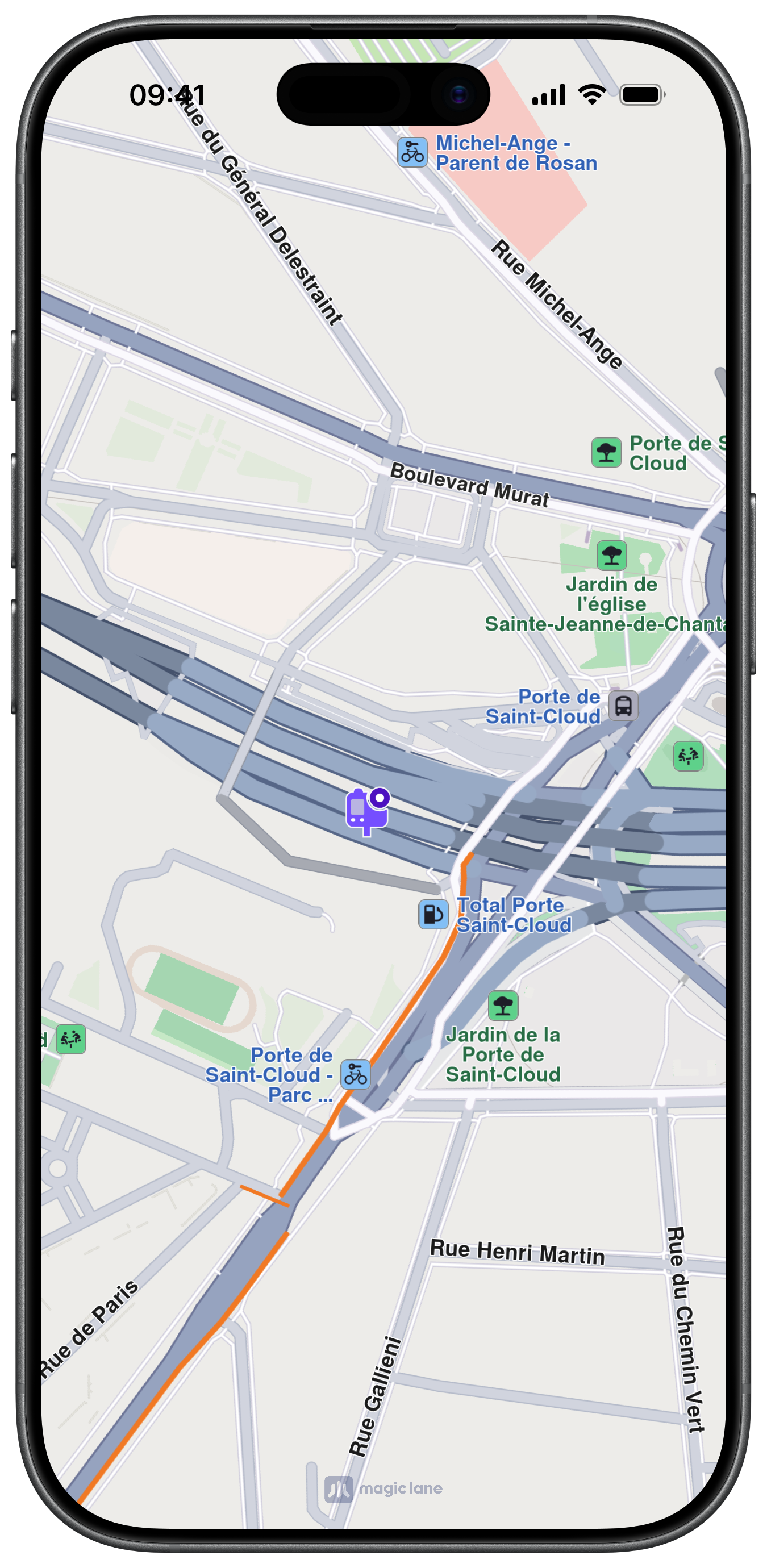
This overlay displays user-reported events such as fixed cameras and construction sites.
Use search(inPreviewDataSocialReportParameterType:) with SocialReportParameterType:
| Parameter | Description |
|---|---|
SocialReportParameterTypeCategNameTTS | Category TTS name |
SocialReportParameterTypeCategValidity | Validity in minutes |
SocialReportParameterTypeDescription | Report description |
SocialReportParameterTypeOwnerId | Report owner ID |
SocialReportParameterTypeOwnerName | Report owner name |
SocialReportParameterTypeOwnReport | Whether the current user owns this report |
SocialReportParameterTypeScore | Report score/rating |
and other more advanced parameters.
Public transport overlay
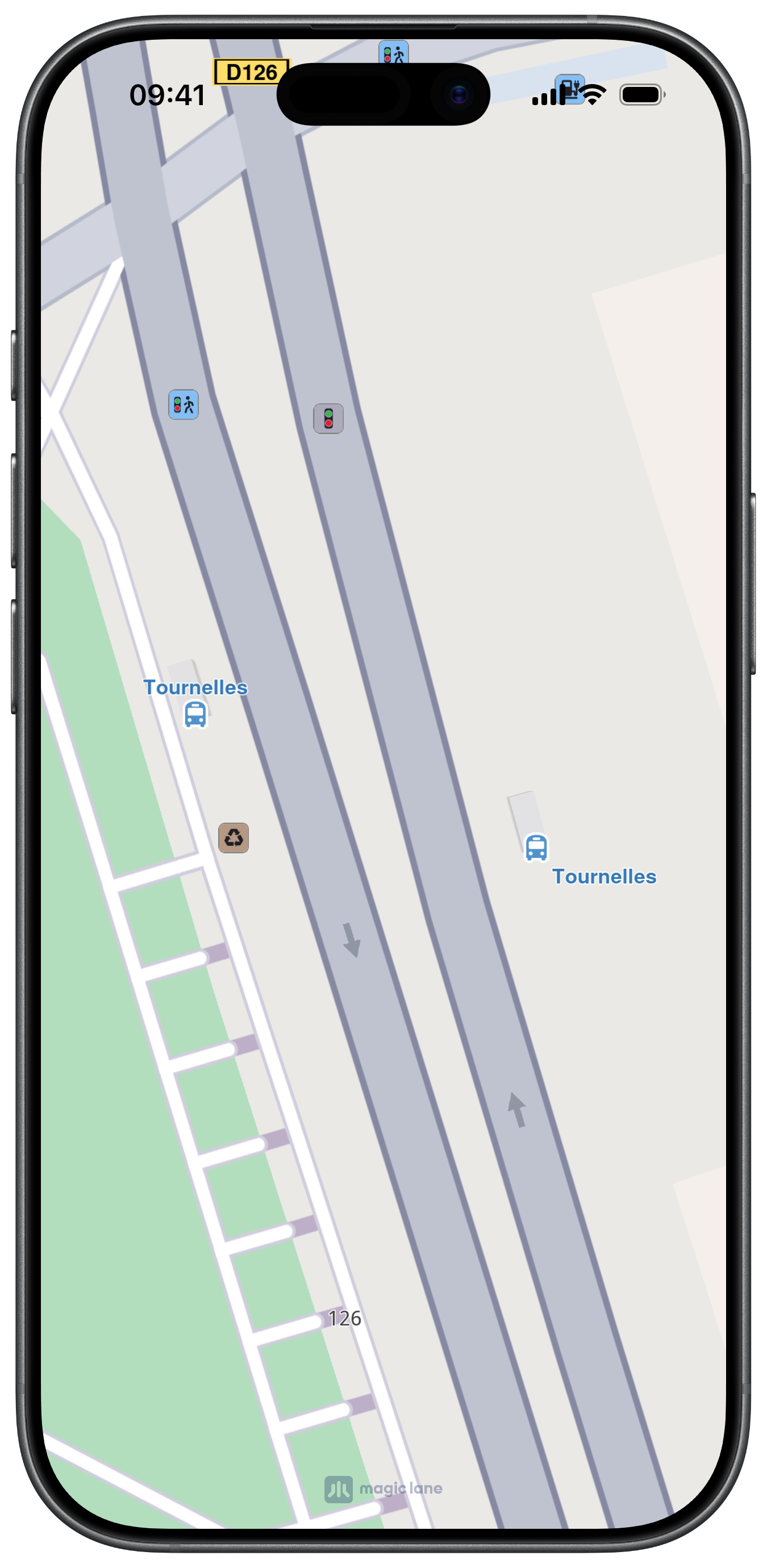
This overlay displays public transport stations. Two types of public transport stops exist:
Two types of public transport stops exist:
- Bus stations with schedule information —
OverlayItemObjectinstances - Bus stations without schedule information —
LandmarkObjectinstances
Work with Overlays
Select overlay items
Overlay items are selectable. Identify specific items when users tap or long-press the map using getCursorSelectionOverlayItems() on MapViewController or using the dedicated overlay selection delegate methods. See the Interact with map guide for details.
Search overlay items
Overlays are searchable. Set the appropriate properties in SearchPreferencesObject when performing a search. See the Get started with Search guide for details.
Calculate routes
Overlay items are not designed for route calculation directly.
For routing, create a landmark from the overlay item's coordinates and a representative name.
if let coords = overlayItem.getCoordinates() {
    let landmark = LandmarkObject.landmark(withName: overlayItem.getName(), location: coords)
    // Use landmark as a route waypoint
}
Display overlay item information
Access overlay item preview data using search(inPreviewDataSafetyCameraParameterType:) or search(inPreviewDataSocialReportParameterType:) for predefined overlays, or getPreviewData(_:) for the raw payload.
Use getPreviewUrl() to open a URL in a web browser for more details about the item.
The preview data is unavailable if the parent map tile is disposed. Retrieve preview data before further map interactions.
Proximity alarms
Configure alarms to notify users when approaching specific overlay items. See the Landmarks and overlay alarms guide for implementation details.
Download overlay data
Some overlays can be downloaded for offline use. See the Offline section for more details.