
Route Profile

Last updated: April 7, 2026 | 5 minutes read

This example demonstrates how to use GEMKit in a UIKit application to calculate a pedestrian route with terrain profiling enabled and display interactive elevation, surface, road type, and steepness charts.

Check the full implementation on GitHub.
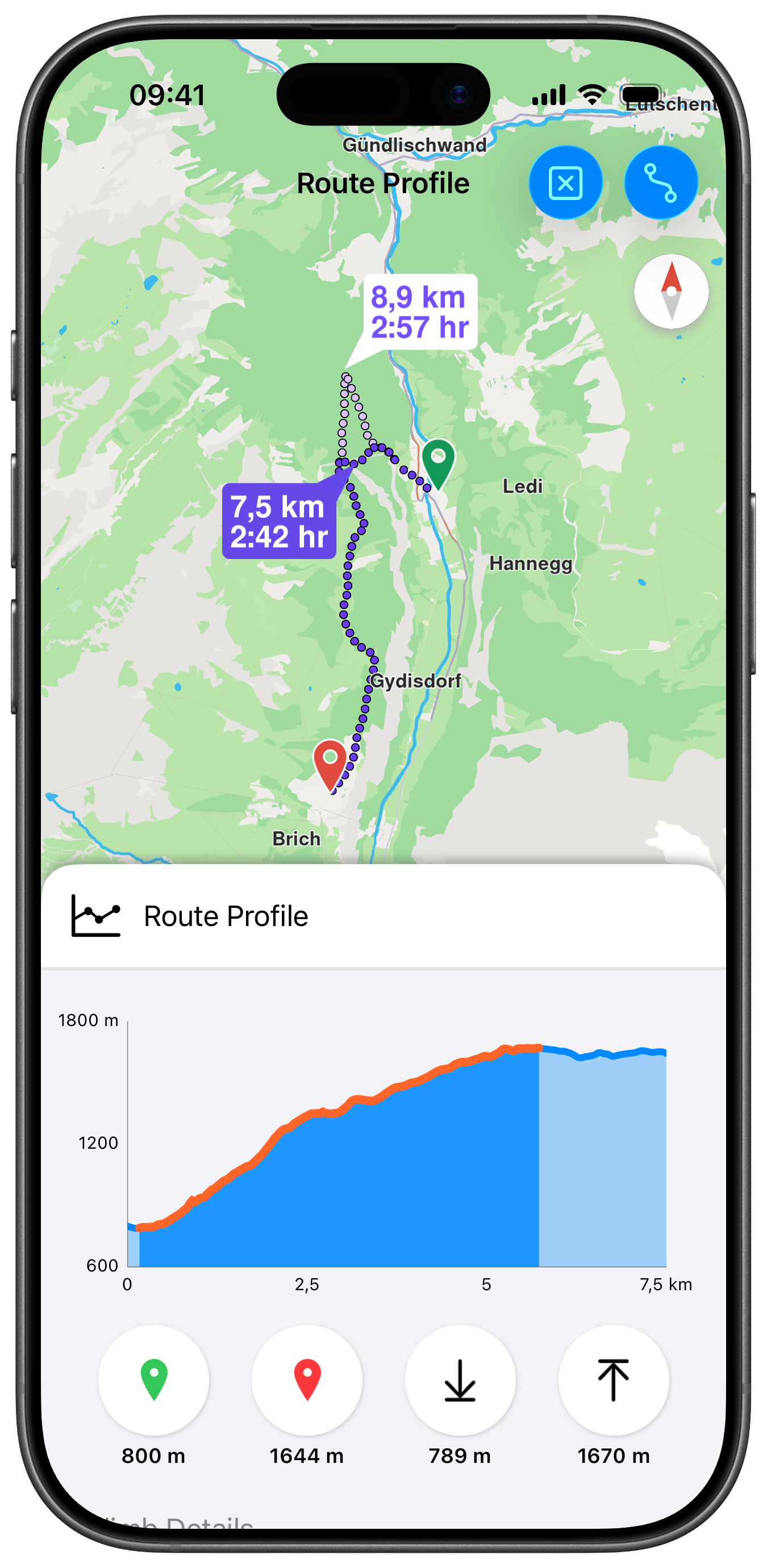
Route Profile

UI and Map Integration

The view uses a MapViewControllerDelegate to update the profile charts when the user taps a different route:

ViewController.swiftView on GitHub
class ViewController: UIViewController, UISearchBarDelegate, MapViewControllerDelegate {

var mapViewController: MapViewController?
var navigationContext: NavigationContext?
var trafficContext: TrafficContext?
var routeProfileViewController: RouteProfileViewController?

override func viewDidLoad() {

super.viewDidLoad()

self.title = "Route Profile"
self.navigationItem.largeTitleDisplayMode = .never

self.createMapView()
self.addButtons()
self.mapViewController!.startRender()
}

func mapViewController(_ mapViewController: MapViewController, didSelectRoute route: RouteObject) {

mapViewController.setMainRoute(route)

if let routeProfileViewController = self.routeProfileViewController {
routeProfileViewController.refreshWithRoute(route)
}
}

Route Preferences with Terrain Profiling

setBuildTerrainProfile(true) must be set on the RoutePreferencesObject before calculation for elevation data to be available:

ViewController.swiftView on GitHub
@objc func routeButtonAction(item: UIBarButtonItem) {

if self.navigationContext == nil {

let preferences = RoutePreferencesObject.init()
preferences.setTransportMode(.pedestrian)
preferences.setRouteType(.fastest)
preferences.setBuildTerrainProfile(true)

self.navigationContext = NavigationContext.init(preferences: preferences)
}

let waypoints = [

LandmarkObject.landmark(
withName: "Murren 1", location: CoordinatesObject.coordinates(withLatitude: 46.593443, longitude: 7.910699)),
LandmarkObject.landmark(
withName: "Murren 2", location: CoordinatesObject.coordinates(withLatitude: 46.559458, longitude: 7.892932))
]

self.navigationContext?
.calculateRoute(
withWaypoints: waypoints,
completionHandler: { [weak self] (results: [RouteObject]) in

guard let strongSelf = self else { return }

if !results.isEmpty {

strongSelf.mapViewController?
.presentRoutes(results, withTraffic: self?.trafficContext, showSummary: true, animationDuration: 1600)

strongSelf.showRouteProfile()
}
})
}

Embedding the Profile Panel Below the Map

showRouteProfile() embeds RouteProfileViewController as a child of MapViewController, pinned to the bottom edge. The map area edge insets account for the panel height so the calculated route is not hidden behind it:

ViewController.swiftView on GitHub
func showRouteProfile() {

guard let mapViewController = self.mapViewController else { return }

guard self.routeProfileViewController == nil else { return }

let route = mapViewController.getMainRoute()

self.routeProfileViewController = RouteProfileViewController()
self.routeProfileViewController!.mapViewController = mapViewController
self.routeProfileViewController!.route = route

self.mapViewController!.addChild(self.routeProfileViewController!)
self.mapViewController!.view.addSubview(self.routeProfileViewController!.view)
self.routeProfileViewController!.didMove(toParent: self.mapViewController!)

self.routeProfileViewController!.view.translatesAutoresizingMaskIntoConstraints = false
NSLayoutConstraint.activate([
self.routeProfileViewController!.view!.leadingAnchor.constraint(equalTo: self.view.leadingAnchor),
self.routeProfileViewController!.view!.trailingAnchor.constraint(equalTo: self.view.trailingAnchor),
self.routeProfileViewController!.view!.bottomAnchor.constraint(equalTo: self.view.bottomAnchor),
self.routeProfileViewController!.view!.heightAnchor.constraint(equalToConstant: bottomViewHeight)
])
}

Route Profile Charts

RouteProfileViewController presents four chart types — elevation, surfaces, road types, and steepness — in a scroll view. Each chart is interactive and highlights the corresponding segment on the map:

RouteProfileViewController.swiftView on GitHub
class RouteProfileViewController: UIViewController {

var route: RouteObject?
var mapViewController: MapViewController?

var elevationChart: ElevationChartViewController?
var surfaceChart: SurfacesChartViewController?
var roadChart: RoadsChartViewController?
var steepnessChart: SteepnessChartViewController?

func prepareCharts() {

self.elevationChart = ElevationChartViewController()
self.elevationChart!.mapViewController = self.mapViewController
self.elevationChart!.route = self.route

self.surfaceChart = SurfacesChartViewController()
self.surfaceChart!.mapViewController = self.mapViewController
self.surfaceChart!.route = self.route

self.roadChart = RoadsChartViewController()
self.roadChart!.mapViewController = self.mapViewController
self.roadChart!.route = self.route

self.steepnessChart = SteepnessChartViewController()
self.steepnessChart!.mapViewController = self.mapViewController
self.steepnessChart!.route = self.route
}

Populating the Elevation Chart using the Terrain Profile

refreshChartData() retrieves the terrain profile from the route via getTerrainProfile(), reads the elevation range and samples the altitude values at evenly-spaced distance intervals. Each sample becomes a ChartDataEntry that is fed into the LineChartView:

info

This example uses a 3rd party charting solution, use the terrain samples and implement them in your data visualization implementation or use them to populate the charting library of your choice.

ElevationChartViewController.swiftView on GitHub
func refreshChartData(minX: Double = 0.0, maxX: Double = 0.0) {

guard let route = self.route else { return }

guard let profile = route.getTerrainProfile() else { return }

let minElevationLocal = self.localElevation(Double(profile.getMinElevation()))
let maxElevationLocal = self.localElevation(Double(profile.getMaxElevation()))

let minElevDistanceLocal = self.localDistance(Double(profile.getMinElevationDistance()))
let maxElevDistanceLocal = self.localDistance(Double(profile.getMaxElevationDistance()))

// configure axis bounds from the profile elevation range
lineChartView.leftAxis.axisMinimum = Double((Int(minElevationLocal / 100) - 1) * 100)
lineChartView.leftAxis.axisMaximum = Double((Int(maxElevationLocal / 100) + 2) * 100)

let timeDist = route.getTimeDistance()

if let timeDist = timeDist {

let maxXValue = maxX > 0 ? maxX : self.localDistance(Double(timeDist.getTotalDistance()))

let distBegin = Int32(self.localDistanceToMeters(minX))
let distEnd = Int32(self.localDistanceToMeters(maxXValue))

let samples = profile.getElevationSamples(Int32(self.sampleSize), distBegin: distBegin, distEnd: distEnd)

var chartDataEntries: [ChartDataEntry] = []

var x = minX
let step = Double((maxXValue - minX) / Double(self.sampleSize - 1))

for index in 0..<self.sampleSize {

let y = samples[index].doubleValue

if index > 0 { x += step }
x = min(x, maxXValue)

let entryX = x
let entryY = self.localElevation(y)

// insert exact min/max elevation markers at their distance positions
if let last = chartDataEntries.last {

if minElevDistanceLocal <= entryX && minElevDistanceLocal >= last.x {
chartDataEntries.append(ChartDataEntry(x: minElevDistanceLocal, y: minElevationLocal))
} else if maxElevDistanceLocal <= entryX && maxElevDistanceLocal >= last.x {
chartDataEntries.append(ChartDataEntry(x: maxElevDistanceLocal, y: maxElevationLocal))
}
}

chartDataEntries.append(ChartDataEntry(x: entryX, y: entryY))
}

let set1 = LineChartDataSet(entries: chartDataEntries, label: "DataSet 1")
set1.setColor(.systemBlue)
set1.drawCirclesEnabled = false
set1.lineWidth = 4
set1.drawFilledEnabled = true
set1.fillColor = .systemBlue

let data: LineChartData = [set1]
data.setDrawValues(false)
lineChartView.data = data
}
}
info

ElevationChartViewController, SurfacesChartViewController, RoadsChartViewController, and SteepnessChartViewController each contain extensive charting logic and use a third-party charting library (Charts) for rendering. The full implementations, including axis formatting, highlight callbacks, zoom synchronisation with the map and more, are too large to reproduce here efficiently. Check the full implementation on GitHub for details.