# Route Instructions
Last updated:
October 18, 2026
\| 5 minutes read
* UIKit
* SwiftUI
This example demonstrates how to use **GEMKit** in a UIKit application to calculate a route and display a detailed list of turn-by-turn instructions alongside any traffic events along the path.
Check the full implementation on [GitHub](https://github.com/magiclane/magiclane-maps-sdk-examples-for-ios/tree/main/UIKit/RoutesAndNavigation/RouteInstructions).
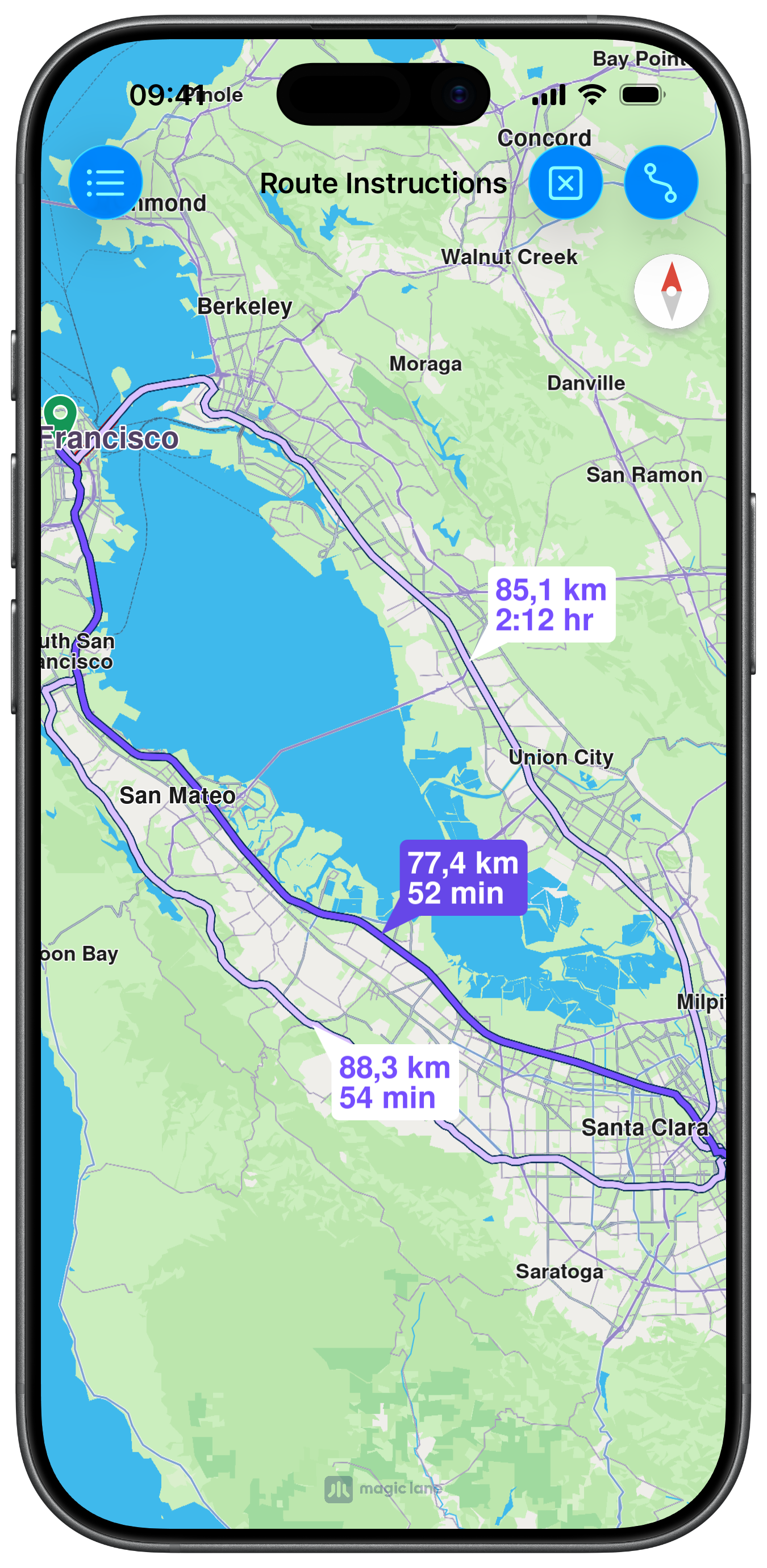
**Route Overview**
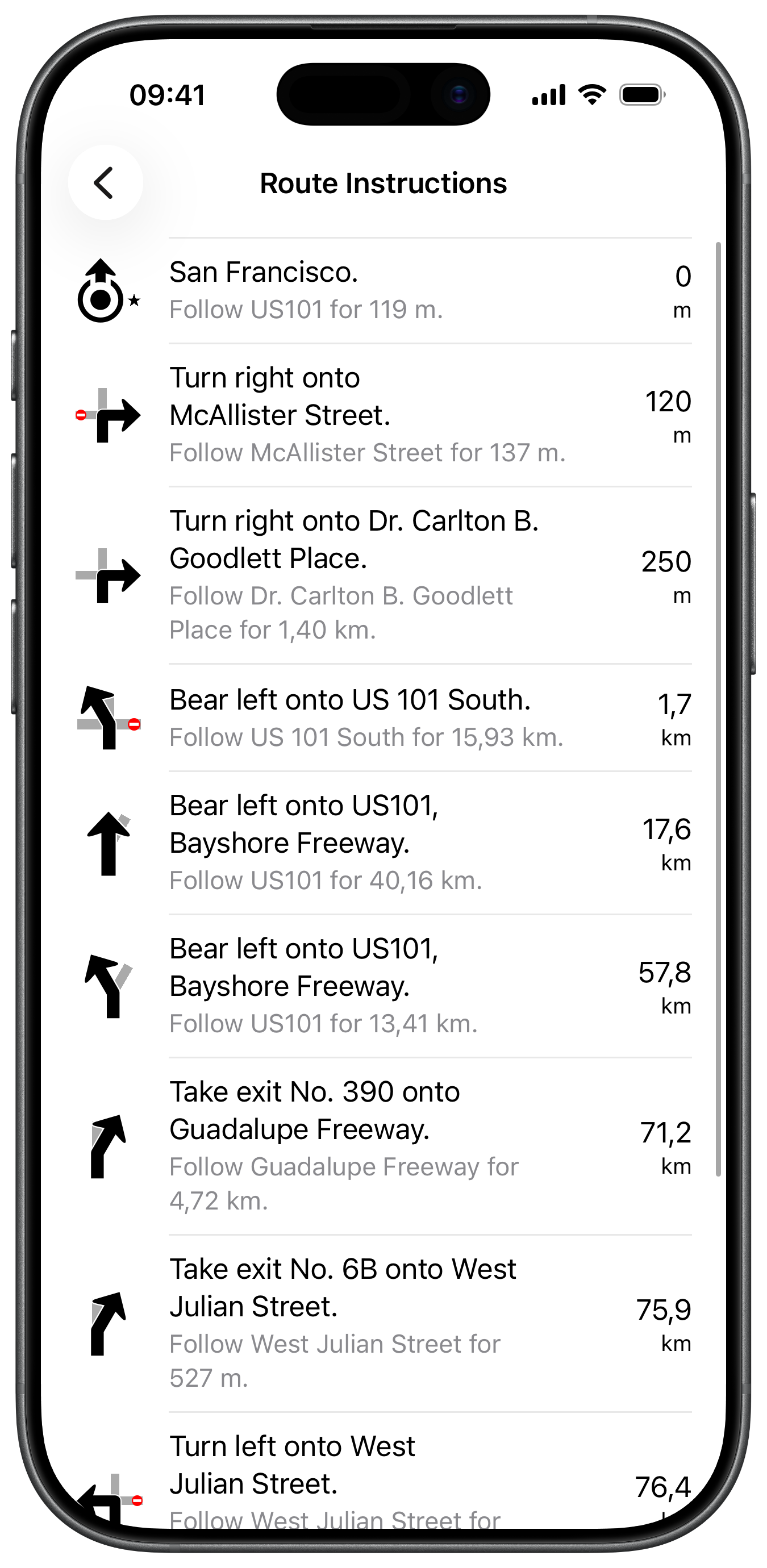
**List of Route Instructions**
### UI and Map Integration[](#ui-and-map-integration "Direct link to UI and Map Integration")
The view controller calculates the route and stores the first result for the instructions view:
ViewController.swift[View on GitHub](https://github.com/magiclane/magiclane-maps-sdk-examples-for-ios/tree/main/UIKit/RoutesAndNavigation/RouteInstructions/RouteInstructions/ViewController.swift)
```swift
class ViewController: UIViewController {
var mapViewController: MapViewController?
var navigationContext: NavigationContext?
var trafficContext: TrafficContext?
var mainRoute: RouteObject?
override func viewDidLoad() {
super.viewDidLoad()
self.title = "Route Instructions"
self.navigationItem.largeTitleDisplayMode = .never
self.createMapView()
self.mapViewController!.startRender()
self.addRouteButton()
}
```
### Calculating the Route[](#calculating-the-route "Direct link to Calculating the Route")
The route is calculated with standard car preferences. The first result is saved on `mainRoute` for later access by the instructions screen:
ViewController.swift[View on GitHub](https://github.com/magiclane/magiclane-maps-sdk-examples-for-ios/tree/main/UIKit/RoutesAndNavigation/RouteInstructions/RouteInstructions/ViewController.swift)
```swift
let preferences = RoutePreferencesObject.init()
preferences.setTransportMode(.car)
preferences.setRouteType(.fastest)
self.navigationContext = NavigationContext.init(preferences: preferences)
self.trafficContext = TrafficContext.init()
self.trafficContext?.setUseTraffic(.useOnline)
let waypoints = [
LandmarkObject.landmark(
withName: "San Francisco", location: CoordinatesObject.coordinates(withLatitude: 37.77903, longitude: -122.41991)),
LandmarkObject.landmark(
withName: "San Jose", location: CoordinatesObject.coordinates(withLatitude: 37.33619, longitude: -121.89058))
]
self.navigationContext?
.calculateRoute(withWaypoints: waypoints,
completionHandler: { [weak self] (results: [RouteObject]) in
guard let strongSelf = self else { return }
if !results.isEmpty {
strongSelf.mainRoute = results.first
strongSelf.mapViewController?
.presentRoutes(results, withTraffic: strongSelf.trafficContext, showSummary: true, animationDuration: 1000)
}
})
```
### Showing Route Instructions[](#showing-route-instructions "Direct link to Showing Route Instructions")
Tapping the list button pushes the `RouteInstructionsViewController`, which iterates over segments and their instructions to build a table, also incorporating any traffic events:
RouteInstructionsViewController.swift[View on GitHub](https://github.com/magiclane/magiclane-maps-sdk-examples-for-ios/tree/main/UIKit/RoutesAndNavigation/RouteInstructions/RouteInstructions/RouteInstructionsViewController.swift)
```swift
func prepareModelData() {
guard self.route != nil else { return }
let scale = UIScreen.main.scale
let imgSize = CGSize.init(width: 40.0 * scale, height: 40.0 * scale)
let segmentList = self.route!.getSegments()
for segment in segmentList {
for routeInstruction in segment.getInstructions() {
let item = ModelDataItem.init()
item.routeInstruction = routeInstruction
if routeInstruction.hasTurnInfo() {
item.title = routeInstruction.getTurnInstruction()
}
if routeInstruction.hasFollowRoadInfo() {
item.description = routeInstruction.getFollowRoadInstruction()
}
if let turn = routeInstruction.getTurnDetails() {
item.image = turn.getTurnImage(
imgSize,
colorActiveInner: UIColor.black,
colorActiveOuter: UIColor.white,
colorInactiveInner: UIColor.lightGray,
colorInactiveOuter: UIColor.lightGray)
}
self.modelData.append(item)
}
}
}
```
This example demonstrates how to use **GEMKit** in a SwiftUI application to calculate a route and display a detailed list of turn-by-turn instructions alongside any traffic events along the path.
Check the full implementation on [GitHub](https://github.com/magiclane/magiclane-maps-sdk-examples-for-ios/tree/main/SwiftUI/RoutesAndNavigation/RouteInstructions).

**Route Overview**

**List of Route Instructions**
### Map View and Instructions Navigation[](#map-view-and-instructions-navigation "Direct link to Map View and Instructions Navigation")
The map is displayed with a `MapRoute` declarative child. A toolbar button navigates to `RouteInstructionsView` once a route is available. When the user selects an instruction and pops back, the map centres on that instruction:
ContentView\.swift[View on GitHub](https://github.com/magiclane/magiclane-maps-sdk-examples-for-ios/tree/main/SwiftUI/RoutesAndNavigation/RouteInstructions/RouteInstructions/ContentView.swift)
```swift
struct ContentView: View {
@State private var navigationContext: NavigationContext?
@State private var trafficContext: TrafficContext?
@State private var presentedRoutes: [RouteObject] = []
@State private var mainRoute: RouteObject?
@State private var isCalculating: Bool = false
@State private var showInstructions: Bool = false
@State private var selectedItem: InstructionItem?
var body: some View {
MapReader { proxy in
MapBase {
MapRoute(routes: presentedRoutes)
}
.ignoresSafeArea()
.toolbar {
ToolbarItem(placement: .topBarLeading) {
Button("", systemImage: "list.bullet") {
showInstructions = true
}
.disabled(mainRoute == nil)
.buttonStyle(.borderedProminent)
}
ToolbarItem(placement: .topBarTrailing) {
Button("", systemImage: "point.topleft.down.curvedto.point.bottomright.up") {
calculateRoute(proxy)
}
.disabled(isCalculating)
.buttonStyle(.borderedProminent)
}
}
.onChange(of: showInstructions) { newValue in
if !newValue, let item = selectedItem {
selectedItem = nil
if let instruction = item.routeInstruction {
proxy.mapViewController?.center(onRouteInstruction: instruction, zoomLevel: -1, animationDuration: 2600)
} else if let event = item.routeTrafficEvent {
proxy.mapViewController?.center(onRouteTrafficEvent: event, zoomLevel: -1, animationDuration: 2000)
}
}
}
}
.navigationDestination(isPresented: $showInstructions) {
if let route = mainRoute {
RouteInstructionsView(
route: route,
selectedItem: $selectedItem,
showInstructions: $showInstructions
)
}
}
.navigationTitle("Route Instructions")
}
}
```
### Calculating the Route[](#calculating-the-route-1 "Direct link to Calculating the Route")
Route preferences and contexts are initialised lazily. The first result is stored in `mainRoute` to enable the instructions button and pass the route to `RouteInstructionsView`:
ContentView\.swift[View on GitHub](https://github.com/magiclane/magiclane-maps-sdk-examples-for-ios/tree/main/SwiftUI/RoutesAndNavigation/RouteInstructions/RouteInstructions/ContentView.swift)
```swift
func calculateRoute(_ proxy: MapProxy) {
if navigationContext == nil {
let preferences = RoutePreferencesObject()
preferences.setTransportMode(.car)
preferences.setRouteType(.fastest)
navigationContext = NavigationContext(preferences: preferences)
}
if trafficContext == nil {
trafficContext = TrafficContext()
trafficContext?.setUseTraffic(.useOnline)
}
let waypoints = [
LandmarkObject.landmark(
withName: "San Francisco",
location: CoordinatesObject.coordinates(withLatitude: 37.77903, longitude: -122.41991)),
LandmarkObject.landmark(
withName: "San Jose",
location: CoordinatesObject.coordinates(withLatitude: 37.33619, longitude: -121.89058))
]
isCalculating = true
navigationContext?.calculateRoute(withWaypoints: waypoints, completionHandler: { results in
if !results.isEmpty {
mainRoute = results.first
presentedRoutes = results
}
isCalculating = false
})
}
```
### Building the Instruction List[](#building-the-instruction-list "Direct link to Building the Instruction List")
`RouteInstructionsView` iterates over route segments and their instructions to build the list. Traffic events are also included and sorted by their distance position along the route. Tapping an item pops back and centres the map on that instruction or event:
RouteInstructionsView\.swift[View on GitHub](https://github.com/magiclane/magiclane-maps-sdk-examples-for-ios/tree/main/SwiftUI/RoutesAndNavigation/RouteInstructions/RouteInstructions/RouteInstructionsView.swift)
```swift
private func prepareItems() -> [InstructionItem] {
var result: [InstructionItem] = []
let scale = UIScreen.main.scale
let imgSize = CGSize(width: 40.0 * scale, height: 40.0 * scale)
for segment in route.getSegments() {
for routeInstruction in segment.getInstructions() {
var title = ""
var description = ""
var image: UIImage?
if routeInstruction.hasTurnInfo() {
title = routeInstruction.getTurnInstruction()
}
if routeInstruction.hasFollowRoadInfo() {
description = routeInstruction.getFollowRoadInstruction()
}
if let turn = routeInstruction.getTurnDetails() {
image = turn.getTurnImage(
imgSize,
colorActiveInner: UIColor.black,
colorActiveOuter: UIColor.white,
colorInactiveInner: UIColor.lightGray,
colorInactiveOuter: UIColor.lightGray)
}
result.append(InstructionItem(
title: title,
description: description,
image: image,
// ... statusText, sortKey, routeInstruction
routeInstruction: routeInstruction,
routeTrafficEvent: nil
))
}
}
// Traffic events sorted by distance along the route
if let timeDistance = route.getTimeDistance() {
let routeLength = timeDistance.getTotalDistance()
for event in route.getTrafficEvents() {
if event.hasTrafficEvent(onDistance: routeLength) {
result.append(InstructionItem(
title: event.getDelayTimeFormatted() + event.getDelayTimeUnitFormatted() + " (" + event.getDescription() + ")",
description: event.getFromLandmark()?.getLandmarkName() ?? "",
image: event.getImage(imgSize),
// ... statusText, sortKey
routeInstruction: nil,
routeTrafficEvent: event
))
}
}
result.sort { $0.sortKey < $1.sortKey }
}
return result
}
```