# No Map Just Routing
Last updated:
October 18, 2026
\| 3 minutes read
* UIKit
This example demonstrates how to use **GEMKit** in a UIKit application to calculate a route and run turn-by-turn guidance entirely without a map view, using only labels and a navigation panel overlay.
Check the full implementation on [GitHub](https://github.com/magiclane/magiclane-maps-sdk-examples-for-ios/tree/main/UIKit/RoutesAndNavigation/NoMapJustRouting).
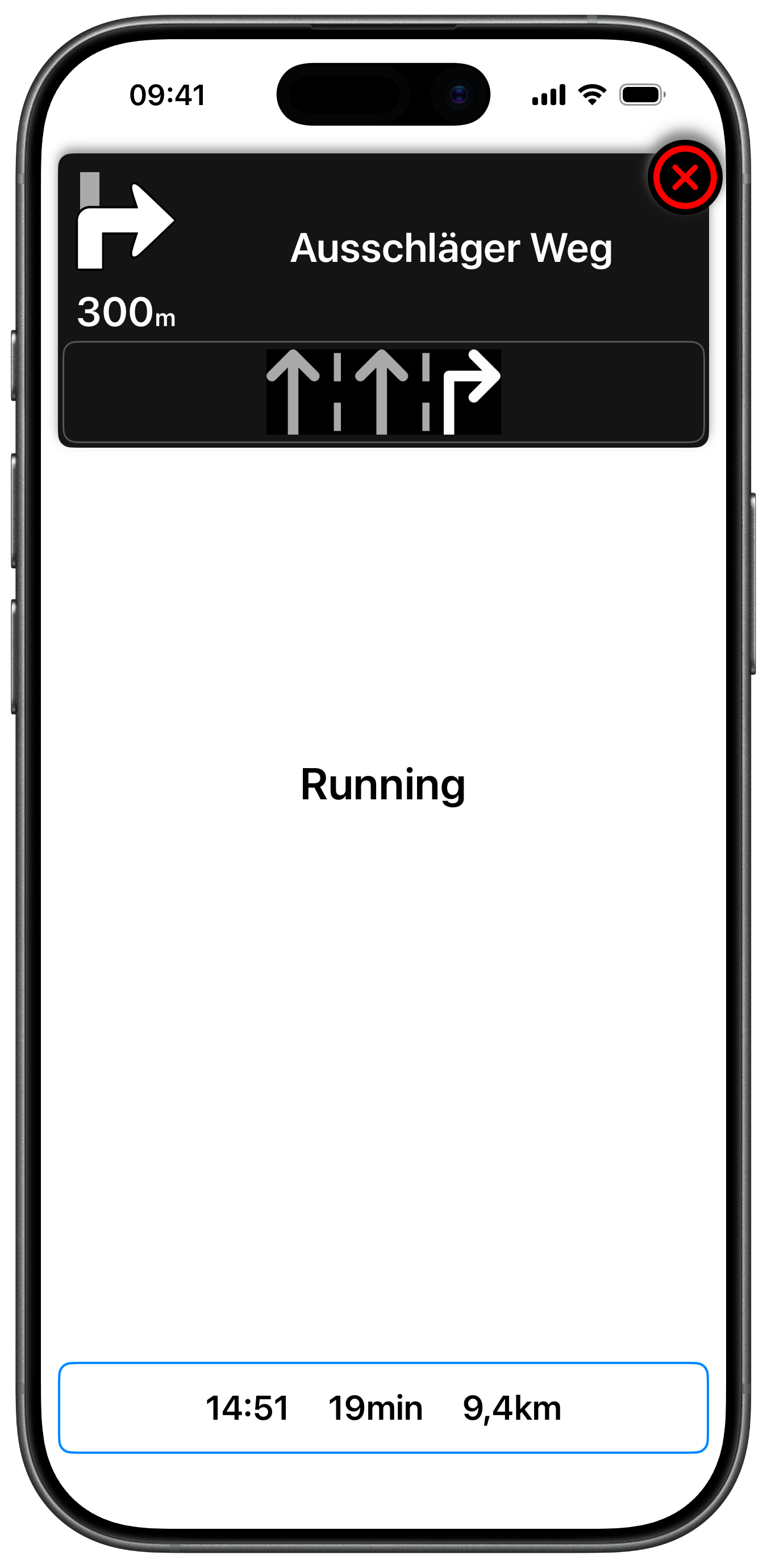
**Active Routing Without a Map**
### Routing Without a Map[](#routing-without-a-map "Direct link to Routing Without a Map")
There is no `MapViewController` in this example. The view displays only a status label and a times label. Route calculation status updates are delivered through the progress closure:
ViewController.swift[View on GitHub](https://github.com/magiclane/magiclane-maps-sdk-examples-for-ios/tree/main/UIKit/RoutesAndNavigation/NoMapJustRouting/NoMapJustRouting/ViewController.swift)
```swift
class ViewController: UIViewController, NavigationContextDelegate, GEMSdkDelegate {
var navigationContext: NavigationContext?
var soundContext: SoundContext?
var mainRoute: RouteObject?
var timesLabel = UILabel.init()
var statusLabel = UILabel.init()
var panelNavigationViewController: NavigationViewController?
override func viewDidLoad() {
super.viewDidLoad()
GEMSdk.shared().delegate = self
self.title = "Just Routing"
self.addLabelText()
self.addStatusLabelText()
self.refreshButtons()
}
```
### Calculating the Route and Displaying Status[](#calculating-the-route-and-displaying-status "Direct link to Calculating the Route and Displaying Status")
Route status changes are shown directly in the `statusLabel` while the calculation is in progress:
ViewController.swift[View on GitHub](https://github.com/magiclane/magiclane-maps-sdk-examples-for-ios/tree/main/UIKit/RoutesAndNavigation/NoMapJustRouting/NoMapJustRouting/ViewController.swift)
```swift
let preferences = RoutePreferencesObject.init()
preferences.setTransportMode(.car)
preferences.setRouteType(.fastest)
self.navigationContext = NavigationContext.init(preferences: preferences)
self.navigationContext?.delegate = self
self.soundContext = SoundContext.init()
self.soundContext?.setUseTtsWithCompletionHandler({ success in })
self.departure = LandmarkObject.landmark(
withName: "Hamburg 1",
location: CoordinatesObject.coordinates(withLatitude: 53.554010, longitude: 10.027508))
self.destination = LandmarkObject.landmark(
withName: "Hamburg 2",
location: CoordinatesObject.coordinates(withLatitude: 53.618284, longitude: 10.028659))
self.navigationContext!
.calculateRoute(withWaypoints: [self.departure!, self.destination!]) { routeStatus in
switch routeStatus {
case .calculating:
self.statusLabel.text = "Calculating"
case .waitingInternetConnection:
self.statusLabel.text = "Waiting Internet Connection"
case .ready:
self.statusLabel.text = "Ready"
case .error:
self.statusLabel.text = "Error"
default:
self.statusLabel.text = ""
}
} completionHandler: { [weak self] results, code in
guard let strongSelf = self else { return }
if !results.isEmpty {
strongSelf.mainRoute = results.first
strongSelf.startSimulation()
}
}
```
### Navigation Delegate Callbacks Without a Map[](#navigation-delegate-callbacks-without-a-map "Direct link to Navigation Delegate Callbacks Without a Map")
Since there is no map, all navigation feedback is driven through the delegate. Estimated arrival time, remaining travel time, and distance are displayed in a label, and the navigation panel is created lazily on the first update:
ViewController.swift[View on GitHub](https://github.com/magiclane/magiclane-maps-sdk-examples-for-ios/tree/main/UIKit/RoutesAndNavigation/NoMapJustRouting/NoMapJustRouting/ViewController.swift)
```swift
func navigationContext(_ navigationContext: NavigationContext, navigationStartedForRoute route: RouteObject) {
if self.navigationController?.isNavigationBarHidden == false {
self.navigationController?.popToRootViewController(animated: true)
self.navigationController?.setNavigationBarHidden(true, animated: false)
}
}
func navigationContext(
_ navigationContext: NavigationContext, navigationInstructionUpdatedForRoute route: RouteObject, updatedEvents: Int32
) {
let eta = navigationContext.getEstimateTimeOfArrivalFormatted() + navigationContext.getEstimateTimeOfArrivalUnitFormatted()
let rtt = navigationContext.getRemainingTravelTimeFormatted() + navigationContext.getRemainingTravelTimeUnitFormatted()
let rtd = navigationContext.getRemainingTravelDistanceFormatted() + navigationContext.getRemainingTravelDistanceUnitFormatted()
let text = eta + " " + rtt + " " + rtd
self.timesLabel.text = text
self.timesLabel.isHidden = false
if self.panelNavigationViewController == nil {
self.createNavigationPanel()
}
if let turnInstruction = navigationContext.getNavigationInstruction(), turnInstruction.getNavigationStatus() == .running {
if turnInstruction.hasNextTurnInfo() {
self.panelNavigationViewController?.updateTurnInformation(navigationContext: navigationContext)
self.panelNavigationViewController?.updateLaneInformation(navigationContext: navigationContext)
self.panelNavigationViewController?.updateSignpostInformation(navigationContext: navigationContext)
self.panelNavigationViewController?.updateRoadCodeInformation(navigationContext: navigationContext)
self.panelNavigationViewController?.refreshContentLayout()
}
}
}
```
### Navigation Panel[](#navigation-panel "Direct link to Navigation Panel")
info
The `NavigationViewController` used in this example is a full-featured turn-by-turn panel displaying turn images, distance, lane guidance, traffic events, signpost overlays, and safety alerts. Due to its size it is not reproduced here — check the [full implementation on GitHub](https://github.com/magiclane/magiclane-maps-sdk-examples-for-ios/blob/main/UIKit/RoutesAndNavigation/NoMapJustRouting/NoMapJustRouting/NavigationViewController.swift).