
GPX Thumbnail Image

Last updated: April 7, 2026 | 3 minutes read

This example demonstrates how to use GEMKit in a UIKit application to generate a static map thumbnail image from a .gpx track without displaying a full interactive map to the user.

Check the full implementation on GitHub.
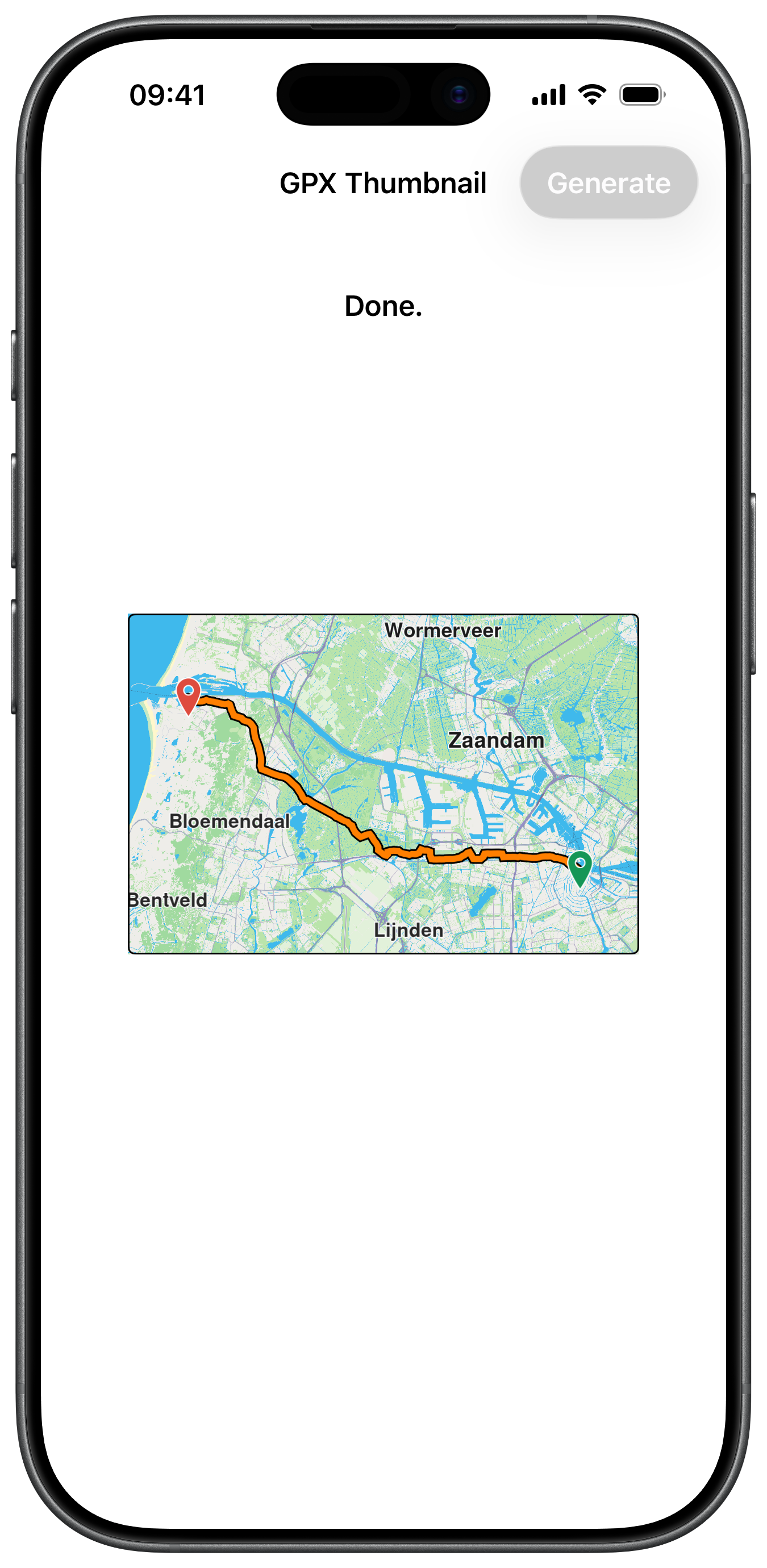
GPX Thumbnail Image Result

Off-screen Map Setup

A MapViewController is created with a fixed frame but never added to the view hierarchy. GEMSdkDelegate callbacks trigger generation only when the map data is current and an internet connection is available:

ViewController.swiftView on GitHub
class ViewController: UIViewController, GEMSdkDelegate {

var mapViewController: MapViewController?

let thumbnailSize = CGSize(width: 300, height: 200)

override func viewDidLoad() {

super.viewDidLoad()

GEMSdk.shared().delegate = self

self.title = "GPX Thumbnail"

self.addButton()
self.addLabel()
}

func prepareMapView() {

guard self.mapViewController == nil else { return }

self.mapViewController = MapViewController.init()
self.mapViewController!.view.backgroundColor = UIColor.systemBackground

self.mapViewController!.view.translatesAutoresizingMaskIntoConstraints = false
NSLayoutConstraint.activate([
self.mapViewController!.view.widthAnchor.constraint(equalToConstant: self.thumbnailSize.width),
self.mapViewController!.view.heightAnchor.constraint(equalToConstant: self.thumbnailSize.height)
])

self.mapViewController!.view.layoutIfNeeded()
self.mapViewController!.startRender()

let preferences = self.mapViewController!.getPreferences()
preferences.setMapLabelsFading(false)
preferences.setTrafficVisibility(false)
}

Loading the GPX Path and Placing Markers

The GPX data is parsed into a PathObject, then start and end markers are placed using ImageDatabaseObject pin images. The path is rendered on the off-screen map with custom border and inner colours:

ViewController.swiftView on GitHub
func showPath(buffer: Data) {

guard let mapViewController = self.mapViewController else { return }
guard let collection = mapViewController.getPaths() else { return }

let path = PathObject.init(dataBuffer: buffer, format: .gpx)
let array = path.getCoordinates()

if array.count > 1 {

let imageDatabase = ImageDatabaseObject.init()
var lmks: [LandmarkObject] = []

if let start = array.first {

let lmk = LandmarkObject.init()
lmk.setCoordinates(start)
if let object = imageDatabase.getImageById(54008) { // pin start
lmk.setImage(object)
}
lmks.append(lmk)
}

if let stop = array.last {

let lmk = LandmarkObject.init()
lmk.setCoordinates(stop)
if let object = imageDatabase.getImageById(54006) { // pin end
lmk.setImage(object)
}
lmks.append(lmk)
}

let settings = HighlightRenderSettings.init()
settings.imageSize = 4
mapViewController.presentHighlights(lmks, settings: settings)
}

let success = collection.add(path, colorBorder: UIColor.black, colorInner: UIColor.orange, szBorder: 0.5, szInner: 1.1)

if success {

if let area = path.getArea() {

mapViewController.setEdgeAreaInsets(self.calculateInsets())

mapViewController.center(onArea: area, zoomLevel: -1, animationDuration: 10) { [weak self] finished in

// Capture screenshot after centering completes
}
}
}
}

Waiting for Map Tiles and Capturing the Screenshot

Once the path is centred, a setOnMapViewRendered callback waits until the map is fully rendered and stationary before calling makeScreenshot(), which uses snapshotImage(with:capture:) to produce the final thumbnail:

ViewController.swiftView on GitHub
func waitingMapTiles(completion: @escaping (_ finished: Bool) -> Void) {

guard let mapViewController = self.mapViewController else { return }

self.updateStatus(message: "Waiting for data...")

mapViewController.setOnMapViewRendered { [weak self] transitionStatus, cameraStatus in

if transitionStatus == .complete && cameraStatus == .stationary {

guard let strongSelf = self else { return }

strongSelf.mapViewController?.resetOnMapViewRenderedCompletion()

completion(true)
}
}
}

func makeScreenshot() {

guard let mapViewController = self.mapViewController else { return }

self.updateStatus(message: "Done.")

Task {

let image = mapViewController.snapshotImage(with: self.thumbnailSize, capture: .zero)

let tag = 100

if let imageView = self.view.viewWithTag(tag) as? UIImageView {

imageView.image = image

} else {

let imageView = UIImageView.init()
imageView.tag = tag
imageView.image = image
imageView.contentMode = .scaleAspectFit
imageView.layer.borderWidth = 1
imageView.layer.borderColor = UIColor.black.cgColor
imageView.layer.cornerRadius = 4

self.view.addSubview(imageView)
imageView.translatesAutoresizingMaskIntoConstraints = false
let array: [NSLayoutConstraint] = [
imageView.widthAnchor.constraint(equalToConstant: self.thumbnailSize.width),
imageView.heightAnchor.constraint(equalToConstant: self.thumbnailSize.height),
imageView.centerXAnchor.constraint(equalTo: self.view.centerXAnchor, constant: 0),
imageView.centerYAnchor.constraint(equalTo: self.view.centerYAnchor, constant: 0)
]
NSLayoutConstraint.activate(array)
}
}
}