# GPX Thumbnail Image
Last updated:
October 18, 2026
\| 3 minutes read
* UIKit
This example demonstrates how to use **GEMKit** in a UIKit application to generate a static map thumbnail image from a `.gpx` track without displaying a full interactive map to the user.
Check the full implementation on [GitHub](https://github.com/magiclane/magiclane-maps-sdk-examples-for-ios/tree/main/UIKit/RoutesAndNavigation/GpxThumbnailImage).
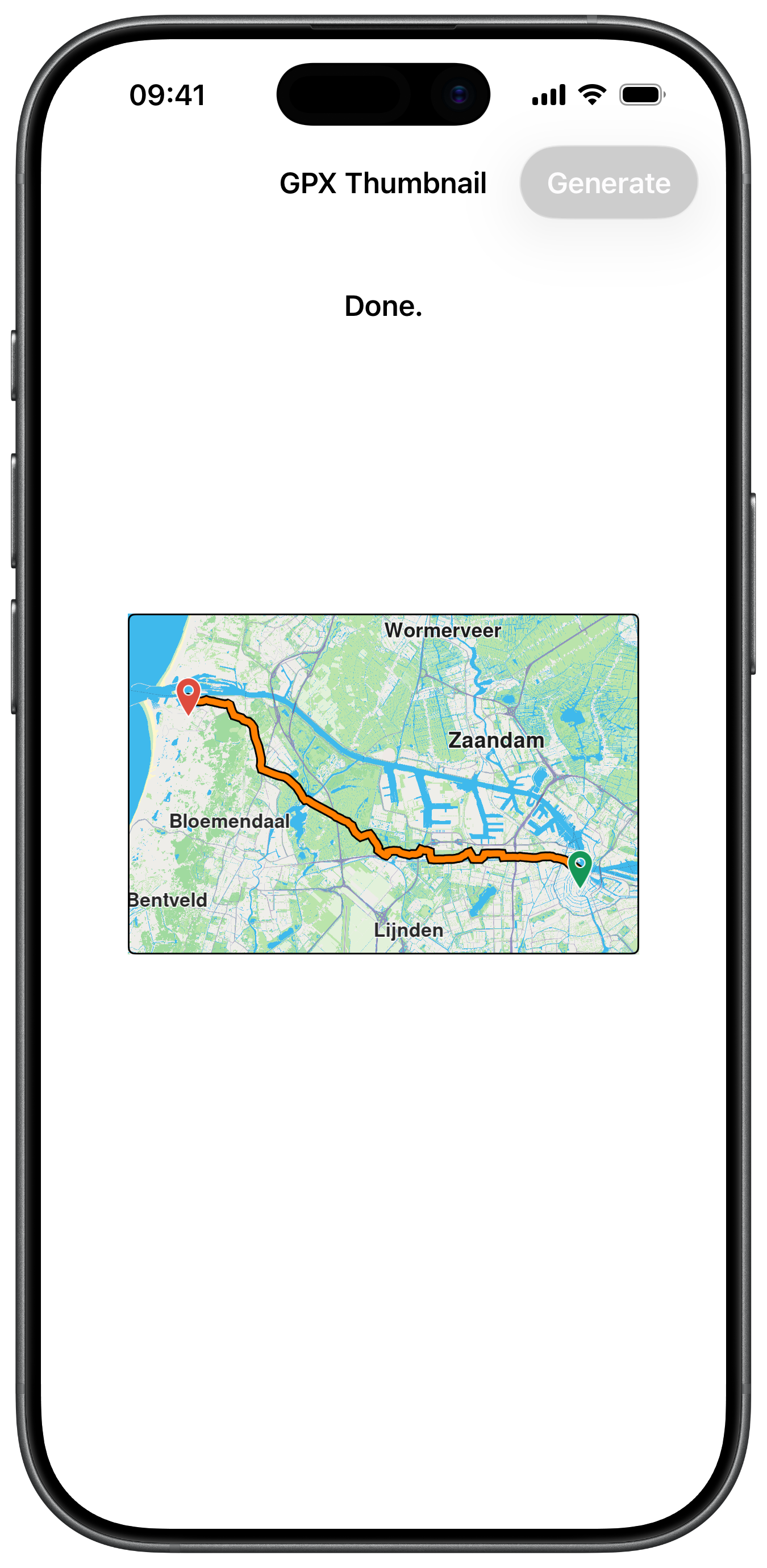
**GPX Thumbnail Image Result**
### Off-screen Map Setup[](#off-screen-map-setup "Direct link to Off-screen Map Setup")
A `MapViewController` is created with a fixed frame but never added to the view hierarchy. `GEMSdkDelegate` callbacks trigger generation only when the map data is current and an internet connection is available:
ViewController.swift[View on GitHub](https://github.com/magiclane/magiclane-maps-sdk-examples-for-ios/tree/main/UIKit/RoutesAndNavigation/GpxThumbnailImage/GpxThumbnailImage/ViewController.swift)
```swift
class ViewController: UIViewController, GEMSdkDelegate {
var mapViewController: MapViewController?
let thumbnailSize = CGSize(width: 300, height: 200)
override func viewDidLoad() {
super.viewDidLoad()
GEMSdk.shared().delegate = self
self.title = "GPX Thumbnail"
self.addButton()
self.addLabel()
}
func prepareMapView() {
guard self.mapViewController == nil else { return }
self.mapViewController = MapViewController.init()
self.mapViewController!.view.backgroundColor = UIColor.systemBackground
self.mapViewController!.view.translatesAutoresizingMaskIntoConstraints = false
NSLayoutConstraint.activate([
self.mapViewController!.view.widthAnchor.constraint(equalToConstant: self.thumbnailSize.width),
self.mapViewController!.view.heightAnchor.constraint(equalToConstant: self.thumbnailSize.height)
])
self.mapViewController!.view.layoutIfNeeded()
self.mapViewController!.startRender()
let preferences = self.mapViewController!.getPreferences()
preferences.setMapLabelsFading(false)
preferences.setTrafficVisibility(false)
}
```
### Loading the GPX Path and Placing Markers[](#loading-the-gpx-path-and-placing-markers "Direct link to Loading the GPX Path and Placing Markers")
The GPX data is parsed into a `PathObject`, then start and end markers are placed using `ImageDatabaseObject` pin images. The path is rendered on the off-screen map with custom border and inner colours:
ViewController.swift[View on GitHub](https://github.com/magiclane/magiclane-maps-sdk-examples-for-ios/tree/main/UIKit/RoutesAndNavigation/GpxThumbnailImage/GpxThumbnailImage/ViewController.swift)
```swift
func showPath(buffer: Data) {
guard let mapViewController = self.mapViewController else { return }
guard let collection = mapViewController.getPaths() else { return }
let path = PathObject.init(dataBuffer: buffer, format: .gpx)
let array = path.getCoordinates()
if array.count > 1 {
let imageDatabase = ImageDatabaseObject.init()
var lmks: [LandmarkObject] = []
if let start = array.first {
let lmk = LandmarkObject.init()
lmk.setCoordinates(start)
if let object = imageDatabase.getImageById(54008) { // pin start
lmk.setImage(object)
}
lmks.append(lmk)
}
if let stop = array.last {
let lmk = LandmarkObject.init()
lmk.setCoordinates(stop)
if let object = imageDatabase.getImageById(54006) { // pin end
lmk.setImage(object)
}
lmks.append(lmk)
}
let settings = HighlightRenderSettings.init()
settings.imageSize = 4
mapViewController.presentHighlights(lmks, settings: settings)
}
let success = collection.add(path, colorBorder: UIColor.black, colorInner: UIColor.orange, szBorder: 0.5, szInner: 1.1)
if success {
if let area = path.getArea() {
mapViewController.setEdgeAreaInsets(self.calculateInsets())
mapViewController.center(onArea: area, zoomLevel: -1, animationDuration: 10) { [weak self] finished in
// Capture screenshot after centering completes
}
}
}
}
```
### Waiting for Map Tiles and Capturing the Screenshot[](#waiting-for-map-tiles-and-capturing-the-screenshot "Direct link to Waiting for Map Tiles and Capturing the Screenshot")
Once the path is centred, a `setOnMapViewRendered` callback waits until the map is fully rendered and stationary before calling `makeScreenshot()`, which uses `snapshotImage(with:capture:)` to produce the final thumbnail:
ViewController.swift[View on GitHub](https://github.com/magiclane/magiclane-maps-sdk-examples-for-ios/tree/main/UIKit/RoutesAndNavigation/GpxThumbnailImage/GpxThumbnailImage/ViewController.swift)
```swift
func waitingMapTiles(completion: @escaping (_ finished: Bool) -> Void) {
guard let mapViewController = self.mapViewController else { return }
self.updateStatus(message: "Waiting for data...")
mapViewController.setOnMapViewRendered { [weak self] transitionStatus, cameraStatus in
if transitionStatus == .complete && cameraStatus == .stationary {
guard let strongSelf = self else { return }
strongSelf.mapViewController?.resetOnMapViewRenderedCompletion()
completion(true)
}
}
}
func makeScreenshot() {
guard let mapViewController = self.mapViewController else { return }
self.updateStatus(message: "Done.")
Task {
let image = mapViewController.snapshotImage(with: self.thumbnailSize, capture: .zero)
let tag = 100
if let imageView = self.view.viewWithTag(tag) as? UIImageView {
imageView.image = image
} else {
let imageView = UIImageView.init()
imageView.tag = tag
imageView.image = image
imageView.contentMode = .scaleAspectFit
imageView.layer.borderWidth = 1
imageView.layer.borderColor = UIColor.black.cgColor
imageView.layer.cornerRadius = 4
self.view.addSubview(imageView)
imageView.translatesAutoresizingMaskIntoConstraints = false
let array: [NSLayoutConstraint] = [
imageView.widthAnchor.constraint(equalToConstant: self.thumbnailSize.width),
imageView.heightAnchor.constraint(equalToConstant: self.thumbnailSize.height),
imageView.centerXAnchor.constraint(equalTo: self.view.centerXAnchor, constant: 0),
imageView.centerYAnchor.constraint(equalTo: self.view.centerYAnchor, constant: 0)
]
NSLayoutConstraint.activate(array)
}
}
}
```