
Follow Position Preferences

Last updated: April 7, 2026 | 3 minutes read

This example demonstrates how to use GEMKit in a UIKit application to customise the follow-position camera behaviour so the user's pinch and drag adjustments to zoom level and tilt angle are persisted across the session, and can be reset to defaults on demand.

Check the full implementation on GitHub.
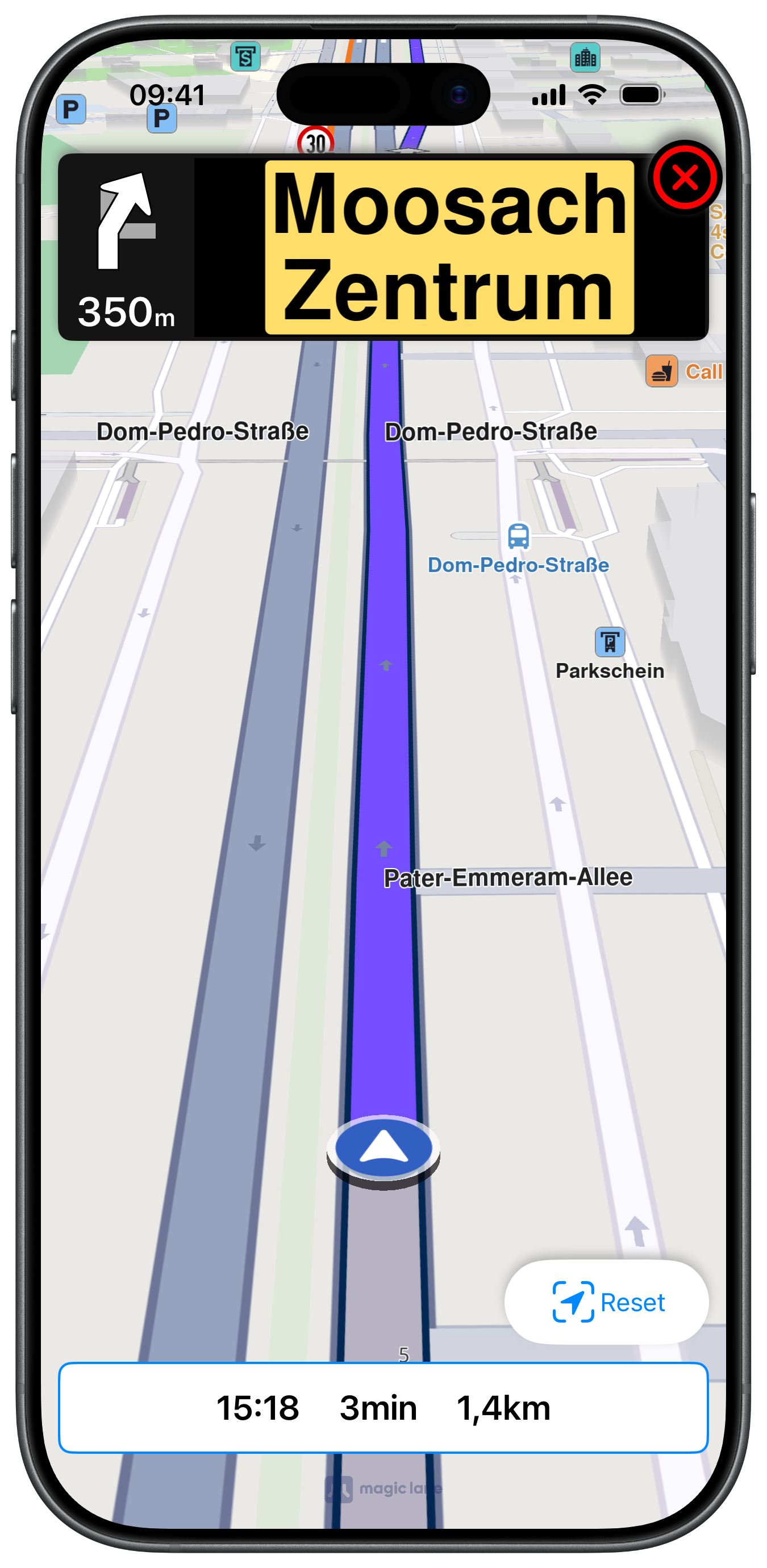
Preferences reset button after gesture adjustments by user

Enabling Persistent Follow Position Modifications

setTouchHandlerModifyPersistent(true) is called during map setup so that any zoom or angle change the user makes while following the position is remembered:

ViewController.swiftView on GitHub
class ViewController: UIViewController, MapViewControllerDelegate, NavigationContextDelegate {

var mapViewController: MapViewController?

var navigationContext: NavigationContext?
var soundContext: SoundContext?
var trafficContext: TrafficContext?
var alarmContext: AlarmContext?

var mainRoute: RouteObject?
var myResults: [RouteObject] = []

var departure: LandmarkObject?
var destination: LandmarkObject?

var label = UILabel.init()

var panelNavigationViewController: NavigationViewController?

var followPositionButton: UIButton?
var resetFollowPreferencesButton: UIButton?

var positionTrackerState: Data?

override func viewDidLoad() {

super.viewDidLoad()

if let navigationController = self.navigationController {

let appearance = navigationController.navigationBar.standardAppearance

navigationController.navigationBar.scrollEdgeAppearance = appearance
}

self.title = "Follow Preferences"
self.navigationItem.hidesSearchBarWhenScrolling = false
self.navigationItem.largeTitleDisplayMode = .never

self.createMapView()

self.mapViewController!.startRender()

self.addRouteButtons()
self.addLabelText()
self.addFollowPositionButton()
self.addResetFollowPreferencesButton()
}

func setMapFollowPositionPreferences() {

guard let mapViewController = self.mapViewController else { return }

let followPositionPreferences = mapViewController.getPreferences().getFollowPositionPreferences()

followPositionPreferences.setTouchHandlerModifyPersistent(true)
}

Restoring Default Follow Position

A Reset button calls restoreFollowingPosition(withAnimationDuration:completionHandler:) to animate back to the original zoom and angle without stopping navigation:

ViewController.swiftView on GitHub
@objc func followPositionButtonAction() {

guard self.navigationContext != nil else { return }

guard let mapViewController = self.mapViewController else { return }

mapViewController.startFollowingPosition(withAnimationDuration: 200, zoomLevel: -1) { success in

// Do any action on completion
}
}

@objc func resetFollowPositionPreferencesButtonAction() {

guard self.navigationContext != nil else { return }

guard let mapViewController = self.mapViewController else { return }

mapViewController.restoreFollowingPosition(
withAnimationDuration: 200,
completionHandler: { success in

// Do any action on completion
})

self.positionTrackerState = nil

self.resetFollowPreferencesButton!.isHidden = true
}

Saving Tracker State on Pinch or Shove

Both the pinch and shove MapViewControllerDelegate callbacks trigger savePositionTrackerState(). When the map is actively following the position, the current zoom and angle combination is serialised with saveStatePositionTracker() so it can be restored on demand:

ViewController.swiftView on GitHub
func mapViewController(
_ mapViewController: MapViewController, onPinch startPoint1: CGPoint, startPoint2: CGPoint,
toPoint1 endPoint1: CGPoint, toPoint2 endPoint2: CGPoint,
center: CGPoint
) {

self.savePositionTrackerState()
}

func mapViewController(
_ mapViewController: MapViewController, onShove pointersAngleDeg: Double, initial: CGPoint, start: CGPoint, end: CGPoint
) {

self.savePositionTrackerState()
}

func savePositionTrackerState() {

guard self.navigationContext != nil else { return }

guard let mapViewController = self.mapViewController else { return }

let isFollowingPosition = mapViewController.isFollowingPosition()

if isFollowingPosition {

if let state = mapViewController.saveStatePositionTracker() {

self.positionTrackerState = state

self.resetFollowPreferencesButton!.isHidden = false
}
}
}
info

The NavigationViewController used in this example is a full-featured turn-by-turn panel displaying turn images, distance, lane guidance, traffic events, signpost overlays, and safety alerts. Due to its size it is not reproduced here — check the full implementation on GitHub.