# Follow Position Preferences
Last updated:
October 18, 2026
\| 3 minutes read
* UIKit
This example demonstrates how to use **GEMKit** in a UIKit application to customise the follow-position camera behaviour so the user's pinch and drag adjustments to zoom level and tilt angle are persisted across the session, and can be reset to defaults on demand.
Check the full implementation on [GitHub](https://github.com/magiclane/magiclane-maps-sdk-examples-for-ios/tree/main/UIKit/RoutesAndNavigation/FollowPositionPreferences).
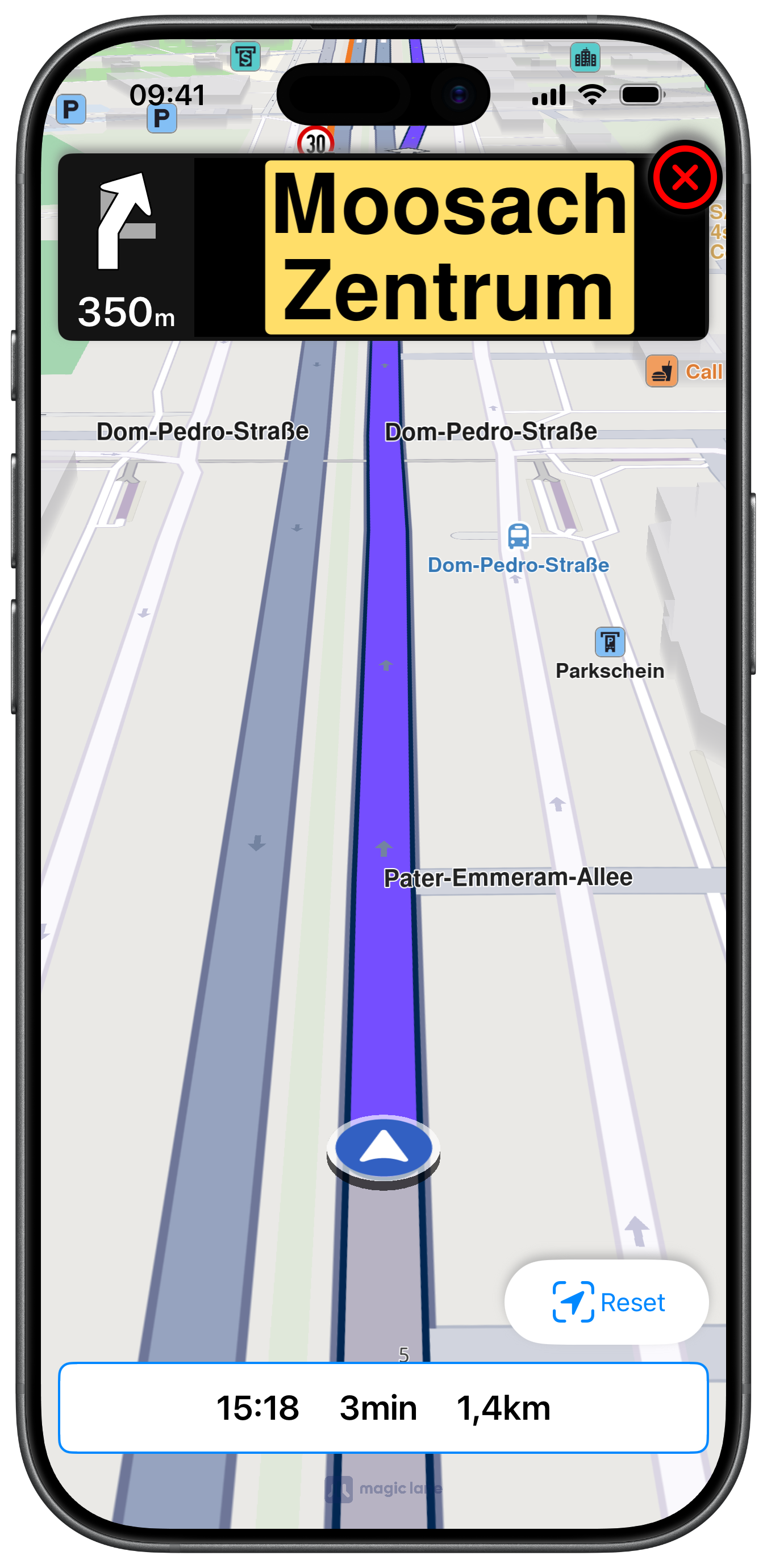
**Preferences reset button after gesture adjustments by user**
### Enabling Persistent Follow Position Modifications[](#enabling-persistent-follow-position-modifications "Direct link to Enabling Persistent Follow Position Modifications")
`setTouchHandlerModifyPersistent(true)` is called during map setup so that any zoom or angle change the user makes while following the position is remembered:
ViewController.swift[View on GitHub](https://github.com/magiclane/magiclane-maps-sdk-examples-for-ios/tree/main/UIKit/RoutesAndNavigation/FollowPositionPreferences/FollowPositionPreferences/ViewController.swift)
```swift
class ViewController: UIViewController, MapViewControllerDelegate, NavigationContextDelegate {
var mapViewController: MapViewController?
var navigationContext: NavigationContext?
var soundContext: SoundContext?
var trafficContext: TrafficContext?
var alarmContext: AlarmContext?
var mainRoute: RouteObject?
var myResults: [RouteObject] = []
var departure: LandmarkObject?
var destination: LandmarkObject?
var label = UILabel.init()
var panelNavigationViewController: NavigationViewController?
var followPositionButton: UIButton?
var resetFollowPreferencesButton: UIButton?
var positionTrackerState: Data?
override func viewDidLoad() {
super.viewDidLoad()
if let navigationController = self.navigationController {
let appearance = navigationController.navigationBar.standardAppearance
navigationController.navigationBar.scrollEdgeAppearance = appearance
}
self.title = "Follow Preferences"
self.navigationItem.hidesSearchBarWhenScrolling = false
self.navigationItem.largeTitleDisplayMode = .never
self.createMapView()
self.mapViewController!.startRender()
self.addRouteButtons()
self.addLabelText()
self.addFollowPositionButton()
self.addResetFollowPreferencesButton()
}
func setMapFollowPositionPreferences() {
guard let mapViewController = self.mapViewController else { return }
let followPositionPreferences = mapViewController.getPreferences().getFollowPositionPreferences()
followPositionPreferences.setTouchHandlerModifyPersistent(true)
}
```
### Restoring Default Follow Position[](#restoring-default-follow-position "Direct link to Restoring Default Follow Position")
A **Reset** button calls `restoreFollowingPosition(withAnimationDuration:completionHandler:)` to animate back to the original zoom and angle without stopping navigation:
ViewController.swift[View on GitHub](https://github.com/magiclane/magiclane-maps-sdk-examples-for-ios/tree/main/UIKit/RoutesAndNavigation/FollowPositionPreferences/FollowPositionPreferences/ViewController.swift)
```swift
@objc func followPositionButtonAction() {
guard self.navigationContext != nil else { return }
guard let mapViewController = self.mapViewController else { return }
mapViewController.startFollowingPosition(withAnimationDuration: 200, zoomLevel: -1) { success in
// Do any action on completion
}
}
@objc func resetFollowPositionPreferencesButtonAction() {
guard self.navigationContext != nil else { return }
guard let mapViewController = self.mapViewController else { return }
mapViewController.restoreFollowingPosition(
withAnimationDuration: 200,
completionHandler: { success in
// Do any action on completion
})
self.positionTrackerState = nil
self.resetFollowPreferencesButton!.isHidden = true
}
```
### Saving Tracker State on Pinch or Shove[](#saving-tracker-state-on-pinch-or-shove "Direct link to Saving Tracker State on Pinch or Shove")
Both the pinch and shove `MapViewControllerDelegate` callbacks trigger `savePositionTrackerState()`. When the map is actively following the position, the current zoom and angle combination is serialised with `saveStatePositionTracker()` so it can be restored on demand:
ViewController.swift[View on GitHub](https://github.com/magiclane/magiclane-maps-sdk-examples-for-ios/tree/main/UIKit/RoutesAndNavigation/FollowPositionPreferences/FollowPositionPreferences/ViewController.swift)
```swift
func mapViewController(
_ mapViewController: MapViewController, onPinch startPoint1: CGPoint, startPoint2: CGPoint,
toPoint1 endPoint1: CGPoint, toPoint2 endPoint2: CGPoint,
center: CGPoint
) {
self.savePositionTrackerState()
}
func mapViewController(
_ mapViewController: MapViewController, onShove pointersAngleDeg: Double, initial: CGPoint, start: CGPoint, end: CGPoint
) {
self.savePositionTrackerState()
}
func savePositionTrackerState() {
guard self.navigationContext != nil else { return }
guard let mapViewController = self.mapViewController else { return }
let isFollowingPosition = mapViewController.isFollowingPosition()
if isFollowingPosition {
if let state = mapViewController.saveStatePositionTracker() {
self.positionTrackerState = state
self.resetFollowPreferencesButton!.isHidden = false
}
}
}
```
### Navigation Panel[](#navigation-panel "Direct link to Navigation Panel")
info
The `NavigationViewController` used in this example is a full-featured turn-by-turn panel displaying turn images, distance, lane guidance, traffic events, signpost overlays, and safety alerts. Due to its size it is not reproduced here — check the [full implementation on GitHub](https://github.com/magiclane/magiclane-maps-sdk-examples-for-ios/blob/main/UIKit/RoutesAndNavigation/FollowPositionPreferences/FollowPositionPreferences/NavigationViewController.swift).