# What's Nearby
Last updated:
October 18, 2026
\| 6 minutes read
* UIKit
* SwiftUI
This example demonstrates how to use **GEMKit** in a UIKit application to perform searches for nearby landmarks around a specific location.
Check the full implementation on [GitHub](https://github.com/magiclane/magiclane-maps-sdk-examples-for-ios/tree/main/UIKit/Places/WhatsNearby).
info
`SearchContext` settings and parameters showcased in the other examples, such as category and query, can also be applied in this scenario to further refine the search results.
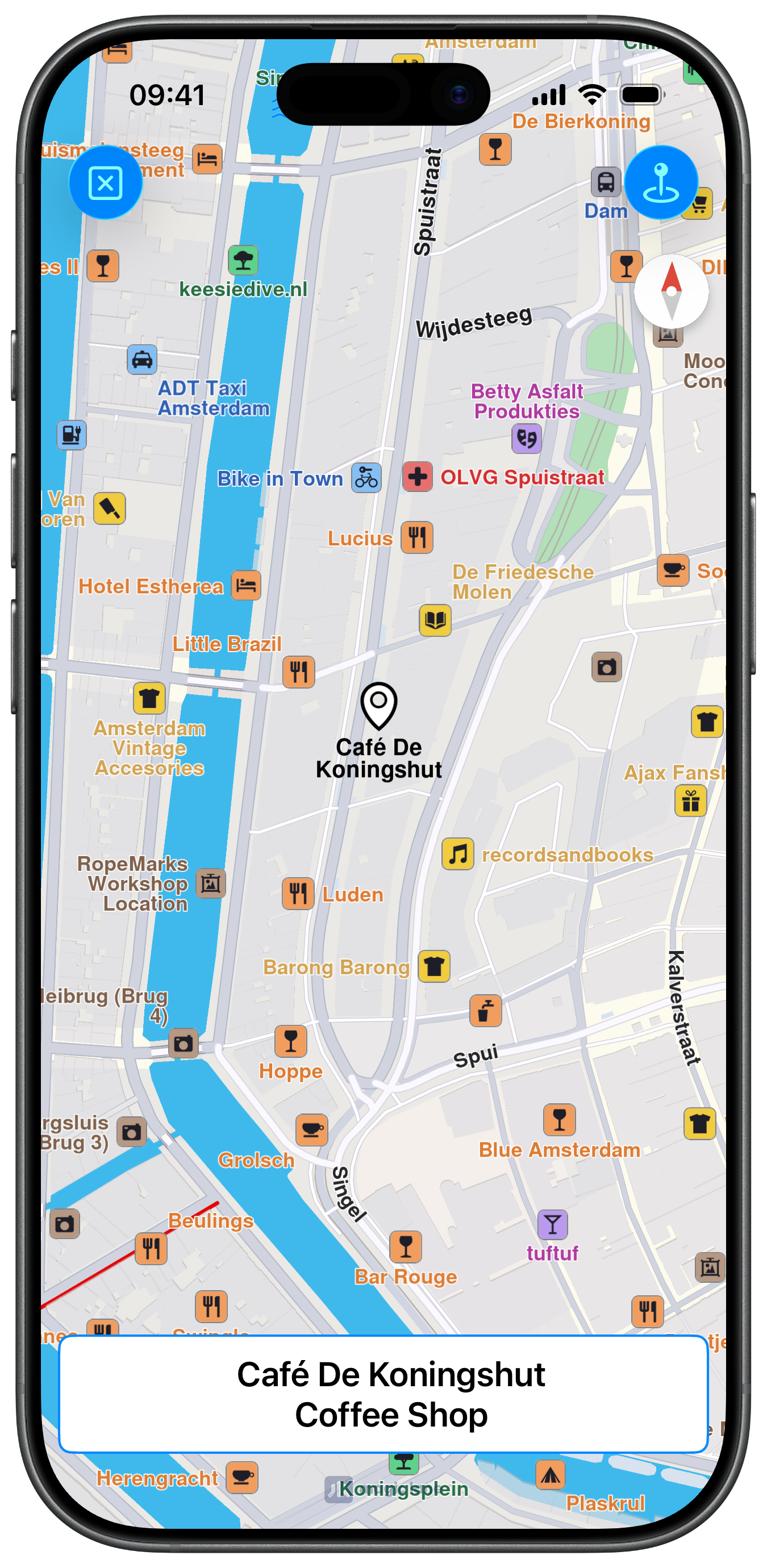
**Landmark Selected**
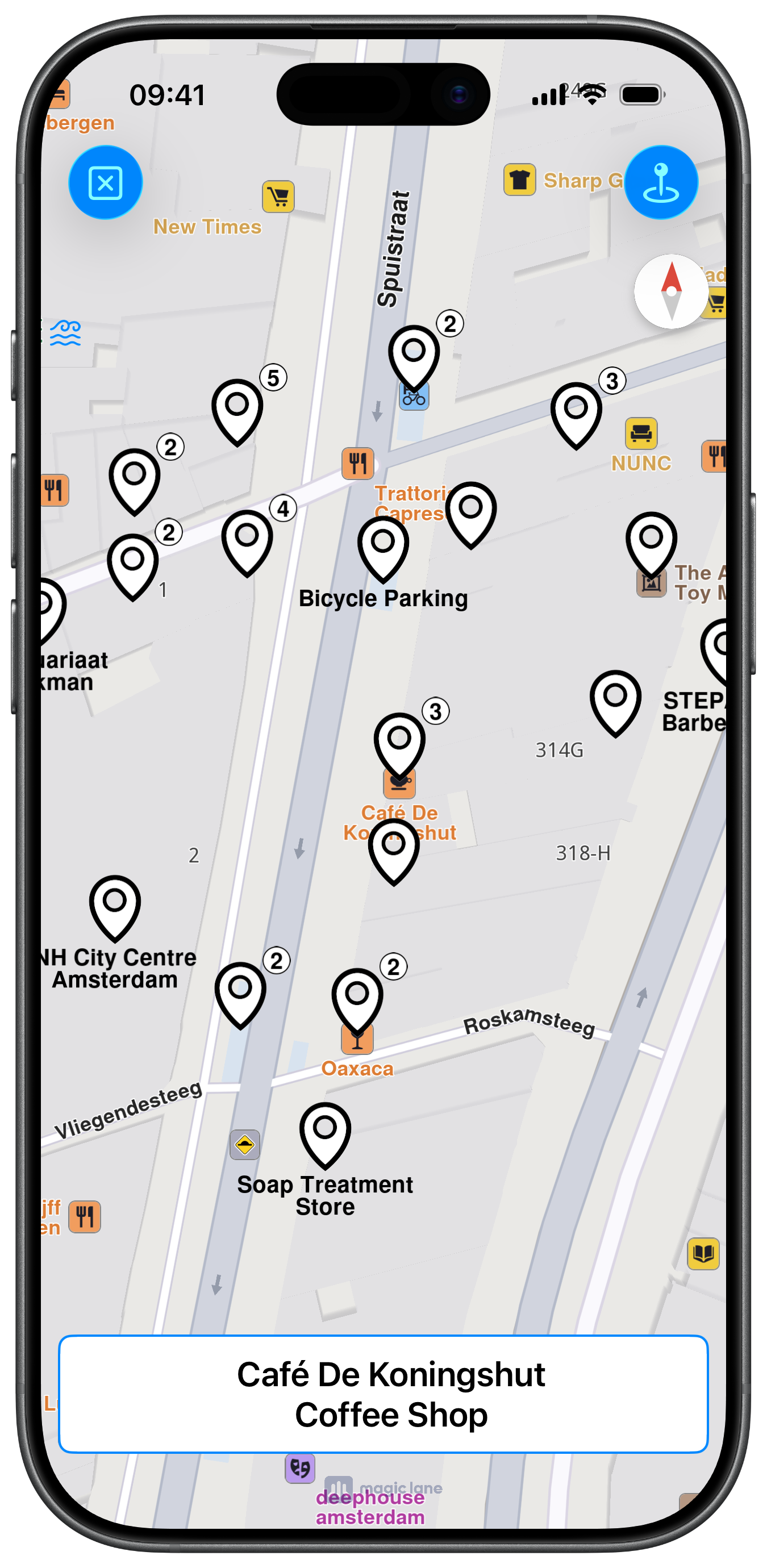
**Search Around the Landmark**
### Map Integration and Search Around Button[](#map-integration-and-search-around-button "Direct link to Map Integration and Search Around Button")
The following code outlines the map view integration with the basic selection methods and the search around button in the navigation bar:
ViewController.swift[View on GitHub](https://github.com/magiclane/magiclane-maps-sdk-examples-for-ios/tree/main/UIKit/Places/WhatsNearby/WhatsNearby/ViewController.swift)
```swift
class ViewController: UIViewController, MapViewControllerDelegate {
var mapViewController: MapViewController?
var landmark: LandmarkObject?
let searchContext = SearchContext.init()
let label = UILabel.init()
let defaultHighlightId: Int32 = 10
override func viewDidLoad() {
super.viewDidLoad()
// Do any additional setup after loading the view.
if let navigationController = self.navigationController {
let appearance = navigationController.navigationBar.standardAppearance
navigationController.navigationBar.scrollEdgeAppearance = appearance
}
self.createMapView()
self.mapViewController!.startRender()
self.mapViewController!.delegate = self
self.addLabelText()
self.addSearch()
}
override func viewDidAppear(_ animated: Bool) {
super.viewDidAppear(animated)
let location = CoordinatesObject.coordinates(withLatitude: 52.368447, longitude: 4.888229)
self.mapViewController!.center(onCoordinates: location, zoomLevel: 70, animationDuration: 0)
}
// MARK: - Map View
func createMapView() {
self.mapViewController = MapViewController.init()
self.mapViewController!.view.backgroundColor = UIColor.systemBackground
self.addChild(self.mapViewController!)
self.view.addSubview(self.mapViewController!.view)
self.mapViewController!.didMove(toParent: self)
self.mapViewController?.view.translatesAutoresizingMaskIntoConstraints = false
NSLayoutConstraint.activate([
self.mapViewController!.view.topAnchor.constraint(equalTo: self.view.topAnchor),
self.mapViewController!.view.leadingAnchor.constraint(equalTo: self.view.leadingAnchor),
self.mapViewController!.view.bottomAnchor.constraint(equalTo: self.view.bottomAnchor),
self.mapViewController!.view.trailingAnchor.constraint(equalTo: self.view.trailingAnchor)
])
}
// MARK: - Label
func addLabelText() {
self.label.adjustsFontSizeToFitWidth = true
self.label.font = UIFont.boldSystemFont(ofSize: 20)
self.label.numberOfLines = 0
self.label.backgroundColor = UIColor.systemBackground
self.label.isHidden = false
self.label.textAlignment = .center
self.label.layer.borderColor = UIColor.systemBlue.cgColor
self.label.layer.borderWidth = 1.4
self.label.layer.cornerRadius = 8.0
self.label.layer.masksToBounds = true
self.label.text = "Select a point on the map and tap the button in the top right to search around it"
self.view.addSubview(self.label)
self.label.translatesAutoresizingMaskIntoConstraints = false
NSLayoutConstraint.activate([
self.label.leadingAnchor.constraint(equalTo: self.view.leadingAnchor, constant: 10),
self.label.trailingAnchor.constraint(equalTo: self.view.trailingAnchor, constant: -10),
self.label.bottomAnchor.constraint(equalTo: self.view.safeAreaLayoutGuide.bottomAnchor, constant: -10),
self.label.heightAnchor.constraint(equalToConstant: 70)
])
}
// MARK: - MapViewControllerDelegate
func mapViewController(_ mapViewController: MapViewController, didSelectLandmarks landmarks: [LandmarkObject], onTouch point: CGPoint) {
guard let landmark = landmarks.first else { return }
self.processSelection(landmark: landmark)
}
func mapViewController(
_ mapViewController: MapViewController, didSelectLandmarks landmarks: [LandmarkObject], onLongTouch point: CGPoint
) {
guard let landmark = landmarks.first else { return }
self.processSelection(landmark: landmark)
}
func mapViewController(_ mapViewController: MapViewController, didSelectStreets streets: [LandmarkObject], onTouch point: CGPoint) {
guard let landmark = streets.first else { return }
self.processSelection(landmark: landmark)
}
func mapViewController(_ mapViewController: MapViewController, didSelectStreets streets: [LandmarkObject], onLongTouch point: CGPoint) {
guard let landmark = streets.first else { return }
self.processSelection(landmark: landmark)
}
// MARK: - Search
func addSearch() {
let image1 = UIImage.init(systemName: "clear")
let image2 = UIImage.init(systemName: "mappin.and.ellipse")
let barButton1 = UIBarButtonItem.init(image: image1, style: .done, target: self, action: #selector(cleanMap))
let barButton2 = UIBarButtonItem.init(image: image2, style: .done, target: self, action: #selector(searchNearbyButton))
self.navigationItem.leftBarButtonItems = [barButton1]
self.navigationItem.rightBarButtonItems = [barButton2]
}
```
### Performing Search and Helper Methods[](#performing-search-and-helper-methods "Direct link to Performing Search and Helper Methods")
The code for performing the search for nearby landmarks around the selected landmark, as well as helper methods to process landmark selection and clean the map:
ViewController.swift[View on GitHub](https://github.com/magiclane/magiclane-maps-sdk-examples-for-ios/tree/main/UIKit/Places/WhatsNearby/WhatsNearby/ViewController.swift)
```swift
@objc func searchNearbyButton() {
guard let landmark = self.landmark else { return }
self.searchContext.searchAround(withLocation: landmark.getCoordinates()) { [weak self] (results: [LandmarkObject]) in
guard let strongSelf = self else { return }
strongSelf.mapViewController!.removeHighlights()
let settings = HighlightRenderSettings.init()
settings.options = Int32(HighlightOption.group.rawValue)
settings.showPin = true
settings.imageSize = 7
strongSelf.mapViewController!.presentHighlights(results, settings: settings, highlightId: strongSelf.defaultHighlightId)
strongSelf.centerOnHighlightArea()
}
}
// MARK: - Utils
func showLandmark(landmark: LandmarkObject) {
let text = " " + landmark.getLandmarkName() + "\n" + " " + landmark.getLandmarkDescription()
self.label.text = text
self.label.isHidden = false
let settings = HighlightRenderSettings.init()
settings.showPin = true
self.mapViewController!.presentHighlights([landmark], settings: settings, highlightId: self.defaultHighlightId)
}
func processSelection(landmark: LandmarkObject) {
self.cleanMap()
self.landmark = landmark
self.showLandmark(landmark: landmark)
}
@objc func cleanMap() {
self.mapViewController!.removeHighlights()
self.landmark = nil
self.label.text = "Select a point on the map and tap the button in the top right to search around it"
}
func centerOnHighlightArea() {
let list = self.mapViewController!.getHighlight(self.defaultHighlightId)
guard !list.isEmpty else { return }
guard let area = self.mapViewController!.getHighlightArea(self.defaultHighlightId) else { return }
self.mapViewController!.center(onArea: area, zoomLevel: -1, animationDuration: 1200)
}
}
```
This example demonstrates how to use **GEMKit** in a SwiftUI application to perform searches for nearby landmarks around a specific location.
Check the full implementation on [GitHub](https://github.com/magiclane/magiclane-maps-sdk-examples-for-ios/tree/main/SwiftUI/Places/WhatsNearby).
info
`SearchContext` settings and parameters showcased in the other examples, such as category and query, can also be applied in this scenario to further refine the search results.

**Landmark Selected**

**Search Around the Landmark**
### Map View and Landmark Selection[](#map-view-and-landmark-selection "Direct link to Map View and Landmark Selection")
`MapBase` uses `.didSelectLandmarks` and `.didSelectStreets` to capture taps and long presses on both landmarks and streets, passing the first result to `processSelection(landmark:proxy:)`. A status label overlaid at the bottom updates to show the selected landmark's name and description. Two toolbar buttons trigger the nearby search and clear the map:
ContentView\.swift[View on GitHub](https://github.com/magiclane/magiclane-maps-sdk-examples-for-ios/tree/main/SwiftUI/Places/WhatsNearby/WhatsNearby/ContentView.swift)
```swift
var body: some View {
MapReader { proxy in
ZStack(alignment: .bottom) {
MapBase(initialPosition: .amsterdam, initialZoomLevel: 70) {
MapLandmark(
landmarks: nearbyLandmarks,
renderSettings: getGroupSettings(),
highlightId: defaultHighlightId,
animationDuration: 800
)
}
.didSelectLandmarks { landmarks, touchPoint, isLongTouch in
guard let landmark = landmarks.first else { return }
processSelection(landmark: landmark, proxy: proxy)
}
.didSelectStreets { streets, touchPoint, isLongTouch in
guard let street = streets.first else { return }
processSelection(landmark: street, proxy: proxy)
}
.ignoresSafeArea()
Text(labelText)
.font(.system(size: 16, weight: .bold))
.multilineTextAlignment(.center)
.padding(10)
.frame(maxWidth: .infinity)
.frame(height: 70)
.background(Color(UIColor.systemBackground))
.overlay(
RoundedRectangle(cornerRadius: 8)
.stroke(Color.blue, lineWidth: 1.4)
)
.padding(.horizontal, 10)
.padding(.bottom, 10)
}
.toolbar {
ToolbarItem(placement: .topBarLeading) {
Button { cleanMap(proxy: proxy) } label: {
Image(systemName: "clear")
}
.buttonStyle(.borderedProminent)
}
ToolbarItem(placement: .topBarTrailing) {
Button { searchNearby() } label: {
Image(systemName: "mappin.and.ellipse")
}
.buttonStyle(.borderedProminent)
}
}
}
}
```
### Performing the Nearby Search and Helper Methods[](#performing-the-nearby-search-and-helper-methods "Direct link to Performing the Nearby Search and Helper Methods")
`searchNearby()` calls `searchContext.searchAround(withLocation:)` using the selected landmark's coordinates. `processSelection(landmark:proxy:)` highlights the tapped point with a pin and updates the label. `cleanMap(proxy:)` removes all highlights and resets state:
ContentView\.swift[View on GitHub](https://github.com/magiclane/magiclane-maps-sdk-examples-for-ios/tree/main/SwiftUI/Places/WhatsNearby/WhatsNearby/ContentView.swift)
```swift
private func searchNearby() {
guard let landmark = selectedLandmark else { return }
searchContext.searchAround(withLocation: landmark.getCoordinates()) { results in
nearbyLandmarks = results
}
}
private func processSelection(landmark: LandmarkObject, proxy: MapProxy) {
cleanMap(proxy: proxy)
selectedLandmark = landmark
let name = landmark.getLandmarkName()
let description = landmark.getLandmarkDescription()
labelText = " \(name)\n \(description)"
let settings = HighlightRenderSettings.init()
settings.showPin = true
proxy.present(highlights: [landmark], settings: settings, highlightId: Int(defaultHighlightId))
}
private func cleanMap(proxy: MapProxy) {
proxy.removeAllHighlights()
nearbyLandmarks = []
selectedLandmark = nil
labelText = "Select a point on the map and tap the button in the top right to search around it"
}
```