Search Text
- UIKit
- SwiftUI
This example demonstrates how to use GEMKit in a UIKit application to search for Landmarks using a text query.
Check the full implementation on GitHub.
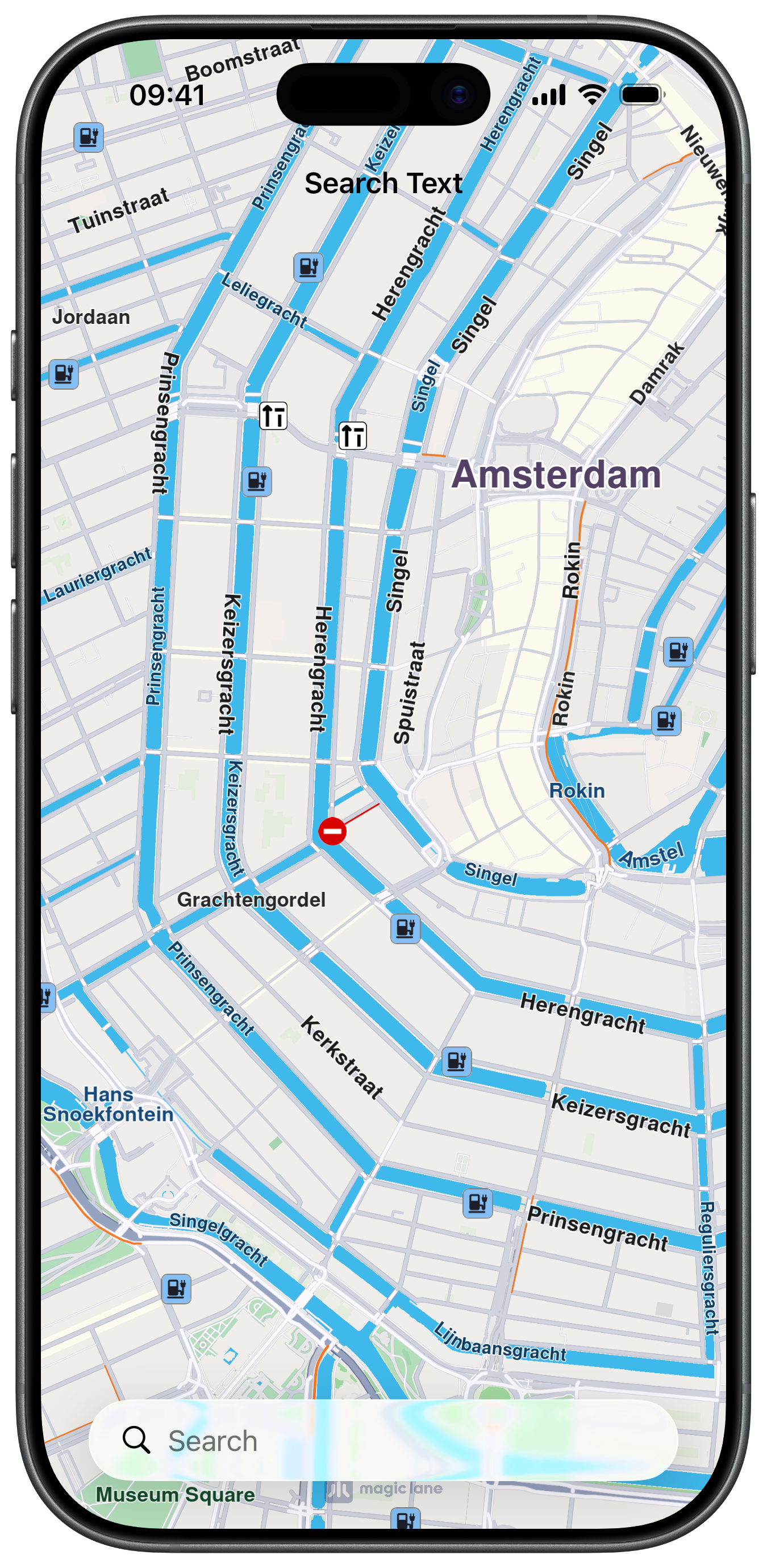
Initial screen
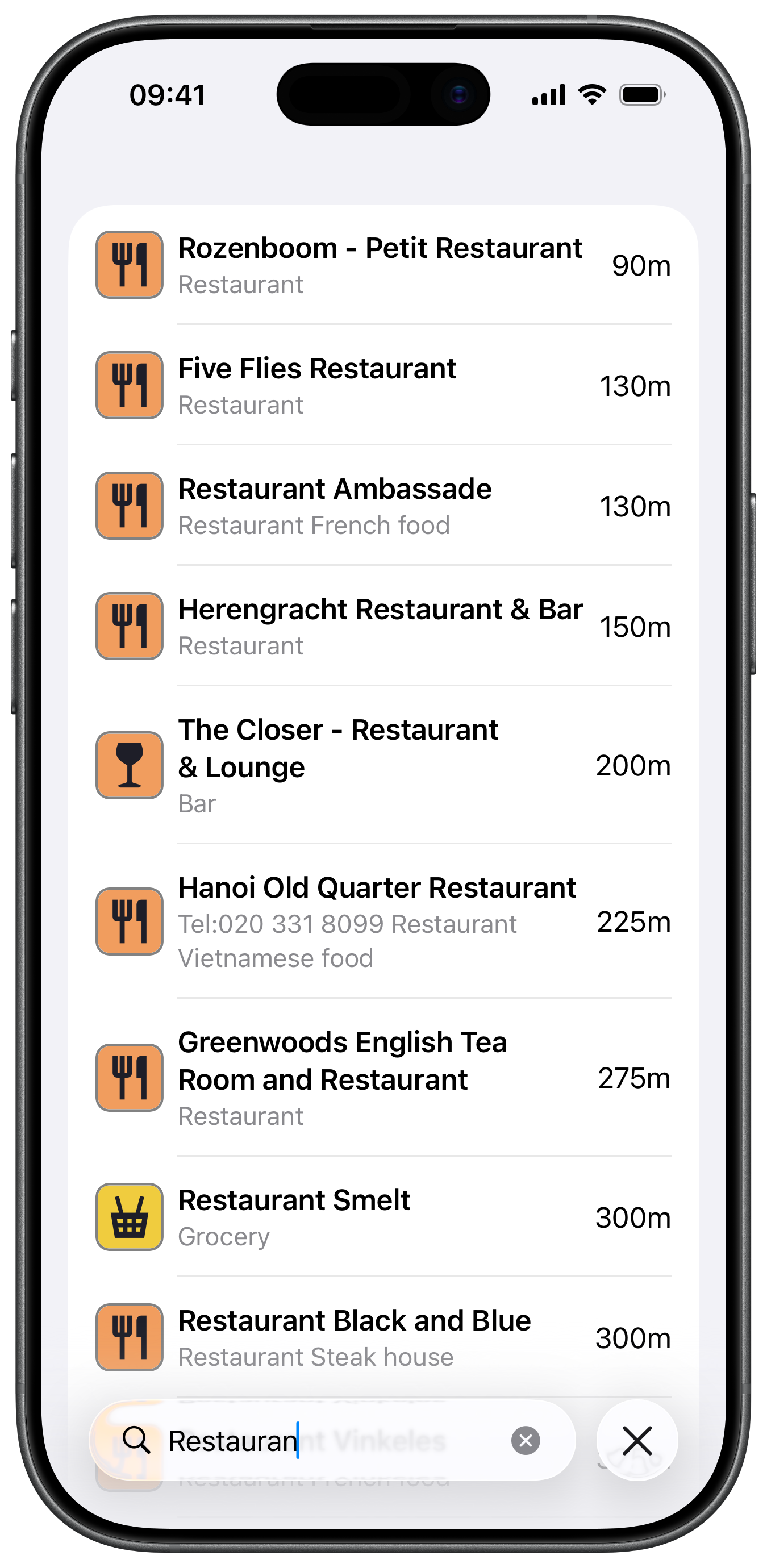
Text Query Search
UI and Map Integration
The following code outlines the map view with a simple search field:
ViewController.swiftView on GitHub
class ViewController: UIViewController, UISearchBarDelegate, ResultsViewControllerDelegate {

    var mapViewController: MapViewController?

    var searchContext: SearchContext?

    let resultsViewController = ResultsViewController.init()

    var searchController: UISearchController?

    override func viewDidLoad() {
        super.viewDidLoad()
        // Do any additional setup after loading the view.

        if let navigationController = self.navigationController {

            let appearance = navigationController.navigationBar.standardAppearance

            navigationController.navigationBar.scrollEdgeAppearance = appearance
        }

        self.title = "Search Text"
        self.navigationItem.hidesSearchBarWhenScrolling = false
        self.navigationItem.largeTitleDisplayMode = .never

        self.resultsViewController.delegate = self

        self.searchController = UISearchController.init(searchResultsController: self.resultsViewController)
        self.searchController!.view.backgroundColor = UIColor.systemBackground
        self.searchController!.searchBar.delegate = self
        self.searchController!.searchBar.placeholder = "Search"
        self.searchController!.obscuresBackgroundDuringPresentation = false
        self.searchController!.hidesNavigationBarDuringPresentation = false
        self.navigationItem.searchController = self.searchController

        self.createMapView()

        self.mapViewController!.startRender()
    }

    override func viewDidAppear(_ animated: Bool) {

        super.viewDidAppear(animated)

        let location = CoordinatesObject.coordinates(withLatitude: 52.368447, longitude: 4.888229)

        self.mapViewController!.center(onCoordinates: location, zoomLevel: 50, animationDuration: 0)
    }

    // MARK: - Map View

    func createMapView() {

        self.mapViewController = MapViewController.init()
        self.mapViewController!.view.backgroundColor = UIColor.systemBackground

        self.addChild(self.mapViewController!)
        self.view.addSubview(self.mapViewController!.view)
        self.mapViewController!.didMove(toParent: self)

        self.mapViewController?.view.translatesAutoresizingMaskIntoConstraints = false
        NSLayoutConstraint.activate([
            self.mapViewController!.view.topAnchor.constraint(equalTo: self.view.topAnchor),
            self.mapViewController!.view.leadingAnchor.constraint(equalTo: self.view.leadingAnchor),
            self.mapViewController!.view.bottomAnchor.constraint(equalTo: self.view.bottomAnchor),
            self.mapViewController!.view.trailingAnchor.constraint(equalTo: self.view.trailingAnchor)
        ])
    }

    // MARK: - UISearchBarDelegate

    func searchBar(_ searchBar: UISearchBar, textDidChange searchText: String) {

        self.performSearch(text: searchText)
    }

    func searchBarCancelButtonClicked(_ searchBar: UISearchBar) {

        guard let mapViewController = self.mapViewController else { return }

        if let searchContext = self.searchContext {

            searchContext.cancelSearch()
        }

        mapViewController.removeHighlights()

        self.resultsViewController.dataModel = []
        self.resultsViewController.tableView.reloadData()
    }
Perform Search with query and Helper methods
The code for performing the search alongside the implementation of helper methods for the example, one of them showing how to get the Location for the Map center using screen coordinates:
ViewController.swiftView on GitHub
    func performSearch(text: String) {

        if self.searchContext == nil {

            self.searchContext = SearchContext.init()

            // Preferences
            self.searchContext?.setMaxMatches(40)
            self.searchContext?.setSearchMapPOIs(true)
            self.searchContext?.setSearchAddresses(true)
        }

        // Location Hint support: narrow the search area to a specific radius
        self.searchContext?.setLocationHint(
            RectangleGeographicAreaObject(
                location: self.getMapCenterLocation(),
                horizontalRadius: 2000, verticalRadius: 2000))

        let location = self.getMapCenterLocation()

        self.searchContext?
            .search(withQuery: text, location: location) { [weak self] (results: [LandmarkObject]) in

                guard let strongSelf = self else { return }

                strongSelf.resultsViewController.dataModel = results
                strongSelf.resultsViewController.referencePoint = location

                strongSelf.resultsViewController.tableView.reloadData()
            }
    }

    // MARK: - ResultsViewControllerDelegate

    func didSelectLandmark(landmark: LandmarkObject) {

        guard let searchController = self.searchController else { return }

        guard let mapViewController = self.mapViewController else { return }

        searchController.dismiss(animated: true) {}

        let text = landmark.getLandmarkName()
        searchController.searchBar.text = text

        mapViewController.removeHighlights()

        let settings = HighlightRenderSettings.init()
        settings.showPin = true
        settings.imageSize = 7

        settings.options = Int32(
            HighlightOption.showLandmark.rawValue | HighlightOption.overlap.rawValue | HighlightOption.showContour.rawValue)
        settings.contourInnerColor = UIColor.orange
        settings.contourOuterColor = UIColor.orange

        mapViewController.presentHighlights([landmark], settings: settings)

        self.centerLandmark(landmark: landmark)
    }

    func centerLandmark(landmark: LandmarkObject) {

        guard let mapViewController = self.mapViewController else { return }

        if let contour = landmark.getContourGeograficArea(), !contour.isEmpty() {

            // default
            mapViewController.center(
                onArea: contour,
                zoomLevel: -1,
                animationDuration: 1200)

        } else {

            // 2d
            mapViewController.center(
                onCoordinates: landmark.getCoordinates(),
                zoomLevel: -1,
                mapAngle: Double.greatestFiniteMagnitude,
                viewAngle: 0,
                animationDuration: 1200)
        }
    }

    // MARK: - Utils

    func getMapCenterLocation() -> CoordinatesObject {

        guard let mapViewController = self.mapViewController else { return CoordinatesObject.init() }

        let scale = UIScreen.main.scale

        let center = mapViewController.view.center

        let point = CGPoint.init(x: center.x * scale, y: center.y * scale)

        let location = mapViewController.transformScreen(toWgs: point)

        return location
    }
}
Results List
ViewController.swiftView on GitHub
protocol ResultsViewControllerDelegate: NSObject {

    func didSelectLandmark(landmark: LandmarkObject)
}

class ResultsViewController: UITableViewController {

    weak var delegate: ResultsViewControllerDelegate?

    var dataModel: [LandmarkObject] = []

    var referencePoint: CoordinatesObject?

    override func tableView(_ tableView: UITableView, numberOfRowsInSection section: Int) -> Int {

        return self.dataModel.count
    }

    override func tableView(_ tableView: UITableView, cellForRowAt indexPath: IndexPath) -> UITableViewCell {

        let cell = UITableViewCell.init(style: .subtitle, reuseIdentifier: "testCell")

        let scale = UIScreen.main.scale
        let size = CGSize.init(width: 40 * scale, height: 40 * scale)

        let landmark = self.dataModel[indexPath.row]

        let text = landmark.getLandmarkName()
        let desc = landmark.getLandmarkDescription()
        let img = landmark.getLandmarkImage(size)

        cell.textLabel?.text = text
        cell.detailTextLabel?.text = desc
        cell.imageView?.image = img

        self.setupAccessoryView(tableView: tableView, cell: cell, indexPath: indexPath)

        return cell
    }

    func setupAccessoryView(tableView: UITableView, cell: UITableViewCell, indexPath: IndexPath) {

        let size = CGSize.init(width: 70, height: 40)

        let accessoryView = UIView.init(frame: CGRect.init(origin: CGPoint.zero, size: size))

        if let point = self.referencePoint {

            let statusText = self.dataModel[indexPath.row].getLandmarkDistanceFormatted(withLocation: point)
            let statusDesc = self.dataModel[indexPath.row].getLandmarkDistanceUnitFormatted(withLocation: point)

            let frameL1 = CGRect.init(origin: CGPoint.init(x: 0, y: 0), size: CGSize.init(width: 70, height: 25))

            let labelText = UILabel.init(frame: frameL1)
            labelText.text = statusText + statusDesc
            labelText.textAlignment = .right

            accessoryView.addSubview(labelText)
        }

        cell.accessoryView = accessoryView
    }

    override func tableView(_ tableView: UITableView, didSelectRowAt indexPath: IndexPath) {

        tableView.deselectRow(at: indexPath, animated: true)

        if self.delegate != nil {

            self.delegate!.didSelectLandmark(landmark: self.dataModel[indexPath.row])
        }
    }
}
This example demonstrates how to use GEMKit in a SwiftUI application to search for Landmarks using a text query.
Check the full implementation on GitHub.
Initial screen
Text Query Search
UI and Map Integration
The following code outlines the search result item structure and the map view with a simple search field:
ContentView.swiftView on GitHub
struct Place: Identifiable {
    let id = UUID()
    let image: UIImage
    let title: String
    let details: String
    let distance: String
    let lmk: LandmarkObject
}

struct ContentView: View {

    let context = SearchContext.init()
    private let defaultHighlightId = 10

    @State private var searchQuery = ""
    @State private var results: [Place] = []
    @State private var selectedItem: Place?
    @State private var isSearching: Bool = false

    @FocusState private var searchFocused: Bool

    @Environment(\.displayScale) private var displayScale

    var body: some View {
        MapReader { proxy in

            ZStack {
                MapBase(initialPosition: .amsterdam, initialZoomLevel: 64)
                    .mapCompass(false)
                    .ignoresSafeArea()

                if searchFocused {

                    List(results) { place in

                        HStack {

                            Image(uiImage: place.image)
                                .frame(width: 40, height: 40)

                            VStack(alignment: .leading) {
                                Text(place.title)
                                    .font(.headline)
                                Text(place.details)
                                    .font(.subheadline)
                                    .foregroundColor(.secondary)
                            }

                            Spacer()

                            Text(place.distance)
                        }
                        .frame(maxWidth: .infinity, alignment: .leading)
                        .contentShape(Rectangle())
                        .onTapGesture {
                            proxy.centerOn(coordinates: place.lmk.getCoordinates(), duration: 1200)
                            proxy.present(highlights: [place.lmk], settings: getRenderSettings())
                            withAnimation(.easeInOut(duration: 0.2)) {
                                selectedItem = place
                                searchFocused = false
                            }
                        }
                    }
                }
            }
            .navigationTitle("Search Text")
            .navigationBarTitleDisplayMode(.inline)
            .searchable(text: $searchQuery, placement: .automatic)
            .searchFocused($searchFocused)
            .onChange(of: searchQuery) { oldValue, newValue in

                performSearch(proxy)
            }
        }
    }
Search with Query
The code for performing a search with a query and a location hint:
ContentView.swiftView on GitHub
    private func performSearch(_ proxy: MapProxy) {
        proxy.removeAllHighlights()
        proxy.centerOn(coordinates: .amsterdam, zoomLevel: 60)
        results.removeAll()
        isSearching = true

        // Location Hint support: narrow the search area to a specific radius
        context.setLocationHint(
            RectangleGeographicAreaObject(
                location: .amsterdam,
                horizontalRadius: 2000, verticalRadius: 2000))

        context.search(withQuery: searchQuery, location: .amsterdam) { response in
            isSearching = false

            results = response.map { item in
                return Place(
                    image: item.getLandmarkImage(CGSize(width: 40 * displayScale, height: 40 * displayScale)) ?? UIImage(),
                    title: item.getLandmarkName(),
                    details: item.getLandmarkDescription(),
                    distance: item.getLandmarkDistanceFormatted(withLocation: .amsterdam) + item.getLandmarkDistanceUnitFormatted(withLocation: .amsterdam),
                    lmk: item)
            }
        }
    }