# Search Text
Last updated:
October 18, 2026
\| 6 minutes read
* UIKit
* SwiftUI
This example demonstrates how to use **GEMKit** in a UIKit application to search for `Landmarks` using a text query.
Check the full implementation on [GitHub](https://github.com/magiclane/magiclane-maps-sdk-examples-for-ios/tree/main/UIKit/Places/SearchText).
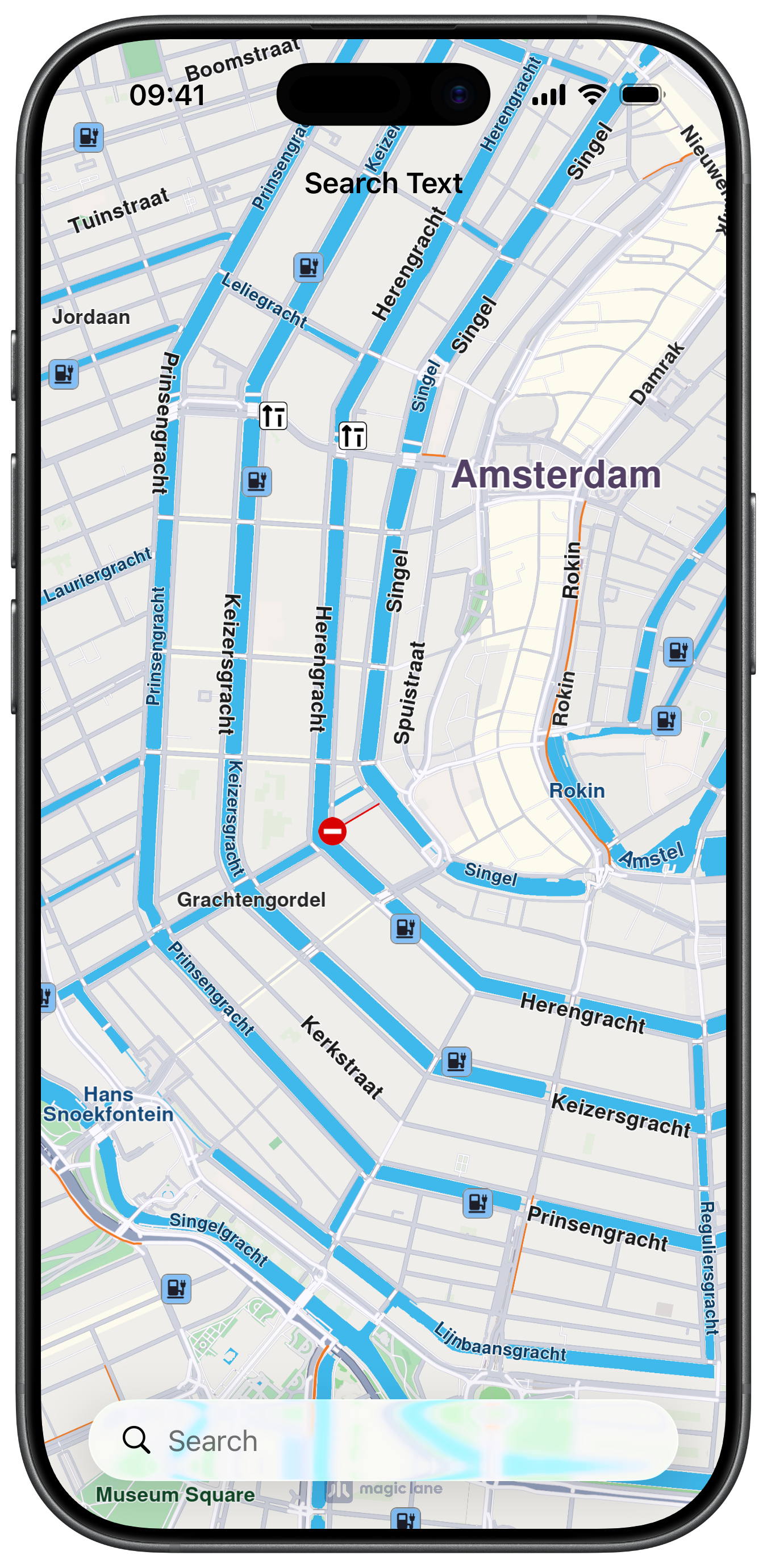
**Initial screen**
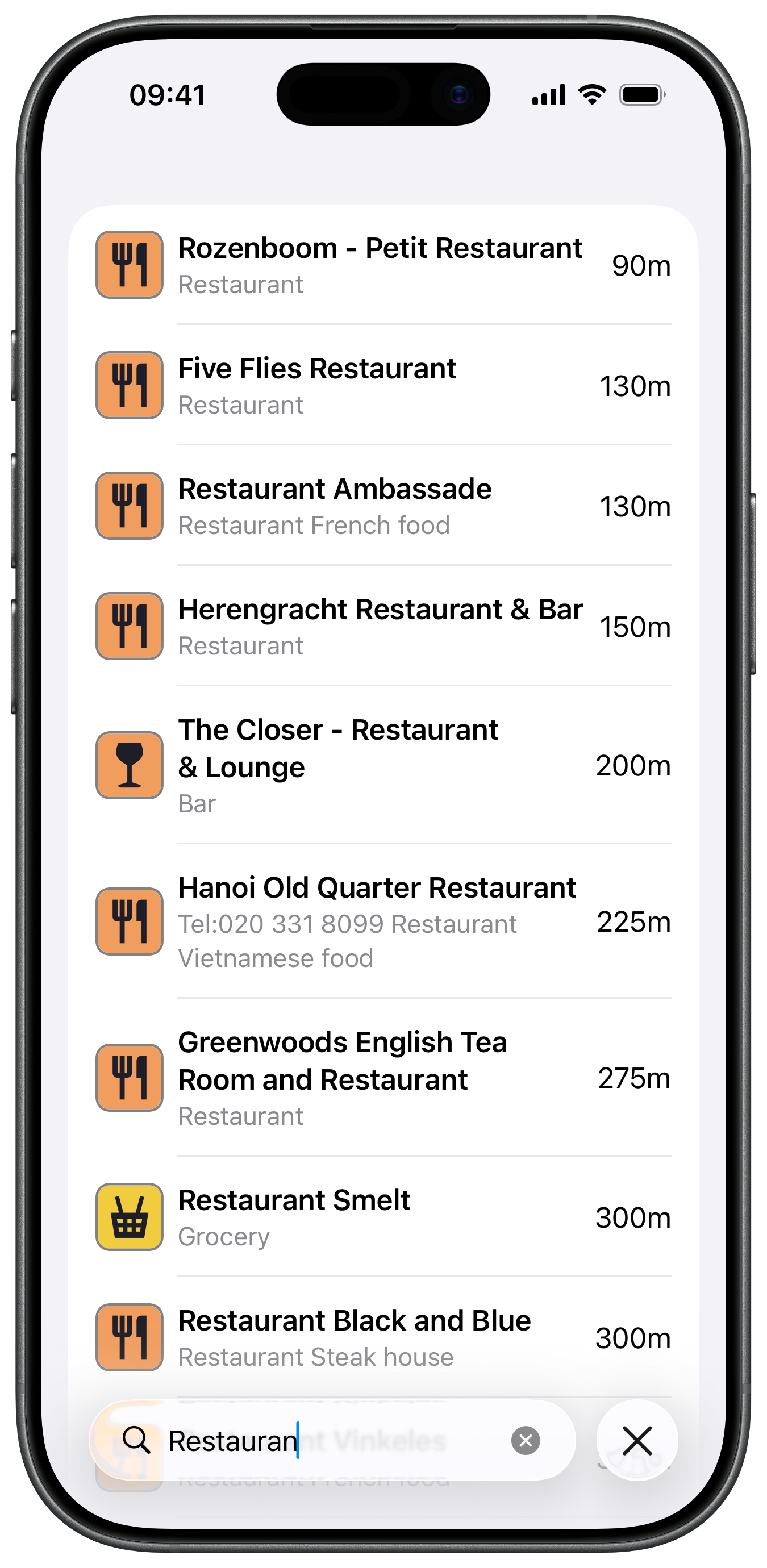
**Text Query Search**
### UI and Map Integration[](#ui-and-map-integration "Direct link to UI and Map Integration")
The following code outlines the map view with a simple search field:
ViewController.swift[View on GitHub](https://github.com/magiclane/magiclane-maps-sdk-examples-for-ios/tree/main/UIKit/Places/SearchText/SearchText/ViewController.swift)
```swift
class ViewController: UIViewController, UISearchBarDelegate, ResultsViewControllerDelegate {
var mapViewController: MapViewController?
var searchContext: SearchContext?
let resultsViewController = ResultsViewController.init()
var searchController: UISearchController?
override func viewDidLoad() {
super.viewDidLoad()
// Do any additional setup after loading the view.
if let navigationController = self.navigationController {
let appearance = navigationController.navigationBar.standardAppearance
navigationController.navigationBar.scrollEdgeAppearance = appearance
}
self.title = "Search Text"
self.navigationItem.hidesSearchBarWhenScrolling = false
self.navigationItem.largeTitleDisplayMode = .never
self.resultsViewController.delegate = self
self.searchController = UISearchController.init(searchResultsController: self.resultsViewController)
self.searchController!.view.backgroundColor = UIColor.systemBackground
self.searchController!.searchBar.delegate = self
self.searchController!.searchBar.placeholder = "Search"
self.searchController!.obscuresBackgroundDuringPresentation = false
self.searchController!.hidesNavigationBarDuringPresentation = false
self.navigationItem.searchController = self.searchController
self.createMapView()
self.mapViewController!.startRender()
}
override func viewDidAppear(_ animated: Bool) {
super.viewDidAppear(animated)
let location = CoordinatesObject.coordinates(withLatitude: 52.368447, longitude: 4.888229)
self.mapViewController!.center(onCoordinates: location, zoomLevel: 50, animationDuration: 0)
}
// MARK: - Map View
func createMapView() {
self.mapViewController = MapViewController.init()
self.mapViewController!.view.backgroundColor = UIColor.systemBackground
self.addChild(self.mapViewController!)
self.view.addSubview(self.mapViewController!.view)
self.mapViewController!.didMove(toParent: self)
self.mapViewController?.view.translatesAutoresizingMaskIntoConstraints = false
NSLayoutConstraint.activate([
self.mapViewController!.view.topAnchor.constraint(equalTo: self.view.topAnchor),
self.mapViewController!.view.leadingAnchor.constraint(equalTo: self.view.leadingAnchor),
self.mapViewController!.view.bottomAnchor.constraint(equalTo: self.view.bottomAnchor),
self.mapViewController!.view.trailingAnchor.constraint(equalTo: self.view.trailingAnchor)
])
}
// MARK: - UISearchBarDelegate
func searchBar(_ searchBar: UISearchBar, textDidChange searchText: String) {
self.performSearch(text: searchText)
}
func searchBarCancelButtonClicked(_ searchBar: UISearchBar) {
guard let mapViewController = self.mapViewController else { return }
if let searchContext = self.searchContext {
searchContext.cancelSearch()
}
mapViewController.removeHighlights()
self.resultsViewController.dataModel = []
self.resultsViewController.tableView.reloadData()
}
```
### Perform Search with query and Helper methods[](#perform-search-with-query-and-helper-methods "Direct link to Perform Search with query and Helper methods")
The code for performing the search alongside the implementation of helper methods for the example, one of them showing how to get the Location for the Map center using screen coordinates:
ViewController.swift[View on GitHub](https://github.com/magiclane/magiclane-maps-sdk-examples-for-ios/tree/main/UIKit/Places/SearchText/SearchText/ViewController.swift)
```swift
func performSearch(text: String) {
if self.searchContext == nil {
self.searchContext = SearchContext.init()
// Preferences
self.searchContext?.setMaxMatches(40)
self.searchContext?.setSearchMapPOIs(true)
self.searchContext?.setSearchAddresses(true)
}
// Location Hint support: narrow the search area to a specific radius
self.searchContext?.setLocationHint(
RectangleGeographicAreaObject(
location: self.getMapCenterLocation(),
horizontalRadius: 2000, verticalRadius: 2000))
let location = self.getMapCenterLocation()
self.searchContext?
.search(withQuery: text, location: location) { [weak self] (results: [LandmarkObject]) in
guard let strongSelf = self else { return }
strongSelf.resultsViewController.dataModel = results
strongSelf.resultsViewController.referencePoint = location
strongSelf.resultsViewController.tableView.reloadData()
}
}
// MARK: - ResultsViewControllerDelegate
func didSelectLandmark(landmark: LandmarkObject) {
guard let searchController = self.searchController else { return }
guard let mapViewController = self.mapViewController else { return }
searchController.dismiss(animated: true) {}
let text = landmark.getLandmarkName()
searchController.searchBar.text = text
mapViewController.removeHighlights()
let settings = HighlightRenderSettings.init()
settings.showPin = true
settings.imageSize = 7
settings.options = Int32(
HighlightOption.showLandmark.rawValue | HighlightOption.overlap.rawValue | HighlightOption.showContour.rawValue)
settings.contourInnerColor = UIColor.orange
settings.contourOuterColor = UIColor.orange
mapViewController.presentHighlights([landmark], settings: settings)
self.centerLandmark(landmark: landmark)
}
func centerLandmark(landmark: LandmarkObject) {
guard let mapViewController = self.mapViewController else { return }
if let contour = landmark.getContourGeograficArea(), !contour.isEmpty() {
// default
mapViewController.center(
onArea: contour,
zoomLevel: -1,
animationDuration: 1200)
} else {
// 2d
mapViewController.center(
onCoordinates: landmark.getCoordinates(),
zoomLevel: -1,
mapAngle: Double.greatestFiniteMagnitude,
viewAngle: 0,
animationDuration: 1200)
}
}
// MARK: - Utils
func getMapCenterLocation() -> CoordinatesObject {
guard let mapViewController = self.mapViewController else { return CoordinatesObject.init() }
let scale = UIScreen.main.scale
let center = mapViewController.view.center
let point = CGPoint.init(x: center.x * scale, y: center.y * scale)
let location = mapViewController.transformScreen(toWgs: point)
return location
}
}
```
### Results List[](#results-list "Direct link to Results List")
ViewController.swift[View on GitHub](https://github.com/magiclane/magiclane-maps-sdk-examples-for-ios/tree/main/UIKit/Places/SearchText/SearchText/ViewController.swift)
```swift
protocol ResultsViewControllerDelegate: NSObject {
func didSelectLandmark(landmark: LandmarkObject)
}
class ResultsViewController: UITableViewController {
weak var delegate: ResultsViewControllerDelegate?
var dataModel: [LandmarkObject] = []
var referencePoint: CoordinatesObject?
override func tableView(_ tableView: UITableView, numberOfRowsInSection section: Int) -> Int {
return self.dataModel.count
}
override func tableView(_ tableView: UITableView, cellForRowAt indexPath: IndexPath) -> UITableViewCell {
let cell = UITableViewCell.init(style: .subtitle, reuseIdentifier: "testCell")
let scale = UIScreen.main.scale
let size = CGSize.init(width: 40 * scale, height: 40 * scale)
let landmark = self.dataModel[indexPath.row]
let text = landmark.getLandmarkName()
let desc = landmark.getLandmarkDescription()
let img = landmark.getLandmarkImage(size)
cell.textLabel?.text = text
cell.detailTextLabel?.text = desc
cell.imageView?.image = img
self.setupAccessoryView(tableView: tableView, cell: cell, indexPath: indexPath)
return cell
}
func setupAccessoryView(tableView: UITableView, cell: UITableViewCell, indexPath: IndexPath) {
let size = CGSize.init(width: 70, height: 40)
let accessoryView = UIView.init(frame: CGRect.init(origin: CGPoint.zero, size: size))
if let point = self.referencePoint {
let statusText = self.dataModel[indexPath.row].getLandmarkDistanceFormatted(withLocation: point)
let statusDesc = self.dataModel[indexPath.row].getLandmarkDistanceUnitFormatted(withLocation: point)
let frameL1 = CGRect.init(origin: CGPoint.init(x: 0, y: 0), size: CGSize.init(width: 70, height: 25))
let labelText = UILabel.init(frame: frameL1)
labelText.text = statusText + statusDesc
labelText.textAlignment = .right
accessoryView.addSubview(labelText)
}
cell.accessoryView = accessoryView
}
override func tableView(_ tableView: UITableView, didSelectRowAt indexPath: IndexPath) {
tableView.deselectRow(at: indexPath, animated: true)
if self.delegate != nil {
self.delegate!.didSelectLandmark(landmark: self.dataModel[indexPath.row])
}
}
}
```
This example demonstrates how to use **GEMKit** in a SwiftUI application to search for `Landmarks` using a text query.
Check the full implementation on [GitHub](https://github.com/magiclane/magiclane-maps-sdk-examples-for-ios/tree/main/SwiftUI/Places/SearchText).

**Initial screen**

**Text Query Search**
### UI and Map Integration[](#ui-and-map-integration-1 "Direct link to UI and Map Integration")
The following code outlines the search result item structure and the map view with a simple search field:
ContentView\.swift[View on GitHub](https://github.com/magiclane/magiclane-maps-sdk-examples-for-ios/tree/main/SwiftUI/Places/SearchText/SearchText/ContentView.swift)
```swift
struct Place: Identifiable {
let id = UUID()
let image: UIImage
let title: String
let details: String
let distance: String
let lmk: LandmarkObject
}
struct ContentView: View {
let context = SearchContext.init()
private let defaultHighlightId = 10
@State private var searchQuery = ""
@State private var results: [Place] = []
@State private var selectedItem: Place?
@State private var isSearching: Bool = false
@FocusState private var searchFocused: Bool
@Environment(\.displayScale) private var displayScale
var body: some View {
MapReader { proxy in
ZStack {
MapBase(initialPosition: .amsterdam, initialZoomLevel: 64)
.mapCompass(false)
.ignoresSafeArea()
if searchFocused {
List(results) { place in
HStack {
Image(uiImage: place.image)
.frame(width: 40, height: 40)
VStack(alignment: .leading) {
Text(place.title)
.font(.headline)
Text(place.details)
.font(.subheadline)
.foregroundColor(.secondary)
}
Spacer()
Text(place.distance)
}
.frame(maxWidth: .infinity, alignment: .leading)
.contentShape(Rectangle())
.onTapGesture {
proxy.centerOn(coordinates: place.lmk.getCoordinates(), duration: 1200)
proxy.present(highlights: [place.lmk], settings: getRenderSettings())
withAnimation(.easeInOut(duration: 0.2)) {
selectedItem = place
searchFocused = false
}
}
}
}
}
.navigationTitle("Search Text")
.navigationBarTitleDisplayMode(.inline)
.searchable(text: $searchQuery, placement: .automatic)
.searchFocused($searchFocused)
.onChange(of: searchQuery) { oldValue, newValue in
performSearch(proxy)
}
}
}
```
### Search with Query[](#search-with-query "Direct link to Search with Query")
The code for performing a search with a query and a location hint:
ContentView\.swift[View on GitHub](https://github.com/magiclane/magiclane-maps-sdk-examples-for-ios/tree/main/SwiftUI/Places/SearchText/SearchText/ContentView.swift)
```swift
private func performSearch(_ proxy: MapProxy) {
proxy.removeAllHighlights()
proxy.centerOn(coordinates: .amsterdam, zoomLevel: 60)
results.removeAll()
isSearching = true
// Location Hint support: narrow the search area to a specific radius
context.setLocationHint(
RectangleGeographicAreaObject(
location: .amsterdam,
horizontalRadius: 2000, verticalRadius: 2000))
context.search(withQuery: searchQuery, location: .amsterdam) { response in
isSearching = false
results = response.map { item in
return Place(
image: item.getLandmarkImage(CGSize(width: 40 * displayScale, height: 40 * displayScale)) ?? UIImage(),
title: item.getLandmarkName(),
details: item.getLandmarkDescription(),
distance: item.getLandmarkDistanceFormatted(withLocation: .amsterdam) + item.getLandmarkDistanceUnitFormatted(withLocation: .amsterdam),
lmk: item)
}
}
}
```