# Search Along Route
Last updated:
October 18, 2026
\| 5 minutes read
* UIKit
* SwiftUI
This example demonstrates how to use **GEMKit** in a UIKit application to calculate a car route, search for landmarks along it using `SearchContext`, and display the results as grouped `Highlights` on the map.
Check the full implementation on [GitHub](https://github.com/magiclane/magiclane-maps-sdk-examples-for-ios/tree/main/UIKit/Places/SearchAlongRoute).
info
`SearchContext` settings and parameters showcased in the other examples, such as category and query, can also be applied in this scenario to further refine the search results.
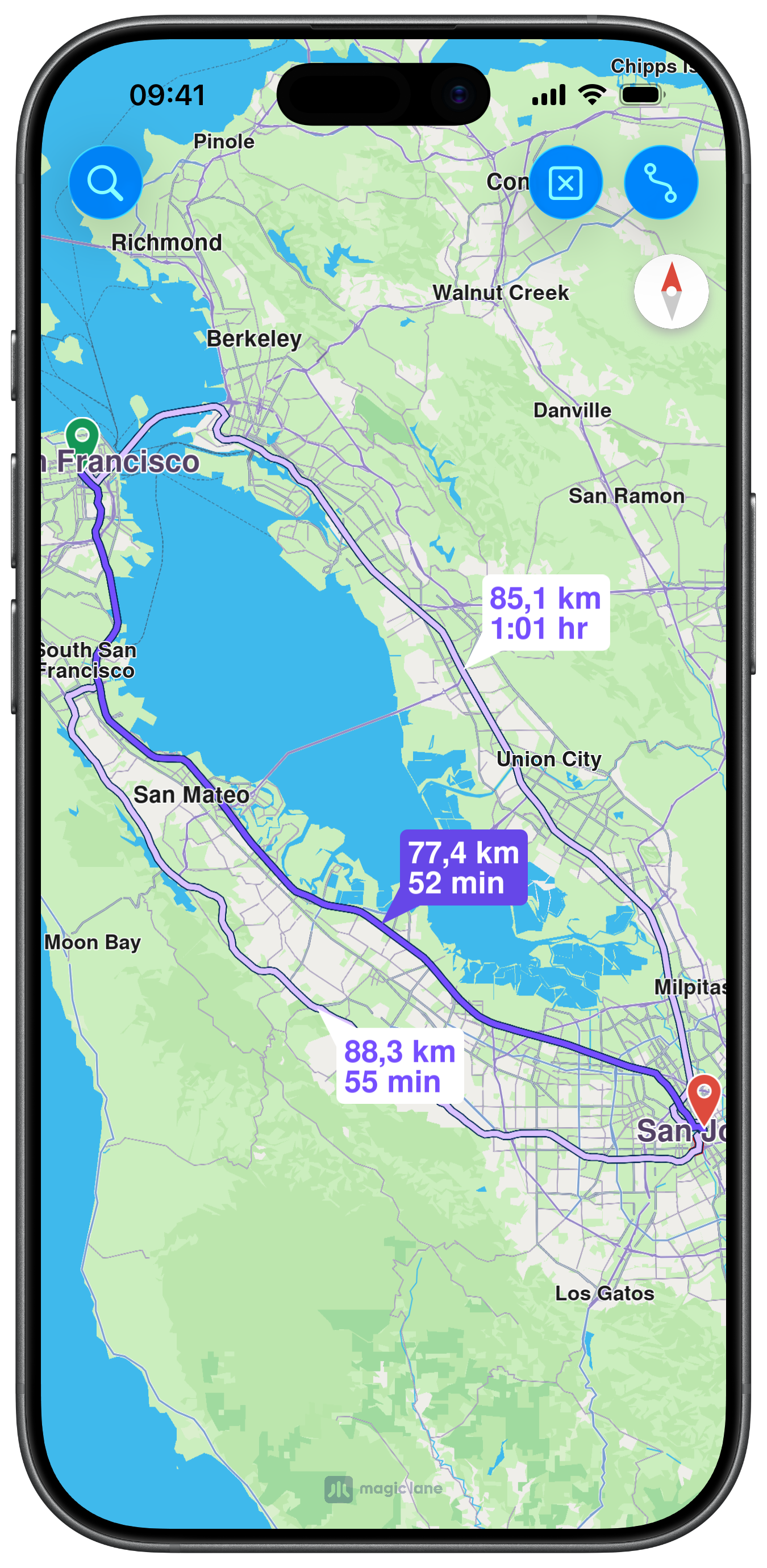
**Route Calculated**
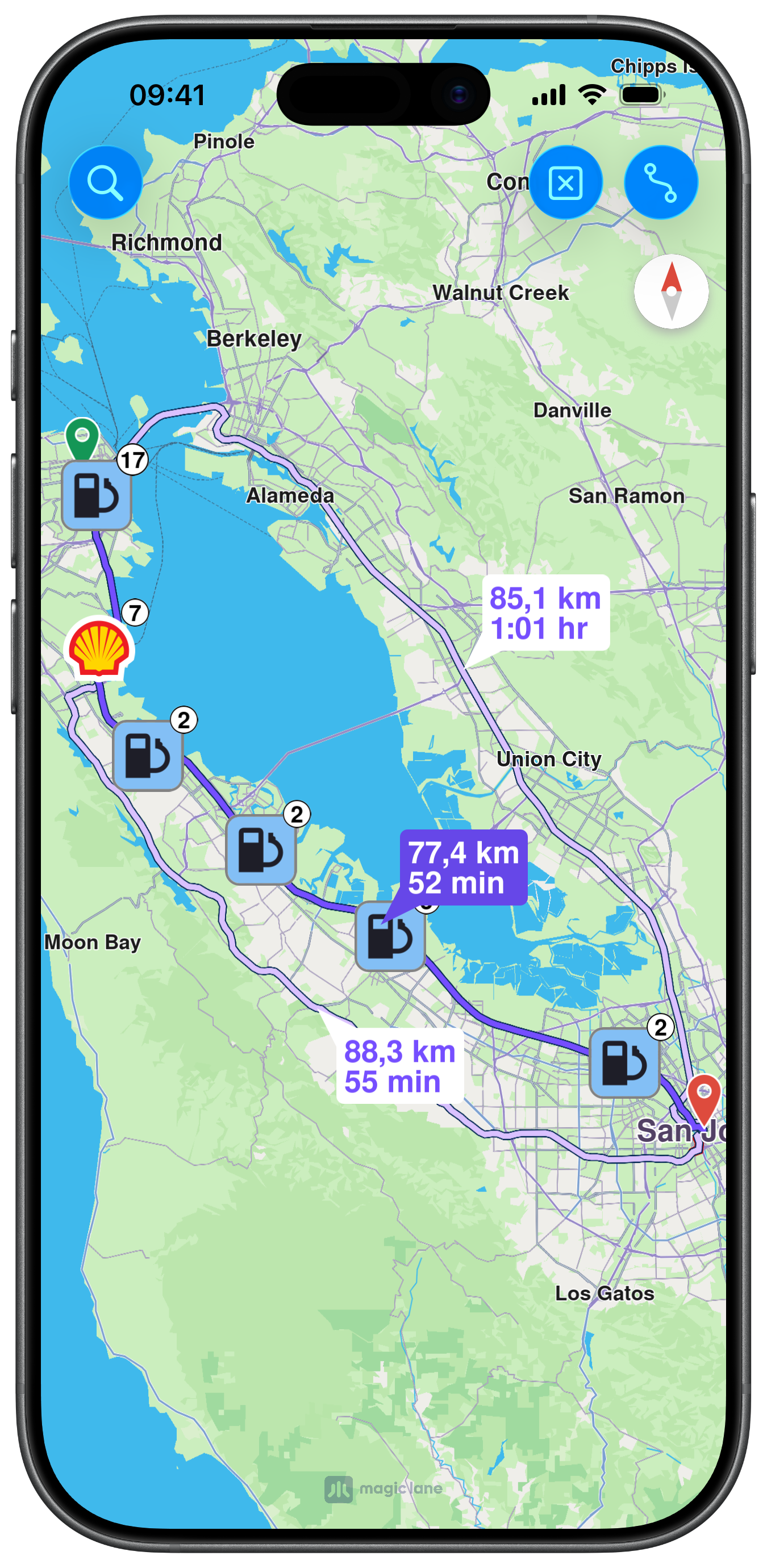
**Search Along Route Results**
### Map View and Route Display[](#map-view-and-route-display "Direct link to Map View and Route Display")
`MapViewController` is embedded full-screen with edge insets to leave room for route summary bubbles. The delegate is set so route selection events can promote a route to main. Two navigation bar buttons trigger route calculation and clearing:
ViewController.swift[View on GitHub](https://github.com/magiclane/magiclane-maps-sdk-examples-for-ios/tree/main/UIKit/Places/SearchAlongRoute/SearchAlongRoute/ViewController.swift)
```swift
func createMapView() {
self.mapViewController = MapViewController.init()
self.mapViewController!.delegate = self
self.mapViewController!.view.backgroundColor = UIColor.systemBackground
self.addChild(self.mapViewController!)
self.view.addSubview(self.mapViewController!.view)
self.mapViewController!.didMove(toParent: self)
self.mapViewController!.setEdgeAreaInsets(UIEdgeInsets(top: 30, left: 40, bottom: 30, right: 40))
self.mapViewController?.view.translatesAutoresizingMaskIntoConstraints = false
NSLayoutConstraint.activate([
self.mapViewController!.view.topAnchor.constraint(equalTo: self.view.topAnchor),
self.mapViewController!.view.leadingAnchor.constraint(equalTo: self.view.leadingAnchor),
self.mapViewController!.view.bottomAnchor.constraint(equalTo: self.view.bottomAnchor),
self.mapViewController!.view.trailingAnchor.constraint(equalTo: self.view.trailingAnchor)
])
}
// MARK: - MapViewControllerDelegate
func mapViewController(_ mapViewController: MapViewController, didSelectRoute route: RouteObject) {
self.mainRoute = route
mapViewController.setMainRoute(route)
}
```
### Calculating the Route[](#calculating-the-route "Direct link to Calculating the Route")
`routeButtonAction` lazily creates a `NavigationContext` with car preferences on first tap, then calls `calculateRoute(withWaypoints:completionHandler:)` with San Francisco and San Jose as waypoints. On completion, routes are presented on the map:
ViewController.swift[View on GitHub](https://github.com/magiclane/magiclane-maps-sdk-examples-for-ios/tree/main/UIKit/Places/SearchAlongRoute/SearchAlongRoute/ViewController.swift)
```swift
@objc func routeButtonAction(item: UIBarButtonItem) {
if self.navigationContext == nil {
let preferences = RoutePreferencesObject.init()
preferences.setTransportMode(.car)
preferences.setRouteType(.fastest)
preferences.setAvoidUnpavedRoads(true)
self.navigationContext = NavigationContext.init(preferences: preferences)
self.navigationContext?.delegate = self
}
let waypoints = [
LandmarkObject.landmark(
withName: "San Francisco", location: CoordinatesObject.coordinates(withLatitude: 37.77903, longitude: -122.41991)),
LandmarkObject.landmark(
withName: "San Jose", location: CoordinatesObject.coordinates(withLatitude: 37.33619, longitude: -121.89058))
]
item.isEnabled = false
self.navigationContext?
.calculateRoute(
withWaypoints: waypoints,
completionHandler: { [weak self] (results: [RouteObject]) in
guard let strongSelf = self else { return }
strongSelf.routeResults = results
if !results.isEmpty {
strongSelf.mainRoute = results.first
strongSelf.addSearch()
strongSelf.mapViewController?.presentRoutes(results, withTraffic: nil, showSummary: true, animationDuration: 1000)
}
item.isEnabled = true
})
}
```
### Searching Along the Route[](#searching-along-the-route "Direct link to Searching Along the Route")
`searchButton` lazily initialises a `SearchContext` with a maximum of 40 matches, then calls `searchAlong(withRoute:query:)` using the current main route. Results are rendered on the map as grouped highlights via `presentHighlights(_:settings:highlightId:)`:
ViewController.swift[View on GitHub](https://github.com/magiclane/magiclane-maps-sdk-examples-for-ios/tree/main/UIKit/Places/SearchAlongRoute/SearchAlongRoute/ViewController.swift)
```swift
@objc func searchButton() {
guard let mainRoute = self.mainRoute else { return }
if self.searchContext == nil {
self.searchContext = SearchContext.init()
self.searchContext?.setMaxMatches(40)
self.searchContext?.setSearchMapPOIs(true)
self.searchContext?.setSearchAddresses(true)
}
self.searchContext!
.searchAlong(withRoute: mainRoute, query: "Gas station") { [weak self] (results: [LandmarkObject]) in
guard let strongSelf = self else { return }
let settings = HighlightRenderSettings()
settings.imageSize = 7
settings.options = Int32(HighlightOption.group.rawValue)
strongSelf.mapViewController?.presentHighlights(results, settings: settings, highlightId: strongSelf.defaultHighlightId)
}
}
```
This example demonstrates how to use **GEMKit** in a SwiftUI application to calculate a car route, search for landmarks along it using `SearchContext`, and display the results as grouped `Highlights` on the map.
Check the full implementation on [GitHub](https://github.com/magiclane/magiclane-maps-sdk-examples-for-ios/tree/main/SwiftUI/Places/SearchAlongRoute).
info
`SearchContext` settings and parameters showcased in the other examples, such as category and query, can also be applied in this scenario to further refine the search results.

**Route Calculated**

**Search Along Route Results**
### Map View and Route Display[](#map-view-and-route-display-1 "Direct link to Map View and Route Display")
`MapBase` hosts a `MapRoute` for rendering calculated routes and a `MapLandmark` for search result highlights. The `.didSelectRoutes` modifier promotes a selected route to main with `proxy.setMain(route:)`. Three toolbar buttons trigger route calculation, search, and clearing:
ContentView\.swift[View on GitHub](https://github.com/magiclane/magiclane-maps-sdk-examples-for-ios/tree/main/SwiftUI/Places/SearchAlongRoute/SearchAlongRoute/ContentView.swift)
```swift
var body: some View {
MapReader { proxy in
MapBase {
if !routeResults.isEmpty {
MapRoute(
routes: routeResults,
bubbleSummary: true,
animationDuration: 800
)
}
MapLandmark(
landmarks: searchResultLandmarks,
renderSettings: getHighlightSettings(),
highlightId: defaultHighlightId,
animationDuration: -1
)
}
.didSelectRoutes { routes, point in
guard let route = routes.first else { return }
mainRoute = route
proxy.setMain(route: route)
}
.mapEdgeInsets(UIEdgeInsets(top: 30, left: 40, bottom: 30, right: 40))
.ignoresSafeArea()
.toolbar {
ToolbarItem(placement: .topBarTrailing) {
Button("", systemImage: "point.topleft.down.curvedto.point.bottomright.up") {
calculateRoute(proxy)
}
.disabled(isCalculating)
.buttonStyle(.borderedProminent)
}
ToolbarItem(placement: .topBarTrailing) {
Button("", systemImage: "clear") {
clearAll(proxy)
}
.buttonStyle(.borderedProminent)
}
ToolbarItem(placement: .topBarLeading) {
Button("", systemImage: "magnifyingglass") {
searchAlongRoute(proxy)
}
.disabled(mainRoute == nil)
.buttonStyle(.borderedProminent)
}
}
}
}
```
### Calculating the Route[](#calculating-the-route-1 "Direct link to Calculating the Route")
`calculateRoute(_:)` builds a `NavigationContext` with car preferences on first call, then calls `calculateRoute(withWaypoints:)` with San Francisco and San Jose as waypoints. The first result is set as the `mainRoute`:
ContentView\.swift[View on GitHub](https://github.com/magiclane/magiclane-maps-sdk-examples-for-ios/tree/main/SwiftUI/Places/SearchAlongRoute/SearchAlongRoute/ContentView.swift)
```swift
private func calculateRoute(_ proxy: MapProxy) {
if navigationContext == nil {
let preferences = RoutePreferencesObject()
preferences.setTransportMode(.car)
preferences.setRouteType(.fastest)
preferences.setAvoidUnpavedRoads(true)
navigationContext = NavigationContext(preferences: preferences)
}
let waypoints = [
LandmarkObject.landmark(
withName: "San Francisco",
location: CoordinatesObject.coordinates(withLatitude: 37.77903, longitude: -122.41991)),
LandmarkObject.landmark(
withName: "San Jose",
location: CoordinatesObject.coordinates(withLatitude: 37.33619, longitude: -121.89058))
]
isCalculating = true
navigationContext?.calculateRoute(withWaypoints: waypoints) { results in
routeResults = results
if !results.isEmpty {
mainRoute = results.first
routeResults = results
}
isCalculating = false
}
}
```
### Searching Along the Route[](#searching-along-the-route-1 "Direct link to Searching Along the Route")
`searchAlongRoute(_:)` lazily initialises a `SearchContext` with a maximum of 40 matches, then calls `searchAlong(withRoute:query:)` using the selected main route. Results are stored in `searchResultLandmarks` and rendered automatically by the `MapLandmark` view:
ContentView\.swift[View on GitHub](https://github.com/magiclane/magiclane-maps-sdk-examples-for-ios/tree/main/SwiftUI/Places/SearchAlongRoute/SearchAlongRoute/ContentView.swift)
```swift
private func searchAlongRoute(_ proxy: MapProxy) {
guard let route = mainRoute else { return }
if searchContext == nil {
searchContext = SearchContext()
searchContext?.setMaxMatches(40)
searchContext?.setSearchMapPOIs(true)
searchContext?.setSearchAddresses(true)
}
searchContext?.searchAlong(withRoute: route, query: "Gas station") { results in
searchResultLandmarks = results
}
}
```