
Group Search Results

Last updated: April 24, 2026 | 6 minutes read

This example demonstrates how to use GEMKit in a UIKit application to display and center the results of a text search on the map as Highlights, with grouping enabled and a custom pin image.

Check the full implementation on GitHub.
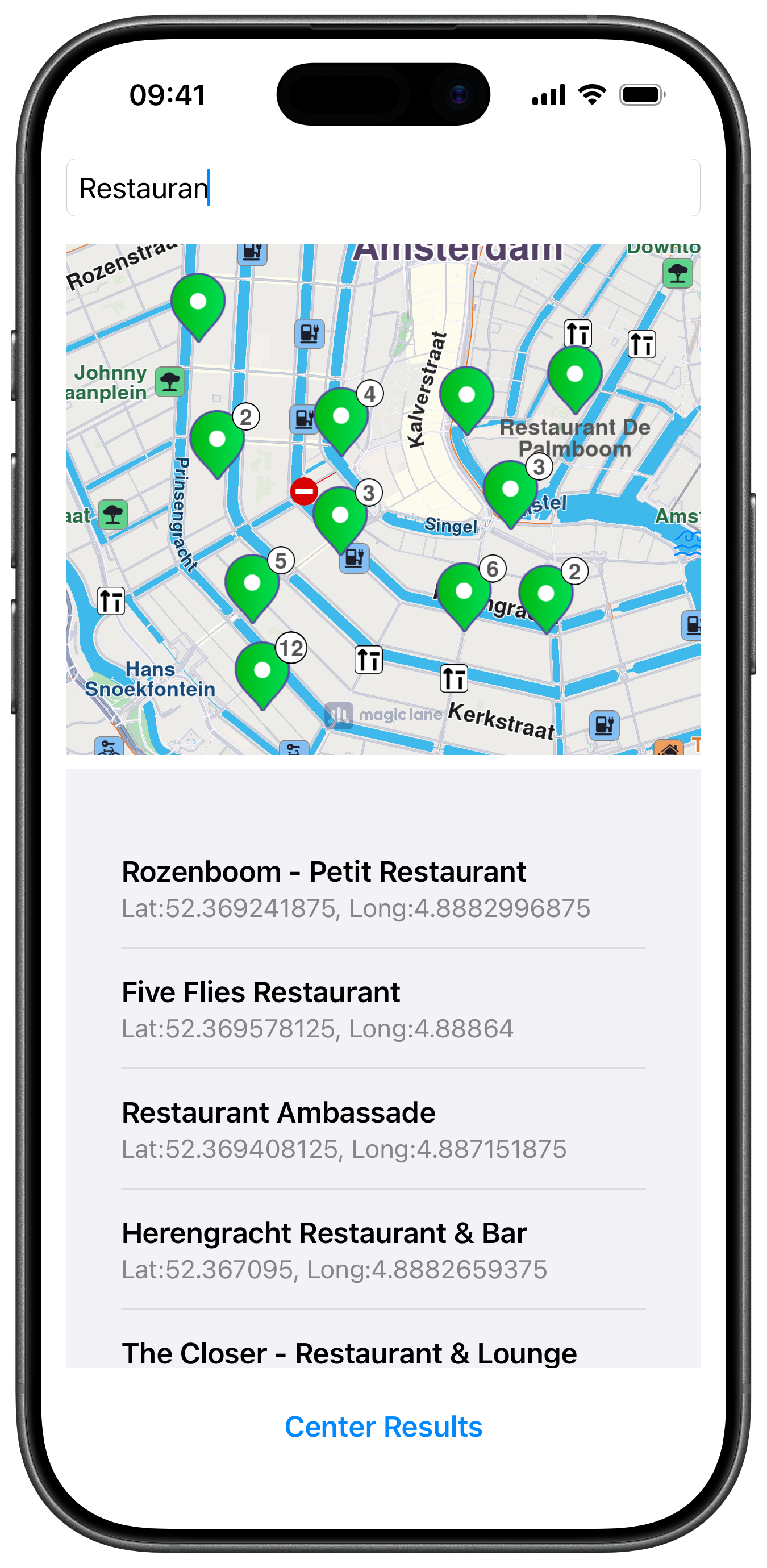
Grouped Search Results

UI and Map Integration

The layout stacks a search field (with an activity indicator), a map container, a results table, and a "Center Results" button. MapViewController is embedded inside the tagged mapContainer view and pinned to its edges:

ViewController.swiftView on GitHub
func createMapView() {
guard let mapContainer = self.view.viewWithTag(100) else { return }

self.mapViewController = MapViewController.init()
self.mapViewController!.view.backgroundColor = .systemBackground

self.addChild(self.mapViewController!)
mapContainer.addSubview(self.mapViewController!.view)
self.mapViewController!.didMove(toParent: self)

self.mapViewController!.view.translatesAutoresizingMaskIntoConstraints = false
NSLayoutConstraint.activate([
self.mapViewController!.view.topAnchor.constraint(equalTo: mapContainer.topAnchor),
self.mapViewController!.view.leadingAnchor.constraint(equalTo: mapContainer.leadingAnchor),
self.mapViewController!.view.bottomAnchor.constraint(equalTo: mapContainer.bottomAnchor),
self.mapViewController!.view.trailingAnchor.constraint(equalTo: mapContainer.trailingAnchor),
])
}

Performing Search and Setting a Custom Pin Image

performSearch(text:) clears previous results, sets a rectangular location hint around Amsterdam, then calls searchContext.search(withQuery:location:). Each returned LandmarkObject receives a custom pin image via setImage(_:) before being added to the landmarks array. After the search completes, presentHighlights(_:settings:highlightId:) renders all results on the map:

ViewController.swiftView on GitHub
func performSearch(text: String) {
guard let mapViewController = self.mapViewController else { return }

mapViewController.removeHighlights()

let amsterdam = CoordinatesObject.coordinates(withLatitude: 52.368447, longitude: 4.888229)
mapViewController.center(onCoordinates: amsterdam, zoomLevel: 60, animationDuration: 0)

landmarks.removeAll()
results.removeAll()
selectedIndex = nil
tableView.reloadData()
activityIndicator.startAnimating()

searchContext.setLocationHint(
RectangleGeographicAreaObject(
location: amsterdam,
horizontalRadius: 2000, verticalRadius: 2000))

searchContext.search(withQuery: text, location: amsterdam) { [weak self] (response: [LandmarkObject]) in
guard let self = self else { return }

self.activityIndicator.stopAnimating()

for item in response {
item.setImage(self.getImageObject())
self.landmarks.append(item)
}

self.results = response.map { item in
let coords = item.getCoordinates()
return Place(
title: item.getLandmarkName(),
details: "Lat:\(coords.latitude), Long:\(coords.longitude)",
landmark: item)
}

let settings = self.getHighlightSettings()
mapViewController.presentHighlights(self.landmarks, settings: settings, highlightId: self.defaultHighlightId)

self.centerButton.isEnabled = !self.landmarks.isEmpty
self.tableView.reloadData()
}
}

func getImageObject() -> ImageObject {
if let image = UIImage(named: "MapPinDefault"),
let data = image.pngData()
{
return ImageObject(dataBuffer: data, format: .png)
}
return ImageObject()
}

Center on Highlight Area and Highlight Settings

Tapping a row in the table centers the map on that result's coordinates. The "Center Results" button calls getHighlightArea(_:) to retrieve the bounding area of all highlights and then uses center(onArea:zoomLevel:animationDuration:) to fit them all in view. getHighlightSettings() configures grouping, landmark display, and text/image sizes:

ViewController.swiftView on GitHub
func tableView(_ tableView: UITableView, didSelectRowAt indexPath: IndexPath) {
tableView.deselectRow(at: indexPath, animated: true)

guard let mapViewController = self.mapViewController else { return }

selectedIndex = indexPath.row
tableView.reloadData()

let place = results[indexPath.row]
mapViewController.center(onCoordinates: place.landmark.getCoordinates(), zoomLevel: -1, animationDuration: 1200)
}

@objc func centerResultsTapped() {
guard let mapViewController = self.mapViewController else { return }

selectedIndex = nil
tableView.reloadData()

let list = mapViewController.getHighlight(defaultHighlightId)
guard !list.isEmpty else { return }
guard let area = mapViewController.getHighlightArea(defaultHighlightId) else { return }
mapViewController.center(onArea: area, zoomLevel: -1, animationDuration: 1200)
}

func getHighlightSettings() -> HighlightRenderSettings {
let settings = HighlightRenderSettings.init()
settings.options = Int32(
HighlightOption.showLandmark.rawValue | HighlightOption.group.rawValue | HighlightOption.selectable.rawValue)
settings.textColor = UIColor.darkGray
settings.textSize = 2.2
settings.imageSize = 5.6
return settings
}