# Group Search Results
Last updated:
October 18, 2026
\| 6 minutes read
* UIKit
* SwiftUI
This example demonstrates how to use **GEMKit** in a UIKit application to display and center the results of a text search on the map as `Highlights`, with grouping enabled and a custom pin image.
Check the full implementation on [GitHub](https://github.com/magiclane/magiclane-maps-sdk-examples-for-ios/tree/main/UIKit/Places/GroupSearchResults).
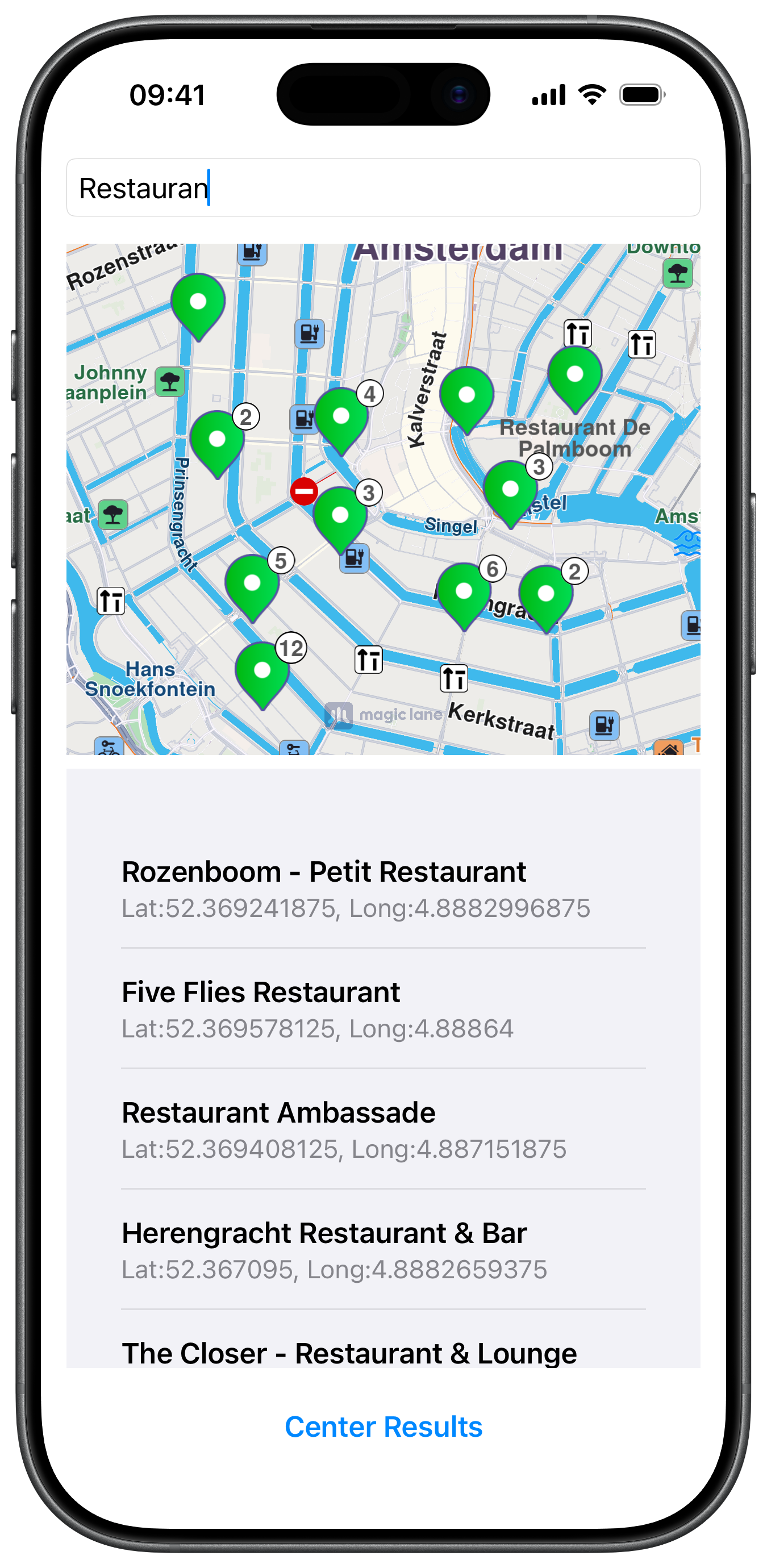
**Grouped Search Results**
### UI and Map Integration[](#ui-and-map-integration "Direct link to UI and Map Integration")
The layout stacks a search field (with an activity indicator), a map container, a results table, and a "Center Results" button. `MapViewController` is embedded inside the tagged `mapContainer` view and pinned to its edges:
ViewController.swift[View on GitHub](https://github.com/magiclane/magiclane-maps-sdk-examples-for-ios/tree/main/UIKit/Places/GroupSearchResults/GroupSearchResults/ViewController.swift)
```swift
func createMapView() {
guard let mapContainer = self.view.viewWithTag(100) else { return }
self.mapViewController = MapViewController.init()
self.mapViewController!.view.backgroundColor = .systemBackground
self.addChild(self.mapViewController!)
mapContainer.addSubview(self.mapViewController!.view)
self.mapViewController!.didMove(toParent: self)
self.mapViewController!.view.translatesAutoresizingMaskIntoConstraints = false
NSLayoutConstraint.activate([
self.mapViewController!.view.topAnchor.constraint(equalTo: mapContainer.topAnchor),
self.mapViewController!.view.leadingAnchor.constraint(equalTo: mapContainer.leadingAnchor),
self.mapViewController!.view.bottomAnchor.constraint(equalTo: mapContainer.bottomAnchor),
self.mapViewController!.view.trailingAnchor.constraint(equalTo: mapContainer.trailingAnchor),
])
}
```
### Performing Search and Setting a Custom Pin Image[](#performing-search-and-setting-a-custom-pin-image "Direct link to Performing Search and Setting a Custom Pin Image")
`performSearch(text:)` clears previous results, sets a rectangular location hint around Amsterdam, then calls `searchContext.search(withQuery:location:)`. Each returned `LandmarkObject` receives a custom pin image via `setImage(_:)` before being added to the landmarks array. After the search completes, `presentHighlights(_:settings:highlightId:)` renders all results on the map:
ViewController.swift[View on GitHub](https://github.com/magiclane/magiclane-maps-sdk-examples-for-ios/tree/main/UIKit/Places/GroupSearchResults/GroupSearchResults/ViewController.swift)
```swift
func performSearch(text: String) {
guard let mapViewController = self.mapViewController else { return }
mapViewController.removeHighlights()
let amsterdam = CoordinatesObject.coordinates(withLatitude: 52.368447, longitude: 4.888229)
mapViewController.center(onCoordinates: amsterdam, zoomLevel: 60, animationDuration: 0)
landmarks.removeAll()
results.removeAll()
selectedIndex = nil
tableView.reloadData()
activityIndicator.startAnimating()
searchContext.setLocationHint(
RectangleGeographicAreaObject(
location: amsterdam,
horizontalRadius: 2000, verticalRadius: 2000))
searchContext.search(withQuery: text, location: amsterdam) { [weak self] (response: [LandmarkObject]) in
guard let self = self else { return }
self.activityIndicator.stopAnimating()
for item in response {
item.setImage(self.getImageObject())
self.landmarks.append(item)
}
self.results = response.map { item in
let coords = item.getCoordinates()
return Place(
title: item.getLandmarkName(),
details: "Lat:\(coords.latitude), Long:\(coords.longitude)",
landmark: item)
}
let settings = self.getHighlightSettings()
mapViewController.presentHighlights(self.landmarks, settings: settings, highlightId: self.defaultHighlightId)
self.centerButton.isEnabled = !self.landmarks.isEmpty
self.tableView.reloadData()
}
}
func getImageObject() -> ImageObject {
if let image = UIImage(named: "MapPinDefault"),
let data = image.pngData()
{
return ImageObject(dataBuffer: data, format: .png)
}
return ImageObject()
}
```
### Center on Highlight Area and Highlight Settings[](#center-on-highlight-area-and-highlight-settings "Direct link to Center on Highlight Area and Highlight Settings")
Tapping a row in the table centers the map on that result's coordinates. The "Center Results" button calls `getHighlightArea(_:)` to retrieve the bounding area of all highlights and then uses `center(onArea:zoomLevel:animationDuration:)` to fit them all in view. `getHighlightSettings()` configures grouping, landmark display, and text/image sizes:
ViewController.swift[View on GitHub](https://github.com/magiclane/magiclane-maps-sdk-examples-for-ios/tree/main/UIKit/Places/GroupSearchResults/GroupSearchResults/ViewController.swift)
```swift
func tableView(_ tableView: UITableView, didSelectRowAt indexPath: IndexPath) {
tableView.deselectRow(at: indexPath, animated: true)
guard let mapViewController = self.mapViewController else { return }
selectedIndex = indexPath.row
tableView.reloadData()
let place = results[indexPath.row]
mapViewController.center(onCoordinates: place.landmark.getCoordinates(), zoomLevel: -1, animationDuration: 1200)
}
@objc func centerResultsTapped() {
guard let mapViewController = self.mapViewController else { return }
selectedIndex = nil
tableView.reloadData()
let list = mapViewController.getHighlight(defaultHighlightId)
guard !list.isEmpty else { return }
guard let area = mapViewController.getHighlightArea(defaultHighlightId) else { return }
mapViewController.center(onArea: area, zoomLevel: -1, animationDuration: 1200)
}
func getHighlightSettings() -> HighlightRenderSettings {
let settings = HighlightRenderSettings.init()
settings.options = Int32(
HighlightOption.showLandmark.rawValue | HighlightOption.group.rawValue | HighlightOption.selectable.rawValue)
settings.textColor = UIColor.darkGray
settings.textSize = 2.2
settings.imageSize = 5.6
return settings
}
```
This example demonstrates how to use **GEMKit** in a SwiftUI application to display and center the results of a text search on the map as `Highlights`, with grouping enabled and a custom pin image.
Check the full implementation on [GitHub](https://github.com/magiclane/magiclane-maps-sdk-examples-for-ios/tree/main/SwiftUI/Places/GroupSearchResults).

**Grouped Search Results**
### UI and Map Integration[](#ui-and-map-integration-1 "Direct link to UI and Map Integration")
The following code outlines the search result item structure and the map view with a simple search field:
ContentView\.swift[View on GitHub](https://github.com/magiclane/magiclane-maps-sdk-examples-for-ios/tree/main/SwiftUI/Places/GroupSearchResults/GroupSearchResults/ContentView.swift)
```swift
struct Place: Identifiable, Equatable {
let id = UUID()
let title: String
let details: String
let lmk: LandmarkObject
}
struct ContentView: View {
let context = SearchContext.init()
private let defaultHighlightId = 10
@State private var searchQuery = ""
@State private var landmarks: [LandmarkObject] = []
@State private var results: [Place] = []
@State private var selectedItem: Place?
@State private var isSearching: Bool = false
@Environment(\.displayScale) var displayScale
var body: some View {
MapReader { proxy in
VStack {
HStack {
TextField(
"Search", text: $searchQuery,
onCommit: {
performSearch(proxy)
}
)
.textFieldStyle(RoundedBorderTextFieldStyle())
if isSearching {
ProgressView()
.transition(.opacity)
.progressViewStyle(.circular)
.controlSize(.regular)
}
}
.frame(height: 50)
MapBase(initialPosition: .amsterdam, initialZoomLevel: 64) {
MapLandmark(
landmarks: landmarks, renderSettings: getSettings(),
highlightId: defaultHighlightId, animationDuration: 800)
}
.didSelectLandmarks({ landmarks, touchPoint, isLongTouch in
guard let coordinates = landmarks.first?.getCoordinates() else { return }
proxy.centerOn(coordinates: coordinates, duration: 1200)
})
.mapCompass(false)
.mapEdgeInsets(getInsets())
.frame(height: 300)
List(results) { place in
VStack(alignment: .leading) {
Text(place.title)
.font(.headline)
Text(place.details)
.font(.subheadline)
.foregroundColor(.secondary)
}
.frame(maxWidth: .infinity, alignment: .leading)
.contentShape(Rectangle())
.onTapGesture {
proxy.centerOn(coordinates: place.lmk.getCoordinates(), duration: 1200)
withAnimation(.easeInOut(duration: 0.2)) {
selectedItem = place
}
}
.listRowBackground(
selectedItem == place ? Color.blue.opacity(0.2) : Color.clear
)
}
Button {
selectedItem = nil
centerOnHighlightArea(proxy)
} label: {
Text("Center Results")
.font(.headline)
.foregroundStyle(.blue)
}
.padding()
.buttonStyle(PlainButtonStyle())
.disabled(landmarks.isEmpty)
}
}
.padding(.horizontal, 15)
}
```
### Performing Search and setting Custom Pin Image[](#performing-search-and-setting-custom-pin-image "Direct link to Performing Search and setting Custom Pin Image")
The following code demonstrates how to perform a search with a location hint and set a custom pin image for the search results:
ContentView\.swift[View on GitHub](https://github.com/magiclane/magiclane-maps-sdk-examples-for-ios/tree/main/SwiftUI/Places/GroupSearchResults/GroupSearchResults/ContentView.swift)
```swift
private func performSearch(_ proxy: MapProxy) {
proxy.removeAllHighlights()
proxy.centerOn(coordinates: .amsterdam, zoomLevel: 60)
landmarks.removeAll()
results.removeAll()
isSearching = true
// Location Hit support: narrow the search area to a specific radius
context.setLocationHint(
RectangleGeographicAreaObject(
location: .amsterdam,
horizontalRadius: 2000, verticalRadius: 2000))
context.search(withQuery: searchQuery, location: .amsterdam) { response in
isSearching = false
for item in response {
item.setImage(getImageObject()) // set custom pin image
landmarks.append(item)
}
results = response.map { item in
let coordinates = item.getCoordinates()
return Place(
title: item.getLandmarkName(),
details: "Lat:\(coordinates.latitude), Long:\(coordinates.longitude)",
lmk: item)
}
}
}
private func getImageObject() -> ImageObject {
if let image = UIImage.init(named: "MapPinDefault"),
let data = image.pngData()
{
let object = ImageObject.init(dataBuffer: data, format: .png)
return object
}
return ImageObject()
}
```
### Center on Highlight Area and Helper Methods[](#center-on-highlight-area-and-helper-methods "Direct link to Center on Highlight Area and Helper Methods")
The following code demonstrates how to center the map on the area of the search results and includes helper methods for highlight settings and map insets:
ContentView\.swift[View on GitHub](https://github.com/magiclane/magiclane-maps-sdk-examples-for-ios/tree/main/SwiftUI/Places/GroupSearchResults/GroupSearchResults/ContentView.swift)
```swift
private func getSettings() -> HighlightRenderSettings {
let settings = HighlightRenderSettings.init()
settings.options = Int32(
HighlightOption.showLandmark.rawValue | HighlightOption.group.rawValue | HighlightOption.selectable.rawValue)
settings.textColor = UIColor.darkGray
settings.textSize = 2.2
settings.imageSize = 5.6
return settings
}
func centerOnHighlightArea(_ proxy: MapProxy) {
guard let mapViewController = proxy.mapViewController else { return }
let list = mapViewController.getHighlight(Int32(defaultHighlightId))
guard !list.isEmpty else { return }
guard let area = mapViewController.getHighlightArea(Int32(defaultHighlightId)) else { return }
mapViewController.center(onArea: area, zoomLevel: -1, animationDuration: 1200)
}
func getInsets() -> UIEdgeInsets {
let margin: CGFloat = 35
return UIEdgeInsets.init(
top: displayScale * margin, left: displayScale * margin,
bottom: displayScale * margin, right: displayScale * margin)
}
}
```