Shapes
- UIKit
- SwiftUI
This example demonstrates how to use GEMKit in a UIKit application to draw Shapes on the map using Markers.
Check the full implementation on GitHub.
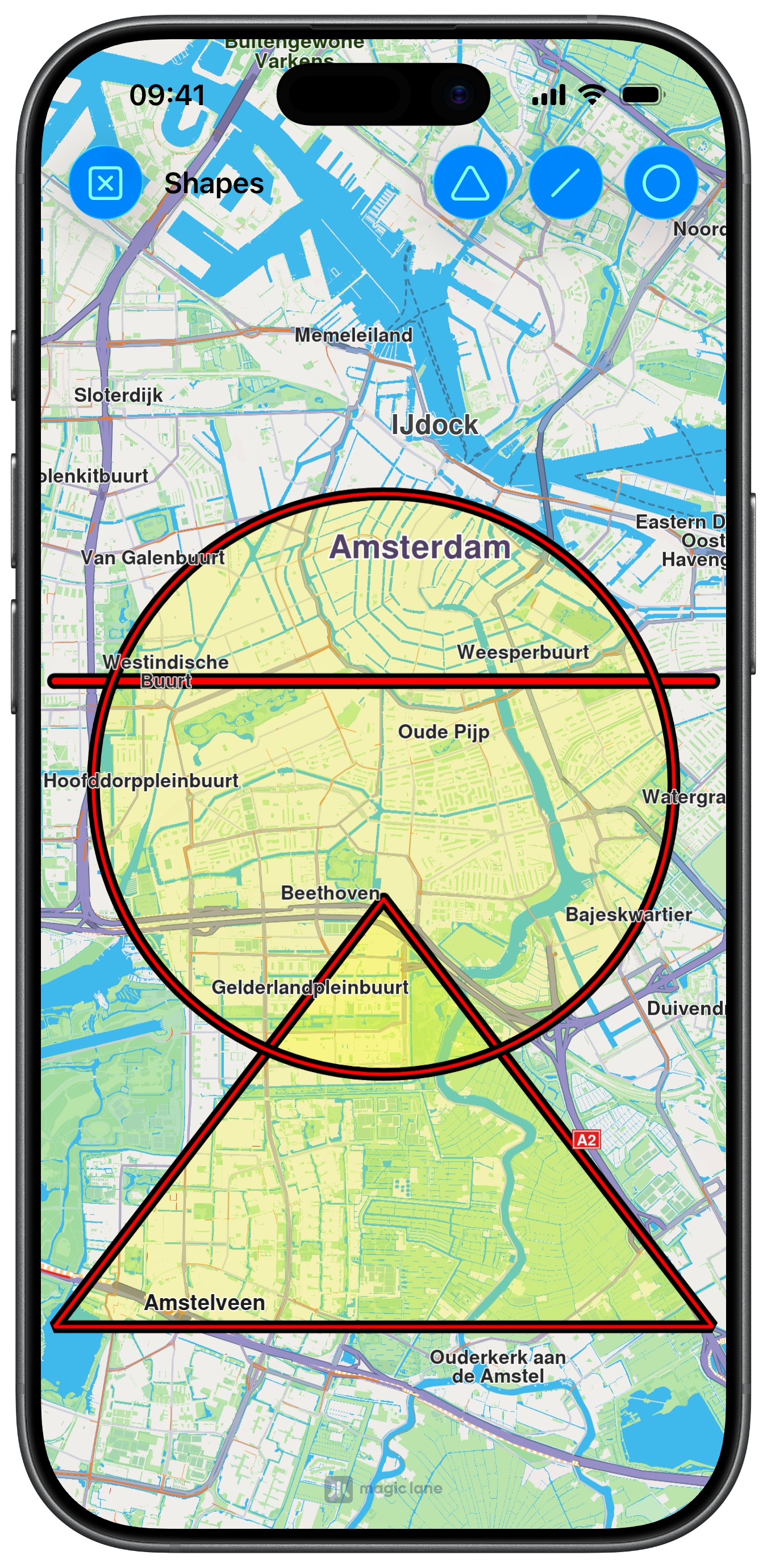
UI and Map Integration
The following code outlines the main view, which displays the map and creates the action buttons:
class ViewController: UIViewController {

    var mapViewController: MapViewController?

    override func viewDidLoad() {
        super.viewDidLoad()
        // Do any additional setup after loading the view.

        if let navigationController = self.navigationController {

            let appearance = navigationController.navigationBar.standardAppearance

            navigationController.navigationBar.scrollEdgeAppearance = appearance
        }

        self.title = "Shapes"

        self.createMapView()

        self.mapViewController!.startRender()
        self.mapViewController!.setEdgeAreaInsets(self.areaEdge(margin: 30))
        self.mapViewController!.hideCompass()

        self.addShapesButton()
    }

    // MARK: - Map View

    func createMapView() {

        self.mapViewController = MapViewController.init()
        self.mapViewController!.view.backgroundColor = UIColor.systemBackground

        self.addChild(self.mapViewController!)
        self.view.addSubview(self.mapViewController!.view)
        self.mapViewController!.didMove(toParent: self)

        self.mapViewController!.view.translatesAutoresizingMaskIntoConstraints = false
        NSLayoutConstraint.activate([
            self.mapViewController!.view.topAnchor.constraint(equalTo: self.view.topAnchor, constant: 0),
            self.mapViewController!.view.leadingAnchor.constraint(equalTo: self.view.leadingAnchor, constant: 0),
            self.mapViewController!.view.bottomAnchor.constraint(equalTo: self.view.bottomAnchor, constant: -0),
            self.mapViewController!.view.trailingAnchor.constraint(equalTo: self.view.trailingAnchor, constant: -0)
        ])
    }

    // MARK: - Shapes

    func addShapesButton() {

        var image = UIImage.init(systemName: "circle")
        let barButton1 = UIBarButtonItem.init(image: image, style: .done, target: self, action: #selector(toggleCircle(_:)))
        barButton1.tag = 1

        image = UIImage.init(systemName: "line.diagonal")
        let barButton2 = UIBarButtonItem.init(image: image, style: .done, target: self, action: #selector(togglePolylines(_:)))
        barButton2.tag = 2

        image = UIImage.init(systemName: "triangle")
        let barButton3 = UIBarButtonItem.init(image: image, style: .done, target: self, action: #selector(togglePolygon(_:)))
        barButton3.tag = 3

        image = UIImage.init(systemName: "clear")
        let barButton = UIBarButtonItem.init(image: image, style: .done, target: self, action: #selector(clearAll))

        self.navigationItem.rightBarButtonItems = [barButton1, barButton2, barButton3]
        self.navigationItem.leftBarButtonItem = barButton
    }
Drawing the Shapes and handling Marker Collections
The following code implements the methods to draw the shapes, by creating a MarkerCollectionObject for each one, and the methods for general Marker handling:
@objc func toggleCircle(_ barButton: UIBarButtonItem) {
    let name = "My Circle"
    if let marker = self.markerAvailable(name: name) {
        self.mapViewController!.removeMarker(marker)
    } else {
        let coordinates = CoordinatesObject.coordinates(withLatitude: 52.350934, longitude: 4.886882)
        let marker = MarkerObject.init(circleCenter: coordinates, radius: 3000)
        let markerCollection = MarkerCollectionObject.init(name: name, type: .polygon)
        markerCollection.addMarker(marker)
        markerCollection.setInnerSize(0.6)
        markerCollection.setInnerColor(UIColor.red)
        markerCollection.setOuterSize(1.2)
        markerCollection.setOuterColor(UIColor.black)
        markerCollection.setFill(UIColor.yellow.withAlphaComponent(0.25))
        self.mapViewController!.addMarker(markerCollection, animationDuration: 100)
    }
}

@objc func togglePolylines(_ barButton: UIBarButtonItem) {
    let name = "My Polyline"
    if let marker = self.markerAvailable(name: name) {
        self.mapViewController!.removeMarker(marker)
    } else {
        let coordinates = self.generatePolylinesCoordinates()
        let marker = MarkerObject.init(coordinates: coordinates)
        let markerCollection = MarkerCollectionObject.init(name: name, type: .polyline)
        markerCollection.addMarker(marker)
        markerCollection.setInnerSize(1.0)
        markerCollection.setInnerColor(UIColor.red)
        markerCollection.setOuterSize(1.2)
        markerCollection.setOuterColor(UIColor.black)
        self.mapViewController!.addMarker(markerCollection, animationDuration: 100)
    }
}

@objc func togglePolygon(_ barButton: UIBarButtonItem) {
    let name = "My Polygon"
    if let marker = self.markerAvailable(name: name) {
        self.mapViewController!.removeMarker(marker)
    } else {
        let coordinates = self.generatePolygonCoordinates()
        let marker = MarkerObject.init(coordinates: coordinates)
        let markerCollection = MarkerCollectionObject.init(name: name, type: .polygon)
        markerCollection.addMarker(marker)
        markerCollection.setInnerSize(0.6)
        markerCollection.setInnerColor(UIColor.red)
        markerCollection.setOuterSize(1.2)
        markerCollection.setOuterColor(UIColor.black)
        markerCollection.setFill(UIColor.yellow.withAlphaComponent(0.25))
        self.mapViewController!.addMarker(markerCollection, animationDuration: 100)
    }
}

@objc func clearAll() {
    let allMarkers = self.mapViewController!.getAvailableMarkers()
    for marker in allMarkers {
        self.mapViewController!.removeMarker(marker)
    }
}

// MARK: - Utils

func generatePolylinesCoordinates() -> [CoordinatesObject] {
    var coordinates: [CoordinatesObject] = []
    coordinates.append(CoordinatesObject.coordinates(withLatitude: 52.360495, longitude: 4.936882))
    coordinates.append(CoordinatesObject.coordinates(withLatitude: 52.360495, longitude: 4.836882))
    return coordinates
}

func generatePolygonCoordinates() -> [CoordinatesObject] {
    var coordinates: [CoordinatesObject] = []
    coordinates.append(CoordinatesObject.coordinates(withLatitude: 52.340234, longitude: 4.886882))
    coordinates.append(CoordinatesObject.coordinates(withLatitude: 52.300495, longitude: 4.936882))
    coordinates.append(CoordinatesObject.coordinates(withLatitude: 52.300495, longitude: 4.836882))
    return coordinates
}

func markerAvailable(name: String) -> MarkerCollectionObject? {
    let allMarkers = self.mapViewController!.getAvailableMarkers()
    for marker in allMarkers {
        let markerName = marker.getName()
        if markerName == name {
            return marker
        }
    }
    return nil
}
This example demonstrates how to use GEMKit in a SwiftUI application to draw Shapes on the map using Markers.
Check the full implementation on GitHub.
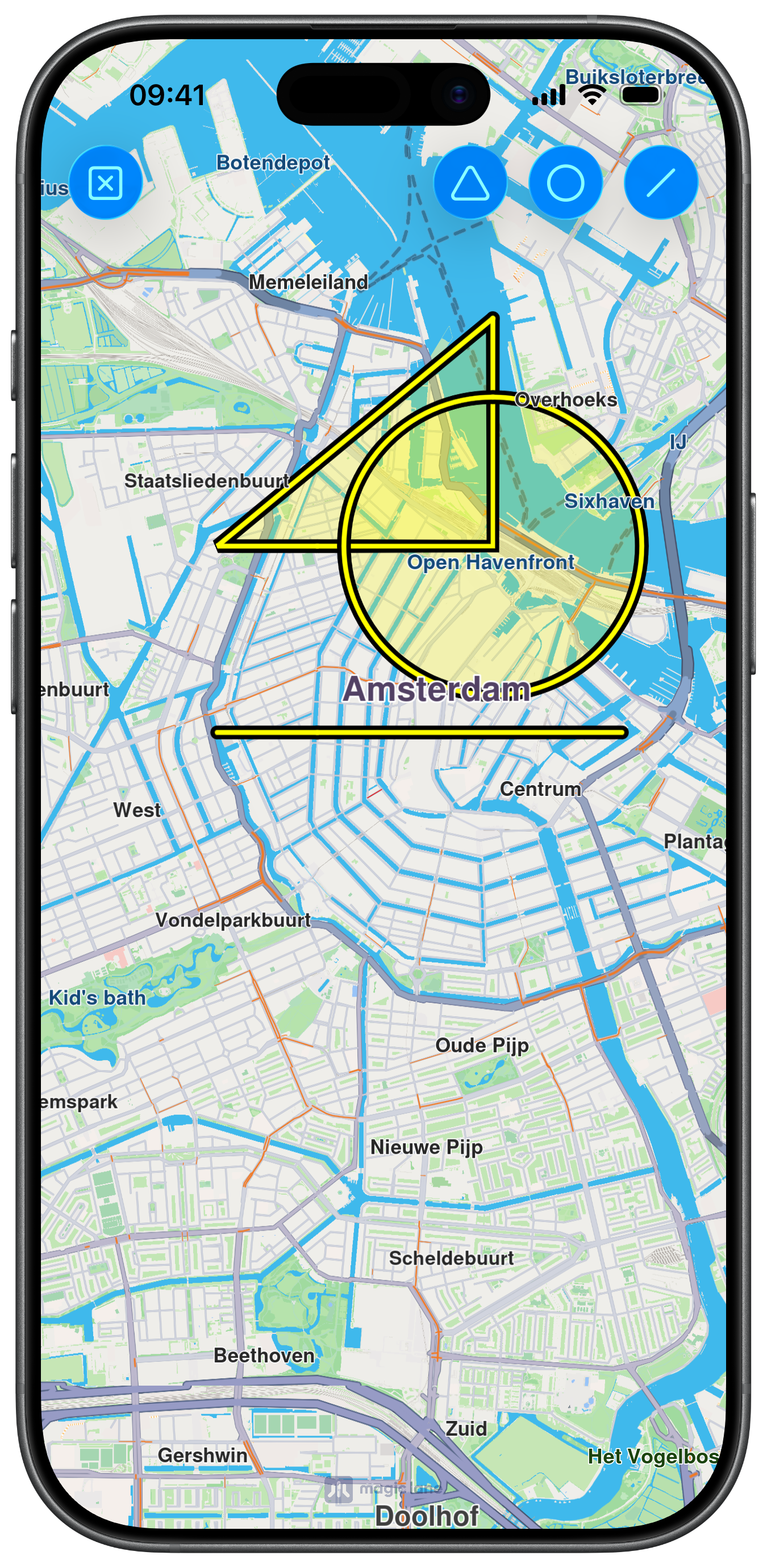
UI and Map Integration with Markers Content
The following code outlines the main view, which displays the map, prepares the MarkerCollectionObject arrays and links those markers to the MapBase content building closure:
enum ShapeType: Int { case triangle, circle, line }

struct ContentView: View {

    @State var collType1: [MarkerCollectionObject] = []
    @State var collType2: [MarkerCollectionObject] = []
    @State var collType3: [MarkerCollectionObject] = []

    var body: some View {
        MapReader { proxy in
            ZStack {
                MapBase(initialPosition: .amsterdam, initialZoomLevel: 56,
                        content: {
                    MapMarker(title: "A", collections: collType1)
                    MapMarker(title: "B", collections: collType2)
                    MapMarker(title: "C", collections: collType3)
                })
                .mapCompass(false)
                .toolbar {
                    ToolbarItem(placement: .topBarTrailing) {
                        Button("", systemImage: "triangle") {

                            refreshMarkerCollections(proxy, .triangle)
                        }
                        .buttonStyle(.borderedProminent)
                    }
                    ToolbarItem(placement: .topBarTrailing) {
                        Button("", systemImage: "circle") {

                            refreshMarkerCollections(proxy, .circle)
                        }
                        .buttonStyle(.borderedProminent)
                    }
                    ToolbarItem(placement: .topBarTrailing) {
                        Button("", systemImage: "line.diagonal") {

                            refreshMarkerCollections(proxy, .line)
                        }
                        .buttonStyle(.borderedProminent)
                    }
                    ToolbarItem(placement: .topBarLeading) {
                        Button("", systemImage: "x.square") {

                            removeAllMarkers(proxy)
                        }
                        .buttonStyle(.borderedProminent)
                    }
                }
                .ignoresSafeArea()
            }
        }
    }
Drawing the Shapes
The following code implements the methods to draw the shapes by adding markers to the previously created collections:
func refreshMarkerCollections(_ proxy: MapProxy, _ type: ShapeType) {
    if type == .triangle {

        if !collType1.isEmpty {
            collType1.removeAll()
            return
        }

        let markerCollection = MarkerCollectionObject.init(name: "My Triangle", type: .polygon)
        markerCollection.setInnerSize(0.8)
        markerCollection.setInnerColor(UIColor.yellow)
        markerCollection.setOuterSize(1.2)
        markerCollection.setOuterColor(UIColor.black)
        markerCollection.setFill(UIColor.yellow.withAlphaComponent(0.25))
        markerCollection.addMarker(
            MarkerObject.init(coordinates: [
                .coordinates(withLatitude: 52.390934, longitude: 4.896882),
                .coordinates(withLatitude: 52.379934, longitude: 4.875082),
                .coordinates(withLatitude: 52.379934, longitude: 4.896882)
            ])
        )
        collType1.append(markerCollection)

    } else if type == .circle {

        if !collType2.isEmpty {
            collType2.removeAll()
            return
        }
        let markerCollection = MarkerCollectionObject.init(name: "My Circle", type: .polygon)
        markerCollection.setInnerSize(0.8)
        markerCollection.setInnerColor(UIColor.yellow)
        markerCollection.setOuterSize(1.2)
        markerCollection.setOuterColor(UIColor.black)
        markerCollection.setFill(UIColor.yellow.withAlphaComponent(0.25))
        markerCollection.addMarker(
            MarkerObject.init(
                circleCenter:
                    .coordinates(withLatitude: 52.379934, longitude: 4.896882), radius: 800)
        )
        collType2.append(markerCollection)

    } else if type == .line {

        if !collType3.isEmpty {
            collType3.removeAll()
            return
        }
        let markerCollection = MarkerCollectionObject.init(name: "My Line", type: .polyline)
        markerCollection.setInnerSize(0.8)
        markerCollection.setInnerColor(UIColor.yellow)
        markerCollection.setOuterSize(1.2)
        markerCollection.setOuterColor(UIColor.black)
        markerCollection.setFill(UIColor.yellow.withAlphaComponent(0.25))
        markerCollection.addMarker(
            MarkerObject.init(coordinates: [
                .coordinates(withLatitude: 52.370934, longitude: 4.907082),
                .coordinates(withLatitude: 52.370934, longitude: 4.875082)
            ])
        )
        collType3.append(markerCollection)
    }
}

func removeAllMarkers(_ proxy: MapProxy) {

    collType1.removeAll()
    collType2.removeAll()
    collType3.removeAll()
}