# Shapes
Last updated:
October 18, 2026
\| 5 minutes read
* UIKit
* SwiftUI
This example demonstrates how to use **GEMKit** in a UIKit application to draw Shapes on the map using `Markers`.
Check the full implementation on [GitHub](https://github.com/magiclane/magiclane-maps-sdk-examples-for-ios/tree/main/UIKit/3DScene/Shapes).
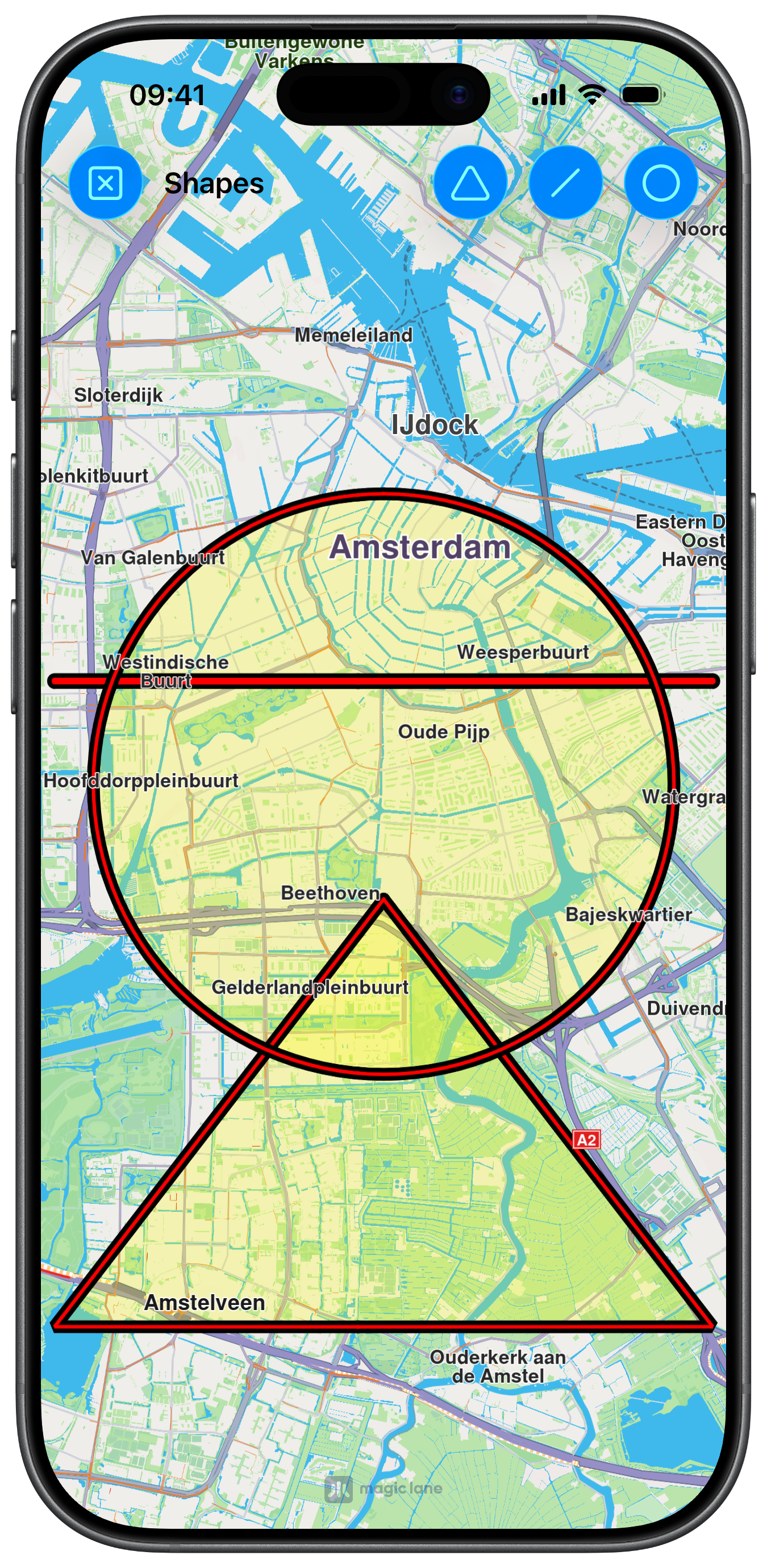
**Shapes drawn on Map**
### UI and Map Integration[](#ui-and-map-integration "Direct link to UI and Map Integration")
The following code outlines the main view, which displays the map and creates the action buttons:
ViewController.swift[View on GitHub](https://github.com/magiclane/magiclane-maps-sdk-examples-for-ios/tree/main/UIKit/3DScene/Shapes/Shapes/ViewController.swift)
```swift
class ViewController: UIViewController {
var mapViewController: MapViewController?
override func viewDidLoad() {
super.viewDidLoad()
// Do any additional setup after loading the view.
if let navigationController = self.navigationController {
let appearance = navigationController.navigationBar.standardAppearance
navigationController.navigationBar.scrollEdgeAppearance = appearance
}
self.title = "Shapes"
self.createMapView()
self.mapViewController!.startRender()
self.mapViewController!.setEdgeAreaInsets(self.areaEdge(margin: 30))
self.mapViewController!.hideCompass()
self.addShapesButton()
}
// MARK: - Map View
func createMapView() {
self.mapViewController = MapViewController.init()
self.mapViewController!.view.backgroundColor = UIColor.systemBackground
self.addChild(self.mapViewController!)
self.view.addSubview(self.mapViewController!.view)
self.mapViewController!.didMove(toParent: self)
self.mapViewController!.view.translatesAutoresizingMaskIntoConstraints = false
NSLayoutConstraint.activate([
self.mapViewController!.view.topAnchor.constraint(equalTo: self.view.topAnchor, constant: 0),
self.mapViewController!.view.leadingAnchor.constraint(equalTo: self.view.leadingAnchor, constant: 0),
self.mapViewController!.view.bottomAnchor.constraint(equalTo: self.view.bottomAnchor, constant: -0),
self.mapViewController!.view.trailingAnchor.constraint(equalTo: self.view.trailingAnchor, constant: -0)
])
}
// MARK: - Shapes
func addShapesButton() {
var image = UIImage.init(systemName: "circle")
let barButton1 = UIBarButtonItem.init(image: image, style: .done, target: self, action: #selector(toggleCircle(_:)))
barButton1.tag = 1
image = UIImage.init(systemName: "line.diagonal")
let barButton2 = UIBarButtonItem.init(image: image, style: .done, target: self, action: #selector(togglePolylines(_:)))
barButton2.tag = 2
image = UIImage.init(systemName: "triangle")
let barButton3 = UIBarButtonItem.init(image: image, style: .done, target: self, action: #selector(togglePolygon(_:)))
barButton3.tag = 3
image = UIImage.init(systemName: "clear")
let barButton = UIBarButtonItem.init(image: image, style: .done, target: self, action: #selector(clearAll))
self.navigationItem.rightBarButtonItems = [barButton1, barButton2, barButton3]
self.navigationItem.leftBarButtonItem = barButton
}
```
### Drawing the Shapes and handling Marker Collections[](#drawing-the-shapes-and-handling-marker-collections "Direct link to Drawing the Shapes and handling Marker Collections")
The following code implements the methods to draw the shapes, by creating a `MarkerCollectionObject` for each one, and the methods for general Marker handling:
ViewController.swift[View on GitHub](https://github.com/magiclane/magiclane-maps-sdk-examples-for-ios/tree/main/UIKit/3DScene/Shapes/Shapes/ViewController.swift)
```swift
@objc func toggleCircle(_ barButton: UIBarButtonItem) {
let name = "My Circle"
if let marker = self.markerAvailable(name: name) {
self.mapViewController!.removeMarker(marker)
} else {
let coordinates = CoordinatesObject.coordinates(withLatitude: 52.350934, longitude: 4.886882)
let marker = MarkerObject.init(circleCenter: coordinates, radius: 3000)
let markerCollection = MarkerCollectionObject.init(name: name, type: .polygon)
markerCollection.addMarker(marker)
markerCollection.setInnerSize(0.6)
markerCollection.setInnerColor(UIColor.red)
markerCollection.setOuterSize(1.2)
markerCollection.setOuterColor(UIColor.black)
markerCollection.setFill(UIColor.yellow.withAlphaComponent(0.25))
self.mapViewController!.addMarker(markerCollection, animationDuration: 100)
}
}
@objc func togglePolylines(_ barButton: UIBarButtonItem) {
let name = "My Polyline"
if let marker = self.markerAvailable(name: name) {
self.mapViewController!.removeMarker(marker)
} else {
let coordinates = self.generatePolylinesCoordinates()
let marker = MarkerObject.init(coordinates: coordinates)
let markerCollection = MarkerCollectionObject.init(name: name, type: .polyline)
markerCollection.addMarker(marker)
markerCollection.setInnerSize(1.0)
markerCollection.setInnerColor(UIColor.red)
markerCollection.setOuterSize(1.2)
markerCollection.setOuterColor(UIColor.black)
self.mapViewController!.addMarker(markerCollection, animationDuration: 100)
}
}
@objc func togglePolygon(_ barButton: UIBarButtonItem) {
let name = "My Polygon"
if let marker = self.markerAvailable(name: name) {
self.mapViewController!.removeMarker(marker)
} else {
let coordinates = self.generatePolygonCoordinates()
let marker = MarkerObject.init(coordinates: coordinates)
let markerCollection = MarkerCollectionObject.init(name: name, type: .polygon)
markerCollection.addMarker(marker)
markerCollection.setInnerSize(0.6)
markerCollection.setInnerColor(UIColor.red)
markerCollection.setOuterSize(1.2)
markerCollection.setOuterColor(UIColor.black)
markerCollection.setFill(UIColor.yellow.withAlphaComponent(0.25))
self.mapViewController!.addMarker(markerCollection, animationDuration: 100)
}
}
@objc func clearAll() {
let allMarkers = self.mapViewController!.getAvailableMarkers()
for marker in allMarkers {
self.mapViewController!.removeMarker(marker)
}
}
// MARK: - Utils
func generatePolylinesCoordinates() -> [CoordinatesObject] {
var coordinates: [CoordinatesObject] = []
coordinates.append(CoordinatesObject.coordinates(withLatitude: 52.360495, longitude: 4.936882))
coordinates.append(CoordinatesObject.coordinates(withLatitude: 52.360495, longitude: 4.836882))
return coordinates
}
func generatePolygonCoordinates() -> [CoordinatesObject] {
var coordinates: [CoordinatesObject] = []
coordinates.append(CoordinatesObject.coordinates(withLatitude: 52.340234, longitude: 4.886882))
coordinates.append(CoordinatesObject.coordinates(withLatitude: 52.300495, longitude: 4.936882))
coordinates.append(CoordinatesObject.coordinates(withLatitude: 52.300495, longitude: 4.836882))
return coordinates
}
func markerAvailable(name: String) -> MarkerCollectionObject? {
let allMarkers = self.mapViewController!.getAvailableMarkers()
for marker in allMarkers {
let markerName = marker.getName()
if markerName == name {
return marker
}
}
return nil
}
```
This example demonstrates how to use **GEMKit** in a SwiftUI application to draw Shapes on the map using `Markers`.
Check the full implementation on [GitHub](https://github.com/magiclane/magiclane-maps-sdk-examples-for-ios/tree/main/SwiftUI/3DScene/Shapes).
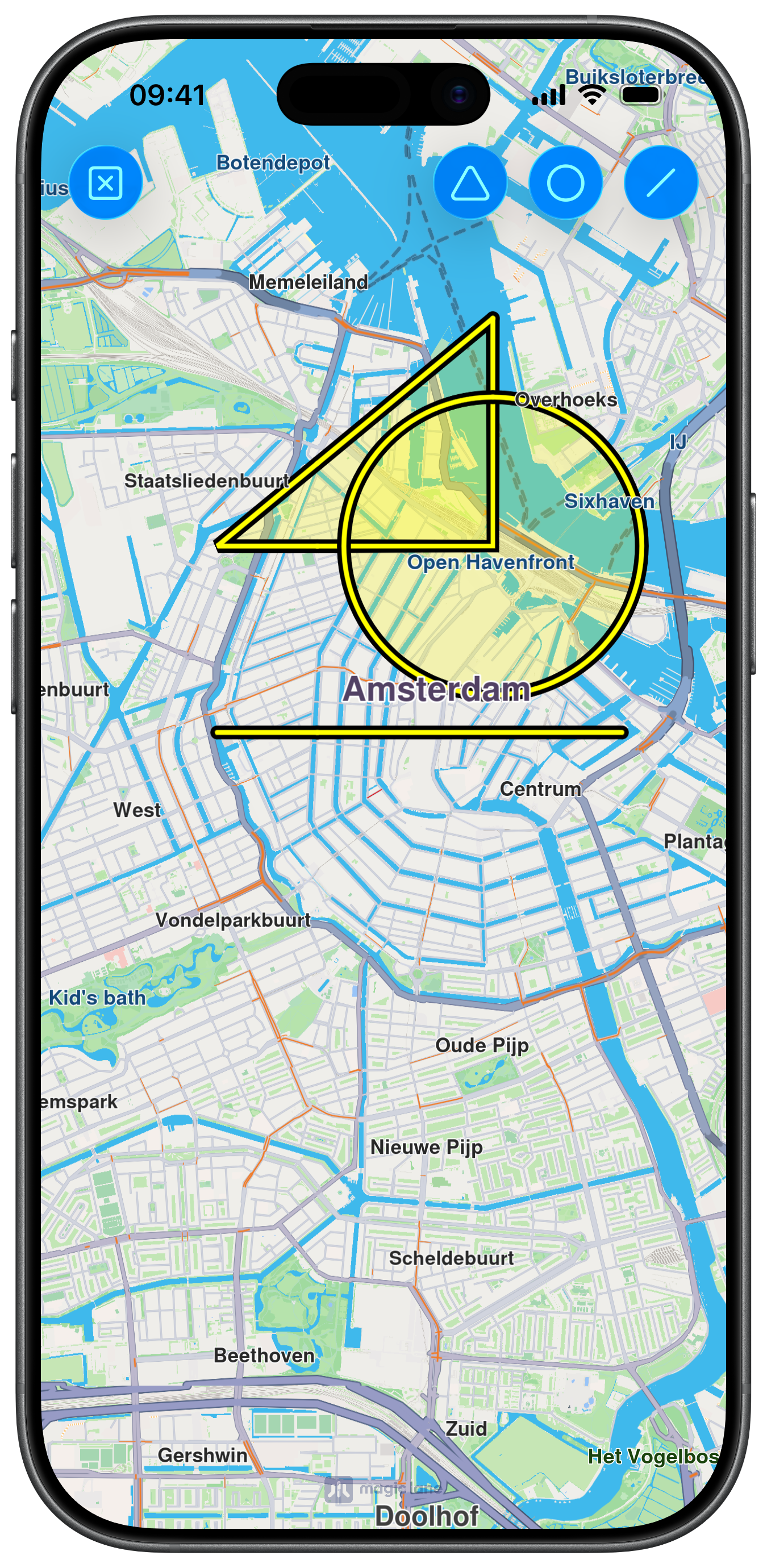
**Shapes drawn on Map**
### UI and Map Integration with Markers Content[](#ui-and-map-integration-with-markers-content "Direct link to UI and Map Integration with Markers Content")
The following code outlines the main view, which displays the map, prepares the `MarkerCollectionObject` arrays and links those markers to the `MapBase` content building closure:
ContentView\.swift[View on GitHub](https://github.com/magiclane/magiclane-maps-sdk-examples-for-ios/tree/main/SwiftUI/3DScene/Shapes/Shapes/ContentView.swift)
```swift
enum ShapeType: Int { case triangle, circle, line }
struct ContentView: View {
@State var collType1: [MarkerCollectionObject] = []
@State var collType2: [MarkerCollectionObject] = []
@State var collType3: [MarkerCollectionObject] = []
var body: some View {
MapReader { proxy in
ZStack {
MapBase(initialPosition: .amsterdam, initialZoomLevel: 56,
content: {
MapMarker(title: "A", collections: collType1)
MapMarker(title: "B", collections: collType2)
MapMarker(title: "C", collections: collType3)
})
.mapCompass(false)
.toolbar {
ToolbarItem(placement: .topBarTrailing) {
Button("", systemImage: "triangle") {
refreshMarkerCollections(proxy, .triangle)
}
.buttonStyle(.borderedProminent)
}
ToolbarItem(placement: .topBarTrailing) {
Button("", systemImage: "circle") {
refreshMarkerCollections(proxy, .circle)
}
.buttonStyle(.borderedProminent)
}
ToolbarItem(placement: .topBarTrailing) {
Button("", systemImage: "line.diagonal") {
refreshMarkerCollections(proxy, .line)
}
.buttonStyle(.borderedProminent)
}
ToolbarItem(placement: .topBarLeading) {
Button("", systemImage: "x.square") {
removeAllMarkers(proxy)
}
.buttonStyle(.borderedProminent)
}
}
.ignoresSafeArea()
}
}
}
```
### Drawing the Shapes[](#drawing-the-shapes "Direct link to Drawing the Shapes")
The following code implements the methods to draw the shapes by adding markers to the previously created collections:
ContentView\.swift[View on GitHub](https://github.com/magiclane/magiclane-maps-sdk-examples-for-ios/tree/main/SwiftUI/3DScene/Shapes/Shapes/ContentView.swift)
```swift
func refreshMarkerCollections(_ proxy: MapProxy, _ type: ShapeType) {
if type == .triangle {
if !collType1.isEmpty {
collType1.removeAll()
return
}
let markerCollection = MarkerCollectionObject.init(name: "My Triangle", type: .polygon)
markerCollection.setInnerSize(0.8)
markerCollection.setInnerColor(UIColor.yellow)
markerCollection.setOuterSize(1.2)
markerCollection.setOuterColor(UIColor.black)
markerCollection.setFill(UIColor.yellow.withAlphaComponent(0.25))
markerCollection.addMarker(
MarkerObject.init(coordinates: [
.coordinates(withLatitude: 52.390934, longitude: 4.896882),
.coordinates(withLatitude: 52.379934, longitude: 4.875082),
.coordinates(withLatitude: 52.379934, longitude: 4.896882)
])
)
collType1.append(markerCollection)
} else if type == .circle {
if !collType2.isEmpty {
collType2.removeAll()
return
}
let markerCollection = MarkerCollectionObject.init(name: "My Circle", type: .polygon)
markerCollection.setInnerSize(0.8)
markerCollection.setInnerColor(UIColor.yellow)
markerCollection.setOuterSize(1.2)
markerCollection.setOuterColor(UIColor.black)
markerCollection.setFill(UIColor.yellow.withAlphaComponent(0.25))
markerCollection.addMarker(
MarkerObject.init(
circleCenter:
.coordinates(withLatitude: 52.379934, longitude: 4.896882), radius: 800)
)
collType2.append(markerCollection)
} else if type == .line {
if !collType3.isEmpty {
collType3.removeAll()
return
}
let markerCollection = MarkerCollectionObject.init(name: "My Line", type: .polyline)
markerCollection.setInnerSize(0.8)
markerCollection.setInnerColor(UIColor.yellow)
markerCollection.setOuterSize(1.2)
markerCollection.setOuterColor(UIColor.black)
markerCollection.setFill(UIColor.yellow.withAlphaComponent(0.25))
markerCollection.addMarker(
MarkerObject.init(coordinates: [
.coordinates(withLatitude: 52.370934, longitude: 4.907082),
.coordinates(withLatitude: 52.370934, longitude: 4.875082)
])
)
collType3.append(markerCollection)
}
}
func removeAllMarkers(_ proxy: MapProxy) {
collType1.removeAll()
collType2.removeAll()
collType3.removeAll()
}
```