Range
- UIKit / SwiftUI
This example demonstrates how to use GEMKit in a UIKit application to display multiple maps simultaneously.
Check the full implementation on GitHub.
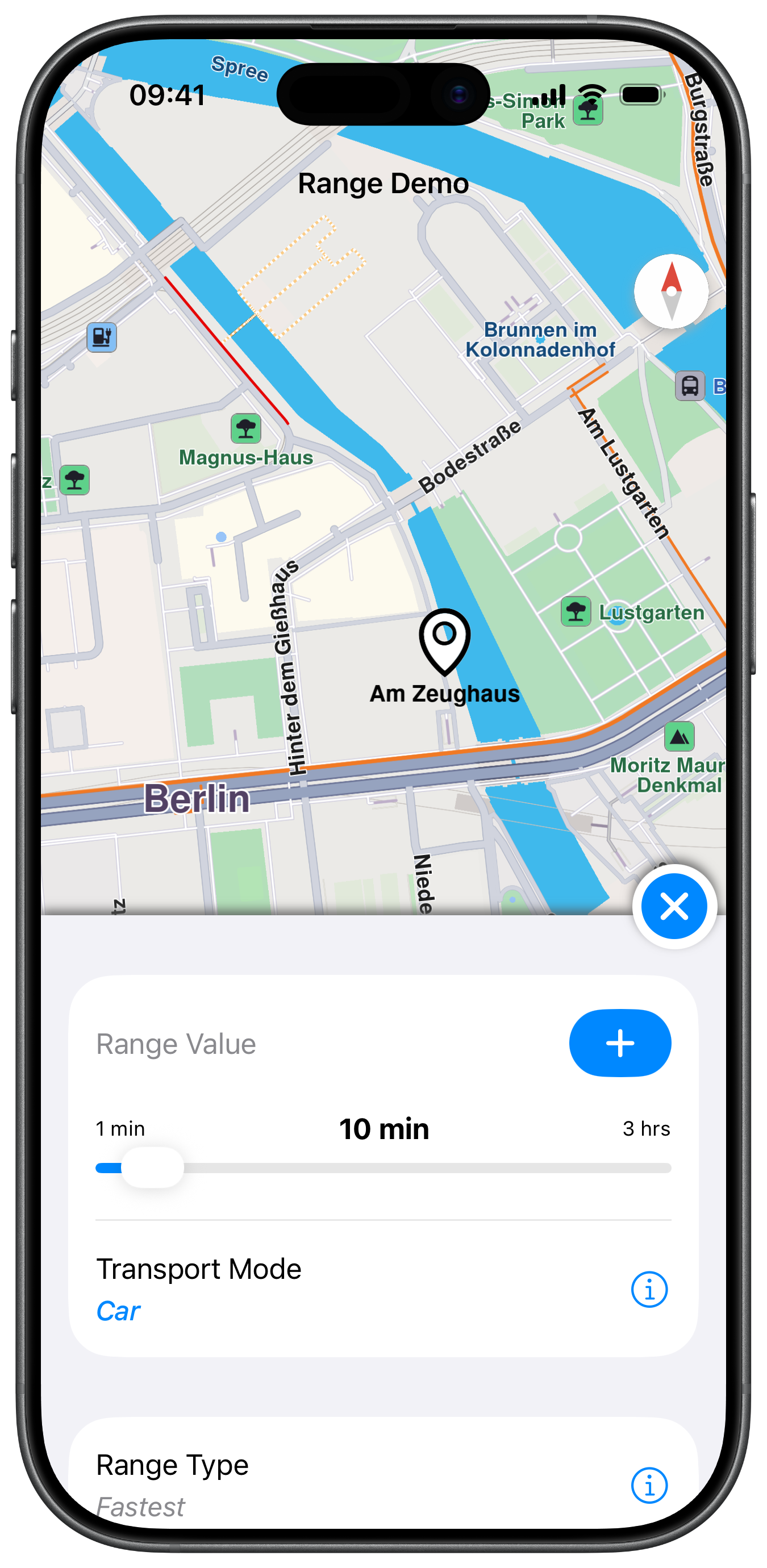
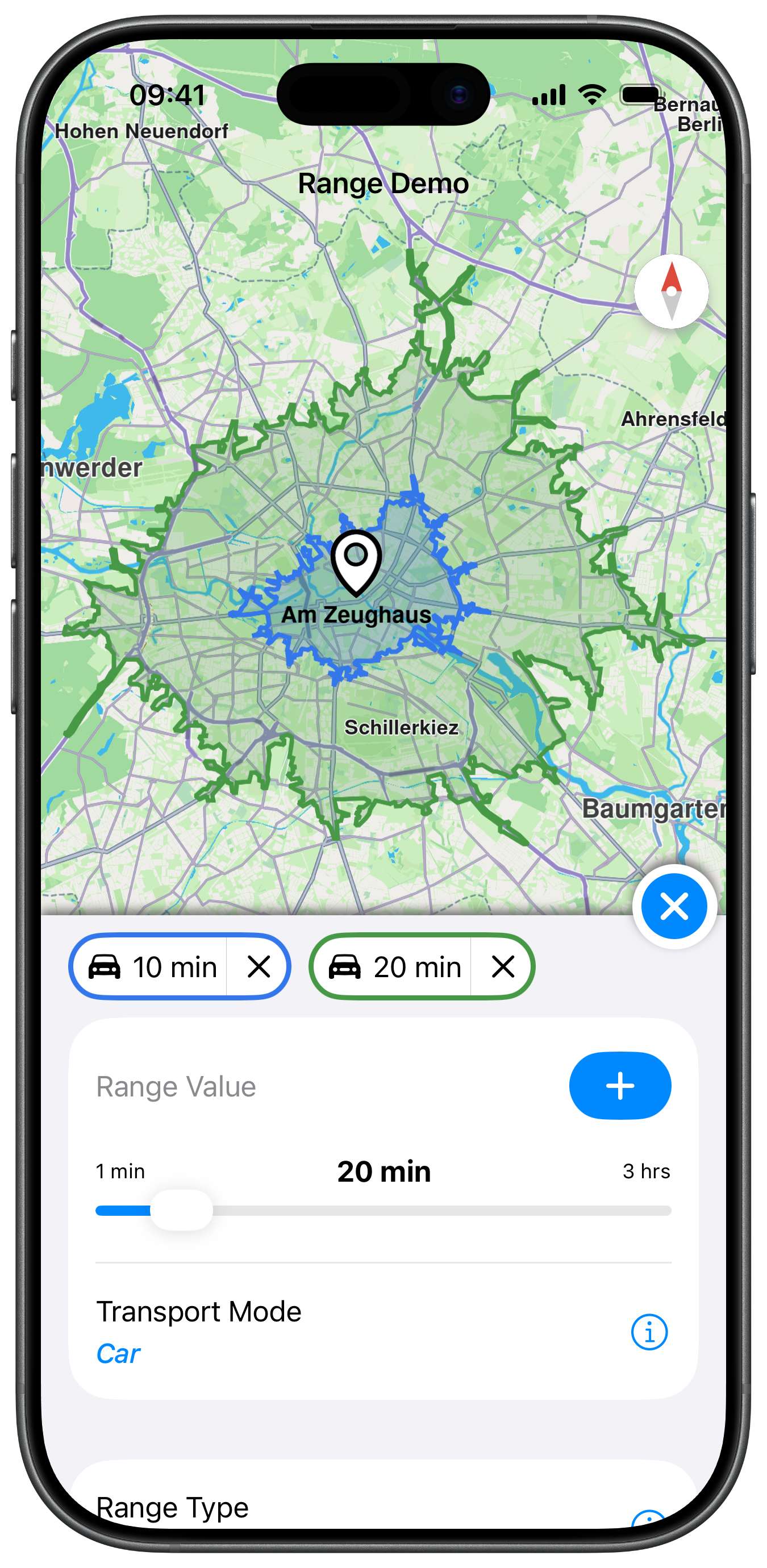
Map Display and Range View Preparation
The following code outlines the main view, which displays the map and prepares the range calculation view:
class ViewController: UIViewController, MapViewControllerDelegate {

    var mapViewController: MapViewController?
    var rangeViewController: RangeViewController?

    var buttonExit: UIButton?

    deinit {

        if let controller = mapViewController {

            controller.destroy()
        }
    }

    override func viewDidLoad() {

        super.viewDidLoad()

        if let navigationController = self.navigationController {

            let appearance = navigationController.navigationBar.standardAppearance

            navigationController.navigationBar.scrollEdgeAppearance = appearance
        }

        self.title = "Range Demo"

        self.createMapView()
    }

    override func viewWillAppear(_ animated: Bool) {

        super.viewWillAppear(animated)

        self.mapViewController!.startRender()
    }

    override func viewDidAppear(_ animated: Bool) {

        super.viewDidAppear(animated)

        let location = CoordinatesObject.coordinates(withLatitude: 52.517477, longitude: 13.397152)  // Berlin

        self.mapViewController!.center(onCoordinates: location, zoomLevel: 70, animationDuration: 0)
    }

    override func viewWillDisappear(_ animated: Bool) {

        super.viewWillDisappear(animated)

        self.mapViewController!.stopRender()
    }

    // MARK: - Map View

    func createMapView() {

        self.mapViewController = MapViewController.init()
        self.mapViewController!.delegate = self
        self.mapViewController!.view.backgroundColor = UIColor.systemBackground

        self.addChild(self.mapViewController!)
        self.view.addSubview(self.mapViewController!.view)
        self.mapViewController!.didMove(toParent: self)

        self.mapViewController!.view.translatesAutoresizingMaskIntoConstraints = false
        NSLayoutConstraint.activate([
            self.mapViewController!.view.topAnchor.constraint(equalTo: self.view.topAnchor, constant: 0),
            self.mapViewController!.view.leadingAnchor.constraint(equalTo: self.view.leadingAnchor, constant: 0),
            self.mapViewController!.view.bottomAnchor.constraint(equalTo: self.view.bottomAnchor, constant: -0),
            self.mapViewController!.view.trailingAnchor.constraint(equalTo: self.view.trailingAnchor, constant: -0)
        ])
    }

    // MARK: - TableView

    func addRangeView() {

        let rangeViewController = RangeViewController.init(mapViewController: self.mapViewController!)
        rangeViewController.view.layer.shadowColor = UIColor.darkGray.cgColor
        rangeViewController.view.layer.shadowOpacity = 0.8

        self.view.addSubview(rangeViewController.view)

        rangeViewController.view.translatesAutoresizingMaskIntoConstraints = false
        NSLayoutConstraint.activate([
            rangeViewController.view!.leadingAnchor.constraint(equalTo: self.view.leadingAnchor),
            rangeViewController.view!.trailingAnchor.constraint(equalTo: self.view.trailingAnchor),
            rangeViewController.view!.bottomAnchor.constraint(equalTo: self.view.bottomAnchor),
            rangeViewController.view!.heightAnchor.constraint(equalToConstant: 360)
        ])

        let size: CGFloat = 50

        let buttonExit = UIButton.init(type: .system)
        buttonExit.setImage(
            UIImage.init(systemName: "xmark.circle.fill", withConfiguration: UIImage.SymbolConfiguration(pointSize: 30, weight: .medium)),
            for: .normal)
        buttonExit.addTarget(self, action: #selector(closeRangeView), for: .touchUpInside)
        buttonExit.layer.shadowColor = UIColor.darkGray.cgColor
        buttonExit.layer.shadowOpacity = 0.8
        buttonExit.backgroundColor = UIColor.systemBackground
        buttonExit.layer.cornerRadius = size / 2

        self.buttonExit = buttonExit

        self.view.addSubview(buttonExit)

        buttonExit.translatesAutoresizingMaskIntoConstraints = false
        NSLayoutConstraint.activate([
            buttonExit.trailingAnchor.constraint(equalTo: self.view.trailingAnchor, constant: -5),
            buttonExit.bottomAnchor.constraint(equalTo: rangeViewController.view!.topAnchor, constant: size - 30),
            buttonExit.widthAnchor.constraint(equalToConstant: size),
            buttonExit.heightAnchor.constraint(equalToConstant: size)
        ])

        self.rangeViewController = rangeViewController
    }
Range View Actions
The following code outlines the main functions to handle the range view actions, such as closing the view and handling the range operations, including adding, deleting, and selecting range routes:
For this example the Range UI that shows the different route settings and range actions is done in a SwiftUI View for the sake of simplicity. You can find the full implementation of the RangeView in the GitHub repository linked above.
    func prepareView() {

        guard let mapViewController = self.mapViewController else { return }

        self.rangeView = RangeView(model: self.model)

        self.rangeView!.didSelectOptionItem = { [weak self] item in

            guard let strongSelf = self else { return }

            guard let rangeView = strongSelf.rangeView else { return }

            let alert = strongSelf.presentOptionsMenu(
                title: item.title,
                options: item.options,
                selectedIndex: item.chosenOption
            ) { newIndex in

                rangeView.updateSettingsOnOption(item: item, newOption: newIndex)
            }

            if let alert = alert {

                strongSelf.present(alert, animated: true, completion: nil)
            }
        }

        self.rangeView!.didSelectTransportMode = { [weak self] in

            guard let strongSelf = self else { return }
            guard let rangeView = strongSelf.rangeView else { return }

            let alert = strongSelf.presentOptionsMenu(
                title: "Transport Mode",
                options: [
                    "Car",
                    "Pedestrian",
                    "Bicycle",
                    "Truck"
                ],
                selectedIndex: strongSelf.model.mode.rawValue
            ) { newIndex in

                if strongSelf.model.mode.rawValue != newIndex {

                    rangeView.updateTransportModeOnOption(newOption: newIndex)
                }
            }

            if let alert = alert {

                strongSelf.present(alert, animated: true, completion: nil)
            }
        }

        self.rangeView!.onRangeAdded = { [weak self] in

            guard let strongSelf = self else { return }

            if strongSelf.model.isRangeValueUsed(value: strongSelf.model.rangeValue, transportMode: strongSelf.model.mode) == false {

                strongSelf.calculateRangeRoutes()
            }
        }

        self.rangeView!.onRangeDeleted = { [weak self] item in

            guard let strongSelf = self else { return }

            mapViewController.removeRoutes(item.routes)

            strongSelf.colors[item.routeColor] = false

            strongSelf.centerOnRoutes(routes: strongSelf.model.getSelectedRangeRoutes())
        }

        self.rangeView!.onRangeSelected = { [weak self] item in

            guard self != nil else { return }

            if item.isSelected {

                // let insets = strongSelf.calculateAreaInset(margin: 10)
                // mapViewController.setEdgeAreaInsets(insets)

                mapViewController.presentRoutes(item.routes, withTraffic: nil, showSummary: false, animationDuration: 200)

                // mapViewController.setDebugEdgeAreaVisible(true)

                if let route = item.routes.first {

                    let renderSettings = MapViewRouteRenderSettings.init()
                    renderSettings.options = Int32(MapViewRouteRenderOption.main.rawValue)
                    renderSettings.fillColor = item.routeColor

                    renderSettings.contourInnerSize = 0.3
                    renderSettings.contourOuterSize = 0.3

                    let preferences = mapViewController.getPreferences()
                    preferences.setRenderSettings(renderSettings, route: route)
                }

            } else {

                mapViewController.removeRoutes(item.routes)
            }
        }

        let controller = UIHostingController.init(rootView: self.rangeView!)

        self.addChild(controller)
        self.view.addSubview(controller.view)
        controller.didMove(toParent: self)

        controller.view.translatesAutoresizingMaskIntoConstraints = false

        let array: [NSLayoutConstraint] = [
            controller.view.topAnchor.constraint(equalTo: self.view.topAnchor, constant: 0),
            controller.view.leadingAnchor.constraint(equalTo: self.view.leadingAnchor, constant: 0),
            controller.view.trailingAnchor.constraint(equalTo: self.view.trailingAnchor, constant: -0),
            controller.view.bottomAnchor.constraint(equalTo: self.view.bottomAnchor, constant: -0)
        ]
        NSLayoutConstraint.activate(array)

        controller.view.backgroundColor = .systemBackground
    }
Range Calculation
The following code demonstrates how to calculate the range based on the selected settings in the range view and present the results on the map:
    // MARK: - Draw Routes

    func calculateRangeRoutes() {

        guard let mapViewController = self.mapViewController else { return }

        guard let rangeLandmark = landmark else { return }

        let value = NSNumber.init(value: model.rangeType == .time ? Int(model.rangeValue) * 60 : Int(model.rangeValue))

        let routePreferences = self.getRoutePreferences(transportMode: model.mode)

        //Range value setting for the route calculation.
        routePreferences.setRouteRanges([value], quality: 100)

        self.navigationContext = NavigationContext.init(preferences: routePreferences)

        self.model.isCalculating = true

        self.navigationContext.calculateRoute(
            withWaypoints: [rangeLandmark],
            completionHandler: { [weak self] (results: [RouteObject]) in

                guard let strongSelf = self else { return }

                strongSelf.model.isCalculating = false

                if !results.isEmpty, let route = results.first {

                    let rangeRouteItem = RangeValueRoutesItem(
                        rangeType: strongSelf.model.rangeType, rangeValue: strongSelf.model.rangeValue, routes: [route],
                        transportMode: strongSelf.model.mode)
                    strongSelf.model.addPresentedRoutes(rangeRouteItem)

                    let color: UIColor =
                        strongSelf.model.presentedRoutes.count > 1
                        ? (strongSelf.colors.someKey(forValue: false) ?? strongSelf.initialColor) : strongSelf.initialColor

                    // let insets = strongSelf.calculateAreaInset(margin: 10)
                    // mapViewController.setEdgeAreaInsets(insets)

                    mapViewController.presentRoutes(results, withTraffic: nil, showSummary: false, animationDuration: 800)

                    // mapViewController.setDebugEdgeAreaVisible(true)

                    rangeRouteItem.routeColor = color
                    strongSelf.colors[color] = true

                    let renderSettings = MapViewRouteRenderSettings.init()
                    renderSettings.options = Int32(MapViewRouteRenderOption.main.rawValue)
                    renderSettings.fillColor = color

                    renderSettings.contourInnerSize = 0.3
                    renderSettings.contourOuterSize = 0.3

                    let preferences = mapViewController.getPreferences()
                    preferences.setRenderSettings(renderSettings, route: route)
                }
            })
    }