# Map Update
Last updated:
October 18, 2026
\| 9 minutes read
* UIKit
This example demonstrates how to use **GEMKit** in a UIKit application to update the maps. There are two scenarios explained here, the manual update that is mandatory when having offline maps downloaded, and the default automatic update when no offline maps are used.
Check the full implementation on [GitHub](https://github.com/magiclane/magiclane-maps-sdk-examples-for-ios/tree/main/UIKit/3DScene/MapUpdate).
## How it Works[](#how-it-works "Direct link to How it Works")
* Checks the map update status and displays the `Prepare Test` button only when the map is up to date to ensure correct resource handling (especially on a fresh install).
* Integrates the `Prepare Test` action to simulate the scenario for an update by adding an old regional map and replacing the default world map resource with an older version.
* Applies the necessary logic to update the maps to the latest version.
* Manages and integrates map update testing functionality seamlessly within the app's UI.
info
The unmodified example requires the update to be applied manually after checking the status. If you want to test the automatic update process, without the use of offline maps, you will need to make a tiny adjustment in the example code. This is explained in the code snippets below.
info
In order for the example to work correctly you need to be connected to the internet so the SDK can check for updates and also retrieve initial missing map resources, as explained above. If the device is not connected to the internet the update check will fail and the button won't be displayed in order to avoid resources incompatibility issues for this test scenario.
danger
The direct resource file manipulation done in this example is a "hack" to simulate the map update process and is only for demonstration purposes, you should NOT manipulate resource files in this way.
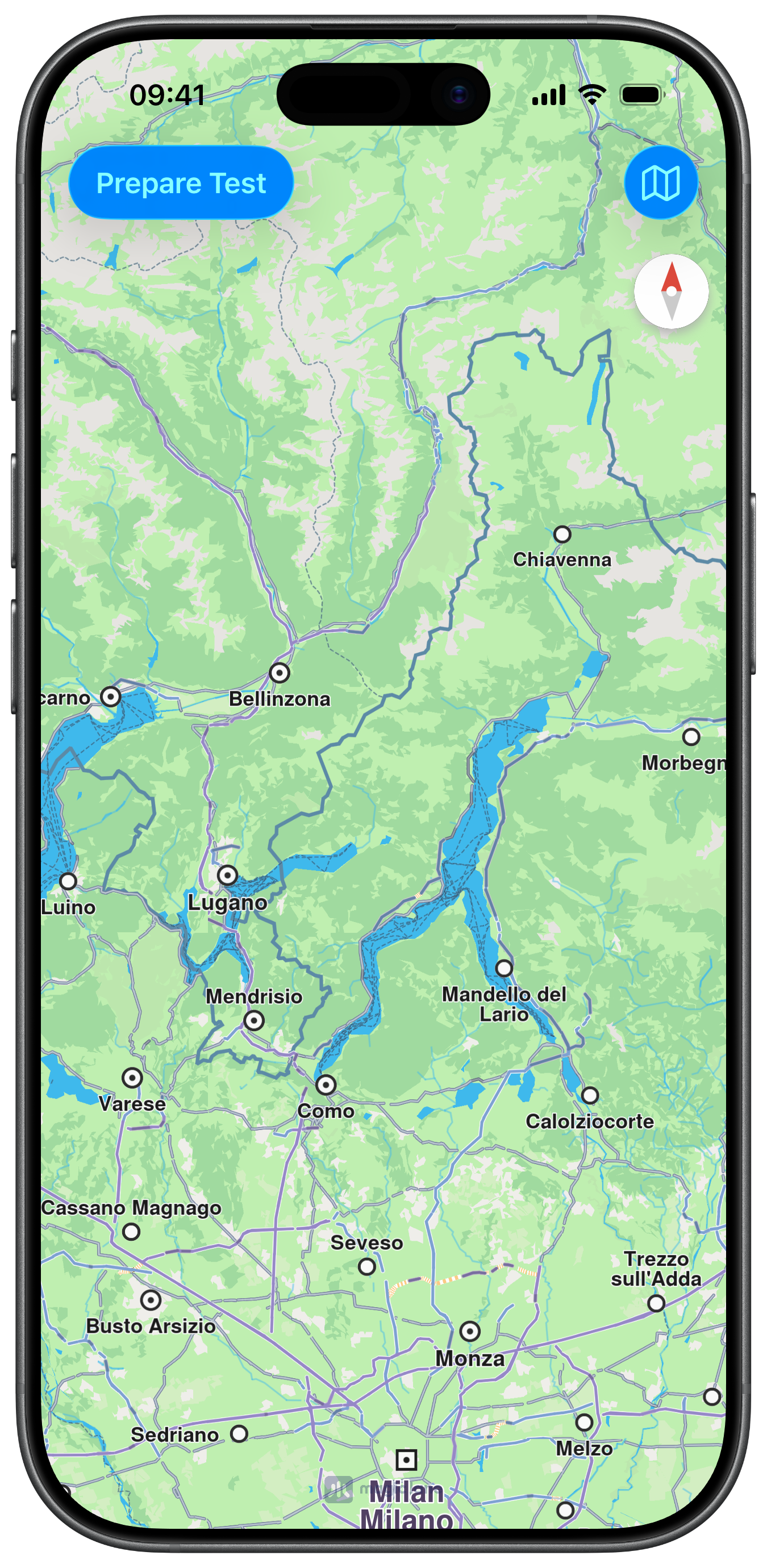
**Initial Screen with Prepare Test and Maps buttons**
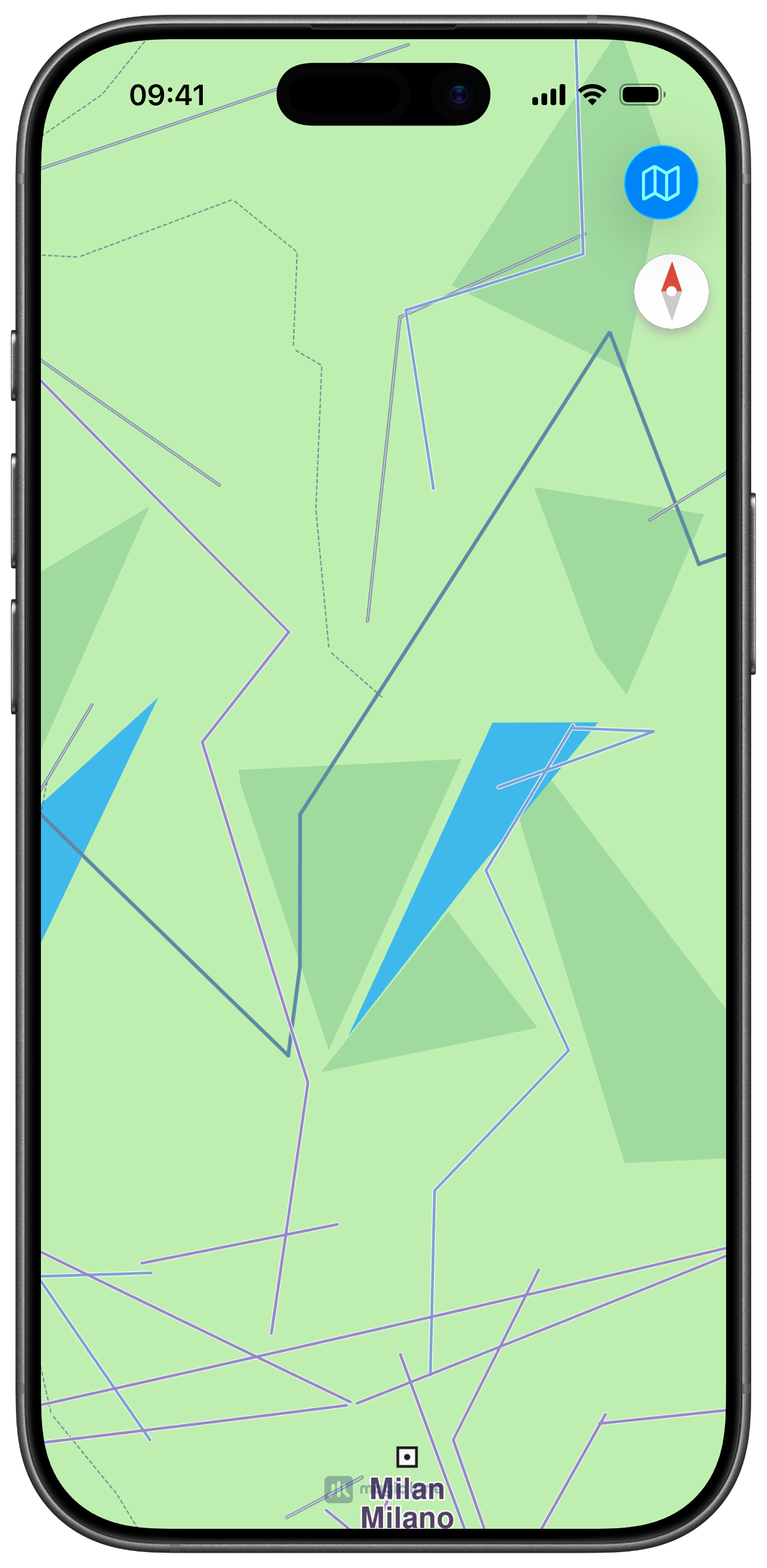
**Old Map with no Data after Resource Replacement**
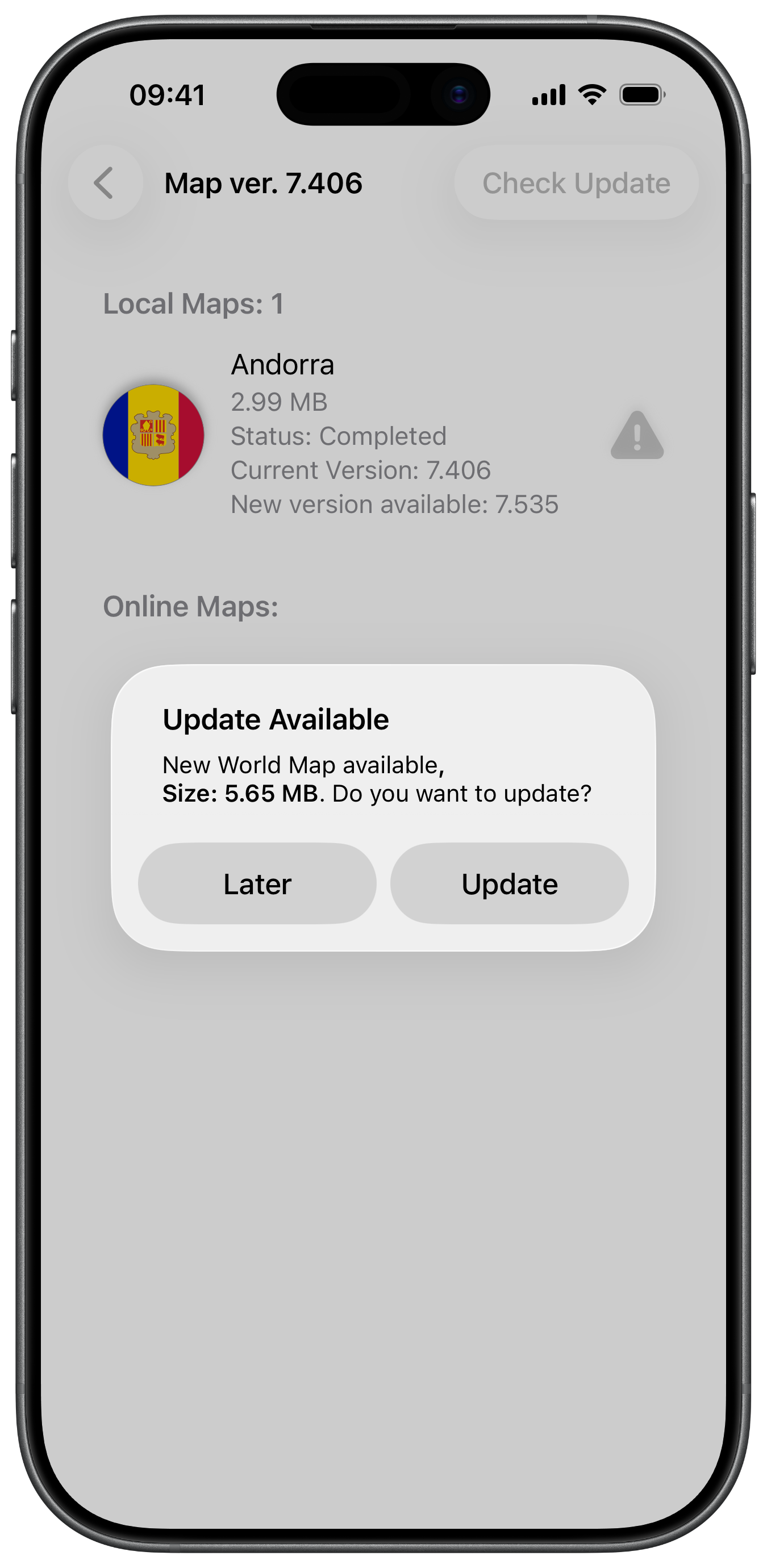
**Update Available for outdated Andorra Map**
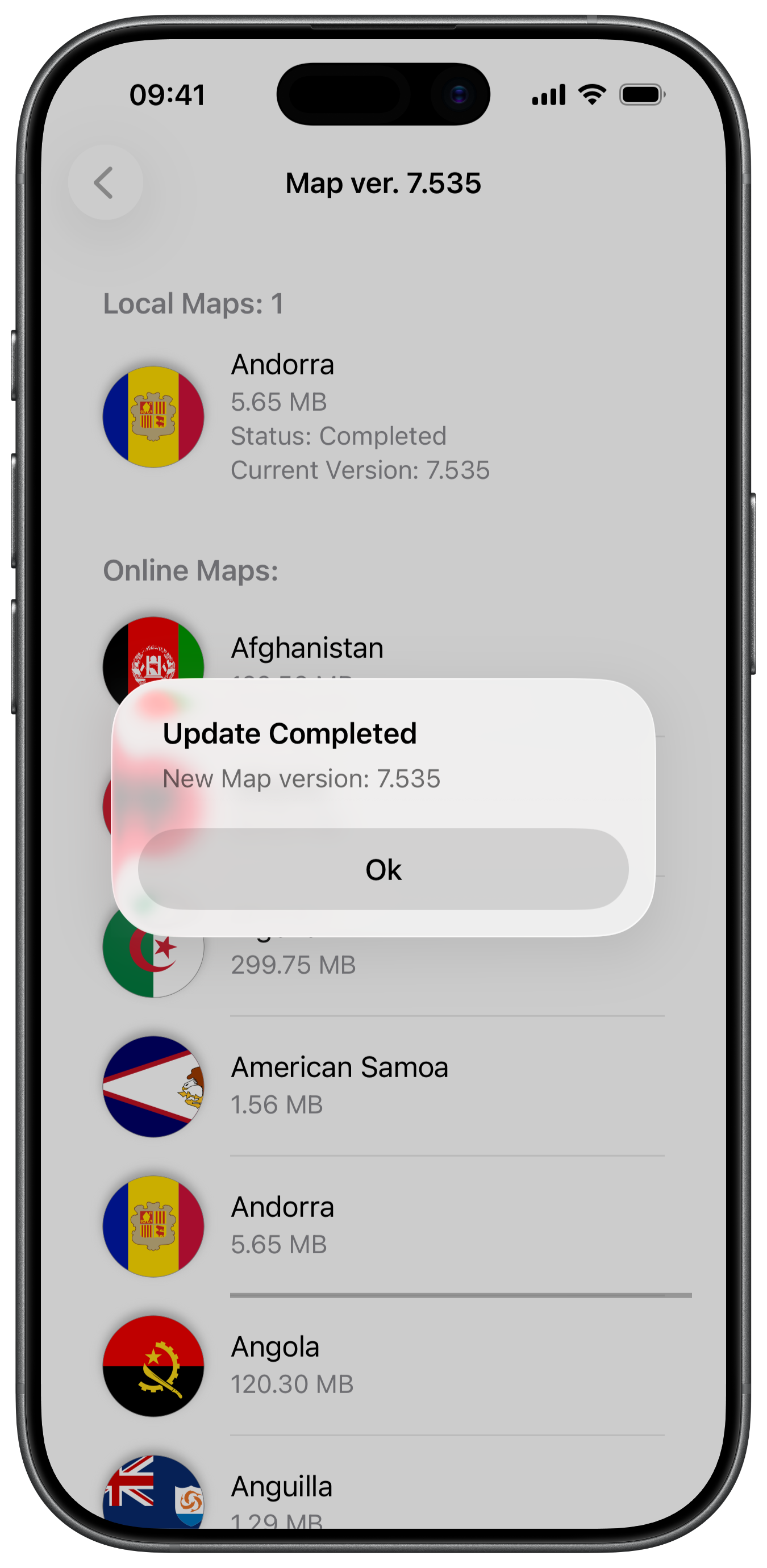
**Up to date Andorra map**
### Map Display and Preparing Testing Scenario[](#map-display-and-preparing-testing-scenario "Direct link to Map Display and Preparing Testing Scenario")
The following code outlines the main view, which displays the map, adds the button that will lead to the maps view, and adds the `Prepare Test` button after checking the map update status:
ViewController.swift[View on GitHub](https://github.com/magiclane/magiclane-maps-sdk-examples-for-ios/tree/main/UIKit/3DScene/MapUpdate/MapUpdate/ViewController.swift)
```swift
class ViewController: UIViewController, GEMSdkDelegate {
var mapViewController: MapViewController?
var mapsContext: MapsContext?
override func viewDidLoad() {
super.viewDidLoad()
// Do any additional setup after loading the view.
if let navigationController = self.navigationController {
let appearance = navigationController.navigationBar.standardAppearance
navigationController.navigationBar.scrollEdgeAppearance = appearance
}
self.mapsContext = MapsContext.init()
self.createMapView()
self.mapViewController!.startRender()
self.addMapsButton()
GEMSdk.shared().delegate = self
}
// MARK: - Map View
func createMapView() {
self.mapViewController = MapViewController.init()
self.mapViewController!.view.backgroundColor = UIColor.systemBackground
self.addChild(self.mapViewController!)
self.view.addSubview(self.mapViewController!.view)
self.mapViewController!.didMove(toParent: self)
self.mapViewController?.view.translatesAutoresizingMaskIntoConstraints = false
NSLayoutConstraint.activate([
self.mapViewController!.view.topAnchor.constraint(equalTo: self.view.topAnchor),
self.mapViewController!.view.leadingAnchor.constraint(equalTo: self.view.leadingAnchor),
self.mapViewController!.view.bottomAnchor.constraint(equalTo: self.view.bottomAnchor),
self.mapViewController!.view.trailingAnchor.constraint(equalTo: self.view.trailingAnchor)
])
}
// MARK: - Map Style
func addMapsButton() {
let image = UIImage.init(systemName: "map")
let barButton = UIBarButtonItem.init(image: image, style: .done, target: self, action: #selector(openMaps))
self.navigationItem.rightBarButtonItem = barButton
}
@objc func openMaps() {
let viewController = MapsViewController.init(context: self.mapsContext!)
self.navigationController?.pushViewController(viewController, animated: true)
}
func addPrepareTestButton() {
let barButton = UIBarButtonItem.init(title: "Prepare Test", style: .done, target: self, action: #selector(prepareTestingScenario))
self.navigationItem.leftBarButtonItem = barButton
}
// MARK: - GEMSdkDelegate
// Control whether the automatic world map update should be applied based on current application status.
func shouldUpdateWorldwideRoadMap(for status: ContentStoreOnlineSupportStatus) -> Bool {
let value = (status == .expiredData || status == .oldData)
print("shouldUpdateWorldwideRoadMap:%@", value ? "YES" : "NO")
if value == false {
self.addPrepareTestButton()
}
return value
}
func updateWorldwideRoadMapFinished(_ success: Bool) {
print("updateWorldwideRoadMapFinished, success:%@", success ? "YES" : "NO")
self.addPrepareTestButton()
}
func onWorldwideRoadMapVersionUpdated() {
print("onWorldwideRoadMapVersionUpdated")
self.addPrepareTestButton()
}
// Show the test preparation button only when map is up to date to ensure correct resource handling.
func onConnectionStatusUpdated(_ connected: Bool) {
print("onConnectionStatusUpdated:%@", connected ? "Connected" : "No connection")
if connected {
self.mapsContext!.checkForUpdate { status in
if status == .upToDate {
self.addPrepareTestButton()
}
}
}
}
```
### Preparing Testing Scenario[](#preparing-testing-scenario "Direct link to Preparing Testing Scenario")
The following code demonstrates the "hack" for this example, called after tapping the `Prepare Test` button, which involves replacing the current map resources with older versions, and then reinitializing the SDK and the map related objects in order to enable the map update flow:
info
TESTING AUTOMATIC UPDATES
If you wish to test the automatic update without the use of offline maps, you should edit the `prepareTestingScenario` method to remove or comment out the code under the `// Offline Map` section, leaving only the `// World Map` snippet. Make sure to delete any existing offline maps manually or by quickly deleting and reinstalling the app.
With this setup, after tapping the `Prepare Test` button, the update will be immediately applied after reinitializing the SDK with the old resource. To control when and if your application can apply the update you must implement and modify the `shouldUpdateWorldwideRoadMap(for status: ContentStoreOnlineSupportStatus)` method from the `GEMSdkDelegate`. This method can be seen in the code above, under the `GEMSdkDelegate` section.
ViewController.swift[View on GitHub](https://github.com/magiclane/magiclane-maps-sdk-examples-for-ios/tree/main/UIKit/3DScene/MapUpdate/MapUpdate/ViewController.swift)
```swift
// MARK: - Utils
// Hack for this example to simulate the need of a map update. After this has been called
// the screen should flash for a moment and a map with old data will be loaded.
@objc func prepareTestingScenario() {
guard let documentsURL = FileManager.default.urls(for: .documentDirectory, in: .userDomainMask).first else { return }
let resourceURL = documentsURL.appendingPathComponent("Data/Res")
let mapsURL = documentsURL.appendingPathComponent("Data/Maps")
let oldOfflineMapURL = Bundle.main.url(forResource: "AndorraOSM_2021Q1", withExtension: "cmap")!
let oldWorldMapURL = Bundle.main.url(forResource: "WM_7_406", withExtension: "map")!
do {
// Offline Map
let mapsFiles = try FileManager.default.contentsOfDirectory(atPath: mapsURL.path())
if let offlineMapFile = mapsFiles.first(where: { $0.hasPrefix("AndorraOSM") }) {
try FileManager.default.removeItem(at: mapsURL.appendingPathComponent(offlineMapFile))
}
if let data = try? Data(contentsOf: oldOfflineMapURL) {
try data.write(to: mapsURL.appending(component: oldOfflineMapURL.lastPathComponent))
}
// Comment out the above code under // Offline Map if you want to test the automatic update process without the use of offline maps,
// but make sure to delete the existing offline maps manually or by reinstalling the app.
// World Map
let resourceFiles = try FileManager.default.contentsOfDirectory(atPath: resourceURL.path())
if let resourceFile = resourceFiles.first(where: {
let pref = $0.hasPrefix("WM_")
return pref
}) {
try FileManager.default.removeItem(at: resourceURL.appendingPathComponent(resourceFile))
}
if let data = try? Data(contentsOf: oldWorldMapURL) {
try data.write(to: resourceURL.appending(component: oldWorldMapURL.lastPathComponent))
}
self.reinitSDKAndCreateMap()
} catch {
print(error.localizedDescription)
}
}
// Clean the map and reinitialize SDK to make sure the map update process is triggered. ONLY FOR DEMONSTRATION PURPOSES.
func reinitSDKAndCreateMap() {
self.navigationItem.leftBarButtonItem = nil
self.mapViewController!.stopRender()
self.mapViewController!.view.removeFromSuperview()
self.mapViewController!.destroy()
self.mapViewController = nil
GEMSdk.shared().cleanDestroy()
GEMSdk.shared().initSdk(getProjectApiToken())
GEMSdk.shared().delegate = self
self.createMapView()
self.mapViewController!.startRender()
self.mapsContext = MapsContext.init()
}
}
```
### Checking for Updates and Updating Maps[](#checking-for-updates-and-updating-maps "Direct link to Checking for Updates and Updating Maps")
The following code implements the logic for checking for map updates inside the Maps view, prompting the user to update if one is available, as well as showing the update download status and progress by making use of `ContentUpdateDelegate`:
MapsViewController.swift[View on GitHub](https://github.com/magiclane/magiclane-maps-sdk-examples-for-ios/tree/main/UIKit/3DScene/MapUpdate/MapUpdate/MapsViewController.swift)
```swift
func addCheckUpdate() {
var buttons: [UIBarButtonItem] = []
buttons.append(UIBarButtonItem.init(title: "Check Update", style: .plain, target: self, action: #selector(checkForUpdate(button:))))
self.navigationItem.rightBarButtonItems = buttons
}
@objc func checkForUpdate(button: UIBarButtonItem) {
guard let context = self.mapsContext else {
return
}
context.checkForUpdate { (status: ContentStoreOnlineSupportStatus) in
if status == .upToDate {
let action = UIAlertAction.init(title: "Ok", style: .default) { action in }
let alert = UIAlertController.init(title: "Info", message: "World Map is up to date.", preferredStyle: .alert)
alert.addAction(action)
self.present(alert, animated: true, completion: nil)
} else if status == .oldData || status == .expiredData {
let action1 = UIAlertAction.init(title: "Update", style: .default) { [weak self] action in
guard let strongSelf = self else { return }
let activity = UIActivityIndicatorView.init(style: .medium)
let button = UIBarButtonItem.init(customView: activity)
strongSelf.navigationItem.rightBarButtonItem = button
activity.startAnimating()
strongSelf.updateMaps()
}
let action2 = UIAlertAction.init(title: "Later", style: .default) { action in }
let alert = UIAlertController.init(title: "Update Available", message: "", preferredStyle: .alert)
alert.addAction(action2)
alert.addAction(action1)
let message1 = "New World Map available"
var message2 = ", \nSize: " + context.getUpdateSizeFormatted()
if context.getUpdateSize() == 0 {
message2 = ""
}
let message3 = ". Do you want to update?"
let attributes1 = [
NSAttributedString.Key.font: UIFont.systemFont(ofSize: 14), NSAttributedString.Key.foregroundColor: UIColor.label
]
let attributes2 = [
NSAttributedString.Key.font: UIFont.boldSystemFont(ofSize: 14), NSAttributedString.Key.foregroundColor: UIColor.label
]
let attributeString = NSMutableAttributedString.init(string: message1, attributes: attributes1)
attributeString.append(NSMutableAttributedString.init(string: message2, attributes: attributes2))
attributeString.append(NSMutableAttributedString.init(string: message3, attributes: attributes1))
alert.setValue(attributeString, forKey: "attributedMessage")
self.present(alert, animated: true, completion: nil)
self.tableView.reloadData()
}
}
}
func updateMaps() {
guard let context = self.mapsContext else {
return
}
context.delegateUpdate = self
context.update(withAllowCellularNetwork: true) { [weak self] success in
guard let strongSelf = self else { return }
strongSelf.updateFinished(success: success)
}
}
func updateFinished(success: Bool) {
guard let context = self.mapsContext else {
return
}
let title = success ? "Update Completed" : "Update Error"
let message = success ? "New Map version: " + context.getWorldMapVersion() : ""
let action = UIAlertAction.init(title: "Ok", style: .default) { action in }
let alert = UIAlertController.init(title: title, message: message, preferredStyle: .alert)
alert.addAction(action)
self.present(alert, animated: true, completion: nil)
let time: DispatchTime = .now() + 1.0
DispatchQueue.main.asyncAfter(deadline: time) {
self.refreshWithLocalMaps()
self.refreshWithOnlineMaps()
self.tableView.reloadData()
self.title = "Map ver. " + context.getWorldMapVersion()
}
self.navigationItem.titleView = nil
self.navigationItem.rightBarButtonItems = []
}
func addCancelUpdate() {
var buttons: [UIBarButtonItem] = []
buttons.append(UIBarButtonItem.init(title: "Cancel Update", style: .plain, target: self, action: #selector(cancelUpdate(button:))))
self.navigationItem.rightBarButtonItems = buttons
}
@objc func cancelUpdate(button: UIBarButtonItem) {
guard let context = self.mapsContext else {
return
}
context.cancelUpdate()
self.navigationItem.rightBarButtonItems = []
}
// MARK: - ContentUpdateDelegate
func contextUpdate(_ context: NSObject, notifyStart hasProgress: Bool) {
self.prepareUpdateBar()
self.addCancelUpdate()
}
func contextUpdate(_ context: NSObject, notifyProgress progress: Int32) {
if self.navigationItem.titleView == nil {
self.addCancelUpdate()
self.prepareUpdateBar()
}
let value: Float = Float(progress) / 100.0
if let masterView = self.navigationItem.titleView {
if let label = masterView.viewWithTag(15) as? UILabel {
label.text = String(format: "%d", progress) + "%"
}
if let progressBar = masterView.viewWithTag(16) as? UIProgressView {
progressBar.progress = value
}
}
}
func contextUpdate(_ context: NSObject, notifyComplete success: Bool) {
self.updateFinished(success: success)
}
func contextUpdate(_ context: NSObject, notifyStatusChanged status: ContentUpdateStatus) {
}
// MARK: - Utils
func prepareUpdateBar() {
self.navigationItem.titleView = nil
let masterView = UIView.init()
let label = UILabel.init()
label.tag = 15
label.textAlignment = .center
label.font = UIFont.boldSystemFont(ofSize: 14)
let progressBar = UIProgressView.init(progressViewStyle: .bar)
progressBar.tag = 16
progressBar.trackTintColor = UIColor.lightGray.withAlphaComponent(0.5)
progressBar.progress = 0
progressBar.clipsToBounds = true
progressBar.layer.cornerRadius = 4.0
masterView.addSubview(label)
masterView.addSubview(progressBar)
label.translatesAutoresizingMaskIntoConstraints = false
NSLayoutConstraint.activate([
label.bottomAnchor.constraint(equalTo: progressBar.topAnchor),
label.widthAnchor.constraint(equalTo: masterView.widthAnchor)
])
progressBar.translatesAutoresizingMaskIntoConstraints = false
NSLayoutConstraint.activate([
progressBar.widthAnchor.constraint(equalTo: masterView.widthAnchor),
progressBar.heightAnchor.constraint(equalToConstant: 8),
progressBar.bottomAnchor.constraint(equalTo: masterView.bottomAnchor)
])
masterView.translatesAutoresizingMaskIntoConstraints = false
NSLayoutConstraint.activate([
masterView.widthAnchor.constraint(equalToConstant: 120),
masterView.heightAnchor.constraint(equalToConstant: 32)
])
masterView.sizeToFit()
self.navigationItem.titleView = masterView
}
```
Rest of the UI code for the Maps view is not included here as it's not relevant for the map update process, check the full `MapsViewController.swift` file for the complete implementation.