Map Selection
- UIKit
- SwiftUI
This example demonstrates how to handle user interactions with map elements (e.g. streets, landmarks, overlays, and traffic events) and apply custom highlight styles using HighlightRenderSettings in a UIKit application.
Check the full implementation on GitHub.
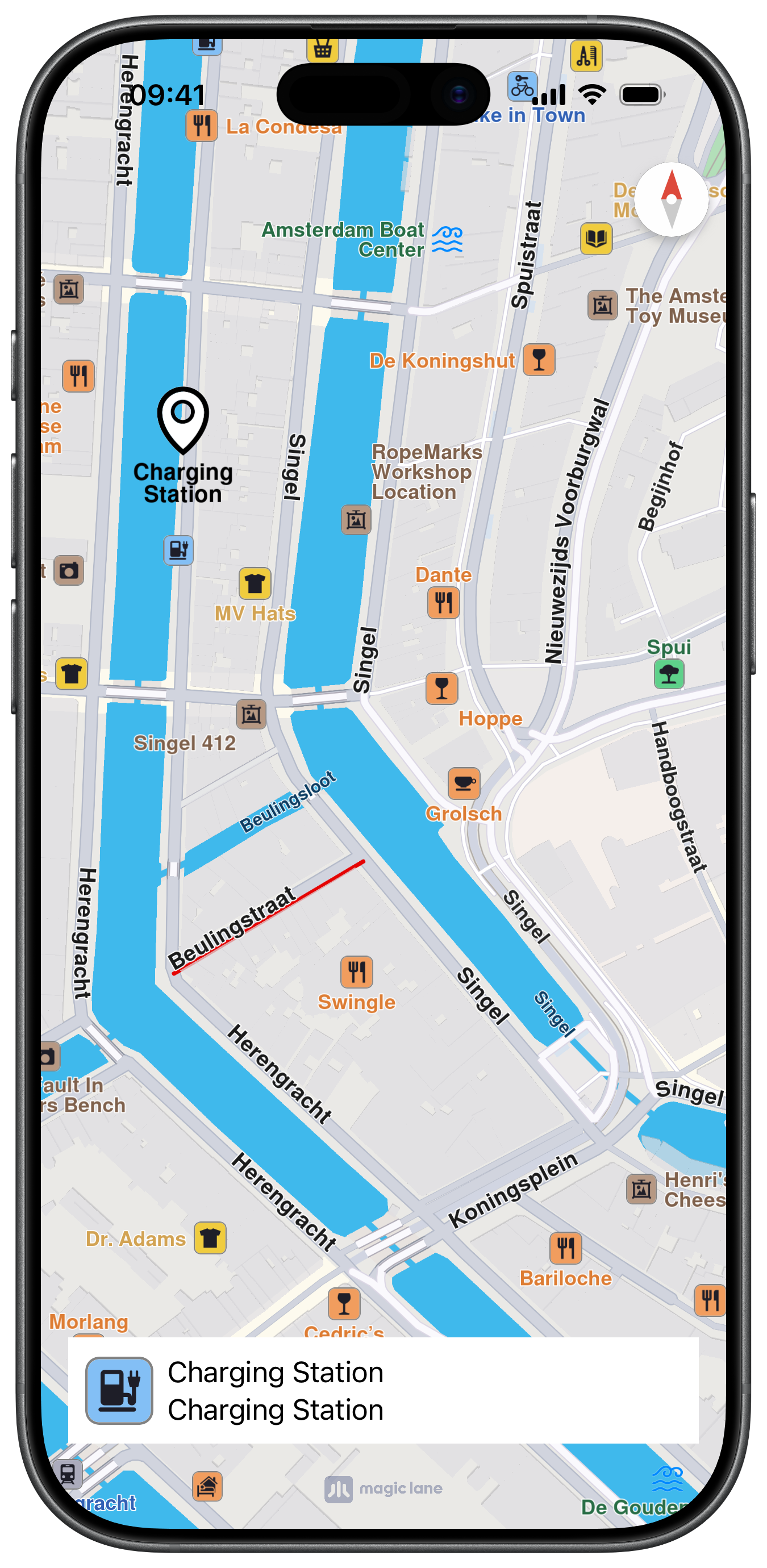
UI and Map selection events
The following code outlines the main view controller, which displays the map, centers on a position and implements the selection methods from the MapViewControllerDelegate protocol:
class ViewController: UIViewController, MapViewControllerDelegate {

    var mapViewController: MapViewController?

    var label = UILabel.init()
    var imageView = UIImageView()

    override func viewDidLoad() {
        super.viewDidLoad()
        // Do any additional setup after loading the view.

        if let navigationController = self.navigationController {

            let appearance = navigationController.navigationBar.standardAppearance

            navigationController.navigationBar.scrollEdgeAppearance = appearance
        }

        self.title = "Map Selection"
        self.navigationItem.hidesSearchBarWhenScrolling = false
        self.navigationItem.largeTitleDisplayMode = .never

        self.createMapView()

        self.mapViewController!.startRender()

        self.addLabelText()
    }

    override func viewDidAppear(_ animated: Bool) {
        super.viewDidAppear(animated)

        // Paris
        let location = CoordinatesObject.coordinates(withLatitude: 48.840827, longitude: 2.381899)

        self.mapViewController!.center(onCoordinates: location, zoomLevel: 70, animationDuration: 1200)
    }

    // MARK: - Map View

    func createMapView() {

        self.mapViewController = MapViewController.init()
        self.mapViewController!.delegate = self
        self.mapViewController!.view.backgroundColor = UIColor.systemBackground

        self.addChild(self.mapViewController!)
        self.view.addSubview(self.mapViewController!.view)
        self.mapViewController!.didMove(toParent: self)

        self.mapViewController?.view.translatesAutoresizingMaskIntoConstraints = false
        NSLayoutConstraint.activate([
            self.mapViewController!.view.topAnchor.constraint(equalTo: self.view.topAnchor),
            self.mapViewController!.view.bottomAnchor.constraint(equalTo: self.view.bottomAnchor),
            self.mapViewController!.view.leadingAnchor.constraint(equalTo: self.view.leadingAnchor),
            self.mapViewController!.view.trailingAnchor.constraint(equalTo: self.view.trailingAnchor),
        ])
    }

    // MARK: - Label

    func addLabelText() {

        self.imageView.contentMode = .scaleAspectFit
        self.imageView.isHidden = true
        self.imageView.layer.shadowColor = UIColor.lightGray.cgColor
        self.imageView.layer.shadowOpacity = 0.8

        self.label.font = UIFont.boldSystemFont(ofSize: 14)
        self.label.numberOfLines = 0
        self.label.backgroundColor = UIColor.systemBackground
        self.label.isHidden = true

        self.label.layer.shadowColor = UIColor.lightGray.cgColor
        self.label.layer.shadowOpacity = 0.8

        self.view.addSubview(self.label)
        self.view.addSubview(self.imageView)

        self.label.translatesAutoresizingMaskIntoConstraints = false
        NSLayoutConstraint.activate([
            self.label.leadingAnchor.constraint(equalTo: self.view.leadingAnchor, constant: 10),
            self.label.trailingAnchor.constraint(equalTo: self.view.trailingAnchor, constant: -10),
            self.label.bottomAnchor.constraint(equalTo: self.view.safeAreaLayoutGuide.bottomAnchor, constant: -10),
            self.label.heightAnchor.constraint(equalToConstant: 70)
        ])

        self.imageView.translatesAutoresizingMaskIntoConstraints = false
        NSLayoutConstraint.activate([
            self.imageView.leadingAnchor.constraint(equalTo: self.label.leadingAnchor),
            self.imageView.topAnchor.constraint(equalTo: self.label.topAnchor, constant: -30),
            self.imageView.widthAnchor.constraint(equalToConstant: 40),
            self.imageView.heightAnchor.constraint(equalToConstant: 40)
        ])
    }

    // MARK: - MapViewControllerDelegate

    func mapViewController(_ mapViewController: MapViewController, didSelectLandmarks landmarks: [LandmarkObject], onTouch point: CGPoint) {

        guard let landmark = landmarks.first else { return }

        let text = "  " + landmark.getLandmarkName() + "\n" + "  " + landmark.getLandmarkDescription()

        self.label.text = text
        self.label.isHidden = false

        let scale = UIScreen.main.scale
        self.imageView.image = landmark.getLandmarkImage(CGSize.init(width: 40 * scale, height: 40 * scale))
        self.imageView.isHidden = false

        self.highlight(landmark: landmark)
    }

    func mapViewController(
        _ mapViewController: MapViewController, didSelectLandmarks landmarks: [LandmarkObject], onLongTouch point: CGPoint
    ) {

        guard let landmark = landmarks.first else { return }

        let text = "  " + landmark.getLandmarkName() + "\n" + "  " + landmark.getLandmarkDescription()

        self.label.text = text
        self.label.isHidden = false

        let scale = UIScreen.main.scale
        self.imageView.image = landmark.getLandmarkImage(CGSize.init(width: 40 * scale, height: 40 * scale))
        self.imageView.isHidden = false

        self.highlight(landmark: landmark)
    }

    func mapViewController(_ mapViewController: MapViewController, didSelectStreets streets: [LandmarkObject], onTouch point: CGPoint) {

        guard let landmark = streets.first else { return }

        let text = "  " + landmark.getLandmarkName() + "\n" + "  " + landmark.getLandmarkDescription()

        self.label.text = text
        self.label.isHidden = false

        let scale = UIScreen.main.scale
        self.imageView.image = landmark.getLandmarkImage(CGSize.init(width: 40 * scale, height: 40 * scale))
        self.imageView.isHidden = false

        self.highlight(landmark: landmark)
    }

    func mapViewController(_ mapViewController: MapViewController, didSelectStreets streets: [LandmarkObject], onLongTouch point: CGPoint) {

        guard let landmark = streets.first else { return }

        let text = "  " + landmark.getLandmarkName() + "\n" + "  " + landmark.getLandmarkDescription()

        self.label.text = text
        self.label.isHidden = false

        let scale = UIScreen.main.scale
        self.imageView.image = landmark.getLandmarkImage(CGSize.init(width: 40 * scale, height: 40 * scale))
        self.imageView.isHidden = false

        self.highlight(landmark: landmark)
    }

    func mapViewController(_ mapViewController: MapViewController, didSelectOverlays overlays: [OverlayItemObject], onTouch point: CGPoint) {

        print("didSelectOverlays")
    }

    func mapViewController(_ mapViewController: MapViewController, didSelectOverlays overlays: [OverlayItemObject], onLongTouch point: CGPoint) {

        print("didSelectOverlays")
    }

    func mapViewController(_ mapViewController: MapViewController, didSelectTrafficEvents events: [TrafficEventObject]) {

        print("didSelectTrafficEvents")
    }

    func highlight(landmark: LandmarkObject) {

        let settings = HighlightRenderSettings.init()
        settings.showPin = true
        settings.imageSize = 7

        if landmark.isContourGeograficAreaEmpty() == false {

            settings.options = Int32(
                HighlightOption.showLandmark.rawValue | HighlightOption.overlap.rawValue | HighlightOption.showContour.rawValue)
            settings.contourInnerColor = UIColor.white
            settings.contourOuterColor = UIColor.systemBlue
        }

        self.mapViewController!.presentHighlights([landmark], settings: settings, highlightId: 0)

        // Center animation
        // self.mapViewController!.center(onCoordinates: landmark.getCoordinates(), zoomLevel: -1, animationDuration: 900)
    }
}
This example demonstrates how to handle user interactions with map elements (e.g. streets, landmarks, overlays, and traffic events) and apply custom highlight styles using HighlightRenderSettings in a SwiftUI application.
Check the full implementation on GitHub.
UI and Map selection events
The following code outlines the main view, which displays the map, centers on a position and implements the MapBase view modifiers for different selection events:
struct ContentView: View {

    @Environment(\.displayScale) private var displayScale

    @State private var selectedLandmark: LandmarkObject?
    @State private var zoom = 74

    var body: some View {
        MapReader { proxy in
            ZStack(alignment: .bottom) {
                MapBase()
                    .didSelectStreets { streets, touchPoint, isLongTouch in
                        proxy.present(highlights: streets, settings: getRenderSettings())

                        selectedLandmark = streets.first
                    }
                    .didSelectLandmarks { landmarks, touchPoint, isLongTouch in
                        proxy.present(highlights: landmarks, settings: getRenderSettings())

                        selectedLandmark = landmarks.first
                    }
                    .didSelectOverlays { overlays, touchPoint, isLongTouch in
                        print("didSelectOverlays")
                    }
                    .didSelectTrafficEvents { events, touchPoint, isLongTouch in
                        print("didSelectTrafficEvents")
                    }
                    .onAppear {
                        goToPosition(proxy)
                    }
                    .ignoresSafeArea()

                if let selectedLandmark = selectedLandmark {

                    HStack {

                        Image(uiImage: getLandmarkImage(landmark: selectedLandmark))
                            .frame(width: 40, height: 40)

                        Text(selectedLandmark.getLandmarkName() + "\n" + selectedLandmark.getLandmarkDescription())

                        Spacer()
                    }
                    .padding(10)
                    .background(Rectangle().fill(.background))
                    .padding()
                }
            }
        }
    }

    func getRenderSettings() -> HighlightRenderSettings {
        let settings = HighlightRenderSettings.init()
        settings.showPin = true
        settings.imageSize = 7

        return settings
    }

    func getLandmarkImage(landmark: LandmarkObject) -> UIImage {

        let image = landmark.getLandmarkImage(CGSize(width: 40 * displayScale, height: 40 * displayScale)) ?? UIImage()

        return image
    }

    func goToPosition(_ proxy: MapProxy) {
        proxy.centerOn(coordinates: .amsterdam, zoomLevel: zoom)
    }
}

extension CoordinatesObject {
    static let amsterdam =
        CoordinatesObject.coordinates(withLatitude: 52.368447, longitude: 4.888229)
}