Map Download
- UIKit
This example demonstrates how to use GEMKit in a UIKit application to display multiple maps simultaneously.
Check the full implementation on GitHub.
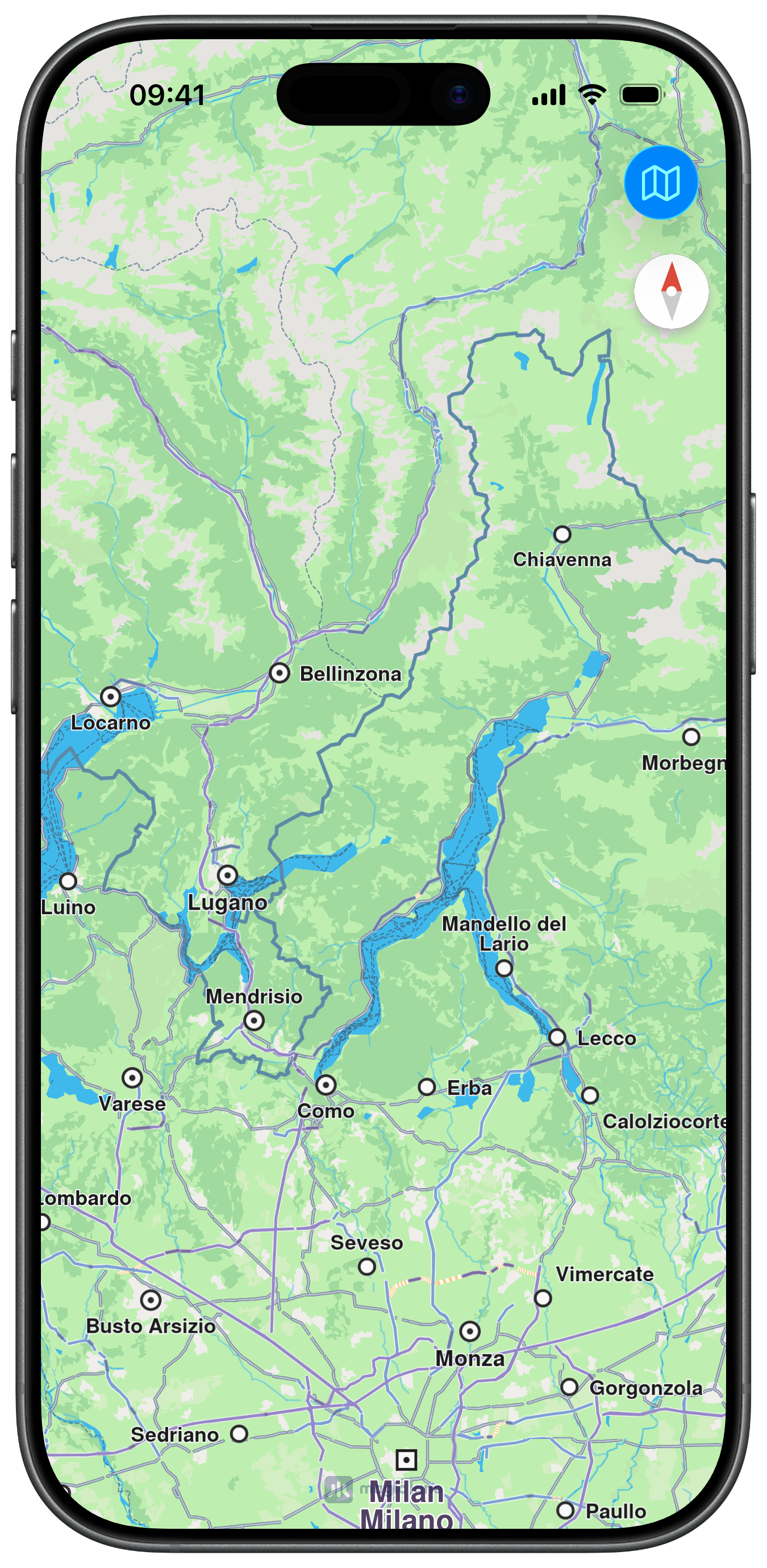
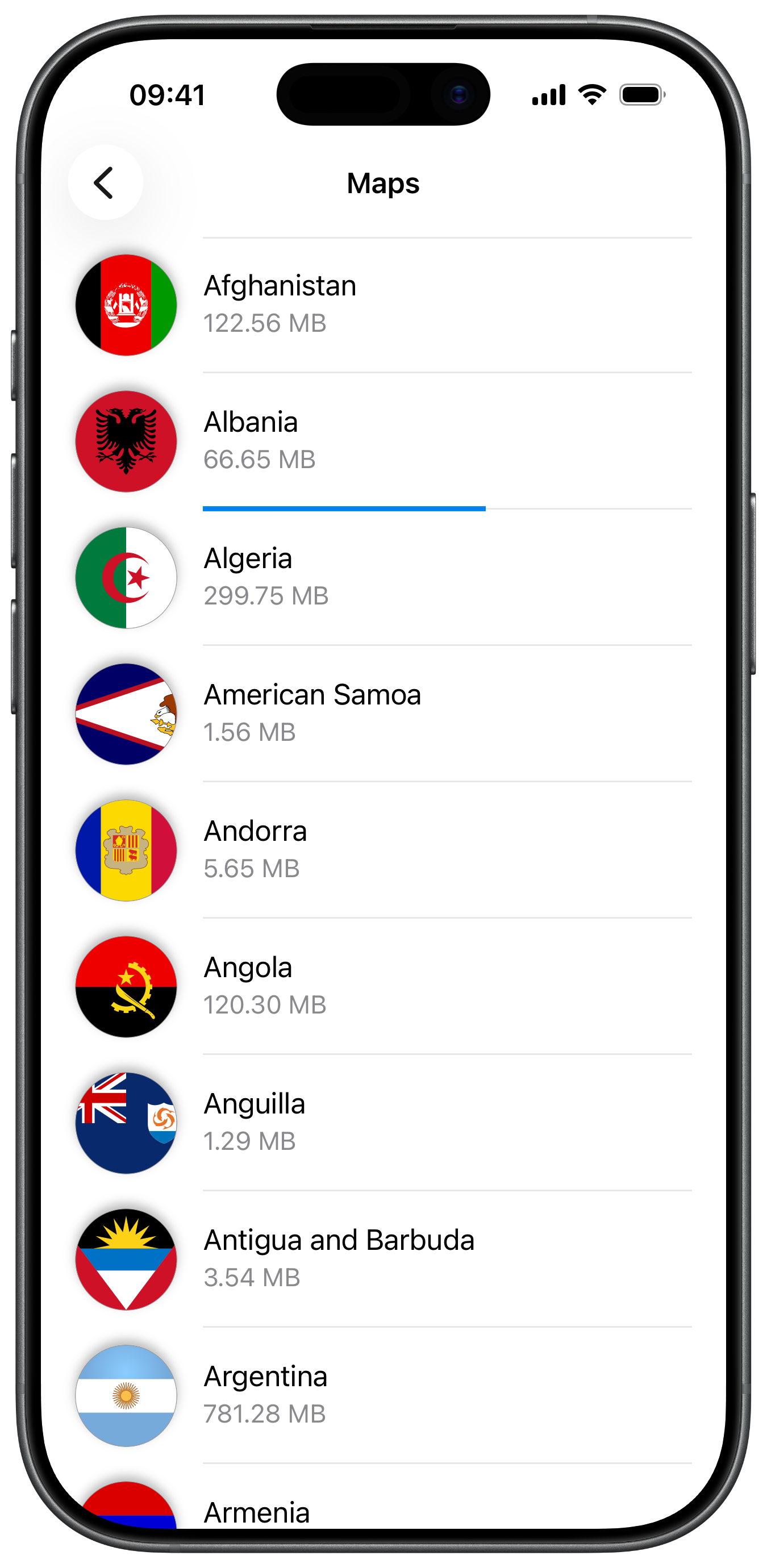
Map Display and Map Download Button
The following code outlines the main view, which displays the map and prepares the button that will lead to the map download view:
class ViewController: UIViewController {

    var mapViewController: MapViewController?

    override func viewDidLoad() {
        super.viewDidLoad()
        // Do any additional setup after loading the view.

        if let navigationController = self.navigationController {

            let appearance = navigationController.navigationBar.standardAppearance

            navigationController.navigationBar.scrollEdgeAppearance = appearance
        }

        self.createMapView()

        self.mapViewController!.startRender()

        self.addMapsButton()
    }

    // MARK: - Map View

    func createMapView() {

        self.mapViewController = MapViewController.init()
        self.mapViewController!.view.backgroundColor = UIColor.systemBackground

        self.addChild(self.mapViewController!)
        self.view.addSubview(self.mapViewController!.view)
        self.mapViewController!.didMove(toParent: self)

        self.mapViewController?.view.translatesAutoresizingMaskIntoConstraints = false
        NSLayoutConstraint.activate([
            self.mapViewController!.view.topAnchor.constraint(equalTo: self.view.topAnchor),
            self.mapViewController!.view.bottomAnchor.constraint(equalTo: self.view.bottomAnchor),
            self.mapViewController!.view.leadingAnchor.constraint(equalTo: self.view.leadingAnchor),
            self.mapViewController!.view.trailingAnchor.constraint(equalTo: self.view.trailingAnchor),
        ])
    }

    // MARK: - Map Style

    func addMapsButton() {

        let image = UIImage.init(systemName: "map")
        let barButton = UIBarButtonItem.init(image: image, style: .done, target: self, action: #selector(openMaps))
        self.navigationItem.rightBarButtonItem = barButton
    }

    @objc func openMaps() {

        let viewController = DownloadMapsViewController.init()
        self.navigationController?.pushViewController(viewController, animated: true)
    }
}
Map Download View
The following code outlines the map download list view, which is presented when the user taps the map download button, initializes the maps context, and retrieves the list of available maps:
class DownloadMapsViewController: UITableViewController, ContentStoreObjectDelegate {

    var kProgressViewTag = 100

    var mapsContext: MapsContext?

    var mapsList: [ContentStoreObject] = []

    deinit {

        NSLog("DownloadMapsViewController: deinit")
    }

    // MARK: - Life Cycle

    override func viewDidLoad() {

        super.viewDidLoad()

        self.title = "Maps"
        self.navigationItem.largeTitleDisplayMode = .never

        self.view.backgroundColor = UIColor.systemBackground

        self.mapsContext = MapsContext.init()

        self.refreshWithLocalMaps()
        self.refreshWithOnlineMaps()
    }

    // MARK: - Refresh

    func refreshWithOnlineMaps() {

        self.mapsContext!
            .getOnlineList(completionHandler: { [weak self] array in

                guard let weakSelf = self else {
                    return
                }

                if !array.isEmpty {

                    weakSelf.mapsList = array

                    weakSelf.tableView.reloadData()
                }
            })
    }

    func refreshWithLocalMaps() {

        self.mapsList = self.mapsContext!.getLocalList()
    }
Map Download Table View with Progress Bar
The following code demonstrates the implementation of the table view, which displays the list of maps and their download status, and allows the user to start, pause, or delete map downloads:
    override func tableView(_ tableView: UITableView, numberOfRowsInSection section: Int) -> Int {

        let rows = self.mapsList.count

        return rows
    }

    override func tableView(_ tableView: UITableView, cellForRowAt indexPath: IndexPath) -> UITableViewCell {

        let identifier = "defaultCellId"

        var cell = tableView.dequeueReusableCell(withIdentifier: identifier)

        if cell == nil {

            cell = UITableViewCell.init(style: .subtitle, reuseIdentifier: identifier)

            cell!.textLabel!.numberOfLines = 0
            cell!.detailTextLabel!.numberOfLines = 0
        }

        cell!.selectionStyle = .default

        let object = self.mapsList[indexPath.row]

        if object.getStatus() == .completed {

            cell!.selectionStyle = .none
        }

        self.setupText(tableView: tableView, cell: cell!, indexPath: indexPath)

        self.setupImage(tableView: tableView, cell: cell!, indexPath: indexPath)

        self.setupAccessoryView(tableView: tableView, cell: cell!, indexPath: indexPath)

        return cell!
    }

    func setupText(tableView: UITableView, cell: UITableViewCell, indexPath: IndexPath) {

        let object = self.mapsList[indexPath.row]

        let text = object.getName()
        cell.textLabel?.text = text

        let description = object.getTotalSizeFormatted()
        cell.detailTextLabel?.text = description
    }

    func setupImage(tableView: UITableView, cell: UITableViewCell, indexPath: IndexPath) {

        let scale = UIScreen.main.scale
        let size = CGSize.init(width: 60.0 * scale, height: 60.0 * scale)

        let object = self.mapsList[indexPath.row]

        if let code = object.getCountryCodes().first {

            if let image = self.mapsContext!.getCountryFlag(withIsoCode: code, size: size) {

                cell.imageView?.image = image
                cell.imageView?.layer.shadowOpacity = 0.8
                cell.imageView?.layer.shadowColor = UIColor.lightGray.cgColor

            } else {

                cell.imageView?.image = nil
                cell.imageView?.layer.shadowOpacity = 0
                cell.imageView?.layer.shadowColor = nil
            }
        }
    }

    func setupAccessoryView(tableView: UITableView, cell: UITableViewCell, indexPath: IndexPath) {

        let object = self.mapsList[indexPath.row]

        let status = object.getStatus()

        var value: Float = 0
        var color = UIColor.systemBlue

        if status == .downloadRunning {

            value = Float(object.getDownloadProgress()) / 100.0

        } else if status == .completed {

            value = 1
            color = UIColor.systemGreen
        }

        if let progressBar = cell.contentView.viewWithTag(kProgressViewTag) as? UIProgressView {

            progressBar.progress = value
            progressBar.tintColor = color

            return
        }

        let progressBar = UIProgressView.init(progressViewStyle: .bar)
        progressBar.tag = kProgressViewTag
        progressBar.progress = value
        progressBar.tintColor = color

        cell.contentView.addSubview(progressBar)

        progressBar.translatesAutoresizingMaskIntoConstraints = false
        NSLayoutConstraint.activate([
            progressBar.bottomAnchor.constraint(equalTo: cell.contentView.bottomAnchor, constant: 0),
            progressBar.leadingAnchor.constraint(equalTo: cell.textLabel!.leadingAnchor, constant: 0),
            progressBar.trailingAnchor.constraint(equalTo: cell.contentView.trailingAnchor, constant: 0),
            progressBar.heightAnchor.constraint(equalToConstant: 2.0)
        ])
    }

    // MARK: - UITableViewDelegate

    override func tableView(_ tableView: UITableView, editingStyleForRowAt indexPath: IndexPath) -> UITableViewCell.EditingStyle {

        return .delete
    }

    override func tableView(_ tableView: UITableView, trailingSwipeActionsConfigurationForRowAt indexPath: IndexPath)
        -> UISwipeActionsConfiguration?
    {

        let action = UIContextualAction.init(
            style: .destructive, title: "Delete",
            handler: { (action, view, completion) in

                let object = self.mapsList[indexPath.row]

                if object.canDeleteContent() {

                    object.deleteContent()

                    self.tableView.reloadRows(at: [indexPath], with: .fade)
                }

                completion(true)
            })

        let actions = UISwipeActionsConfiguration.init(actions: [action])

        return actions
    }

    override func tableView(_ tableView: UITableView, didSelectRowAt indexPath: IndexPath) {

        tableView.deselectRow(at: indexPath, animated: true)

        let object = self.mapsList[indexPath.row]
        object.delegate = self

        let status = object.getStatus()

        if status == .downloadRunning {

            object.pauseDownload()

        } else if status == .unavailable || status == .paused {

            object.download(withAllowCellularNetwork: true) { (success: Bool) in }
        }
    }
Content Store Object Delegate
The following code implements the ContentStoreObjectDelegate methods to receive status updates and update the progress bar in the table view cells as the map download progresses:
    // MARK: - ContentStoreObjectDelegate

    func contentStoreObject(_ object: ContentStoreObject, notifyStart hasProgress: Bool) {

    }

    func contentStoreObject(_ object: ContentStoreObject, notifyProgress progress: Int32) {

        if let row = self.mapsList.firstIndex(of: object) {

            let indexPath = IndexPath.init(row: row, section: 0)

            if let cell = self.tableView.cellForRow(at: indexPath) {

                if let view = cell.contentView.viewWithTag(kProgressViewTag) as? UIProgressView {

                    let value: Float = Float(progress) / 100.0

                    view.progress = value
                }
            }
        }
    }

    func contentStoreObject(_ object: ContentStoreObject, notifyComplete success: Bool) {

    }

    func contentStoreObject(_ object: ContentStoreObject, notifyStatusChanged status: ContentStoreObjectStatus) {

        if status == .completed {

            if let row = self.mapsList.firstIndex(of: object) {

                let indexPath = IndexPath.init(row: row, section: 0)

                if let cell = self.tableView.cellForRow(at: indexPath) {

                    if let view = cell.contentView.viewWithTag(kProgressViewTag) as? UIProgressView {

                        view.tintColor = UIColor.systemGreen
                    }
                }
            }
        }
    }
}