# Map Download
Last updated:
October 18, 2026
\| 5 minutes read
* UIKit
This example demonstrates how to use **GEMKit** in a UIKit application to display multiple maps simultaneously.
Check the full implementation on [GitHub](https://github.com/magiclane/magiclane-maps-sdk-examples-for-ios/tree/main/UIKit/3DScene/MapDownload).
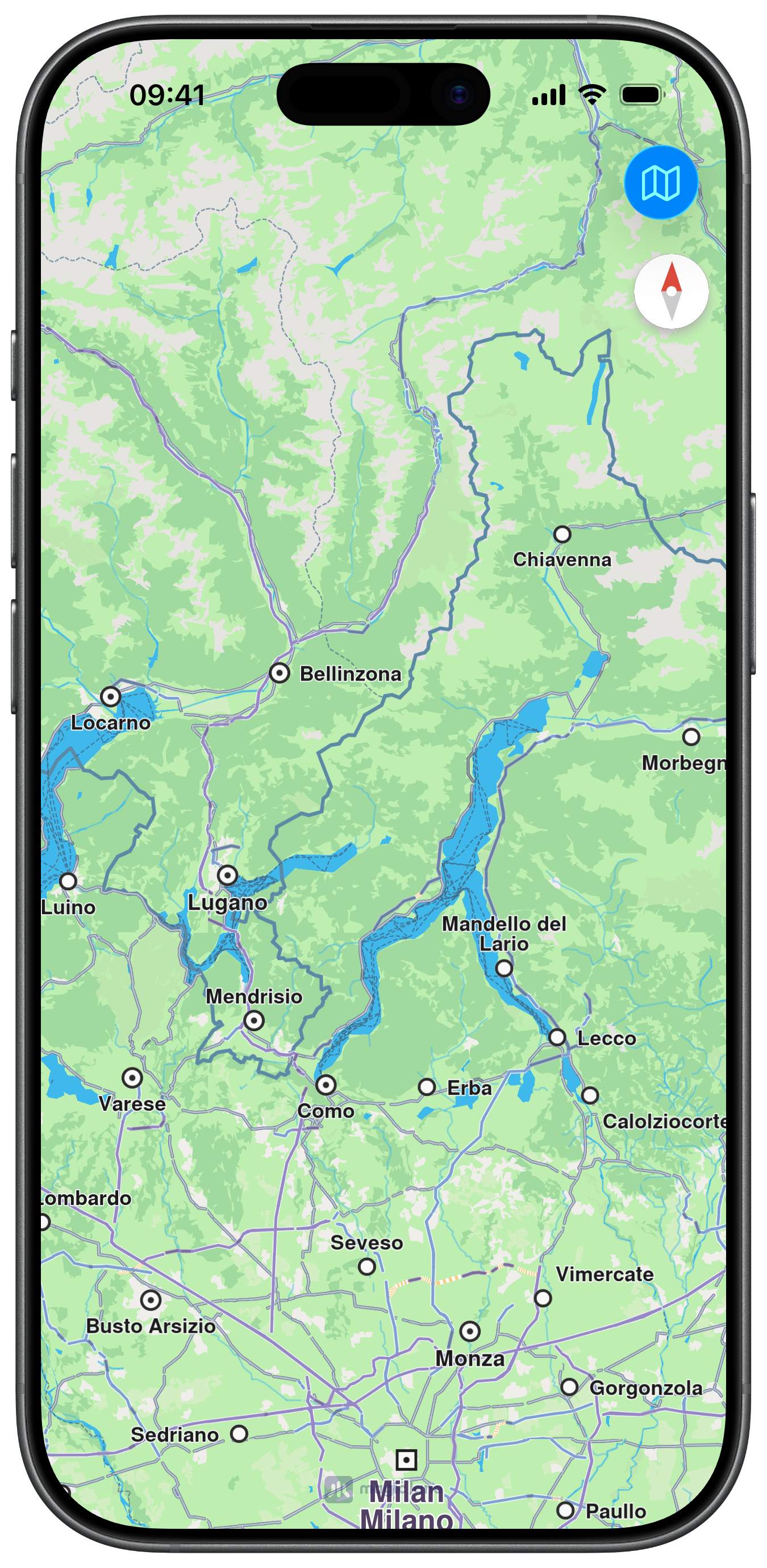
**Initial Screen with Map Download button**
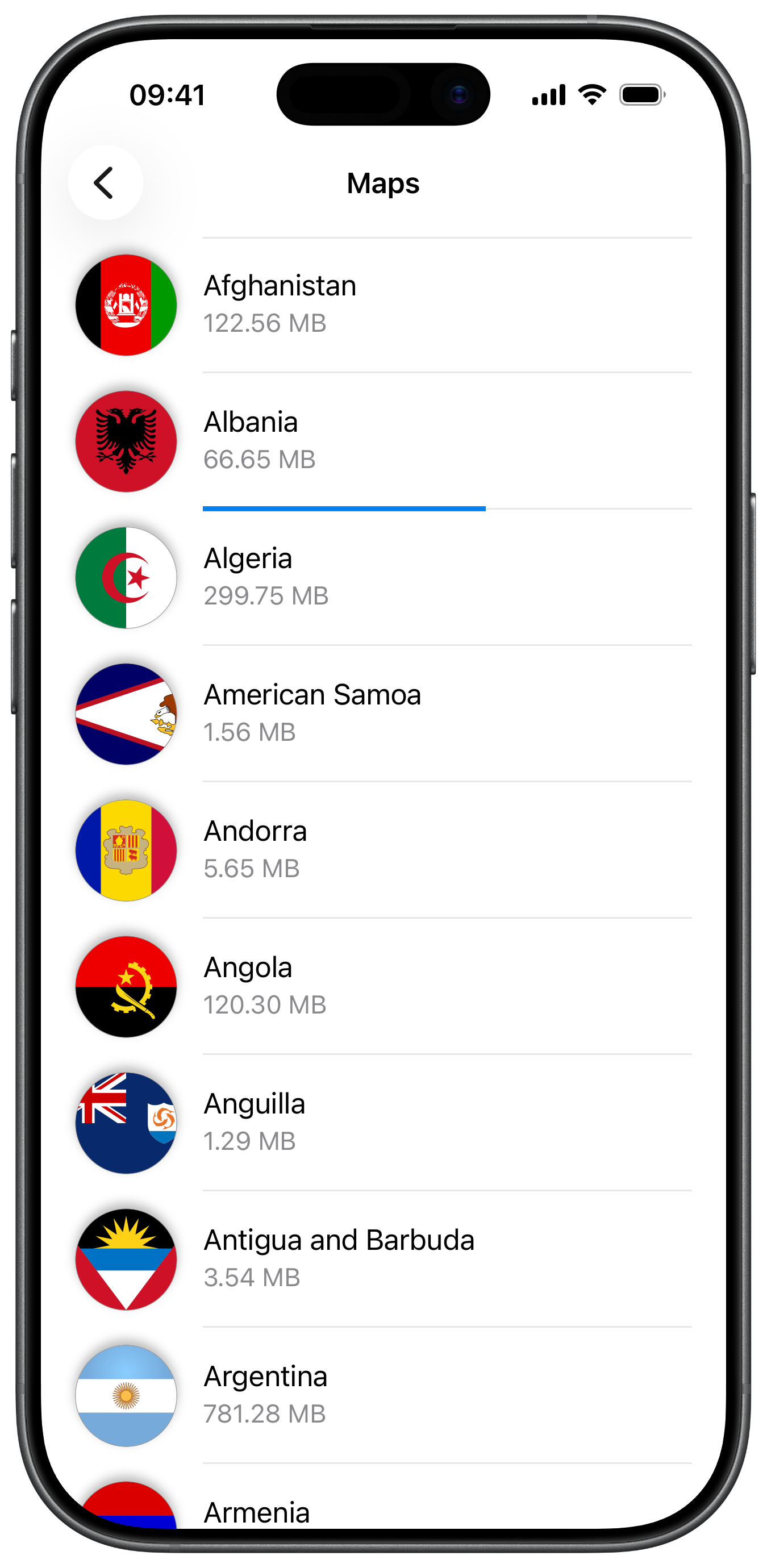
**Downloading a Map with Progress**
### Map Display and Map Download Button[](#map-display-and-map-download-button "Direct link to Map Display and Map Download Button")
The following code outlines the main view, which displays the map and prepares the button that will lead to the map download view:
ViewController.swift[View on GitHub](https://github.com/magiclane/magiclane-maps-sdk-examples-for-ios/tree/main/UIKit/3DScene/MapDownload/MapDownload/ViewController.swift)
```swift
class ViewController: UIViewController {
var mapViewController: MapViewController?
override func viewDidLoad() {
super.viewDidLoad()
// Do any additional setup after loading the view.
if let navigationController = self.navigationController {
let appearance = navigationController.navigationBar.standardAppearance
navigationController.navigationBar.scrollEdgeAppearance = appearance
}
self.createMapView()
self.mapViewController!.startRender()
self.addMapsButton()
}
// MARK: - Map View
func createMapView() {
self.mapViewController = MapViewController.init()
self.mapViewController!.view.backgroundColor = UIColor.systemBackground
self.addChild(self.mapViewController!)
self.view.addSubview(self.mapViewController!.view)
self.mapViewController!.didMove(toParent: self)
self.mapViewController?.view.translatesAutoresizingMaskIntoConstraints = false
NSLayoutConstraint.activate([
self.mapViewController!.view.topAnchor.constraint(equalTo: self.view.topAnchor),
self.mapViewController!.view.bottomAnchor.constraint(equalTo: self.view.bottomAnchor),
self.mapViewController!.view.leadingAnchor.constraint(equalTo: self.view.leadingAnchor),
self.mapViewController!.view.trailingAnchor.constraint(equalTo: self.view.trailingAnchor),
])
}
// MARK: - Map Style
func addMapsButton() {
let image = UIImage.init(systemName: "map")
let barButton = UIBarButtonItem.init(image: image, style: .done, target: self, action: #selector(openMaps))
self.navigationItem.rightBarButtonItem = barButton
}
@objc func openMaps() {
let viewController = DownloadMapsViewController.init()
self.navigationController?.pushViewController(viewController, animated: true)
}
}
```
### Map Download View[](#map-download-view "Direct link to Map Download View")
The following code outlines the map download list view, which is presented when the user taps the map download button, initializes the maps context, and retrieves the list of available maps:
DownloadMapsViewController.swift[View on GitHub](https://github.com/magiclane/magiclane-maps-sdk-examples-for-ios/tree/main/UIKit/3DScene/MapDownload/MapDownload/DownloadMapsViewController.swift)
```swift
class DownloadMapsViewController: UITableViewController, ContentStoreObjectDelegate {
var kProgressViewTag = 100
var mapsContext: MapsContext?
var mapsList: [ContentStoreObject] = []
deinit {
NSLog("DownloadMapsViewController: deinit")
}
// MARK: - Life Cycle
override func viewDidLoad() {
super.viewDidLoad()
self.title = "Maps"
self.navigationItem.largeTitleDisplayMode = .never
self.view.backgroundColor = UIColor.systemBackground
self.mapsContext = MapsContext.init()
self.refreshWithLocalMaps()
self.refreshWithOnlineMaps()
}
// MARK: - Refresh
func refreshWithOnlineMaps() {
self.mapsContext!
.getOnlineList(completionHandler: { [weak self] array in
guard let weakSelf = self else {
return
}
if !array.isEmpty {
weakSelf.mapsList = array
weakSelf.tableView.reloadData()
}
})
}
func refreshWithLocalMaps() {
self.mapsList = self.mapsContext!.getLocalList()
}
```
### Map Download Table View with Progress Bar[](#map-download-table-view-with-progress-bar "Direct link to Map Download Table View with Progress Bar")
The following code demonstrates the implementation of the table view, which displays the list of maps and their download status, and allows the user to start, pause, or delete map downloads:
DownloadMapsViewController.swift[View on GitHub](https://github.com/magiclane/magiclane-maps-sdk-examples-for-ios/tree/main/UIKit/3DScene/MapDownload/MapDownload/DownloadMapsViewController.swift)
```swift
override func tableView(_ tableView: UITableView, numberOfRowsInSection section: Int) -> Int {
let rows = self.mapsList.count
return rows
}
override func tableView(_ tableView: UITableView, cellForRowAt indexPath: IndexPath) -> UITableViewCell {
let identifier = "defaultCellId"
var cell = tableView.dequeueReusableCell(withIdentifier: identifier)
if cell == nil {
cell = UITableViewCell.init(style: .subtitle, reuseIdentifier: identifier)
cell!.textLabel!.numberOfLines = 0
cell!.detailTextLabel!.numberOfLines = 0
}
cell!.selectionStyle = .default
let object = self.mapsList[indexPath.row]
if object.getStatus() == .completed {
cell!.selectionStyle = .none
}
self.setupText(tableView: tableView, cell: cell!, indexPath: indexPath)
self.setupImage(tableView: tableView, cell: cell!, indexPath: indexPath)
self.setupAccessoryView(tableView: tableView, cell: cell!, indexPath: indexPath)
return cell!
}
func setupText(tableView: UITableView, cell: UITableViewCell, indexPath: IndexPath) {
let object = self.mapsList[indexPath.row]
let text = object.getName()
cell.textLabel?.text = text
let description = object.getTotalSizeFormatted()
cell.detailTextLabel?.text = description
}
func setupImage(tableView: UITableView, cell: UITableViewCell, indexPath: IndexPath) {
let scale = UIScreen.main.scale
let size = CGSize.init(width: 60.0 * scale, height: 60.0 * scale)
let object = self.mapsList[indexPath.row]
if let code = object.getCountryCodes().first {
if let image = self.mapsContext!.getCountryFlag(withIsoCode: code, size: size) {
cell.imageView?.image = image
cell.imageView?.layer.shadowOpacity = 0.8
cell.imageView?.layer.shadowColor = UIColor.lightGray.cgColor
} else {
cell.imageView?.image = nil
cell.imageView?.layer.shadowOpacity = 0
cell.imageView?.layer.shadowColor = nil
}
}
}
func setupAccessoryView(tableView: UITableView, cell: UITableViewCell, indexPath: IndexPath) {
let object = self.mapsList[indexPath.row]
let status = object.getStatus()
var value: Float = 0
var color = UIColor.systemBlue
if status == .downloadRunning {
value = Float(object.getDownloadProgress()) / 100.0
} else if status == .completed {
value = 1
color = UIColor.systemGreen
}
if let progressBar = cell.contentView.viewWithTag(kProgressViewTag) as? UIProgressView {
progressBar.progress = value
progressBar.tintColor = color
return
}
let progressBar = UIProgressView.init(progressViewStyle: .bar)
progressBar.tag = kProgressViewTag
progressBar.progress = value
progressBar.tintColor = color
cell.contentView.addSubview(progressBar)
progressBar.translatesAutoresizingMaskIntoConstraints = false
NSLayoutConstraint.activate([
progressBar.bottomAnchor.constraint(equalTo: cell.contentView.bottomAnchor, constant: 0),
progressBar.leadingAnchor.constraint(equalTo: cell.textLabel!.leadingAnchor, constant: 0),
progressBar.trailingAnchor.constraint(equalTo: cell.contentView.trailingAnchor, constant: 0),
progressBar.heightAnchor.constraint(equalToConstant: 2.0)
])
}
// MARK: - UITableViewDelegate
override func tableView(_ tableView: UITableView, editingStyleForRowAt indexPath: IndexPath) -> UITableViewCell.EditingStyle {
return .delete
}
override func tableView(_ tableView: UITableView, trailingSwipeActionsConfigurationForRowAt indexPath: IndexPath)
-> UISwipeActionsConfiguration?
{
let action = UIContextualAction.init(
style: .destructive, title: "Delete",
handler: { (action, view, completion) in
let object = self.mapsList[indexPath.row]
if object.canDeleteContent() {
object.deleteContent()
self.tableView.reloadRows(at: [indexPath], with: .fade)
}
completion(true)
})
let actions = UISwipeActionsConfiguration.init(actions: [action])
return actions
}
override func tableView(_ tableView: UITableView, didSelectRowAt indexPath: IndexPath) {
tableView.deselectRow(at: indexPath, animated: true)
let object = self.mapsList[indexPath.row]
object.delegate = self
let status = object.getStatus()
if status == .downloadRunning {
object.pauseDownload()
} else if status == .unavailable || status == .paused {
object.download(withAllowCellularNetwork: true) { (success: Bool) in }
}
}
```
### Content Store Object Delegate[](#content-store-object-delegate "Direct link to Content Store Object Delegate")
The following code implements the `ContentStoreObjectDelegate` methods to receive status updates and update the progress bar in the table view cells as the map download progresses:
DownloadMapsViewController.swift[View on GitHub](https://github.com/magiclane/magiclane-maps-sdk-examples-for-ios/tree/main/UIKit/3DScene/MapDownload/MapDownload/DownloadMapsViewController.swift)
```swift
// MARK: - ContentStoreObjectDelegate
func contentStoreObject(_ object: ContentStoreObject, notifyStart hasProgress: Bool) {
}
func contentStoreObject(_ object: ContentStoreObject, notifyProgress progress: Int32) {
if let row = self.mapsList.firstIndex(of: object) {
let indexPath = IndexPath.init(row: row, section: 0)
if let cell = self.tableView.cellForRow(at: indexPath) {
if let view = cell.contentView.viewWithTag(kProgressViewTag) as? UIProgressView {
let value: Float = Float(progress) / 100.0
view.progress = value
}
}
}
}
func contentStoreObject(_ object: ContentStoreObject, notifyComplete success: Bool) {
}
func contentStoreObject(_ object: ContentStoreObject, notifyStatusChanged status: ContentStoreObjectStatus) {
if status == .completed {
if let row = self.mapsList.firstIndex(of: object) {
let indexPath = IndexPath.init(row: row, section: 0)
if let cell = self.tableView.cellForRow(at: indexPath) {
if let view = cell.contentView.viewWithTag(kProgressViewTag) as? UIProgressView {
view.tintColor = UIColor.systemGreen
}
}
}
}
}
}
```