# Sensors and data sources
Last updated:
October 18, 2026
\| 12 minutes read
The Maps Flutter SDK integrates with device sensors and external data sources to enhance map functionality. Use GPS, compass, accelerometer, and custom telemetry to build navigation apps, augmented reality layers, and location-aware services.
## Sensor types[](#sensor-types "Direct link to Sensor types")
The SDK supports the following sensor data types:
| **Type** | **Description** |
| ----------------------- | ----------------------------------------------------------------------------------------------------------------------------------------------------------------------------------------------------------------------------------------------------- |
| **Acceleration** | Measures linear movement of the device in three-dimensional space. Useful for detecting motion, steps, or sudden changes in speed. |
| **Activity** | Represents user activity such as walking, running, or being stationary, typically inferred from motion data. Not modelled by a dedicated `SenseData` subclass yet, so instances surface with the base fields only. Only available on Android devices. |
| **Attitude** | Describes the orientation of the device in 3D space, often expressed as Euler angles or quaternions. |
| **Battery** | Provides battery status information such as charge level and power state. |
| **Camera** | Indicates data coming from or triggered by the device's camera, such as frames or detection events. |
| **Compass** | Gives directional heading relative to magnetic or true north using magnetometer data. |
| **Magnetic Field** | Reports raw magnetic field strength, useful for environmental sensing or heading correction. |
| **Orientation** | Combines multiple sensors (like accelerometer and magnetometer) to calculate absolute device orientation. |
| **Position** | Basic geographic position data, including latitude, longitude, and optionally altitude. |
| **Improved Position** | Enhanced position data that has been refined using filtering, correction services, or sensor fusion. |
| **Gyroscope** | Measures the rate of rotation around the device’s axes, used to detect turns and angular movement. |
| **Temperature** | Provides temperature readings, either ambient or internal device temperature. |
| **Notification** | Represents external or system-level events that are not tied to physical sensors. |
| **Mount Information** | Describes how the device is physically mounted or oriented within a fixed system, such as in a vehicle. |
| **Heart Rate** | Biometric data representing beats per minute, typically from a fitness or health sensor. |
| **Cadence** | Crank revolutions per minute when cycling, or steps per minute when running. |
| **Two Wheel Odometry** | Odometry from a two-wheel vehicle: speed and cumulative front/rear wheel revolutions. Produced by bike speed sensors such as a BLE Cycling Speed and Cadence sensor. |
| **Four Wheel Odometry** | Odometry from a four-wheel vehicle: yaw rates, speed, driving direction and per-wheel encoder pulse counts. |
| **NMEA Chunk** | Raw navigation data in NMEA sentence format, typically from GNSS receivers for high-precision tracking. Only available on Android devices. |
| **Improved NMEA Chunk** | A request tag used to ask for the NMEA chunk derived from a fused or dead-reckoned position rather than a raw NMEA stream. |
| **Unknown** | A fallback type used when the source of the data cannot be determined. |
More details about the `Position` and `ImprovedPosition` classes are available [here](/docs/flutter/guides/core/positions.md).
warning
Ensure that the specific `DataType` values are supported on the target platform. Attempting to create data sources or recordings with unsupported types may result in failures.
Web
On web, the SDK does not have access to raw device sensors. Live data comes from the browser [Geolocation API](https://developer.mozilla.org/docs/Web/API/Geolocation_API), so a live `DataSource` provides only `DataType.position` (and the derived improved position). Other sensor types, including `DataType.activity` and `DataType.nmeaChunk`, are unavailable in the browser. To supply richer data on web, push it through a custom (external) data source.
## Working with data sources[](#working-with-data-sources "Direct link to Working with data sources")
The main classes for working with data sources:
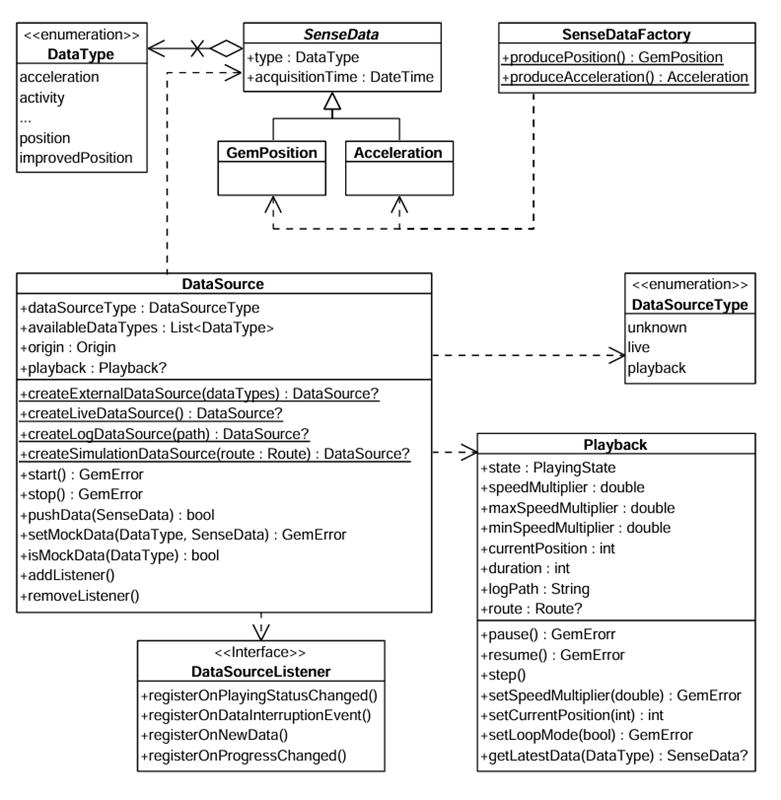
**DataSource**
The `DataType` enum represents multiple data types. Each sensor value is stored in a class derived from `SenseData`, such as `GemPosition` and `Acceleration`.
Use the `SenseDataFactory` helper class to create objects of these types. This class provides static methods like `producePosition` and `produceAcceleration` to create custom sensor data. You'll need this only when creating a custom data source with custom data.
### Create a data source[](#create-a-data-source "Direct link to Create a data source")
Create a `DataSource` using one of these static methods:
* `createLiveDataSource` - Collects data from the device's built-in sensors in real time. Most common for applications relying on actual sensor input
* `createExternalDataSource` - Accepts user-supplied data. Feed data into this source via the `pushData` method. Note that `pushData` returns `false` if used with a non-external source
* `createLogDataSource` - Replays data from a previously recorded session (log file: gpx, nmea). Useful for debugging, training, or offline data processing. See the [Recorder docs](/docs/flutter/guides/positioning/recorder.md) for recording data
* `createSimulationDataSource` - Simulates movement along a specified route. Use for UI prototyping, testing, or feature validation without real-world movement
The first two types (live and external) are categorized under `DataSourceType.live`. The latter two (log and simulation) fall under `DataSourceType.playback`.
All four factories return `null` when the engine refuses the source. The underlying `GemError` is not surfaced, so check for null before using the result.
### Choose how positions are improved[](#choose-how-positions-are-improved "Direct link to Choose how positions are improved")
Every data source runs an "improve" stage that turns raw samples into an improved position. The `improveMode` parameter of the four factory methods selects which engine runs that stage and whether map-matching is layered on top of its output:
```dart
final dataSource = DataSource.createLiveDataSource(
improveMode: ImproveMode.deadReckoningWithMapMatching,
);
```
warning
A live source can only run a dead reckoning mode where it emits NMEA itself, which is Android only. On other platforms this call returns `null`; feed NMEA through an external source instead.
Note also that if a live source already exists, it is returned as it is and the `improveMode` argument is ignored. Create the source with the mode you want before calling `PositionService.setLiveDataSource`.
| Enum Case | Engine | Map-matching | Consumes |
| ------------------------------ | ------------------------------------------------------------------------------------------------------------------- | ------------ | ---------------------------------------------------- |
| `sensorFusion` | Sensor fusion: combines GPS, accelerometer and gyroscope into a fused position. | No | `DataType.position` or `DataType.improvedPosition` |
| `deadReckoning` | Dead reckoning: combines NMEA chunks (GNSS), IMU and wheel odometry to estimate position even during a GNSS outage. | No | `DataType.nmeaChunk` or `DataType.improvedNmeaChunk` |
| `sensorFusionWithMapMatching` | Sensor fusion. | Yes | `DataType.position` or `DataType.improvedPosition` |
| `deadReckoningWithMapMatching` | Dead reckoning. | Yes | `DataType.nmeaChunk` or `DataType.improvedNmeaChunk` |
Map-matching snaps the improved position onto the road graph. It is orthogonal to which engine produces the unsnapped position, hence the four-way matrix. The default is `ImproveMode.sensorFusionWithMapMatching`.
The chosen engine constrains the data source: a source that does not provide the input the engine consumes cannot run the mode, and the factory returns `null`. On an external source the input is what the caller declares at creation time, on the other sources it is what the producer emits.
```dart
// Dead reckoning needs NMEA, so the external source must declare it.
final dataSource = DataSource.createExternalDataSource(
[DataType.nmeaChunk, DataType.fourWheelOdometry],
improveMode: ImproveMode.deadReckoning,
);
```
info
By default, a data source starts automatically upon creation. However, it may not be fully initialized when you obtain the data source object.
If you add a `DataSourceListener` immediately after acquiring the data source, you may miss the initial "playing status changed" notification - the data source may already be in the started state when the listener is attached.
### Configure and control a data source[](#configure-and-control-a-data-source "Direct link to Configure and control a data source")
Stop or start a data source using the control methods:
```dart
dataSource.stop();
// ...
dataSource.start();
```
Configure a data source's behavior using these methods:
* `setConfiguration` - Set the sampling rate or data filtering behavior
* `setMockPosition` - Simulate location updates
warning
The `setMockPosition` method is only available for live data sources and supports only the `DataType.position` type. To mock other data types, use an external `DataSource`.
### Use DataSourceListener[](#use-datasourcelistener "Direct link to Use DataSourceListener")
Register a `DataSourceListener` to receive updates from a data source. React to various events:
* Changes in the playing status
* Interruptions in data flow (e.g., sensor stopped, app went to background)
* New sensor data becoming available
* Progress updates during playback
Create a listener using the factory constructor and pass the appropriate callbacks:
```dart
final listener = DataSourceListener(
onPlayingStatusChanged: (dataType, status) {
print('Status for $dataType changed to $status');
},
onDataInterruptionEvent: (dataType, reason, ended) {
print('Data interruption on $dataType: $reason. Ended: $ended');
},
onNewData: (data) {
print('New data received: $data');
},
onProgressChanged: (progress) {
print('Playback progress: $progress%');
},
);
```
Register this listener with a `DataSource` for a specific `DataType` (in this case the position):
```dart
final GemError err = myDataSource.addListener(
listener: listener,
dataType: DataType.position,
);
```
`addListener` returns `GemError.invalidInput` when the data type is not available on the source. Check it with `isDataTypeAvailable` first.
Remove the listener when no longer needed:
```dart
myDataSource.removeListener(listener: listener, dataType: DataType.position);
```
Use `removeListenerAllDataTypes(listener)` to detach a listener from every data type it was registered for at once.
### Throttle a listener with a delivery policy[](#throttle-a-listener-with-a-delivery-policy "Direct link to Throttle a listener with a delivery policy")
High-rate sensors can deliver far more samples than an application needs and can cause performance issues. Attach a `DataDeliveryPolicy` when registering a listener and the samples the policy declines are dropped in native code. Internally the engine still uses the data at the best determined policy, the `DataDeliveryPolicy` only affects the data streamed to Dart.
```dart
final policy = DataDeliveryPolicy.create(
dataType: DataType.acceleration,
throttleInterval: Duration(milliseconds: 200),
);
myDataSource.addListener(
listener: listener,
dataType: DataType.acceleration,
deliveryPolicy: policy,
);
```
Three policy classes are available, each created through a static `create` method that returns `null` when the data type cannot carry that policy:
| Class | Behavior | Suitable for |
| ---------------------------- | ----------------------------------------------------------------------------------- | --------------------------------------------------------------------------------------------- |
| `DataDeliveryPolicy` | Limits the update rate and nothing else. | Continuous data types with no meaningful change thresholds. |
| `DiscreteDataDeliveryPolicy` | Delivers a sample only when the compared fields differ from the last delivered one. | `DataType.mountInformation`, `DataType.orientation`, `DataType.activity`, `DataType.battery`. |
| `PositionDataDeliveryPolicy` | Adds minimum distance, speed change, course change and fix-quality triggers. | `DataType.position`, `DataType.improvedPosition`. |
All three share the `throttleInterval` accessor, the minimum time between delivered updates. A sample arriving sooner is dropped, not delayed. `Duration.zero` (the default) and any negative duration mean no throttling; a positive duration shorter than one millisecond is raised to one millisecond.
warning
Not every data type can carry a policy. `create` returns `null` for `DataType.camera`, `DataType.notification`, `DataType.nmeaChunk` and `DataType.unknown`.
`PositionDataDeliveryPolicy` delivers an update when **any** of its triggers fires:
```dart
final policy = PositionDataDeliveryPolicy.create(
dataType: DataType.improvedPosition,
throttleInterval: Duration(seconds: 1),
minDistanceMeters: 25,
minSpeedChange: 2,
minCourseChangeDegrees: 15,
deliverOnFixQualityChange: true,
);
```
| Property | Type | Description |
| --------------------------- | -------- | ------------------------------------------------------------------------------------------------------------------------------------------------------ |
| `minDistanceMeters` | `double` | Minimum movement from the last delivered position that triggers delivery. `0` or less disables the trigger. |
| `minSpeedChange` | `double` | Minimum speed change in m/s that triggers delivery. `0` or less disables the trigger. |
| `minCourseChangeDegrees` | `double` | Minimum course change in degrees that triggers delivery. `0` or less disables the trigger. |
| `deliverOnFixQualityChange` | `bool` | Whether a fix-quality change triggers delivery. Defaults to `true`. Still subject to `throttleInterval`, which is evaluated first and can suppress it. |
warning
A policy is bound to one data type at creation and the type cannot be changed afterwards. Attaching it to a listener registered for a different data type returns `GemError.invalidInput` and registers nothing.
info
Settings can be changed at any time and apply from the next sample. The same policy object may be attached to several registrations, in which case a change affects all of them.
The policy stays attached until `removeListener` or `removeListenerAllDataTypes`. Re-attaching starts a fresh comparison, so the first sample after a re-attach is always delivered.
danger
A policy applies to one listener and one data type. Registering the same `DataSourceListener` on two `DataSource` objects for the same data type makes both registrations share the policy, and detaching from either one removes it. Use a separate listener per data source when the two need different policies.
Position listeners registered through `PositionService` accept the same policies.
## Use the Playback interface[](#use-the-playback-interface "Direct link to Use the Playback interface")
The `Playback` interface controls data sources that support playback functionality - specifically those of type `DataSourceType.playback`, such as log files or simulated route replays. **It is not compatible with live or custom data sources**.
Access a `Playback` instance by checking the data source type:
```dart
if(myDataSource.dataSourceType == DataSourceType.playback) {
final playback = myDataSource.playback!;
playback.pause();
// ...
playback.resume();
}
```
Playback-enabled data sources can be paused and resumed. Adjust the playback speed by setting a `speedMultiplier`, which must fall within the range defined by `Playback.minSpeedMultiplier` and `Playback.maxSpeedMultiplier`.
Control playback position using `Playback.currentPosition`, which represents the elapsed time in milliseconds from the beginning of the log or simulation. This allows you to skip to any point in the playback.
Access supplementary metadata:
* `Playback.logPath` - Path to the log file being executed
* `Playback.route` - Route being simulated (if applicable)
## Track positions[](#track-positions "Direct link to Track positions")
Track positions from a `DataSource` on a map by rendering a marker polyline between relevant map link points. Use the `MapViewExtensions` class member of `GemMapController`.
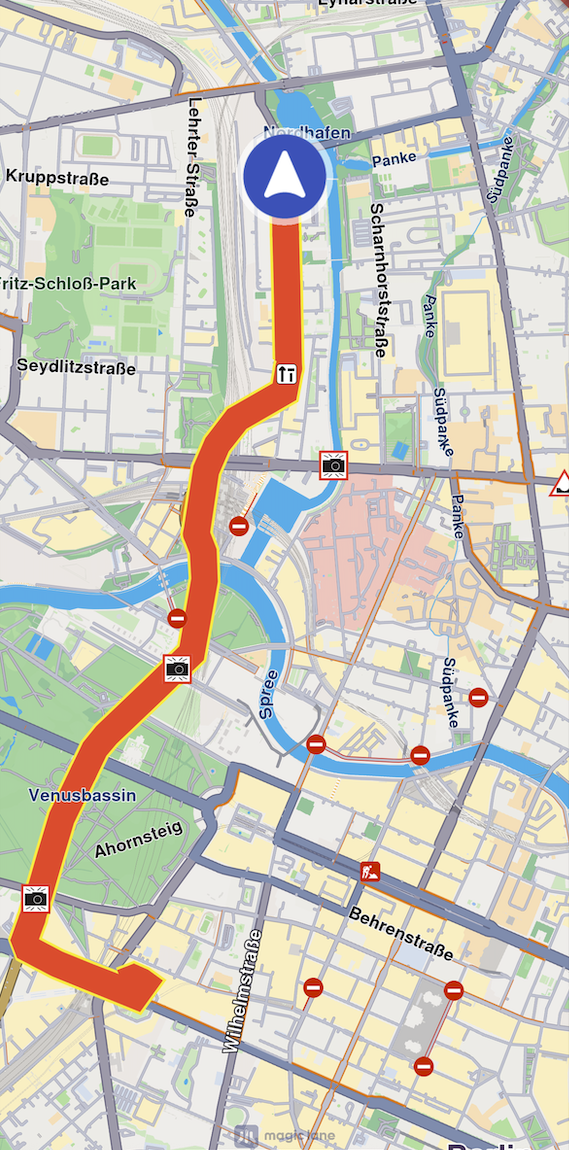
**Tracked path**
```dart
final mapViewExtensions = controller.extensions;
final err = mapViewExtensions.startTrackPositions(
updatePositionMs: 500,
settings: MarkerCollectionRenderSettings(
polylineInnerColor: Colors.red,
polylineOuterColor: Colors.yellow,
polylineInnerSize: 3.0,
polylineOuterSize: 2.0),
dataSource: dataSource);
// other code ...
mapViewExtensions.stopTrackPositions();
```
| **Method** | **Parameters** | **Return type** |
| ----------------------- | -------------------------------------------------------------------------------------------------------------------------------------------------------------------------------------------------------------------------------------------------------------------------------------------------------------- | ------------------------------------------------------------------------------------- |
| **startTrackPositions** | - `updatePositionMs` - Tracked position collection update frequency. High frequency may decrease rendering performance on low-end devices
- `MarkerCollectionRenderSettings` - Markers collection rendering settings in the map view
- `DataSource?` - DataSource object which positions are tracked | `GemError` |
| **stopTrackPositions** | | - `GemError.success` on success
- `GemError.notFound` if tracking is not started |
| **isTrackedPositions** | | `bool` |
| **trackedPositions** | | `List` |
info
If the `dataSource` parameter is left null, tracking uses the current `DataSource` set in `PositionService`. If no `DataSource` is set in `PositionService`, `GemError.notFound` is returned.
### Get tracked positions[](#get-tracked-positions "Direct link to Get tracked positions")
Retrieve tracked positions using the `trackedPositions` getter after calling `MapViewExtensions.startTrackPositions`. This returns a list of `Coordinates` used to render the path polyline on `GemMap`.
```dart
final mapViewExtensions = controller.extensions;
mapViewExtensions.trackedPositions;
// other code ...
mapViewExtensions.stopTrackPositions();
```
warning
Calling the `trackedPositions` getter **after** `stopTrackPositions` returns an empty list.
## Relevant examples demonstrating sensors and data source related features[](#relevant-examples-demonstrating-sensors-and-data-source-related-features "Direct link to Relevant examples demonstrating sensors and data source related features")
* [Recorder](/docs/flutter/examples/routing-navigation/recorder.md)
* [Record NMEA](/docs/flutter/examples/routing-navigation/record-nmea.md)
* [Recorder in Background](/docs/flutter/examples/routing-navigation/background-recorder-with-foreground-service.md)