# Styling
Last updated:
October 18, 2026
\| 8 minutes read
Learn how to customize map appearance using predefined styles or custom styles created in [Magic Lane Map Studio](https://developer.magiclane.com/documentation/OnlineStudio/guide_creating_a_style.html).
## Apply predefined styles[](#apply-predefined-styles "Direct link to Apply predefined styles")
Predefined map styles must be downloaded before use, as they are not loaded into memory by default. Use the `ContentStore` class to retrieve and download available styles.
### Get available styles[](#get-available-styles "Direct link to Get available styles")
Retrieve a list of all available map styles as a `List`:
```dart
void getStyles() {
ContentStore.asyncGetStoreContentList(ContentType.viewStyleLowRes,
(err, items, isCached) {
if (err == GemError.success && items.isNotEmpty) {
for (final item in items) {
_stylesList.add(item);
}
ScaffoldMessenger.of(context).clearSnackBars();
}
});
}
```
The `asyncGetStoreContentList` method can be used to obtain other content such as car models, road maps, TTS voices, and more.
info
Two types of preview styles are available:
* `ContentType.viewStyleHighRes` - optimized for high-resolution displays (mobile devices)
* `ContentType.viewStyleLowRes` - optimized for low-resolution displays (desktop monitors)
The `onComplete` parameter of the `asyncGetStoreContentList` method provides:
* `GemError` - indicates whether any errors occurred during the operation
* `List` - contains the retrieved items (empty if error is not `GemError.success`)
* `boolean` - specifies whether the item is already cached or needs downloading
### ContentStoreItem attributes[](#contentstoreitem-attributes "Direct link to ContentStoreItem attributes")
A `ContentStoreItem` has the following attributes and methods:
| Attribute/Methods | Explanation |
| ----------------------- | ---------------------------------------------------------------------------- |
| name | Gets the name of the associated product. |
| id | Get the unique id of the item in the content store. |
| chapterName | Gets the product chapter name translated to interface language. |
| countryCodes | Gets the country code (ISO 3166-1 alpha-3) list of the product as text. |
| language | Gets the full language code for the product. |
| type | Gets the type of the product as a \[ContentType] value. |
| fileName | Gets the full path to the content data file when available. |
| clientVersion | Gets the client version of the content. |
| totalSize | Get the size of the content in bytes. |
| availableSize | Gets the available size of the content in bytes. |
| isCompleted | Checks if the item is completed downloaded. |
| status | Gets current item status. |
| pauseDownload | Pause a previous download operation. |
| cancelDownload | Cancel a previous download operation. |
| downloadProgress | Get current download progress. |
| canDeleteContent | Check if associated content can be deleted. |
| deleteContent | Delete the associated content |
| isImagePreviewAvailable | Check if there is an image preview available on the client. |
| imgPreview | Get the preview. The user is responsible to check if the image is valid. |
| contentParameters | Get additional parameters for the content. |
| updateItem | Get corresponding update item. |
| isUpdatable | Check if item is updatable, i.e. it has a newer version available. |
| updateSize | Get update size (if an update is available for this item). |
| updateVersion | Get update version (if an update is available for this item). |
| asyncDownload | Asynchronous start/resume the download of the content store product content. |
danger
Certain attributes may not apply to specific types of `ContentStoreItem`. For example, `countryCodes` will not provide meaningful data for `ContentType.viewStyleLowRes`, as styles are not associated with any country.
### Download a style[](#download-a-style "Direct link to Download a style")
Download a map style by calling `ContentStoreItem.asyncDownload()`:
```dart
style.asyncDownload(
(err) {
if (err != GemError.success) {
showSnackbar("Download failed with error $err");
} else {
showSnackbar("Download succeeded");
}
},
onProgress: (progress) {
print('Download progress: $progress');
},
allowChargedNetworks: true
);
```
You can control whether to allow downloads over metered networks by setting the `allowChargedNetworks` parameter. The `onProgress` callback provides the download progress as a percentage (0-100).
### Apply the downloaded style[](#apply-the-downloaded-style "Direct link to Apply the downloaded style")
Apply the downloaded style using `GemMapController.MapViewPreferences.setMapStyleByPath(path)` with the filename:
```dart
final String filename = currentStyle.fileName;
mapController.preferences.setMapStyleByPath(filename);
```
### Alternative methods to set styles[](#alternative-methods-to-set-styles "Direct link to Alternative methods to set styles")
You can also set map styles using:
* `MapViewPreferences.setMapStyle()` - takes a `ContentStoreItem` of type `ContentType.viewStyleHighRes` or `ContentType.viewStyleLowRes`
* `MapViewPreferences.setMapStyleById()` - takes the unique id obtained from `ContentStoreItem.id`
```dart
mapController.preferences.setMapStyle(currentStyle);
mapController.preferences.setMapStyleById(currentStyle.id);
```
## Apply custom styles[](#apply-custom-styles "Direct link to Apply custom styles")
Create a custom map style in [Magic Lane Map Studio](https://developer.magiclane.com/documentation/OnlineStudio/guide_creating_a_style.html). The process generates a `.style` file that you can load into your application.
### Add style file to assets[](#add-style-file-to-assets "Direct link to Add style file to assets")
Create an `assets` directory in the root of your project and place the `.style` file there. Add the following lines to your `pubspec.yaml` file under the `flutter:` section:
```yaml
flutter:
uses-material-design: true
assets:
- assets/
```
This allows the `flutter/services.dart` package to access the `assets` directory.
### Load style into memory[](#load-style-into-memory "Direct link to Load style into memory")
Load the style into memory with the following code:
```dart
// Method to load style and return it as bytes
Future _loadStyle() async {
// Load style into memory
final data = await rootBundle.load('assets/Basic_1_Oldtime-1_21_656.style');
// Convert it to Uint8List
final bytes = data.buffer.asUint8List();
return bytes;
}
```
danger
Import `'package:flutter/services.dart'` for `rootBundle.load()` to work.
### Apply the custom style[](#apply-the-custom-style "Direct link to Apply the custom style")
Once the map style bytes are obtained, set the style using `MapViewPreferences.setMapStyleByBuffer(styleData)`:
```dart
final styleData = await _loadStyle();
mapController.preferences
.setMapStyleByBuffer(styleData, smoothTransition: true);
```
Enable smooth transition by passing `true` to the `smoothTransition` parameter.
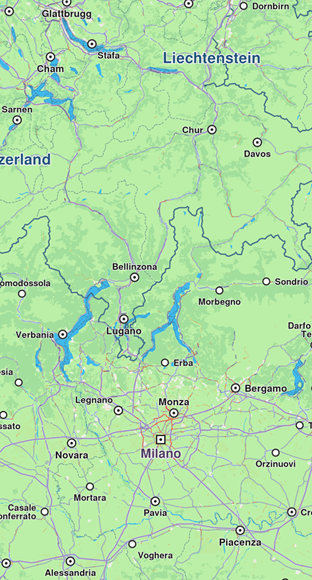
**Default map style**
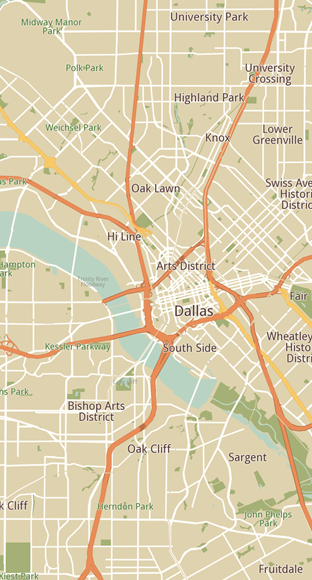
**Custom added map style**
### Set initial map style[](#set-initial-map-style "Direct link to Set initial map style")
Apply a map style when creating a `GemMap` by providing a relative path to the `.style` file using the `initialMapStyleAsset` parameter:
```dart
GemMap(
appAuthorization: projectApiToken,
initialMapStyleAsset: "assets/map-styles/my_map_style.style",
),
```
info
When using `initialMapStyleAsset`, the path is relative to the project root and only works on Android and iOS.
## Use a custom map font[](#use-a-custom-map-font "Direct link to Use a custom map font")
Use `MapViewPreferences.setMapFont` to draw the map labels with your own `.ttf` or `.otf` files instead of the built-in font and of the font defined by the map style. The paths are file system paths, so a font bundled as a Flutter asset must first be written to a file:
```dart
// The font must be a file on disk: write the bundled asset to a file first
final ByteData data =
await rootBundle.load('fonts/MaterialIcons-Regular.otf');
final Directory dir = await getApplicationDocumentsDirectory();
final File fontFile = File('${dir.path}/MaterialIcons-Regular.otf');
await fontFile.writeAsBytes(
data.buffer.asUint8List(data.offsetInBytes, data.lengthInBytes));
// Each path replaces one face; a face without a path keeps the built-in one
final GemError error = mapController.preferences.setMapFont(
fontFile.path,
boldPath: fontFile.path,
);
if (error != GemError.success) {
showSnackbar("Could not load the font: $error");
return;
}
showSnackbar("Map font: ${mapController.preferences.mapFontPath}");
// Pass an empty path to restore the style / built-in font
// mapController.preferences.setMapFont('');
```
Each path replaces one face (regular, bold, italic). A face without a path keeps the built-in one, and characters missing from a custom face are drawn with the built-in font. All the given files are read before anything changes, so on error the current font is kept. The method returns `GemError.notFound` when a file is missing or empty and `GemError.io` when the font cannot be loaded.
Pass an empty regular path with no bold or italic path to restore the style or built-in font. The `mapFontPath` getter returns the path of the custom regular face, or the bold or italic one when only those are set, and an empty string when no custom font is set.
## Inspect the style layers at a position[](#inspect-the-style-layers-at-a-position "Direct link to Inspect the style layers at a position")
Use `getStyleLayerInfo` on the `GemMapController` to find out which layers of the applied map style have content at a given coordinate, for example to tell whether the user tapped a label or an area:
```dart
final Coordinates coordinates = Coordinates(
latitude: 48.8566,
longitude: 2.3522,
);
mapController.centerOnCoordinates(coordinates, zoomLevel: 80);
// Layers of the applied style with content at the position, topmost first
final List layers =
mapController.getStyleLayerInfo(coordinates);
if (layers.isEmpty) {
showSnackbar("No style layer at the position (view not ready?)");
} else {
showSnackbar(layers
.map((StyleLayerInfo layer) => '${layer.id}: ${layer.name}')
.join(', '));
}
```
The layers are returned topmost first. Each `StyleLayerInfo` carries the layer `id` and its `name`, which is the layer type, for example `symbol` for a label layer or `polygon` for an area layer. Only the layers currently visible in the view are considered, and the list is empty when no visible layer has content at the position or when the view is not ready yet.
## Get notified about style changes[](#get-notified-about-style-changes "Direct link to Get notified about style changes")
The user can be notified when the style changes by providing a callback using the `registerOnSetMapStyle` method from the `GemMapController`:
```dart
controller.registerOnSetMapStyle((id, stylepath, viaApi){
print('The style with id $id and path $stylepath has been set. viaApi: $viaApi');
});
```
The callback provides:
* `id` - the style id
* `stylepath` - the path to the `.style` file
* `viaApi` - indicates if the style was set via API
## Relevant examples demonstrating map styling related features[](#relevant-examples-demonstrating-map-styling-related-features "Direct link to Relevant examples demonstrating map styling related features")
* [Map Styles](/docs/flutter/examples/maps-3dscene/map-styles.md)
* [Assets Map Style](/docs/flutter/examples/maps-3dscene/assets-map-styles.md)