# Display route instructions
Last updated:
October 18, 2026
\| 1 minute read
Learn how to display route instructions as arrows on the map and manage their visibility.
## Display instructions on the map[](#display-instructions-on-the-map "Direct link to Display instructions on the map")
Route instructions are represented as arrows on the map. Display them using `GemMapController.centerOnRouteInstruction(instruction, zoomLevel: zoomLevel)`. To obtain a route's instructions, see the [Get the route segments and instructions](/docs/flutter/guides/routing/get-started-routing.md#retrieve-route-instructions) section.
The following example iterates through all instructions of the first segment and displays each one:
```dart
for (final instruction in route.segments.first.instructions) {
mapController.centerOnRouteInstruction(instruction, zoomLevel: 75);
await Future.delayed(Duration(seconds: 3));
}
```
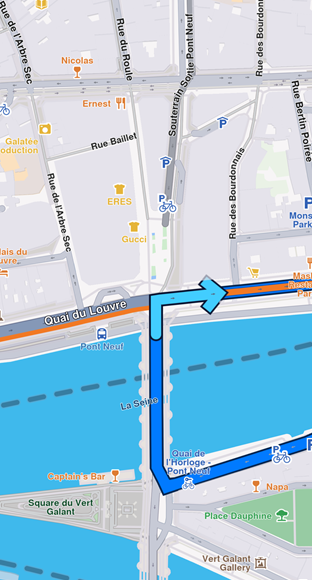
**Turn right arrow instruction**
## Remove instruction arrows[](#remove-instruction-arrows "Direct link to Remove instruction arrows")
Remove the instruction arrow from the map using the `GemMapController.clearRouteInstruction()` method. The route instruction arrow is automatically cleared when a new route instruction is centered on or when the route is cleared.
## Relevant examples demonstrating route instructions related features[](#relevant-examples-demonstrating-route-instructions-related-features "Direct link to Relevant examples demonstrating route instructions related features")
* [Route Instructions](/docs/flutter/examples/routing-navigation/route-instructions.md)