# Overlays
Last updated:
October 18, 2026
\| 10 minutes read
An `Overlay` is an additional map layer with data stored on Magic Lane servers, accessible in online and offline modes. Overlays can be default or user-defined.
Define overlay data using [Magic Lane Map Studio](https://developer.magiclane.com/documentation/OnlineStudio/guide_creating_a_style.html). Upload POI data, categories, and binary information via `GeoJSON` format. Overlays can have multiple categories and subcategories. A single item from an overlay is an overlay item.
danger
Overlays require downloading to work offline. See [Downloading overlays](/docs/flutter/guides/offline/manage-content.md#download-overlays) for details. Most overlay features require a `GemMap` widget with a style containing the overlay.
## OverlayInfo[](#overlayinfo "Direct link to OverlayInfo")
The `OverlayInfo` class contains information about an overlay.
### Structure[](#structure "Direct link to Structure")
| Method | Description | Type |
| ------------- | ----------------------------------------- | ----------------------- |
| uid | Gets the unique ID of the overlay. | `int` |
| categories | Gets the categories of the overlay. | `List` |
| getCategory | Gets a category by its ID. | `OverlayCategory?` |
| img | Gets the image of the overlay. | `Img` |
| name | Gets the name of the overlay. | `String` |
| hasCategories | Checks if the category has subcategories. | `bool` |
### Usage[](#usage "Direct link to Usage")
Use `OverlayInfo` to:
* Access categories within an overlay
* Get the overlay `uid` for filtering search results
* Toggle overlay visibility on the map
* Display overlay information in the UI
## OverlayCategory[](#overlaycategory "Direct link to OverlayCategory")
The `OverlayCategory` class represents hierarchical data for overlay categories.
### Structure[](#structure-1 "Direct link to Structure")
| Property / Method | Description | Type |
| ----------------- | ------------------------------------------------------------------- | ----------------------- |
| uid | The category ID. | `int` |
| overlayuid | The parent overlay ID. Refers to the id of the `OverlayInfo` object | `int` |
| img | The category icon. | `Img` |
| name | The category name. | `String` |
| subcategories | The subcategories of the category. | `List` |
| hasSubcategories | Checks if the category has subcategories. | `bool` |
### Usage[](#usage-1 "Direct link to Usage")
Use the category `uid` to:
* Filter search results
* Filter and manage overlay items that trigger alerts in `AlarmService`
## OverlayItem[](#overlayitem "Direct link to OverlayItem")
An `OverlayItem` represents a single item within an overlay, containing information about the item and its parent overlay.
### Structure[](#structure-2 "Direct link to Structure")
| Property / Method | Description | Type |
| ---------------------------- | ----------------------------------------------------------------------------------------------------------------------------------------------------------------------------------------------------------------------------------------------------------- | ------------------------- |
| categoryId | Gets the OverlayItem's category ID. May be 0 if the item does not belong to a specific category. Gives the id of the root category which may not be the direct parent category. | `int` |
| coordinates | Gets the coordinates of the OverlayItem. | `Coordinates` |
| hasPreviewExtendedData | Checks if the OverlayItem has preview extended data (dynamic data). Available only for overlays predefined. | `bool` |
| img | Gets the image of the OverlayItem. | `Img` |
| name | Gets the name of the OverlayItem. | `String` |
| uid | Gets the unique ID of the OverlayItem within the overlay. | `int` |
| overlayInfo | Gets the parent OverlayInfo. | `OverlayInfo` |
| previewDataParameterList | Gets the OverlayItem preview data as a parameters list. It | `SearchableParameterList` |
| previewData | Gets the OverlayItem preview data as a `OverlayItemParameters` subclass. Contains the data provided by `previewDataParameterList` in a structured form. Returns null if no preview data is available or if the parent overlay is based on user-defined data | `OverlayItemParameters?` |
| previewUrl | Gets the preview URL for the item (if any). | `String` |
| overlayUid | Gets the parent overlay UID. | `int` |
| getPreviewExtendedData | Asynchronously gets the OverlayItem preview extended data. | `ProgressListener` |
| cancelGetPreviewExtendedData | Cancels the asynchronous `getPreviewExtendedData` operation. | `void` |
danger
Don't confuse the `uid` of `OverlayInfo`, `OverlayCategory`, and `OverlayItem`-each serves a distinct purpose.
Tip
Check if an `OverlayItem` belongs to an `OverlayInfo` using the `overlayUid` property, or retrieve the full `OverlayInfo` object via the `overlayInfo` property.
Tip
The `categoryId` getter returns the root category ID, not necessarily the direct parent category.
Get the direct parent category:
```dart
final int parentCategoryId = overlayItem.previewDataParameterList.findParameter('icon').value as int;
```
Use the `getCategory` method from the parent `OverlayInfo` class to retrieve the corresponding `OverlayCategory` object.
### Usage[](#usage-2 "Direct link to Usage")
Select `OverlayItems` from the map or receive them from `AlarmService` on approach. Display overlay item fields and information in the UI.
## Overlay Types[](#overlay-types "Direct link to Overlay Types")
Predefined overlay types:
* Safety overlay
* Public transport overlay
* Social reports overlay
The `CommonOverlayId` enum contains IDs for predefined overlay categories. Each overlay type has a specific `OverlayItemParameters` subclass for structured preview data available on the `previewData` property of `OverlayItem`:
* `OverlayItemParameters` is the base class for all preview data types.
* `SocialReportParameters` for social reports overlay items.
* `PublicTransportParameters` for public transport overlay items.
* `SafetyParameters` for safety overlay items.
The `previewDataParameterList` contains all the fields in a generic list format, including support for user-defined overlays.
### Safety Overlay[](#safety-overlay "Direct link to Safety Overlay")
Safety overlays represent speed limit cameras, red light controls, and similar items.
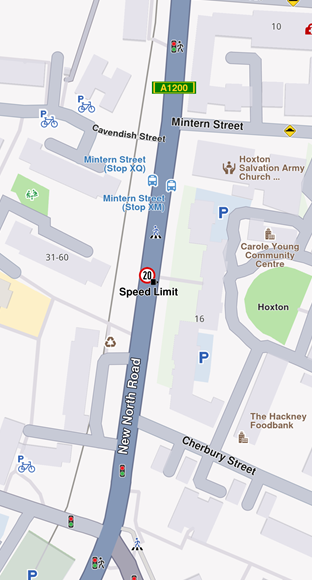
**Speed limit overlay item**
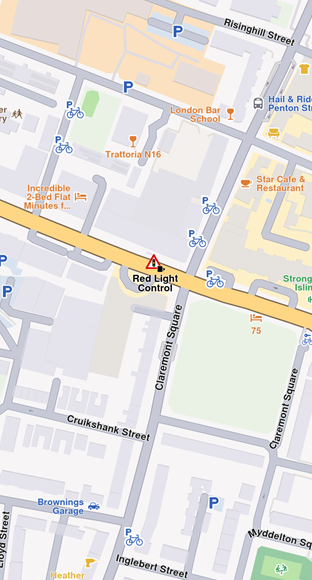
**Red light control overlay item**
Speed limit `previewData` includes:
| Field | Type | Description |
| ------------------------- | ----------- | ---------------------------------------------------------------- |
| `id` | `int?` | The unique identifier of the overlay item. |
| `createStampUtc` | `DateTime?` | Creation timestamp in UTC. |
| `iconId` | `int?` | Overlay item category id. |
| `country` | `String?` | Country ISO3 code. |
| `angleIcon` | `int?` | Angle used to calculate icon rotation. |
| `cameraTypeId` | `int?` | Icon camera type identifier. |
| `strCameraStatus` | `String?` | Camera status (e.g., Active, Inactive). |
| `strDrivingDirection` | `String?` | Driving direction text (e.g., Both Ways). |
| `strLocation` | `String?` | Street address or location text. |
| `strTowards` | `int?` | Angle used to calculate icon rotation (directional). |
| `provider` | `String?` | Data provider name. |
| `providerId` | `int?` | Data provider identifier. |
| `speedUnit` | `String?` | Speed unit (e.g., km/h, mph). |
| `speedValue` | `int?` | Measured speed value. |
| `type` | `String?` | Safety overlay type (e.g., Speed Limit). |
| `strDrivingDirectionFlag` | `bool?` | True if located on a two-way street; false for a one-way street. |
### Public Transport Overlay[](#public-transport-overlay "Direct link to Public Transport Overlay")
This overlay displays public transport stations.
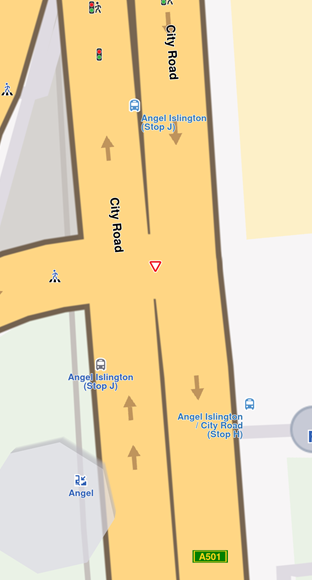
**Map displaying three bus stations**
Bus station `previewData` includes:
| Field | Type | Description |
| ------------------------- | ----------- | -------------------------------------------------------------------- |
| `id` | `int?` | The unique identifier of the overlay item. |
| `createStampUtc` | `DateTime?` | Creation timestamp in UTC. |
| `iconId` | `int?` | Overlay item category id. |
| `name` | `String?` | Public transport stop name. |
| `strDrivingDirectionFlag` | `bool?` | True if the stop is on a two-way street; false for a one-way street. |
danger
Two types of public transport stops exist:
* Bus stations with schedule information (overlay items)
* Bus stations without schedule information (landmarks)
### Social Reports Overlay[](#social-reports-overlay "Direct link to Social Reports Overlay")
This overlay displays fixed cameras, construction sites, and user-reported events.
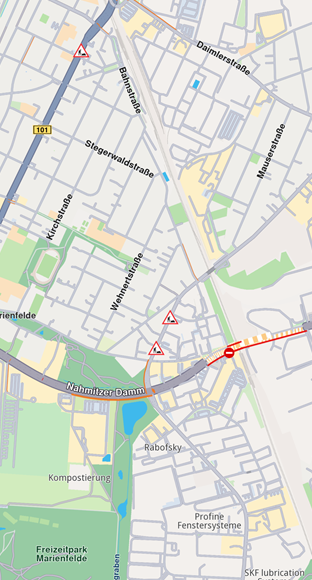
**Construction overlay item**
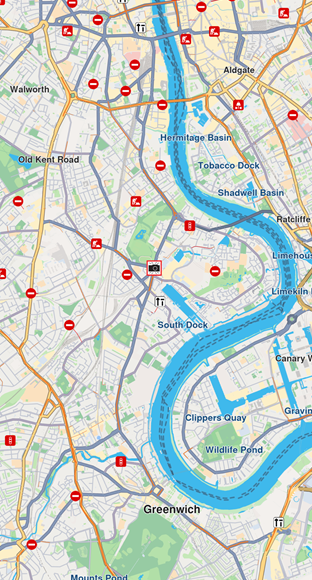
**Fixed camera overlay item**
Construction report `previewData` includes:
| Field | Type | Description |
| ---------------- | -------------- | ---------------------------------------------------------------------- |
| `id` | `int?` | The unique identifier of the overlay item. |
| `createStampUtc` | `int?` | Creation timestamp in seconds since Unix epoch (UTC). |
| `icon` | `int?` | Overlay item category id. Mapped to `iconId`. |
| `type` | `String?` | Reported subject type (e.g., "Police", "Fixed Camera", "Road Hazard"). |
| `tts` | `String?` | Text-to-speech string for the report (language dependent). |
| `coordinates` | `Coordinates?` | Reported coordinates.. |
| `description` | `String?` | Report description text. |
| `ownerId` | `int?` | Identifier of the user who reported the event. |
| `ownerName` | `String?` | Name of the report owner. |
| `score` | `int?` | Numeric confirmations or score from other users. |
| `updateStampUtc` | `int?` | Last update timestamp in seconds since Unix epoch (UTC). |
| `expireStampUtc` | `int?` | Expiration timestamp in seconds since Unix epoch (UTC). |
| `validityMins` | `int?` | Remaining validity time in minutes. |
| `hasSnapshot` | `bool?` | Whether the report has an associated snapshot image. |
| `direction` | `double?` | Azimuth direction relative to north. |
| `allowThumb` | `bool?` | Whether the report can be thumbed up/down. |
| `allowUpdate` | `bool?` | Whether the report can be updated. |
| `allowDelete` | `bool?` | Whether the report can be deleted. |
| `ownReport` | `bool?` | True if the report belongs to the current user. |
| `country` | `String?` | Country ISO3 code. |
The `SocialOverlay` static class generates, updates, and deletes social reports through static methods.
## Work with Overlays[](#work-with-overlays "Direct link to Work with Overlays")
### OverlayService[](#overlayservice "Direct link to OverlayService")
The `OverlayService` manages overlays in the Maps SDK, providing methods to retrieve, enable, disable, and manage overlay data online and offline.
#### Retrieve Overlay Information[](#retrieve-overlay-information "Direct link to Retrieve Overlay Information")
Retrieve all available overlays for the current map style using `getAvailableOverlays`.
This method returns an `(OverlayCollection, bool)` tuple:
* `OverlayCollection` - Contains available overlays
* `bool` - Indicates if some information is unavailable and will download when network is available
Receive a notification when missing information downloads via the `onCompleteDownload` callback.
```dart
final Completer completer = Completer();
final (OverlayCollection, bool) availableOverlays =
OverlayService.getAvailableOverlays(onCompleteDownload: (error) {
completer.complete(error);
});
await completer.future;
OverlayCollection collection = availableOverlays.$1;
```
The `OverlayCollection` class provides:
* `size` - Returns collection size
* `getOverlayAt` - Returns `OverlayInfo` at specified index (null if it doesn't exist)
* `getOverlayById` - Returns `OverlayInfo` by ID
#### Enable and Disable Overlays[](#enable-and-disable-overlays "Direct link to Enable and Disable Overlays")
Enable or disable overlays using `enableOverlay` and `disableOverlay` methods. Check overlay status with `isOverlayEnabled`.
```dart
final int overlayUid = CommonOverlayId.safety.id;
// Enable overlay
final GemError errorCodeWhileEnabling = OverlayService.enableOverlay(overlayUid);
// Disable overlay
final GemError errorCodeWhileDisabling = OverlayService.disableOverlay(overlayUid);
// Check if overlay is enabled
final bool isEnabled = OverlayService.isOverlayEnabled(overlayUid);
```
The `enableOverlay`, `disableOverlay`, and `isOverlayEnabled` methods can also take an optional `categUid` parameter to enable, disable, or check the status of a specific category within an overlay. By default, if no category ID is provided, the entire overlay is affected.
### Select overlay items[](#select-overlay-items "Direct link to Select overlay items")
Overlay items are selectable. Identify specific items programmatically when users tap or click using `cursorSelectionOverlayItems()`. See [Map Selection Functionality](/docs/flutter/guides/maps/interact-with-map.md#select-map-elements) for details.
### Search Overlay Items[](#search-overlay-items "Direct link to Search Overlay Items")
Overlays are searchable. Set the right properties in search preferences when performing a search. See [Get started with Search](/docs/flutter/guides/search/get-started-search.md) for details.
### Calculate Routes[](#calculate-routes "Direct link to Calculate Routes")
Overlay items are **not designed for route calculation**.
Tip
For routing, create a landmark using the overlay item's coordinates and a representative name.
### Display Overlay Item Information[](#display-overlay-item-information "Direct link to Display Overlay Item Information")
Overlay items contain additional information for display. Access this information using:
* `previewDataParameterList` getter
* `getPreviewParametersAs` method
* `previewUrl` getter (returns a URL for more details in a web browser)
The `previewData` getter provides information structured in a `SearchableParametersList`, varying by overlay type. Iterate through parameters (type `GemParameter`):
```dart
SearchableParameterList parameters = overlayItem.previewDataParameterList;
for (GemParameter param in parameters){
// Unique for every parameter
String? key = param.key;
// Used for display on UI - might change depending on language
String? name = param.name;
// The type of param.value
ValueType valueType = param.type;
// The parameter value
dynamic value = param.value;
}
```
danger
The `previewData` is unavailable if the parent map tile is disposed. Get preview data before further map interactions.
Obtain structured preview data using the `getPreviewParametersAs` getter, which retrieves data as a specific class based on overlay type:
```dart
if (overlayItem.overlayUid == CommonOverlayId.publicTransport.id) {
PublicTransportParameters? parameters =
overlays.first.getPreviewParametersAs();
if (parameters == null) {
print("Parameters are null");
return;
}
String? name = parameters.name;
DateTime? createStamp = parameters.createStampUtc;
int? iconId = parameters.iconId;
bool? streetDirectionFlag = parameters.strDrivingDirectionFlag;
}
if (overlayItem.overlayUid == CommonOverlayId.safety.id) {
SafetyParameters? parameters =
overlays.first.getPreviewParametersAs();
if (parameters == null) {
print("Parameters are null");
return;
}
String? countryName = parameters.country;
int? speedValue = parameters.speedValue;
// other fields...
}
if (overlayItem.overlayUid == CommonOverlayId.socialReports.id) {
SocialReportParameters? parameters =
overlays.first.getPreviewParametersAs();
if (parameters == null) {
print("Parameters are null");
return;
}
int? title = parameters.score;
String? description = parameters.description;
DateTime? createStamp = parameters.createStampUtc;
// other fields...
}
```
Retrieve the image associated with an overlay item using the `img` property.
### Proximity Alarms[](#proximity-alarms "Direct link to Proximity Alarms")
Configure alarms to notify users when approaching specific overlay items. See [Landmarks and overlay alarms](/docs/flutter/guides/alarms/landmark-and-overlay-alarms.md) for implementation details.
### Highlight Overlay Items[](#highlight-overlay-items "Direct link to Highlight Overlay Items")
Highlight overlay items using the `activateHighlightOverlayItems` method from the `GemMapController` class.
### Download Overlay Data[](#download-overlay-data "Direct link to Download Overlay Data")
Some overlays can be downloaded for offline use. See more details in the [Downloading overlays](/docs/flutter/guides/offline/manage-content.md#download-overlays) section.
***