# Markers
Last updated:
October 18, 2026
\| 4 minutes read
A **marker** is a visual element placed at a geographic location to indicate a point of interest. Markers can be icons, polylines, or polygons representing temporary or user-defined locations, waypoints, or annotations.
Markers contain basic metadata like position, title, and description. The map does not include markers by default - you must create and add them.
## Create Markers[](#create-markers "Direct link to Create Markers")
Create markers using one of these methods:
* **Default**: `Marker()` - Creates a basic marker object
* **Coordinates**: `Marker.fromCoordinates(List coordinates)` - Creates a marker with specified coordinates
* **Circle area**: `Marker.fromCircleArea(Coordinates centerCoords, double radius)` - Creates a circular marker
* **Ellipse area**: `Marker.fromCircleRadii({required Coordinates centerCoords, required double horizRadius, required double vertRadius})` - Creates an elliptical marker
* **Rectangle area**: `Marker.fromRectangle(Coordinates topLeft, Coordinates bottomRight)` - Creates a rectangular marker
* **Geographic area**: `Marker.fromArea(GeographicArea area)` - Creates a marker from a geographic area
danger
Creating a marker does not automatically display it on the map. Set its coordinates and attach it to the map. See [Display markers](/docs/flutter/guides/maps/display-map-items/display-markers.md) for instructions.
## Marker Structure[](#marker-structure "Direct link to Marker Structure")
Markers contain multiple coordinates organized into parts. Without a specified part, coordinates are added to the default part (index 0). Each part renders differently based on marker type.
### Marker Types[](#marker-types "Direct link to Marker Types")
Three marker types are available:
* **Point markers** - Each part is a group of points (array of coordinates)
* **Polyline markers** - Each part is a polyline (array of coordinates)
* **Polygon markers** - Each part is a polygon (array of coordinates)
Markers provide methods for adding, updating, and deleting coordinates or parts.
### Rendering Options[](#rendering-options "Direct link to Rendering Options")
Markers render using default settings or custom options:
* Image icon
* Polyline with associated images at each point
* Polygon with specific colors and fill
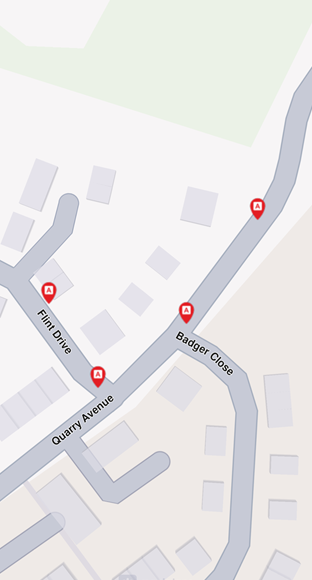
**Point markers**
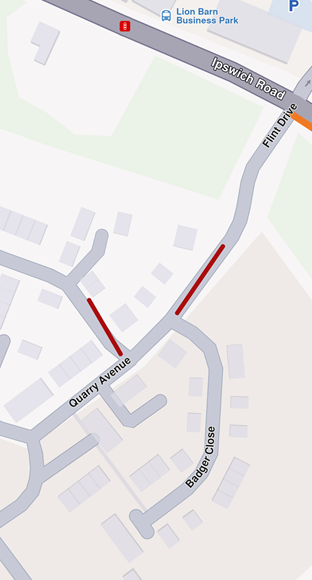
**Polyline marker**
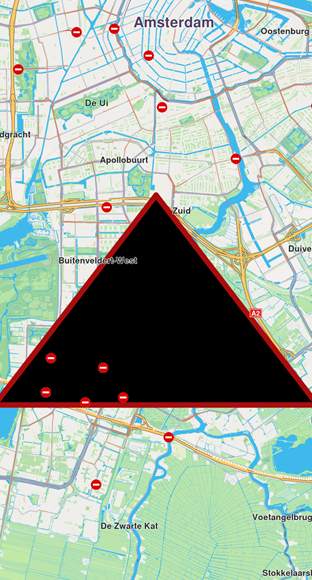
**Polygon marker**
## Customize Markers[](#customize-markers "Direct link to Customize Markers")
Markers offer extensive customization options:
* **Colors** - Modify fill color, contour color, and text color
* **Sizes** - Adjust line width, label size, and margins
* **Labels and positioning** - Define labeling modes, reposition labels, and adjust alignment
* **Grouping behavior** - Configure how markers group when in proximity
* **Icons** - Customize icons for individual markers or groups, including image fit and alignment
* **Textures** - Apply unique textures to polylines and polygons
**MarkerSketches** are predefined collections in the view. Each marker type has a collection, and each element has different render settings.
## Interaction with Markers[](#interaction-with-markers "Direct link to Interaction with Markers")
### Select Markers[](#select-markers "Direct link to Select Markers")
Markers are selectable by default. User interactions like taps identify markers programmatically using the `cursorSelectionMarkers` method of `GemView`.
Tip
When hovering over a grouped marker cluster, `cursorSelectionMarkers` returns the `MarkerMatch` of the group head marker. See [Marker Clustering](/docs/flutter/guides/maps/display-map-items/display-markers.md#marker-clustering) for details.
The result is a list of matches containing:
* Marker type
* Marker collection
* Marker index in the collection
* Part index inside the marker
### Search Markers[](#search-markers "Direct link to Search Markers")
Markers are **not searchable**.
### Calculate Routes[](#calculate-routes "Direct link to Calculate Routes")
Markers are **not designed for route calculation**.
Tip
For route calculation, create a landmark using the marker's coordinates and a representative name.
## MarkerCollection[](#markercollection "Direct link to MarkerCollection")
The `MarkerCollection` class holds markers of the same type and style.
### Structure and Operations[](#structure-and-operations "Direct link to Structure and Operations")
| Name | Type | Description |
| -------------------------------------- | ----------------------- | ------------------------------------------------------------------------------------------- |
| `id` | int | Retrieves the collection's unique ID. |
| `clear()` | void | Deletes all markers from the collection. |
| `add(Marker marker, {int index = -1})` | void | Adds a marker to the collection at a specific index (default is the end of the collection). |
| `indexOf(Marker marker)` | int | Returns the index of a given marker in the collection. |
| `delete(int index)` | void | Deletes a marker from the collection by index. |
| `area` | RectangleGeographicArea | The geographic area enclosing all markers in the collection. |
| `getMarkerAt(int index)` | Marker | Returns the marker at a specific index or an empty marker if the index is invalid. |
| `getMarkerById(int id)` | Marker | Retrieves a marker by its unique ID. |
| `getPointsGroupHead(int id)` | Marker | Retrieves the head of a points group for a given marker ID. |
| `getPointsGroupComponents(int id)` | List\ | Retrieves the components of a points group by its ID. |
| `name` | String | The name of the marker collection. |
| `size` | int | Returns the number of markers in the collection. |
| `type` | MarkerType | Retrieves the type of the marker collection. |
### Create MarkerCollection[](#create-markercollection "Direct link to Create MarkerCollection")
Create a marker collection:
```dart
MarkerCollection markerCollection = MarkerCollection(
markerType: MarkerType.point,
name: "myCollection"
);
```
### Usage[](#usage "Direct link to Usage")
Display markers on the map by adding collections to the map's `MapViewMarkerCollections`. Each collection holds multiple markers of the same type for organized management and rendering.
***