Markers
A marker is a visual element placed at a geographic location to indicate a point of interest. Markers can be icons, polylines, or polygons representing temporary or user-defined locations, waypoints, or annotations.
Markers contain basic metadata like position, title, and description. The map does not include markers by default - you must create and add them.
Create Markers
Create markers using one of these methods:
- Default:
Marker()- Creates a basic marker object - Coordinates:
Marker.fromCoordinates(List<Coordinates> coordinates)- Creates a marker with specified coordinates - Circle area:
Marker.fromCircleArea(Coordinates centerCoords, double radius)- Creates a circular marker - Ellipse area:
Marker.fromCircleRadii({required Coordinates centerCoords, required double horizRadius, required double vertRadius})- Creates an elliptical marker - Rectangle area:
Marker.fromRectangle(Coordinates topLeft, Coordinates bottomRight)- Creates a rectangular marker - Geographic area:
Marker.fromArea(GeographicArea area)- Creates a marker from a geographic area
Creating a marker does not automatically display it on the map. Set its coordinates and attach it to the map. See Display markers for instructions.
Marker Structure
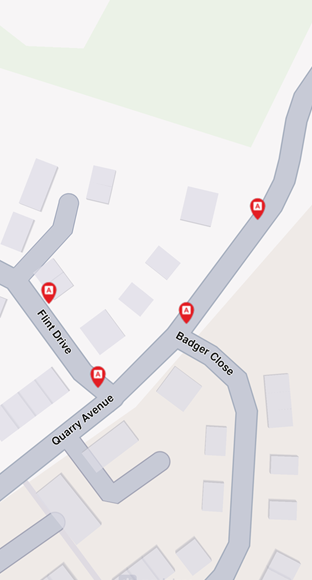
Markers contain multiple coordinates organized into parts. Without a specified part, coordinates are added to the default part (index 0). Each part renders differently based on marker type.
Marker Types
Three marker types are available:
- Point markers - Each part is a group of points (array of coordinates)
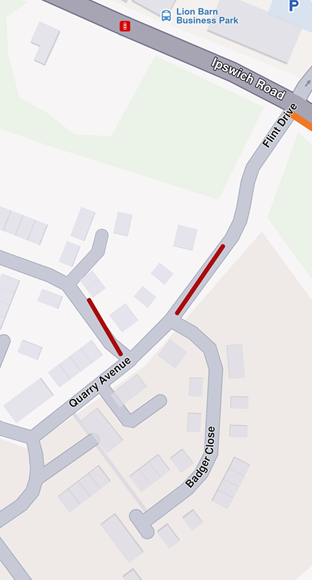
- Polyline markers - Each part is a polyline (array of coordinates)
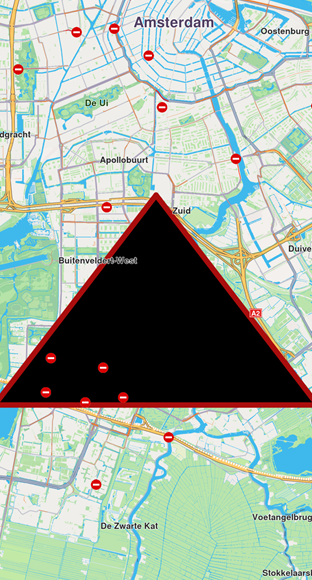
- Polygon markers - Each part is a polygon (array of coordinates)
Markers provide methods for adding, updating, and deleting coordinates or parts.
Rendering Options
Markers render using default settings or custom options:
- Image icon
- Polyline with associated images at each point
- Polygon with specific colors and fill
Customize Markers
Markers offer extensive customization options:
- Colors - Modify fill color, contour color, and text color
- Sizes - Adjust line width, label size, and margins
- Labels and positioning - Define labeling modes, reposition labels, and adjust alignment
- Grouping behavior - Configure how markers group when in proximity
- Icons - Customize icons for individual markers or groups, including image fit and alignment
- Textures - Apply unique textures to polylines and polygons
MarkerSketches are predefined collections in the view. Each marker type has a collection, and each element has different render settings.
Interaction with Markers
Select Markers
Markers are selectable by default. User interactions like taps identify markers programmatically using the cursorSelectionMarkers method of GemView.
When hovering over a grouped marker cluster, cursorSelectionMarkers returns the MarkerMatch of the group head marker. See Marker Clustering for details.
The result is a list of matches containing:
- Marker type
- Marker collection
- Marker index in the collection
- Part index inside the marker
Search Markers
Markers are not searchable.
Calculate Routes
Markers are not designed for route calculation.
For route calculation, create a landmark using the marker's coordinates and a representative name.
MarkerCollection
The MarkerCollection class holds markers of the same type and style.
Structure and Operations
| Name | Type | Description |
|---|---|---|
id | int | Retrieves the collection's unique ID. |
clear() | void | Deletes all markers from the collection. |
add(Marker marker, {int index = -1}) | void | Adds a marker to the collection at a specific index (default is the end of the collection). |
indexOf(Marker marker) | int | Returns the index of a given marker in the collection. |
delete(int index) | void | Deletes a marker from the collection by index. |
area | RectangleGeographicArea | The geographic area enclosing all markers in the collection. |
getMarkerAt(int index) | Marker | Returns the marker at a specific index or an empty marker if the index is invalid. |
getMarkerById(int id) | Marker | Retrieves a marker by its unique ID. |
getPointsGroupHead(int id) | Marker | Retrieves the head of a points group for a given marker ID. |
getPointsGroupComponents(int id) | List<Marker> | Retrieves the components of a points group by its ID. |
name | String | The name of the marker collection. |
size | int | Returns the number of markers in the collection. |
type | MarkerType | Retrieves the type of the marker collection. |
Create MarkerCollection
Create a marker collection:
MarkerCollection markerCollection = MarkerCollection(
  markerType: MarkerType.point,
  name: "myCollection"
);
Usage
Display markers on the map by adding collections to the map's MapViewMarkerCollections. Each collection holds multiple markers of the same type for organized management and rendering.