# Video Recorder
Last updated:
October 18, 2026
\| 7 minutes read
This example demonstrates how to build a Flutter app using the Maps SDK to record video (in chunks) with audio and display the user's track on the map.
## How it works[](#how-it-works "Direct link to How it works")
The example app highlights the following features:
* Initializing a map.
* Requesting and handling camera, microphone, and location permissions.
* Starting and stopping video recording (with configurable chunk duration).
* Pausing and resuming audio recording during the session.
* Displaying the recorded path on the map once recording stops.
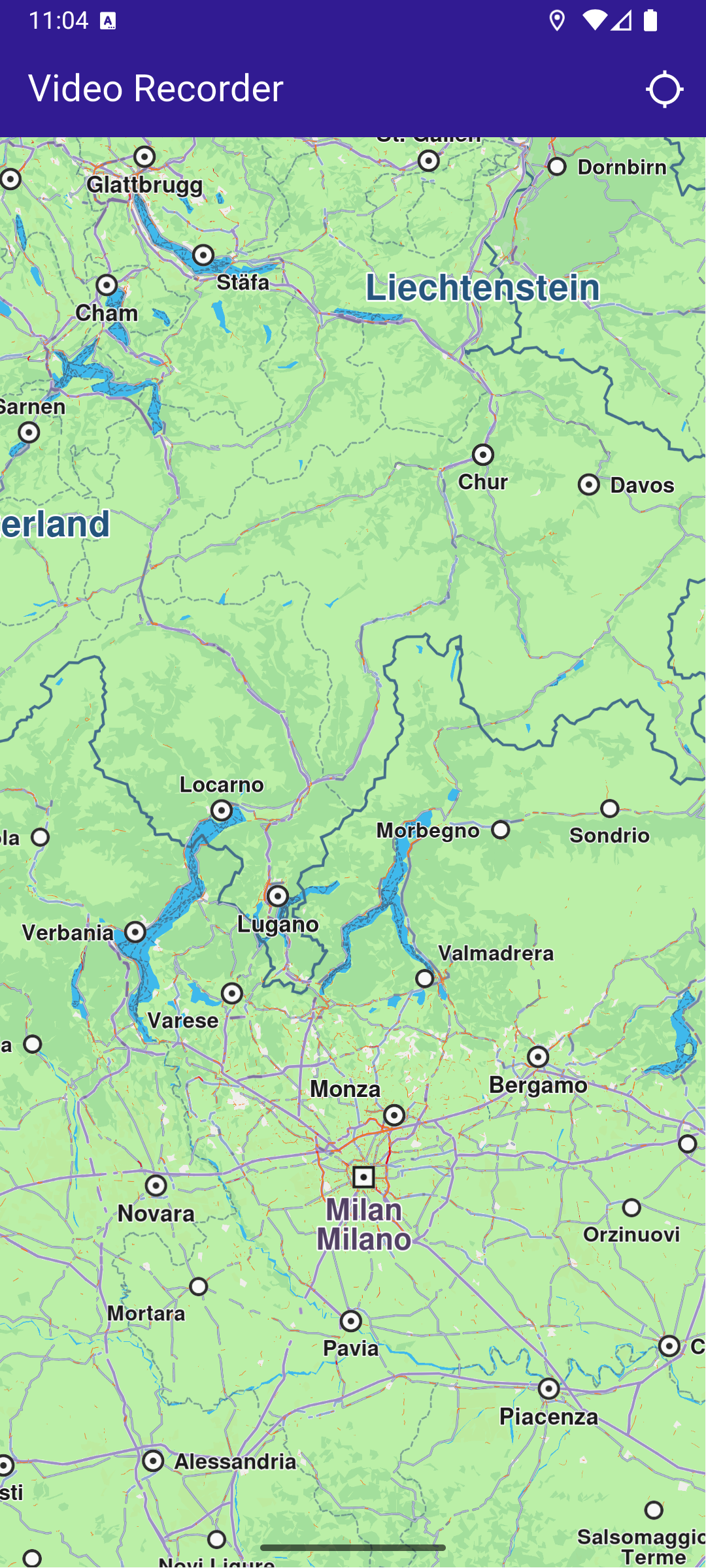
**Initial map**
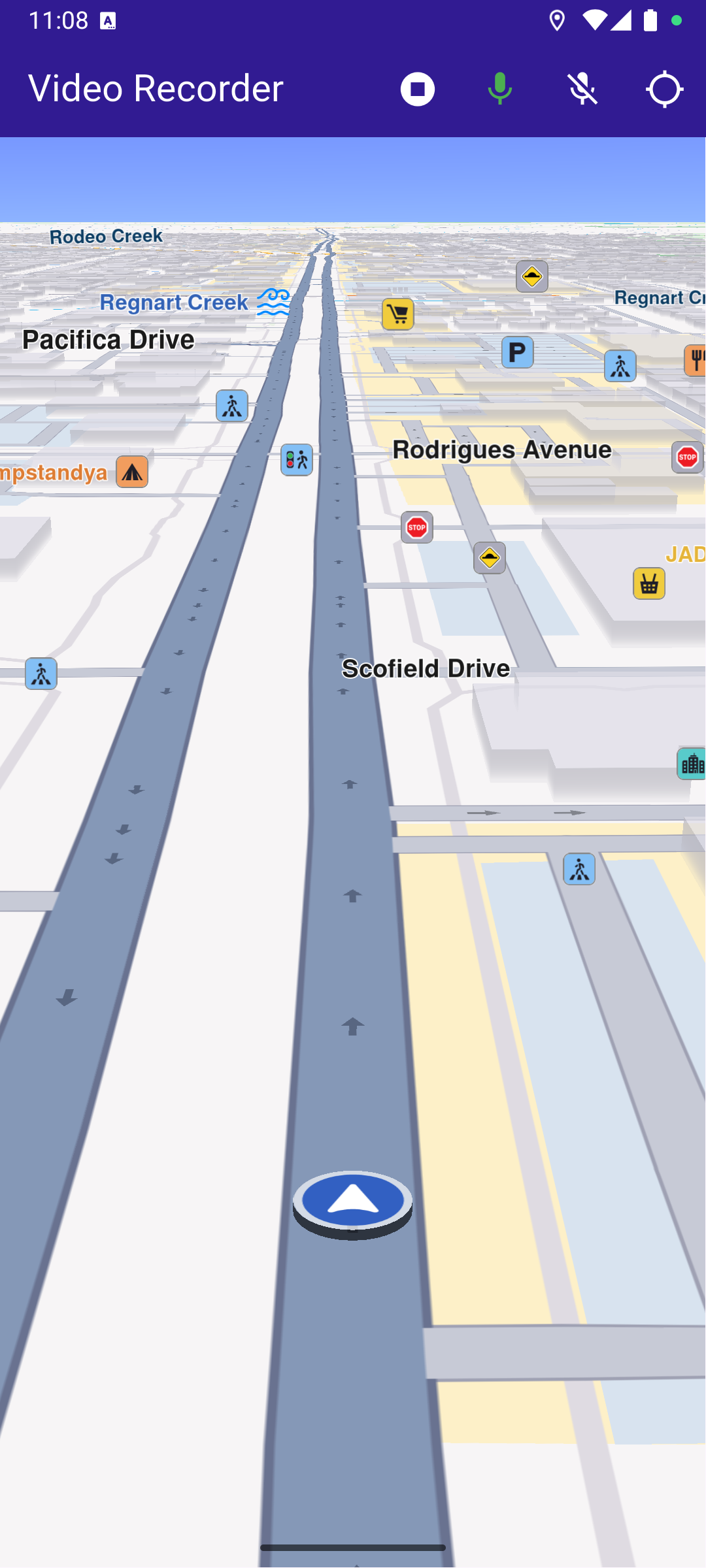
**Recording video + audio**
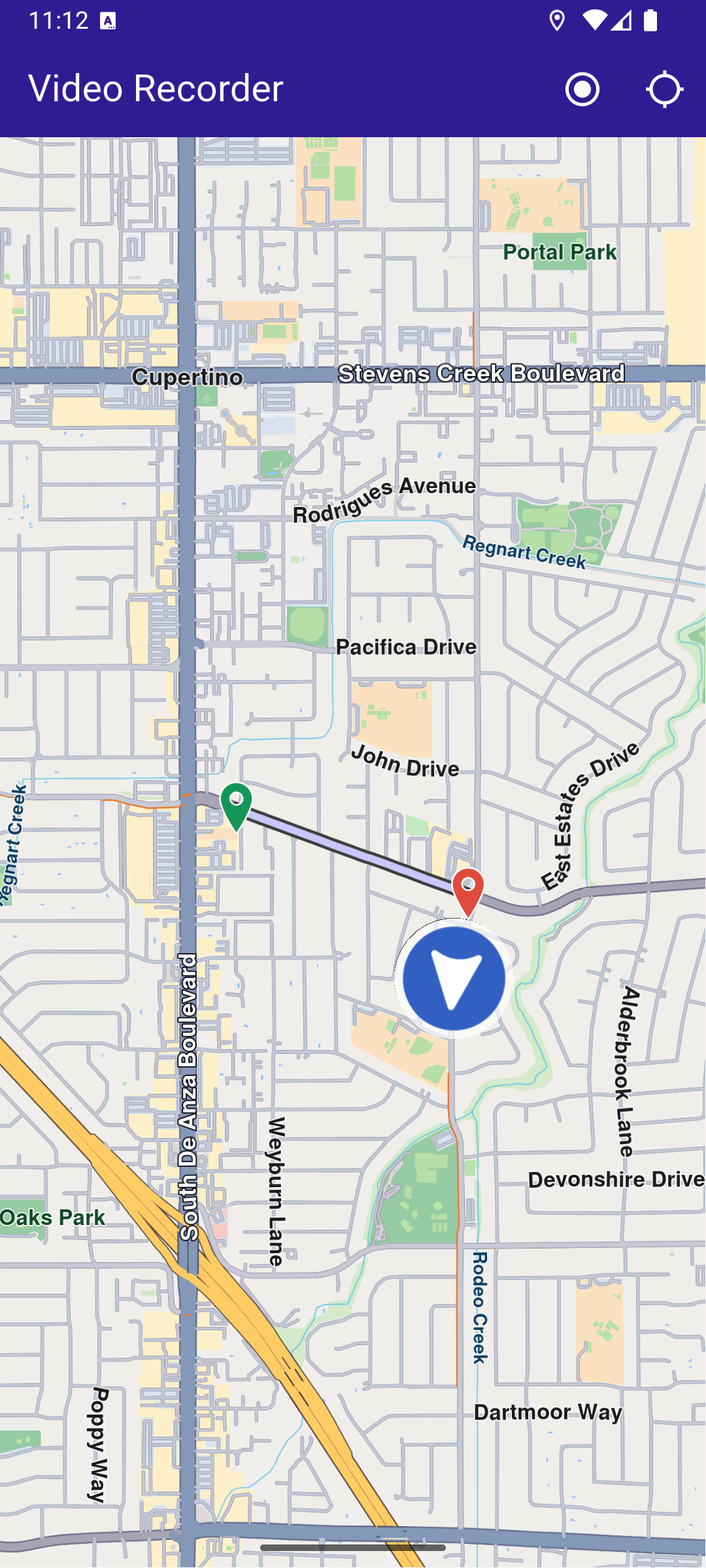
**Stopped recording**
### UI and Map Integration[](#ui-and-map-integration "Direct link to UI and Map Integration")
The following code builds the UI with a `GemMap` widget and an app bar that includes buttons for starting/stopping video recording, controlling audio recording, and following the user's position.
main.dart[View on Github](https://github.com/magiclane/magiclane-maps-sdk-examples-for-flutter/tree/main/video_recorder/lib/main.dart?ref_type=heads#L21)
```dart
class MyApp extends StatelessWidget {
const MyApp({super.key});
@override
Widget build(BuildContext context) {
return const MaterialApp(
debugShowCheckedModeBanner: false,
title: 'Video Recorder',
home: MyHomePage(),
);
}
}
class MyHomePage extends StatefulWidget {
const MyHomePage({super.key});
@override
State createState() => _MyHomePageState();
}
class _MyHomePageState extends State {
late GemMapController _mapController;
late Recorder _recorder;
PermissionStatus _locationPermissionStatus = PermissionStatus.denied;
bool _hasLiveDataSource = false;
bool _isRecording = false;
bool _isAudioRecording = false;
@override
void dispose() {
GemKit.release();
super.dispose();
}
@override
Widget build(BuildContext context) {
return Scaffold(
appBar: AppBar(
backgroundColor: Colors.deepPurple[900],
title: const Text(
'Video Recorder',
style: TextStyle(color: Colors.white),
),
actions: [
if (_hasLiveDataSource && _isRecording == false)
IconButton(
onPressed: _onRecordButtonPressed,
icon: Icon(Icons.radio_button_on, color: Colors.white),
),
if (_isRecording)
IconButton(
onPressed: _onStopRecordingButtonPressed,
icon: Icon(Icons.stop_circle, color: Colors.white),
),
if (_isRecording)
IconButton(
onPressed: _startAudioRecording,
icon: Icon(
Icons.mic,
color: _isAudioRecording ? Colors.green : Colors.white,
),
),
if (_isRecording)
IconButton(
onPressed: _stopAudioRecording,
icon: Icon(
Icons.mic_off,
color: _isAudioRecording ? Colors.white : Colors.grey,
),
),
IconButton(
onPressed: _onFollowPositionButtonPressed,
icon: const Icon(
Icons.location_searching_sharp,
color: Colors.white,
),
),
],
),
body: Stack(
children: [
GemMap(
key: ValueKey("GemMap"),
onMapCreated: (controller) => _onMapCreated(controller),
appAuthorization: projectApiToken,
),
],
),
);
}
// The callback for when map is ready to use.
void _onMapCreated(GemMapController controller) async {
// Save controller for further usage.
_mapController = controller;
}
Future _onFollowPositionButtonPressed() async {
if (kIsWeb) {
// On web platform permission are handled differently than other platforms.
// The SDK handles the request of permission for location.
final locationPermssionWeb =
await PositionService.requestLocationPermission();
if (locationPermssionWeb == true) {
_locationPermissionStatus = PermissionStatus.granted;
} else {
_locationPermissionStatus = PermissionStatus.denied;
}
} else {
// For Android & iOS platforms, permission_handler package is used to ask for permissions.
_locationPermissionStatus = await Permission.locationWhenInUse.request();
}
if (_locationPermissionStatus == PermissionStatus.granted) {
// After the permission was granted, we can set the live data source (in most cases the GPS).
// The data source should be set only once, otherwise we'll get -5 error.
if (!_hasLiveDataSource) {
PositionService.setLiveDataSource();
_hasLiveDataSource = true;
}
// Optionally, we can set an animation
final animation = GemAnimation(type: AnimationType.linear);
// Calling the start following position SDK method.
_mapController.startFollowingPosition(animation: animation);
setState(() {});
}
}
```
### Requesting Permissions[](#requesting-permissions "Direct link to Requesting Permissions")
The following code requests location permission (and storage permission on web) and then camera & microphone permissions before starting a recording.
main.dart[View on Github](https://github.com/magiclane/magiclane-maps-sdk-examples-for-flutter/tree/main/video_recorder/lib/main.dart?ref_type=heads#L119)
```dart
Future _onFollowPositionButtonPressed() async {
if (kIsWeb) {
// On web platform permission are handled differently than other platforms.
// The SDK handles the request of permission for location.
final locationPermssionWeb =
await PositionService.requestLocationPermission();
if (locationPermssionWeb == true) {
_locationPermissionStatus = PermissionStatus.granted;
} else {
_locationPermissionStatus = PermissionStatus.denied;
}
} else {
// For Android & iOS platforms, permission_handler package is used to ask for permissions.
_locationPermissionStatus = await Permission.locationWhenInUse.request();
}
if (_locationPermissionStatus == PermissionStatus.granted) {
// After the permission was granted, we can set the live data source (in most cases the GPS).
// The data source should be set only once, otherwise we'll get -5 error.
if (!_hasLiveDataSource) {
PositionService.setLiveDataSource();
_hasLiveDataSource = true;
}
// Optionally, we can set an animation
final animation = GemAnimation(type: AnimationType.linear);
// Calling the start following position SDK method.
_mapController.startFollowingPosition(animation: animation);
setState(() {});
}
}
```
### Starting and Stopping Recording[](#starting-and-stopping-recording "Direct link to Starting and Stopping Recording")
main.dart[View on Github](https://github.com/magiclane/magiclane-maps-sdk-examples-for-flutter/tree/main/video_recorder/lib/main.dart?ref_type=heads#L153)
```dart
Future _onRecordButtonPressed() async {
final hasCamMicPermission = await requestCameraAndMicPermissions();
if (!hasCamMicPermission) {
if (mounted) {
ScaffoldMessenger.of(context).showSnackBar(
SnackBar(
content: Text('Camera or microphone permission not granted.'),
duration: Duration(seconds: 3),
),
);
}
return;
}
//Helper function that returns path to the Tracks directory
final logsDir = await getDirectoryPath("Tracks");
final recorder = Recorder.create(
RecorderConfiguration(
dataSource: DataSource.createLiveDataSource()!,
logsDir: logsDir,
recordedTypes: [
DataType.position, // GPS position data
DataType.camera, // Video data from the camera sensor
],
enableAudio:
true, // Enable audio recording (requires microphone permission)
minDurationSeconds: 5,
videoQuality: Resolution
.hd720p, // Define the video resolution/quality (requires camera sensor)
chunkDurationSeconds:
180, // Length of each recorded video chunk in seconds
),
);
setState(() {
_isRecording = true;
_recorder = recorder;
});
final error = await _recorder.startRecording();
if (error != GemError.success) {
if (mounted) {
ScaffoldMessenger.of(context).showSnackBar(
SnackBar(
content: Text('Recording failed: $error'),
duration: Duration(seconds: 5),
),
);
}
setState(() {
_isRecording = false;
});
return;
}
// Clear displayed paths
_mapController.preferences.paths.clear();
_mapController.deactivateAllHighlights();
}
Future _onStopRecordingButtonPressed() async {
final endErr = await _recorder.stopRecording();
if (endErr == GemError.success) {
await _presentRecordedRoute();
} else {
if (mounted) {
ScaffoldMessenger.of(context).showSnackBar(
SnackBar(
content: Text('Recording failed: $endErr'),
duration: Duration(seconds: 5),
),
);
}
}
setState(() {
_isRecording = false;
});
}
```
note
The resulting video recordings are saved as `.mp4` files in the `Data/Tracks` directory specified in the recorder configuration.
### Starting and Stopping Audio Recording[](#starting-and-stopping-audio-recording "Direct link to Starting and Stopping Audio Recording")
main.dart[View on Github](https://github.com/magiclane/magiclane-maps-sdk-examples-for-flutter/tree/main/video_recorder/lib/main.dart?ref_type=heads#L306)
```dart
void _startAudioRecording() {
// Start audio recording using the recorder instance
_recorder.startAudioRecording();
setState(() {
_isAudioRecording = true;
});
}
void _stopAudioRecording() {
// Stop audio recording using the recorder instance
_recorder.stopAudioRecording();
setState(() {
_isAudioRecording = false;
});
}
```
### Presenting the Recorded Track on the Map[](#presenting-the-recorded-track-on-the-map "Direct link to Presenting the Recorded Track on the Map")
This code loads the last recorded track from device memory, retrieves the coordinates, builds a `Path` entity, and adds it to the `MapViewPathCollection`.
main.dart[View on Github](https://github.com/magiclane/magiclane-maps-sdk-examples-for-flutter/tree/main/video_recorder/lib/main.dart?ref_type=heads#L236)
```dart
Future _presentRecordedRoute() async {
final logsDir = await getDirectoryPath("Tracks");
// It loads all .gm and .mp4 files at logsDir
final bookmarks = RecorderBookmarks.create(logsDir);
// Get all recordings path
final logList = bookmarks?.getLogsList();
// Get the LogMetadata to obtain details about recorded session
LogMetadata? meta = bookmarks!.getLogMetadata(logList!.last);
final recorderCoordinates = meta!.preciseRoute;
final duration = convertDurationMillis(meta.durationMillis);
// Create a path entity from coordinates
final path = Path.fromCoordinates(recorderCoordinates);
Landmark beginLandmark = Landmark.withCoordinates(
recorderCoordinates.first,
);
Landmark endLandmark = Landmark.withCoordinates(recorderCoordinates.last);
beginLandmark.setImageFromIcon(GemIcon.waypointStart);
endLandmark.setImageFromIcon(GemIcon.waypointFinish);
HighlightRenderSettings renderSettings = HighlightRenderSettings(
options: {HighlightOptions.showLandmark},
);
_mapController.activateHighlight(
[beginLandmark, endLandmark],
renderSettings: renderSettings,
highlightId: 1,
);
// Show the path immediately after stopping recording
_mapController.preferences.paths.add(path);
// Center on recorder path
_mapController.centerOnAreaRect(
path.area,
viewRc: Rectangle(
_mapController.viewport.width ~/ 3,
_mapController.viewport.height ~/ 3,
_mapController.viewport.width ~/ 3,
_mapController.viewport.height ~/ 3,
),
);
if (mounted) {
ScaffoldMessenger.of(context).showSnackBar(
SnackBar(
content: Text('Duration: $duration'),
duration: Duration(seconds: 5),
),
);
}
}
```
### Utility Functions[](#utility-functions "Direct link to Utility Functions")
The `getDirectoryPath` function retrieves the root directory path for the app and returns the desired directory path inside the "Data" folder.
utils.dart[View on Github](https://github.com/magiclane/magiclane-maps-sdk-examples-for-flutter/tree/main/video_recorder/lib/utils.dart?ref_type=heads#L6)
```dart
import 'package:path_provider/path_provider.dart' as path_provider;
import 'package:path/path.dart' as path;
import 'dart:io';
Future getDirectoryPath(String dirName) async {
final docDirectory = Platform.isAndroid
? await path_provider.getExternalStorageDirectory()
: await path_provider.getApplicationDocumentsDirectory();
String absPath = docDirectory!.path;
final expectedPath = path.joinAll([absPath, "Data", dirName]);
return expectedPath;
}
// Utility function to convert the milliseconds duration into a suitable format
String convertDurationMillis(int milliseconds) {
if (milliseconds < 1000) return '$milliseconds ms';
int totalSeconds = milliseconds ~/ 1000;
int hours = totalSeconds ~/ 3600;
int minutes = (totalSeconds % 3600) ~/ 60;
int remainingSeconds = totalSeconds % 60;
String hoursText = (hours > 0) ? '$hours h ' : '';
String minutesText = (minutes > 0) ? '$minutes min ' : '';
String secondsText = '$remainingSeconds sec';
return (hoursText + minutesText + secondsText).trim();
}
```
Required Permissions
To ensure this example functions correctly, the necessary permissions must be added to the project's Android and iOS configuration files:
* Android
* iOS
Add the following code to the `android/app/src/main/AndroidManifest.xml` file, within the `` block:
```
```
This example uses the [Permission Handler](https://pub.dev/packages/permission_handler) package. Be sure to follow the [setup guide](https://pub.dev/packages/permission_handler#setup).
Add the following to `ios/Runner/Info.plist` inside the ``:
```
NSLocationWhenInUseUsageDescription
Location is needed for map localization and navigation
NSCameraUsageDescription
Camera access is needed for video recording
NSMicrophoneUsageDescription
We need microphone access to record audio.
NSPhotoLibraryUsageDescription
Access to the photo library is needed to select media
```
This example uses the [Permission Handler](https://pub.dev/packages/permission_handler) package. Follow the [official setup instructions](https://pub.dev/packages/permission_handler#setup). Add this to your `ios/Podfile`:
```
post_install do |installer|
installer.pods_project.targets.each do |target|
flutter_additional_ios_build_settings(target)
target.build_configurations.each do |config|
config.build_settings['GCC_PREPROCESSOR_DEFINITIONS'] ||= [
'$(inherited)',
'PERMISSION_LOCATION=1',
'PERMISSION_CAMERA=1',
'PERMISSION_MICROPHONE=1'
]
end
end
end
```