# GPX Thumbnail Image
Last updated:
October 18, 2026
\| 4 minutes read
This example demonstrates how to build a Flutter app using the Maps SDK to calculate a path from a GPX file, capture a screenshot of the displayed path, and show it on the screen.
## How It Works[](#how-it-works "Direct link to How It Works")
The example app highlights the following features:
* Importing a GPX file from assets.
* Creating a path from GPX data.
* Taking and displaying a screenshot of the computed path.
**Initial screen**
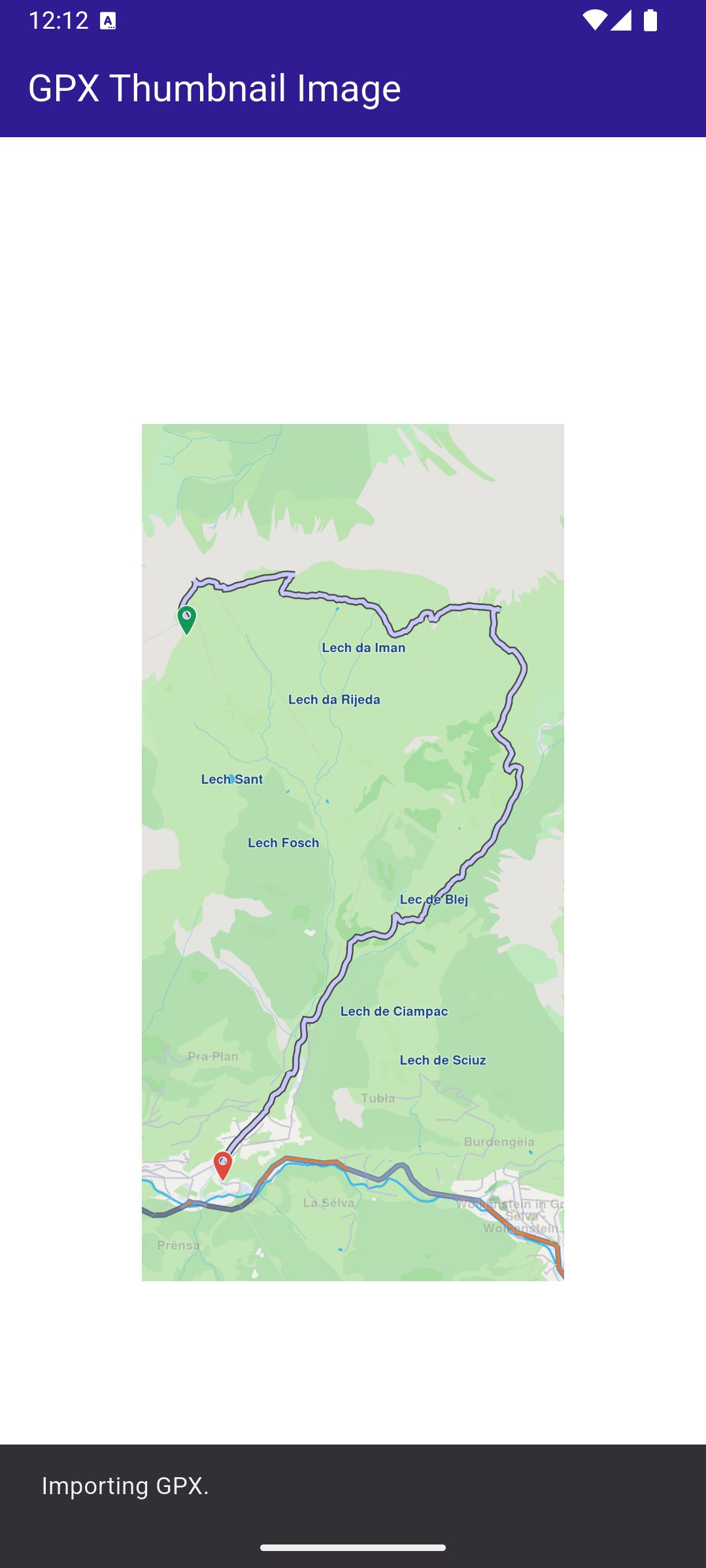
**Displaying screenshot of the computed route**
### UI and Map Integration[](#ui-and-map-integration "Direct link to UI and Map Integration")
The following code creates a UI with an empty page and an app bar that includes an import button for the GPX file. Once the GPX file is imported, the path is calculated and displayed on a hidden `GemMap`. A screenshot of the path is then captured and displayed on the screen.
```dart
const projectApiToken = String.fromEnvironment('YOUR_API_TOKEN_HERE');
void main() {
runApp(const MyApp());
}
class MyApp extends StatelessWidget {
const MyApp({super.key});
@override
Widget build(BuildContext context) {
return const MaterialApp(
debugShowCheckedModeBanner: false,
title: 'GPX Thumbnail Image',
home: MyHomePage(),
);
}
}
class MyHomePage extends StatefulWidget {
const MyHomePage({super.key});
@override
State createState() => _MyHomePageState();
}
class _MyHomePageState extends State {
late GemMapController _mapController;
Uint8List? _screenshotImage;
@override
void initState() {
_copyGpxToAppDocsDir();
super.initState();
}
@override
void dispose() {
GemKit.release();
super.dispose();
}
@override
Widget build(BuildContext context) {
return Scaffold(
appBar: AppBar(
backgroundColor: Colors.deepPurple[900],
title: const Text(
"GPX Thumbnail Image",
style: TextStyle(color: Colors.white),
),
actions: [
if (_screenshotImage == null)
IconButton(
onPressed: _importGPX,
icon: const Icon(Icons.download, color: Colors.white),
),
],
),
body: Stack(
children: [
GemMap(
appAuthorization: projectApiToken,
onMapCreated: (controller) {
_mapController = controller;
},
),
Positioned.fill(child: Container(color: Colors.white)),
_screenshotImage != null
? Center(
child: Image.memory(
_screenshotImage!,
width: MediaQuery.of(context).size.width - 100,
height: 500,
),
)
: const SizedBox(),
],
),
);
}
//Read GPX data from file, then compute & show path on map
Future _importGPX() async {
_showSnackBar(
context,
message: 'Importing GPX.',
duration: Duration(seconds: 3),
);
Path gemPath;
if (kIsWeb) {
final fileBytes = await rootBundle.load('assets/recorded_route.gpx');
final buffer = fileBytes.buffer;
final pathData = buffer.asUint8List(
fileBytes.offsetInBytes,
fileBytes.lengthInBytes,
);
// Process GPX data using your existing method
gemPath = Path.create(data: pathData, format: PathFileFormat.gpx);
} else {
//Read file from app documents directory
final docDirectory = await getApplicationDocumentsDirectory();
final gpxFile = File('${docDirectory.path}/recorded_route.gpx');
//Return if GPX file is not found
if (!await gpxFile.exists()) {
print('GPX file does not exist (${gpxFile.path})');
return;
}
final bytes = await gpxFile.readAsBytes();
final pathData = Uint8List.fromList(bytes);
//Get the Path entity containing all GPX points from file.
gemPath = Path.create(data: pathData, format: PathFileFormat.gpx);
_presentPathOnMap(gemPath);
// Center on path's area with margins
_mapController.centerOnAreaRect(
gemPath.area,
zoomLevel: 70,
viewRc: RectType(
x: _mapController.viewport.x + 100,
y: _mapController.viewport.y + 100,
width: _mapController.viewport.width - 200,
height: _mapController.viewport.height - 100,
),
);
await Future.delayed(Duration(milliseconds: 500));
// Capture the thumbnail image
Uint8List? screenshotImage = await _mapController.captureImage();
if (screenshotImage == null) {
print("Error while taking screenshot.\n");
return;
}
setState(() {
_screenshotImage = screenshotImage;
});
}
}
void _presentPathOnMap(Path path) {
// Present the path on map by adding it to MapViewPathCollection
_mapController.preferences.paths.add(path);
final startCoords = path.coordinates.first;
final endCoords = path.coordinates.last;
// Create start and end waypoints
final lmkStart = Landmark.withCoordinates(startCoords);
lmkStart.setImageFromIcon(GemIcon.waypointStart);
final lmkEnd = Landmark.withCoordinates(endCoords);
lmkEnd.setImageFromIcon(GemIcon.waypointFinish);
// Display start and end waypoints
_mapController.activateHighlight(
[lmkStart, lmkEnd],
renderSettings: HighlightRenderSettings(
options: {HighlightOptions.noFading, HighlightOptions.showLandmark},
),
);
}
//Copy the recorded_route.gpx file from assets directory to app documents directory
Future _copyGpxToAppDocsDir() async {
if (!kIsWeb) {
final docDirectory = await getApplicationDocumentsDirectory();
final gpxFile = File('${docDirectory.path}/recorded_route.gpx');
final fileBytes = await rootBundle.load('assets/recorded_route.gpx');
final buffer = fileBytes.buffer;
await gpxFile.writeAsBytes(
buffer.asUint8List(fileBytes.offsetInBytes, fileBytes.lengthInBytes),
);
}
}
// Method to show message in case calculate route is not finished
void _showSnackBar(
BuildContext context, {
required String message,
Duration duration = const Duration(hours: 1),
}) {
final snackBar = SnackBar(content: Text(message), duration: duration);
ScaffoldMessenger.of(context).showSnackBar(snackBar);
}
}
```