# Add Markers
Last updated:
October 18, 2026
\| 3 minutes read
This example demonstrates how to create a Flutter app that displays a large number of markers on a map using Maps SDK for Flutter.
## Saving Assets[](#saving-assets "Direct link to Saving Assets")
Before running the app, ensure that you save the necessary files (marker icons) into the assets directory.
Update your pubspec.yaml file to include these assets:
```yaml
flutter:
assets:
- assets/
```
## How it works[](#how-it-works "Direct link to How it works")
The example app demonstrates the following features:
* Display a large number of markers on the map.
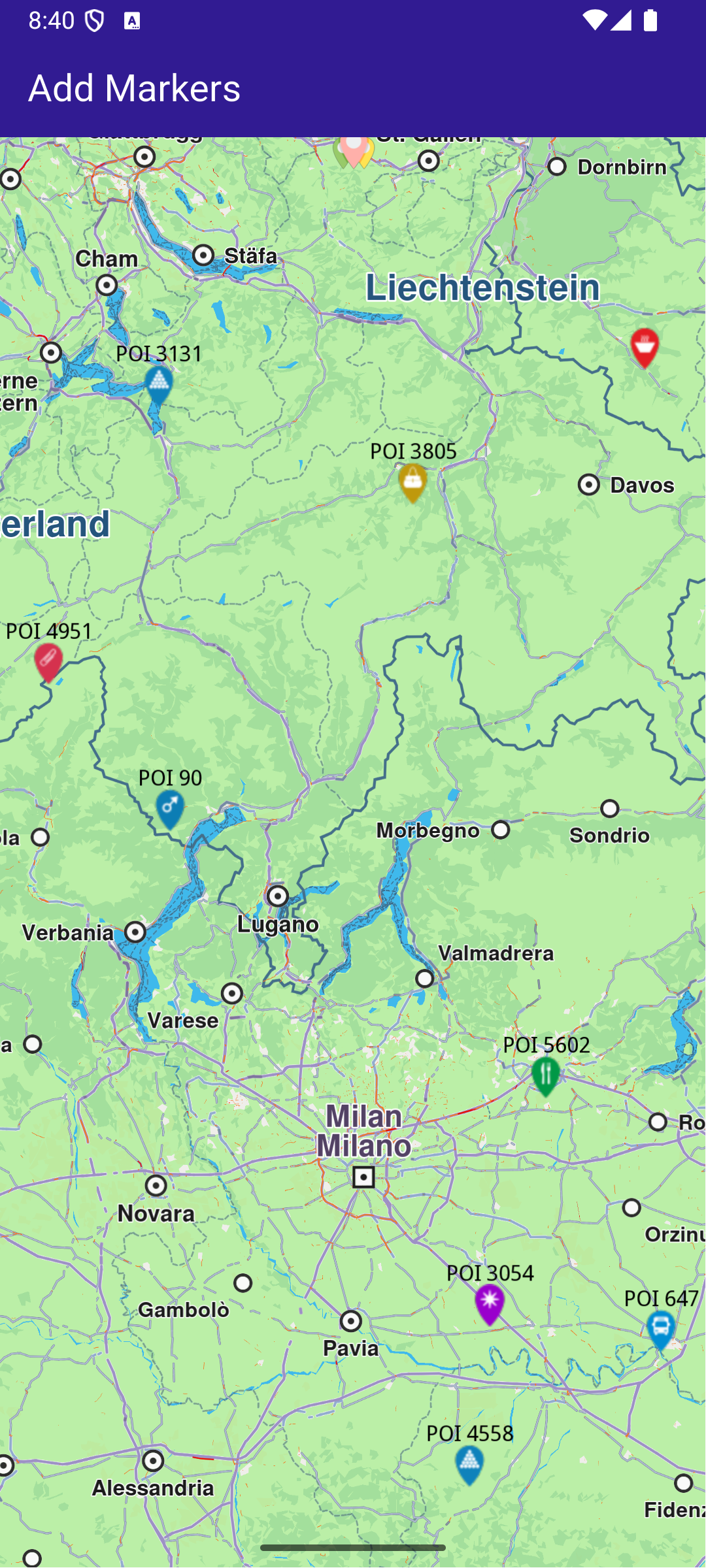
**GemMap widget**
### UI and Map Integration[](#ui-and-map-integration "Direct link to UI and Map Integration")
This code sets up the basic structure of the app, including the map and the app bar, and initializes the map when it is created.
main.dart[View on Github](https://github.com/magiclane/magiclane-maps-sdk-examples-for-flutter/tree/main/add_markers/lib/main.dart?ref_type=heads#L20)
```dart
class MyApp extends StatelessWidget {
const MyApp({super.key});
@override
Widget build(BuildContext context) {
return const MaterialApp(
debugShowCheckedModeBanner: false,
title: 'Add Markers',
home: MyHomePage(),
);
}
}
class MyHomePage extends StatefulWidget {
const MyHomePage({super.key});
@override
State createState() => _MyHomePageState();
}
class _MyHomePageState extends State {
late GemMapController _mapController;
@override
void dispose() {
GemKit.release();
super.dispose();
}
@override
Widget build(BuildContext context) {
return Scaffold(
appBar: AppBar(
backgroundColor: Colors.deepPurple[900],
title: const Text('Add Markers', style: TextStyle(color: Colors.white)),
),
body: GemMap(
key: ValueKey("GemMap"),
onMapCreated: _onMapCreated,
appAuthorization: projectApiToken,
),
);
}
// The callback for when map is ready to use.
Future _onMapCreated(GemMapController controller) async {
// Save controller for further usage.
_mapController = controller;
await addMarkers();
}
```
### Adding and displaying Markers[](#adding-and-displaying-markers "Direct link to Adding and displaying Markers")
This code creates and adds a large number of markers to the map, generating random coordinates across Europe for demonstration purposes. It loads PNG images from assets to be used as marker icons.
main.dart[View on Github](https://github.com/magiclane/magiclane-maps-sdk-examples-for-flutter/tree/main/add_markers/lib/main.dart?ref_type=heads#L72)
```dart
Future addMarkers() async {
final listPngs = await loadPngs();
// Save the image for the group icon.
final ByteData imageData = await rootBundle.load(
'assets/pois/GroupIcon.png',
);
final Uint8List imageBytes = imageData.buffer.asUint8List();
Random random = Random();
double minLat = 35.0; // Southernmost point of Europe
double maxLat = 71.0; // Northernmost point of Europe
double minLon = -10.0; // Westernmost point of Europe
double maxLon = 40.0; // Easternmost point of Europe
List markers = [];
for (int i = 0; i < 8000; ++i) {
// Generate random coordinates to display some markers.
double randomLat = minLat + random.nextDouble() * (maxLat - minLat);
double randomLon = minLon + random.nextDouble() * (maxLon - minLon);
final marker = MarkerJson(
coords: [Coordinates(latitude: randomLat, longitude: randomLon)],
name: "POI $i",
);
// Choose a random POI icon for the marker and set the label size.
final renderSettings = MarkerRenderSettings(
image: GemImage(
image: listPngs[random.nextInt(listPngs.length)],
format: ImageFileFormat.png,
),
labelTextSize: 2.0,
);
// Create a MarkerWithRenderSettings object.
final markerWithRenderSettings = MarkerWithRenderSettings(
marker,
renderSettings,
);
// Add the marker to the list of markers.
markers.add(markerWithRenderSettings);
}
// Create the settings for the collections.
final settings = MarkerCollectionRenderSettings();
// Set the label size.
settings.labelGroupTextSize = 2;
// The zoom level at which the markers will be grouped together.
settings.pointsGroupingZoomLevel = 35;
// Set the image of the collection.
settings.image = GemImage(image: imageBytes, format: ImageFileFormat.png);
// To delete the list you can use this method: _mapController.preferences.markers.clear();
// Add the markers and the settings on the map.
_mapController.preferences.markers.addList(
list: markers,
settings: settings,
name: "Markers",
);
}
// Load all the images from assets and transform them to Uint8List.
Future> loadPngs() async {
List pngs = [];
for (int i = 83; i < 183; ++i) {
try {
final ByteData imageData = await rootBundle.load(
'assets/pois/poi$i.png',
);
final Uint8List png = imageData.buffer.asUint8List();
pngs.add(png);
} catch (e) {
throw ("Error loading png $i");
}
}
return pngs;
}
```