Recorder
The Recorder module is a comprehensive tool designed for managing sensor data recording.
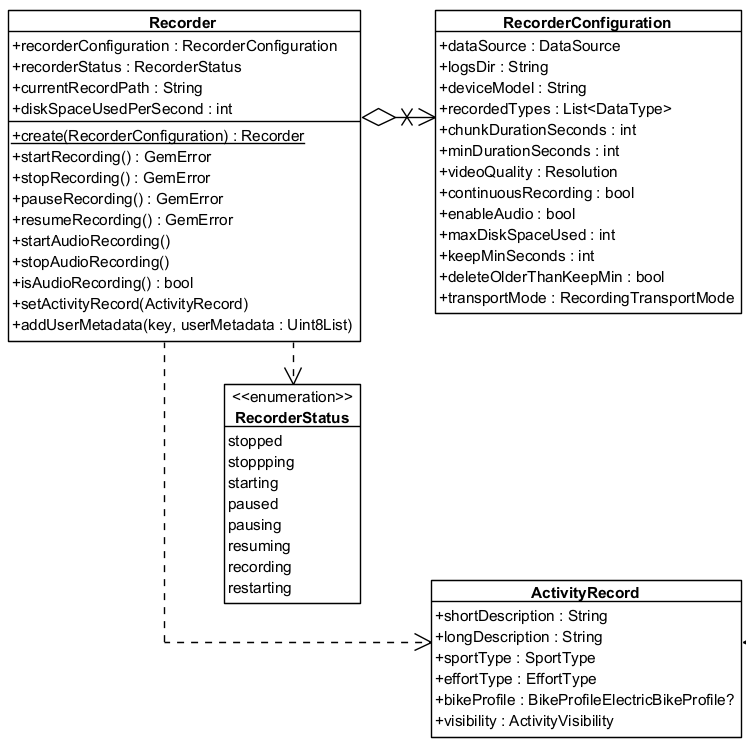
The Recorder supports a wide range of configurable parameters through the RecorderConfiguration, allowing developers to tailor recording behavior to specific application needs. Features include:
- Customizable storage options: Define log directories, manage disk space, and specify the duration of recordings.
- Data type selection: Specify which data types (e.g., video, audio, or sensor data) to record.
- Video and audio options: Set video resolution, enable/disable audio recording, and manage chunk durations. It's possible to record only sensor data, sensor data + video, sensor data + audio or sensor data + video + audio.
The Recorder provides comprehensive methods to control the recording lifecycle:
- Start, stop, pause, and resume recordings.
- Automatic restarts for continuous recording with chunked durations.
The Recorder supports various transportation modes (e.g., car, pedestrian, bike), enabling detailed analysis and classification of recordings based on context.
To prevent overwhelming the device's storage, the Recorder allows for setting disk space limits and automatically manages logs based on specified retention thresholds.
In the following class diagram you can see the main classes used by the Recorder and the relationships between them:
Initialize the Recorder
The Recorder cannot be directly instantiated. Instead, the produce method is used to obtain a configured Recorder instance.
RecorderConfigurationPtr recorderConfiguration = gem::StrongPointerFactory<RecorderConfiguration>();

recorderConfiguration->dataSource = yourDataSource;
recorderConfiguration->logsDir = pathToRecordDirectory;
recorderConfiguration->recordedTypes.push_back( sense::EDataType::Position );

StrongPointer<Recorder> recorder = Recorder::produce( recorderConfiguration );
If the dataSource, logsDir and recordedTypes parameters are not populated with valid data, the startRecording method will return error::KInvalidInput and no data will be recorded.
Configure the RecorderConfiguration
| Recorder configuration attribute | Description |
|---|---|
| dataSource | The source providing the data to be recorded. |
| logsDir | The directory used to keep the logs |
| deviceModel | The device model. Deprecated, use hardwareSpecifications instead. |
| hardwareSpecifications | Extensive details about the device as a hashmap. |
| recordedTypes | The data types that are recorded |
| minDurationSeconds | The minimum duration for the recording to be saved |
| videoQuality | The video quality |
| chunkDurationSeconds | The chunk duration time in seconds |
| bContinuousRecording | Whether the recording should continue automatically when chunk time achieved |
| bEnableAudio | This flag will be used to determine if audio is needed to be recorded or not |
| maxDiskSpaceUsed | When reached, it will stop the recording |
| keepMinSeconds | Will not delete any record if this threshold is not reached |
| deleteOlderThanKeepMin | Older logs that exceeds minimum kept seconds threshold should be deleted |
| transportMode | The transport mode |
If the log duration is shorter than minDurationSeconds the stopRecording method of Recorder will not save the recording and will return error::KRecordedLogTooShort.
The error::KRecordedLogTooShort error may also occur if an insufficient number of positions were emitted, even when the duration between startRecording and stopRecording exceeds minDurationSeconds. To test the recording functionality, you can create a custom external DataSource and push custom positions. Refer to the custom positioning guide for more details. The external DataSource created needs to be provided to the RecorderConfiguration object.
Be aware that if minChunkDuration is set too high, it may cause error::KNoDiskSpace since the SDK will estimate how much space is required for the entire chunk.
The videoQuality parameter is based on the Resolution enum defined below. Each value represents a standard video resolution that affects recording quality and storage requirements.
Camera Resolutions
| Resolution Enum Value | Description | Dimensions (pixels) |
|---|---|---|
UNKNOWN | No resolution set. | - |
SD_480p | Standard Definition | 640 × 480 |
HD_720p | High Definition | 1280 × 720 |
FullHD_1080p | Full HD | 1920 × 1080 |
WQHD_1440p | Wide Quad HD | 2560 × 1440 |
UHD_4K_2160p | Ultra HD (4K) | 3840 × 2160 |
UHD_8K_4320p | Ultra HD (8K) | 7680 × 4320 |
The actual disk usage depends on platform and encoding settings, but here are rough size estimates used internally by the SDK for calculating space requirements:
| Resolution | Approx. Bytes/sec | Approx. MB/min |
|---|---|---|
SD_480p | 210,000 | ~12 MB/min |
HD_720p (iOS) | 1,048,576 | ~60 MB/min |
HD_720p (Android) | 629,760 | ~37 MB/min |
FullHD_1080p | 3,774,874 | ~130 MB/min |
Note: 1 MB = 1,048,576 bytes (binary MB). These are estimates and may vary slightly by platform and encoding settings.
Note: These values are used to pre-check disk availability when
chunkDurationSecondsis set.
Recording lifecycle
-
Starting the Recorder:
- Call the
startRecordingmethod to initiate recording. The recorder transitions to theRecordingstate.
- Call the
-
Pausing and Resuming:
- Use
pauseRecordingandresumeRecordingto manage interruptions.
- Use
-
Chunked Recordings:
- If a chunk duration is set in the configuration, the recording automatically stops when the duration is reached. A new recording will begin seamlessly if continuous recording is enabled, ensuring uninterrupted data capture.
-
Stopping the Recorder:
- The
stopRecordingmethod halts recording, and the system ensures logs meet the configured minimum duration before saving them as.gmfiles insidelogsDir.
- The
How to use the Recorder
The following sections will present some use cases for the recorder, demonstrating its functionality in different scenarios.
auto liveDataSource = sense::DataSourceFactory::produceLive();

String tracksPath = "path/to/record/directory";

if (!liveDataSource){
    GEM_INFO_LOG("The datasource could not be created");
    return;
}

RecorderConfigurationPtr recorderConfiguration = gem::StrongPointerFactory<RecorderConfiguration>();

recorderConfiguration->dataSource = liveDataSource;
recorderConfiguration->logsDir = tracksPath;
recorderConfiguration->recordedTypes.push_back( sense::EDataType::Position );

// Create recorder based on configuration
StrongPointer<Recorder> recorder = Recorder::produce( recorderConfiguration );

if(!recorder)
{
    GEM_INFO_LOG("The recorder could not be created");
    return;
}

// Add a listener to monitor recording progress and status updates
recorder->addListener(yourRecorderProgressListenerImpl);

auto errorStart = recorder->startRecording();
if (errorStart != KNoError) {
    GEM_INFO_LOG("Error starting recording: %d", errorStart);
}

// Other code

auto errorStop = recorder->stopRecording();
if (errorStop != KNoError) {
    GEM_INFO_LOG("Error stopping recording: %d", errorStop);
}
The Recorder will only save data explicitly defined in the recordedTypes list, any other data will be ignored.
The startRecording and stopRecording methods may still do work in background. Design your logic around the status updates delivered on the supplied progress listener.
Record Metrics
The RecordMetrics object provides performance metrics for a recorded activity.
Available only when the recorder is in RecorderStatus.recording status.
Users can access:
distanceMeters→ The total distance traveled in meters.elevationGainMeters→ The total elevation gain in meters.avgSpeedMps→ The average speed in meters per second.
These values allow you to analyze ride or workout performance, monitor progress, and build custom dashboards or statistics.
auto errorStart = recorder->startRecording();
if (errorStart != KNoError)
{
    GEM_INFO_LOG("Error starting recording: %d", errorStart);
}

// Get the recorder metrics at any time while recording
auto metrics = recorder->getMetrics();

GEM_INFO_LOG("Average speed: %f", metrics.avgSpeedMps);
GEM_INFO_LOG("Distance in meters: %f", metrics.distanceMeters);
GEM_INFO_LOG("Elevation gain: %f", metrics.elevationGainMeters);
The metrics reset at the start of each recording, and once the recording is stopped, the collected data is available in LogMetadata.
Record audio
The recorder also supports audio recording. To enable this functionality, set the bEnableAudio parameter in the RecorderConfiguration to true and invoke the startAudioRecording method from the Recorder class. To stop the audio recording, use the stopAudioRecording method. The following code snippet illustrates this process:
auto liveDataSource = sense::DataSourceFactory::produceLive();

String tracksPath = "path/to/record/directory";

if (!liveDataSource){
    GEM_INFO_LOG("The datasource could not be created");
    return;
}

RecorderConfigurationPtr recorderConfiguration = gem::StrongPointerFactory<RecorderConfiguration>();

recorderConfiguration->dataSource = liveDataSource;
recorderConfiguration->logsDir = tracksPath;
recorderConfiguration->recordedTypes.push_back( sense::EDataType::Position );
recorderConfiguration->bEnableAudio = true;

// Create recorder based on configuration
StrongPointer<Recorder> recorder = Recorder::produce( recorderConfiguration );

if(!recorder)
{
    GEM_INFO_LOG("The recorder could not be created");
    return;
}

auto errorStart = recorder->startRecording();
if (errorStart != KNoError) {
    GEM_INFO_LOG("Error starting recording: %d", errorStart);
}

// At any moment enable audio recording
recorder->startAudioRecording();

// Other code

// At any moment stop audio recording
recorder->stopAudioRecording();

auto errorStop = recorder->stopRecording();
if (errorStop != KNoError) {
    GEM_INFO_LOG("Error stopping recording: %d", errorStop);
}
The audio recording will result in a log file of type .mp4. This file also contains the binary data of a .gm file, but it is accessible by system players.
Record video
The recorder also supports video recording. To enable this functionality, add sense::EDataType::Camera to the recordedTypes and set the videoQuality parameter in the RecorderConfiguration to your desired resolution, we recommend using sense::EResolution::Enum::HD_720p. The video recording starts at the call of the startRecording method and stops at the stopRecording method. The following code snippet illustrates this process:
RecorderConfigurationPtr recorderConfiguration = gem::StrongPointerFactory<RecorderConfiguration>();

recorderConfiguration->dataSource = liveDataSource;
recorderConfiguration->logsDir = tracksPath;
recorderConfiguration->recordedTypes.push_back( sense::EDataType::Position );

recorderConfiguration->recordedTypes.push_back( sense::EDataType::Camera );
recorderConfiguration->videoQuality = sense::EResolution::Enum::HD_720p;

// Create recorder based on configuration
StrongPointer<Recorder> recorder = Recorder::produce( recorderConfiguration );

if(!recorder)
{
    GEM_INFO_LOG("The recorder could not be created");
    return;
}

auto errorStart = recorder->startRecording();
if (errorStart != KNoError) {
    GEM_INFO_LOG("Error starting recording: %d", errorStart);
}

// Other code

auto errorStop = recorder->stopRecording();
if (errorStop != KNoError) {
    GEM_INFO_LOG("Error stopping recording: %d", errorStop);
}
The camera recording will result in a log file of type .mp4. This file also contains the binary data of a .gm file, but it is accessible by system players.
Don't forget to request permission for camera usage if you add the sense::EDataType::Camera parameter to recordedTypes.
chunkDurationSecondsWhen chunkDurationSeconds is set, the SDK will check available disk space before starting the recording.
If there isn't enough space to store an entire chunk (based on the selected resolution), the recorder will not start and will return error::KNoDiskSpace.
Make sure to estimate required storage ahead of time. See Camera Resolutions for expected sizes.
Record multimedia
To record a combination of audio, video and sensors you can do that by setting up the RecorderConfiguration with all the desired functionalities. The following code snippet illustrates this process:
RecorderConfigurationPtr recorderConfiguration = gem::StrongPointerFactory<RecorderConfiguration>();

recorderConfiguration->dataSource = liveDataSource;
recorderConfiguration->logsDir = tracksPath;
recorderConfiguration->recordedTypes.push_back( sense::EDataType::Position );
recorderConfiguration->recordedTypes.push_back( sense::EDataType::Camera );
recorderConfiguration->videoQuality = sense::EResolution::Enum::HD_720p;
recorderConfiguration->bEnableAudio = true;

// Create recorder based on configuration
StrongPointer<Recorder> recorder = Recorder::produce( recorderConfiguration );

if(!recorder)
{
    GEM_INFO_LOG("The recorder could not be created");
    return;
}

// optional : add a listener to monitor recording progress and status updates
recorder->addListener(yourRecorderProgressListenerImpl);

auto errorStart = recorder->startRecording();
if (errorStart != KNoError) {
    GEM_INFO_LOG("Error starting recording: %d", errorStart);
}

// At any moment enable audio recording
recorder->startAudioRecording();

// Other code

// At any moment stop audio recording
recorder->stopAudioRecording();

auto errorStop = recorder->stopRecording();
if (errorStop != KNoError) {
    GEM_INFO_LOG("Error stopping recording: %d", errorStop);
}
The audio recording will result in a log file of type .mp4. This file also contains the binary data of a .gm file, but it is accessible by system players.
Related
Recorder Bookmarks and Metadata
The SDK utilizes the proprietary .gm file format for recordings, offering several advantages over standard file types:
- Supports multiple data types, including acceleration, rotation, and more.
- Allows embedding custom user data in binary format.
- Enables automatic storage management by the SDK to optimize space usage.
Recordings are saved as .gm or .mp4 files by the Recorder. The RecorderBookmarks class provides functionality for managing recordings, including exporting .gm or .mp4 files to other formats such as .gpx, as well as importing external formats and converting them to .gm for seamless SDK integration.
Additionally, the LogMetadata class serves as an object-oriented representation of a .gm or .mp4 file, offering features such as retrieving start and end timestamps, coordinates, and path details at varying levels of precision.
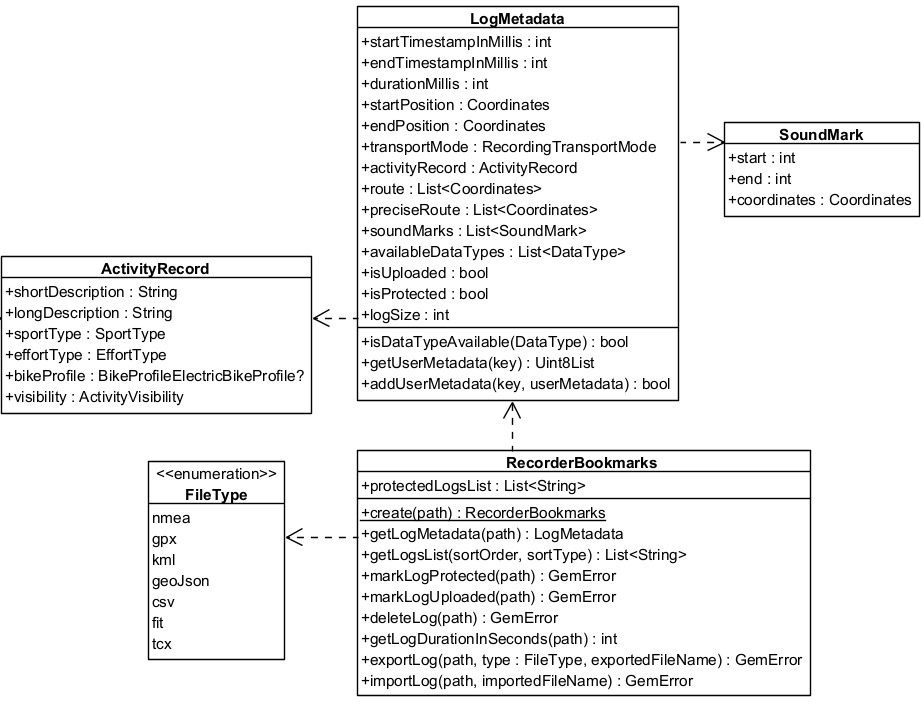
The RecorderBookmarks class for enhanced log management:
- Export and Import Logs: Convert logs to/from different formats such as GPX, NMEA, and KML.
- Log Metadata: Retrieve details like start and end timestamps, transport mode and size.
In the following class diagram you can see the main classes used by the RecorderBookmarks and the relationships between them:
Export logs
// Create recorderBookmarks
// It loads all .gm and .mp4 files at logsDir
StrongPointer<RecorderBookmarks> bookmarks = RecorderBookmarks::produce( tracksPath );

if(!bookmarks) return;

// Get list of logs
List<String> logList = bookmarks->getLogsList();

// Export last recording as a GPX file with a given name
// Assumes the logList is not empty
auto exportLogError = bookmarks->exportLog(
    logList.back(),
    EFileType::Gpx,
    "My_File_Name"
    );
if (exportLogError != KNoError) {
    GEM_INFO_LOG("Error exporting log: %d", exportLogError);
}
The resulting file will be My_File_Name.gpx. If the name of the exported file is not specified, then the log name will be used.
Exporting a .gm file to other formats may result in data loss, depending on the data types supported by each format.
The exported file will be in the same directory as the original log file.
Import logs
Importing logs involves loading a standard file format (such as gpx, nmea or kml) into a .gm file, enabling it to be processed further.
auto importError = bookmarks->importLog("path/to/file", "My_File_Name");
if (importError != KNoError)
{
    GEM_INFO_LOG("Error importing log: %d", importError);
}
Access metadata
Each log contains metadata accessible through the LogMetadata class.
StrongPointer<RecorderBookmarks> bookmarks = RecorderBookmarks::produce( logsDir );

if(bookmarks)
{
    // Get list of logs
    List<String> logList = bookmarks->getLogsList();

    StrongPointer<LogMetadata> logMetadata = bookmarks->getMetadata(logList.back());
}
The getMetadata method will return empty strong pointer if the log file does not exist inside the logsDir directory or if the log file is not a valid .gm file.
The metadata within a LogMetadata object contains:
- getStartPosition / getEndPosition: Geographic coordinates for the log's beginning and end.
- getUserMetadata / addUserMetadata: Store and retrieve additional data using a key-value approach.
- getPreciseRoute: A comprehensive list of all recorded coordinates, capturing the highest level of detail possible.
- getRoute: A list of route coordinates spaced at least 20 meters apart, with a three-second recording delay between each coordinate.
- getTransportMode:
ERecordingTransportModeof recording. - getStartTimestampInMillis / getEndTimestampInMillis: Timestamp of the first/last sensor data.
- getDurationMillis: Log duration.
- isProtected: Check if a log file is protected. Protected logs will not be automatically deleted after
keepMinSecondsspecified inRecorderConfiguration. - getLogSize: Get the log size in bytes.
- isDataTypeAvailable: Verify if a data type is produced by the log file.
- getSoundMarks: A list of recorded soundmarks.
- getActivityRecord: The recorded activity details.
- getMetrics: Basic metrics about the recorded log.
To visualize the recorded route, a Path object can be constructed using the route coordinates from the LogMetadata. This path can then be displayed on a map. For more details, refer to the documentation on the path entity and display paths.
Custom user metadata
Users can add custom metadata to a log either during recording or after it has been completed. This is done using the addUserMetadata method, available in both the Recorder and LogMetadata classes.
The method requires a String key and the associated data as a DataBuffer.
To retrieve previously added metadata, use the getUserMetadata method of the LogMetadata class.
StrongPointer<LogMetadata> logMetadata = bookmarks->getMetadata(logPath);

DataBuffer imageSample; // fill imageSample with image data

// Save image encoded in DataBuffer
logMetadata->addUserMetadata("ImgData", imageSample);

// Get image
StrongPointer<DataBuffer> imageData = logMetadata->getUserMetadata("ImgData");

// Do something with imageData...
ActivityRecord
The ActivityRecord class captures details about a recorded activity, including descriptions, sport type, effort level, and visibility settings. It ensures comprehensive metadata for recorded sessions.
Attributes
| Attribute | Description |
|---|---|
shortDescription | A brief summary of the activity. |
longDescription | A detailed explanation of the activity. |
sportType | The type of sport involved in the activity. |
effortType | The intensity of effort (e.g., easy, moderate, hard). |
bikeProfile | Bike profile details (if applicable). |
visibility | Defines who can view the activity. |
RecordMetrics
The RecordMetrics object provides essential statistics about a recorded log. These metrics are useful for analyzing movement, elevation, and speed data.
| Attribute | Description |
|---|---|
distanceMeters | Total distance covered during the log, measured in meters. |
elevationGainMeters | Total elevation gained over the course of the log, measured in meters. |
avgSpeedMps | Average speed throughout the log, measured in meters per second. |
Setting the activity record
auto errorStart = recorder->startRecording();
if (errorStart != KNoError) {
    GEM_INFO_LOG("Error starting recording: %d", errorStart);
}

// Other code
ActivityRecord activityRecord;

activityRecord.shortDescription = "Morning Run";
activityRecord.longDescription = "A 5km run through the park.";
activityRecord.sportType = ESportType::Run;
activityRecord.effortType = EffortType::Moderate;
activityRecord.visibility = EVisibility::Everyone;

recorder->setActivityRecord( activityRecord );

// Other code

auto errorStop = recorder->stopRecording();
if (errorStop != KNoError) {
    GEM_INFO_LOG("Error stopping recording: %d", errorStop);
}
Call this method while recording, calling it after stopping will not affect the existing recordings.
Getting the activity record
StrongPointer<RecorderBookmarks> bookmarks = RecorderBookmarks::produce( tracksPath );
if (!bookmarks){
    GEM_INFO_LOG("Bookmarks could not be created");
    return;
}

auto logList = bookmarks->getLogsList();

StrongPointer<LogMetadata> metadata = bookmarks->getMetadata(logList.back());

if (!metadata) {
    GEM_INFO_LOG("Log metadata could not be retrieved");
    return;
}

ActivityRecord activityRecord = metadata->getActivityRecord();