Workflow
You can view a complete example here.
Class Diagram
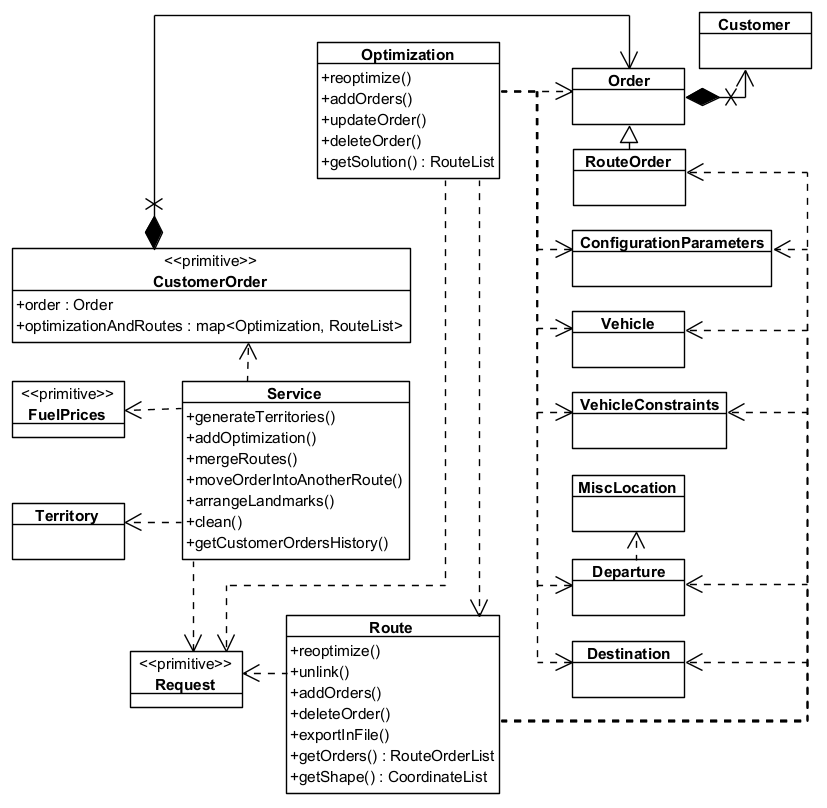
How Fleet Management SDK works
-
Define Orders and Customers: Start by creating orders that need to be fulfilled and associating them with customers. Each order includes details like location, priority, delivery requirements, time windows, weight, and volume.
-
Set Up Vehicles and Constraints: Define the fleet of vehicles available for routing. Each vehicle can have different capacities, fuel types, operational hours, and allowed road types.
-
Set Configuration Parameters: Set up the optimization criteria such as minimizing distance, time, or cost. You can also define constraints like vehicle capacity, time windows, and road restrictions.
-
Execute Optimization: The system uses advanced algorithms to compute the most efficient routes based on the defined goals and constraints, ensuring all orders are fulfilled effectively.
-
Track the Status of the Optimization: When an optimization request is initiated, a request object is created. This object allows you to monitor the progress and status of the optimization process.
-
Review and Manage Routes: After optimization, review the generated routes. You can make changes - such as adding or removing orders - and re-optimize to improve results.
-
Execute and Monitor: Once routes are finalized, they can be executed by the fleet. The system provides real-time tools to track vehicle progress.
Use Cases
-
Delivery Services: Optimize routes for delivery trucks to ensure timely and cost-effective delivery of goods to customers.
-
Field Service Management: Plan routes for service technicians to visit multiple customer locations for maintenance or repairs.
-
Waste Collection: Optimize routes for garbage trucks to collect waste from residential and commercial areas efficiently.