Routes
A Route usually represents a navigable path between two or more landmarks (waypoints). It includes data such as distance, estimated time, and navigation instructions.
Routes can be computed in different ways:
- Based on 2 or more intermediary landmarks (waypoints) - route is navigable.
- Over-track routes (based on a predefined
path, which could come from a GPX file but is not limited to this) are navigable. - Route ranges: These routes are not navigable and do not have segments or instructions.
A navigable route consists of one or more segments. Each segment represents the portion of the route between two consecutive waypoints and includes its own set of route instructions.
Instantiating Routes
Routes cannot be instantiated directly. Instead, they must be computed based on a predefined list of landmarks. For detailed guidance on how to calculate routes, refer to the Getting Started with Routing Guide.
Calculating a route does not automatically display it on the map. Refer to the Display markers guide for detailed instructions on how to display one or more routes.
Route specializations
The SDK supports multiple route types, each tailored to specific use cases through dedicated classes:
-
Normal Routes - Standard routes computed for typical navigation scenarios.
-
Public Transport (PT) Routes - Routes calculated using a public transport mode, including additional details such as service frequency, ticket purchase information, and other transit-specific data.
-
Over-Track (OT) Routes - Routes generated from a predefined path, such as GPX files or paths drawn with the route finder.
-
Electric Vehicle (EV) Routes - Designed for EV-specific needs, including charging station information and related details. Not yet fully implemented.
Specific Classes
Each route type is associated with specific classes that offer functionality suited to its requirements:
| Route Type | Route Class | Segment Class | Instruction Class |
|---|---|---|---|
| Normal Route | Route | RouteSegment | RouteInstruction |
| Public Transport Route | PTRoute | PTRouteSegment | PTRouteInstruction |
| Over-Track Route | OTRoute | Not Available | Not Available |
| Electric Vehicle Route | EVRoute | EVRouteSegment | EVRouteInstruction |
The specific classes extend the functionality of the base classes RouteBase, RouteSegmentBase, RouteInstructionBase that provide the common features for each type of entity.
Route structure
The most important route characteristics are:
| Field/Method | Type | Explanation |
|---|---|---|
| getGeographicArea | RectangleGeographicArea | A geographic boundary or region covered by the route. |
| getPolygonGeographicArea | PolygonGeographicArea | A polygon representing the geographic area as a series of connected points. |
| getTilesGeographicArea | TilesCollectionGeographicArea | A collection of map tiles representing the geographic area. |
| getDominantRoads | List<String> | A list of road names or identifiers that dominate the route. |
| hasFerryConnections | bool | Indicates whether the route includes ferry connections. |
| hasTollRoads | bool | Indicates whether the route includes toll roads. |
| getTollSections | List of TollSection | The list of toll sections along the route. |
| getIncursCosts | bool | Specifies if the route incurs any monetary costs, such as tolls or fees [DEPRECATED - same as hasTollRoads] |
| getRouteStatus | ERouteStatus | If we are navigating a route and we deviate from it, the route is recalculated. This means that the routeStatus might signal that route is computed or we don't have internet connection, or even that on recomputation we got an error. |
| getTerrainProfile | RouteTerrainProfile | A profile of terrain elevations along the route, represented as a list of elevation values. |
| getSegments | List<RouteSegment> | A collection of route segments, each representing a specific portion of the route. Segments are split based on the initial waypoints that were used to compute the route. For Public Transit routes a segment is either a pedestrian part or a public transit part. |
| getTrafficEvents | List<RouteTrafficEvent> | A list of traffic events, such as delays or road closures, affecting the route. |
RouteSegment structure
A route segment represents the portion of a route between two consecutive waypoints. For public transport routes, segments are further categorized as either pedestrian sections or public transit sections, depending on the mode of travel within that segment.
| Field/Method | Return Type | Description |
|---|---|---|
getWaypoints | List<Landmark> | Retrieves the list of landmarks representing the start and end waypoints of the route segment. |
getTimeDistance | TimeDistance | Provides the length in meters and estimated travel time in seconds for the route segment. |
getGeographicArea | RectangleGeographicArea | Retrieves the smallest rectangle enclosing the geographic area of the route. |
getIncursCosts | bool | Checks whether traveling the route or segment incurs a cost to the user. |
getSummary | String | Provides a summary of the route segment. |
getInstructions | List<RouteInstruction> | Retrieves the list of route instructions for the segment. |
isCommon | bool | Indicates whether the segment shares the same travel mode as the parent route. Mostly used within public transport routes. |
getTollSections | List<TollSection> | The list of toll sections along the route segment. |
RouteInstruction structure
A route instruction provides detailed guidance for navigation, offering various methods to retrieve specific information about each maneuver the user needs to make, such as coordinates, turn directions, distances and time to next waypoints.
| Method | Return Type | Description |
|---|---|---|
getCoordinates | Coordinates | Gets coordinates for this route instruction. |
getCountryCodeISO | String | Gets ISO 3166-1 alpha-3 country code for the navigation instruction. |
getExitDetails | String | Gets exit route instruction text. |
getFollowRoadInstruction | String | Gets textual description for follow road information. |
getRealisticNextTurnImage | AbstractGeometryImage | Gets image for the realistic turn information. |
getRemainingTravelTimeDistance | TimeDistance | Gets remaining travel time and distance until the destination |
getRemainingTravelTimeDistanceToNextWaypoint | TimeDistance | Gets remaining travel time and distance to the next waypoint. |
getRoadInfo | List<RoadInfo> | Gets road information. |
getRoadInfoImage | RoadInfoImage | Gets road information image. |
getSignpostDetails | SignpostDetails | Gets extended signpost details. |
getSignpostInstruction | String | Gets textual description for the signpost information. |
getTimeDistanceToNextTurn | TimeDistance | Gets distance and time to the next turn. |
getTraveledTimeDistance | TimeDistance | Gets traveled time and distance. |
getTurnDetails | TurnDetails | Gets full details for the turn. |
getTurnImage | Image | Gets image for the turn. |
getTurnInstruction | String | Gets textual description for the turn. |
hasFollowRoadInfo | bool | Checks if follow road information is available. |
hasSignpostInfo | bool | Checks if signpost information is available. |
hasTurnInfo | bool | Checks if turn information is available. |
hasRoadInfo | bool | Checks if road information is available. |
isCommon | bool | Checks if this instruction is of common type - has the same transport mode as the parent route |
isExit | bool | Checks if the route instruction is a main road exit instruction. |
isFerry | bool | Checks if the route instruction is on a ferry segment. |
isTollRoad | bool | Checks if the route instruction is on a toll road. |
It is important to distinguish between NavigationInstruction and RouteInstruction. NavigationInstruction offers real-time, turn-by-turn navigation based on the user's current position and is relevant only during navigation or simulation. In contrast, RouteInstruction provides an overview of the entire route available as soon as the route is calculated and the list of instructions do not change as the user navigates on the route.
Other classes
Time distance
The TimeDistance class is used to get details about the time and distance to/from certain important points of interests.
The TimeDistance class differentiates between unrestricted and restricted road portions. Restricted segments refer to non-public roads, while unrestricted represent publicly accessible roads:
| Field/Method | Type | Explanation |
|---|---|---|
getUnrestrictedTime | int | Unrestricted time in seconds. |
getRestrictedTime | int | Restricted time in seconds. |
getUnrestrictedDistance | int | Unrestricted distance in meters. |
getRestrictedDistance | int | Restricted distance in meters. |
getRestrictedBeginEndRatio | double | Ratio representing the division of restricted time/distance between the begin and the end. |
getTotalTime | int | Total time in seconds (sum of unrestricted and restricted times). |
getTotalDistance | int | Total distance in meters (sum of unrestricted and restricted distances). |
empty | bool | Indicates whether the total time is zero. |
hasRestrictedBeginEndDifferentiation | bool | Indicates if the begin and end have differentiated restricted values based on the ratio. |
getRestrictedTimeAtBegin | int | Restricted time allocated to the beginning, based on the ratio. |
getRestrictedTimeAtEnd | int | Restricted time allocated to the end, based on the ratio. |
getRestrictedDistanceAtBegin | int | Restricted distance allocated to the beginning, based on the ratio. |
getRestrictedDistanceAtEnd | int | Restricted distance allocated to the end, based on the ratio. |
Signpost details
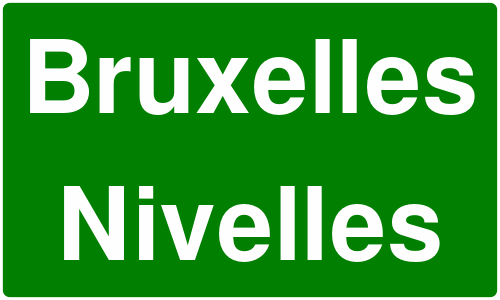
Signposts near roadways typically indicate intersections and directions to various destinations. The SDK provides realistic renderings of these signposts, along with relevant supplementary information.
Below is an example of a rendered signpost details image:
The SignpostDetails class also provides properties such as:
| Member/Method | Type | Description |
|---|---|---|
getBackgroundColor | Color | Retrieves the background color of the signpost. |
getBorderColor | Color | Retrieves the border color of the signpost. |
getTextColor | Color | Retrieves the text color of the signpost. |
hasBackgroundColor | bool | Indicates whether the signpost has a background color. |
hasBorderColor | bool | Indicates whether the signpost has a border color. |
hasTextColor | bool | Indicates whether the signpost has a text color. |
getItems | List<SignpostItem> | Retrieves a list of SignpostItem elements associated with the signpost. |
getImage | SignpostImage | Retrieves the signpost image. |
Each SignpostItem has the following properties:
| Member/Method | Type | Description |
|---|---|---|
getRow | int | Retrieves the one-based row of the item. Zero indicates not applicable. |
getColumn | int | Retrieves the one-based column of the item. Zero indicates not applicable. |
getConnectionInfo | ESignpostConnectionInfo | Retrieves the connection type of the item (branch, towards, exit, invalid) |
getPhoneme | String | Retrieves the phoneme assigned to the item if available, otherwise empty. |
getPictogramType | ESignpostPictogramType | Retrieves the pictogram type for the item (airport, busStation, parkingFacility, etc). |
getShieldType | ERoadShieldType | Retrieves the shield type for the item (county, state, federal, interstate, etc) |
getText | String | Retrieves the text assigned to the item, if available. |
getType | ESignpostItemType | Retrieves the type of the item (placeName, routeNumber, routeName, etc). |
hasAmbiguity | bool | Indicates if the item has ambiguity. Avoid using such items for TTS. |
hasSameShieldLevel | bool | Indicates if the road code item has the same shield level as its road. |
The field nextTurnInstruction provides an instruction in text format, suitable for displaying on UI. Please use the onTextToSpeechInstruction callback for getting an instruction suitable for text-to-speech.
Turn Details
The TurnDetails class provides details such as:
- event: enum containing the turn type. Values for this field include straight, right, left, lightLeft, lightRight, sharpRight, sharpLeft, roundaboutExitRight, roundabout, roundRight, roundLeft, infoGeneric, driveOn, exitNr, exitLeft, exitRight, stayOn and more.
- abstractGeometryImage: abstract image of the turn (the user needs to verify if the image is valid). The colors might be further personalized with
AbstractGeometryImageRenderSettings. - roundaboutExitNumber: the roundabout exist number if it exists.
Turn details abstract image vs. turn image:
The difference between images obtained via abstractGeometryImage (left) and turnImage (right) is shown below:


- abstractGeometryImage: Provides a detailed representation of the entire intersection, offering a comprehensive view of the turn geometry. This image can be customized, including options to adjust various colors for better visual alignment with the application's theme.
- turnImage: Delivers a simplified schematic of the upcoming turn, focusing solely on the essential turn direction. Unlike abstractGeometryImage, this method does not support customization.
Each image is assigned a unique identifier. You can use the Uid getter of the images classes to retrieve this id and update the image in the UI only when the ID changes. This strategy can significantly enhance performance during navigation, especially in scenarios where frequent updates might otherwise impact efficiency.
Abstract geometry image customization
The AbstractGeometryImageRenderSettings allows for abstract geometry render settings customization, with the possibility of specifying the colors, improving the overall user experience:
 AbstractGeometryImageRenderSettings customizedRenderSettings = AbstractGeometryImageRenderSettings(
    Colors.red,
    Colors.green,
    Colors.blue,
    Colors.yellow,
);
The render settings from above will create the following image when used:

Toll sections
The TollSection class represents a tolled portion of a route.
It defines where the toll segment starts and ends (measured in meters from the beginning of the route), along with the toll cost and currency.
| Member | Type | Description |
|---|---|---|
startDistanceM | int | Distance in meters where the section starts (from route starting point). |
endDistanceM | int | Distance in meters where the section ends (from route starting point). |
cost | float | Cost in the specified currency. |
currency | String | Currency code, e.g. EUR, USD. |
If no data for the cost of the section is available then the cost field is 0 and the currency field is empty string.
In order to get the WGS Coordinates of the start and end of a TollSection, you can use the Route.getCoordinateOnRoute method, passing the startDistanceM and endDistanceM values respectively.
Change the language of the instructions
The texts used in route instructions and related classes follow the language set in the SDK. See the internationalization guide for more details.