Base Entities
Weather-related functionalities are organized into distinct classes, each designed to encapsulate specific weather data. These include LocationForecast, Conditions, and WeatherParameter. This document provides a detailed explanation of each class and its purpose.
LocationForecast class
This class is responsible for retaining data such as the forecast update timestamp, the geographic location and forecast data.
| Property | Type | Description |
|---|---|---|
updated | Time? | Forecast update timestamp (UTC) |
coordinates | Coordinates? | Geographic location |
forecast | ConditionsList? | Forecast data |
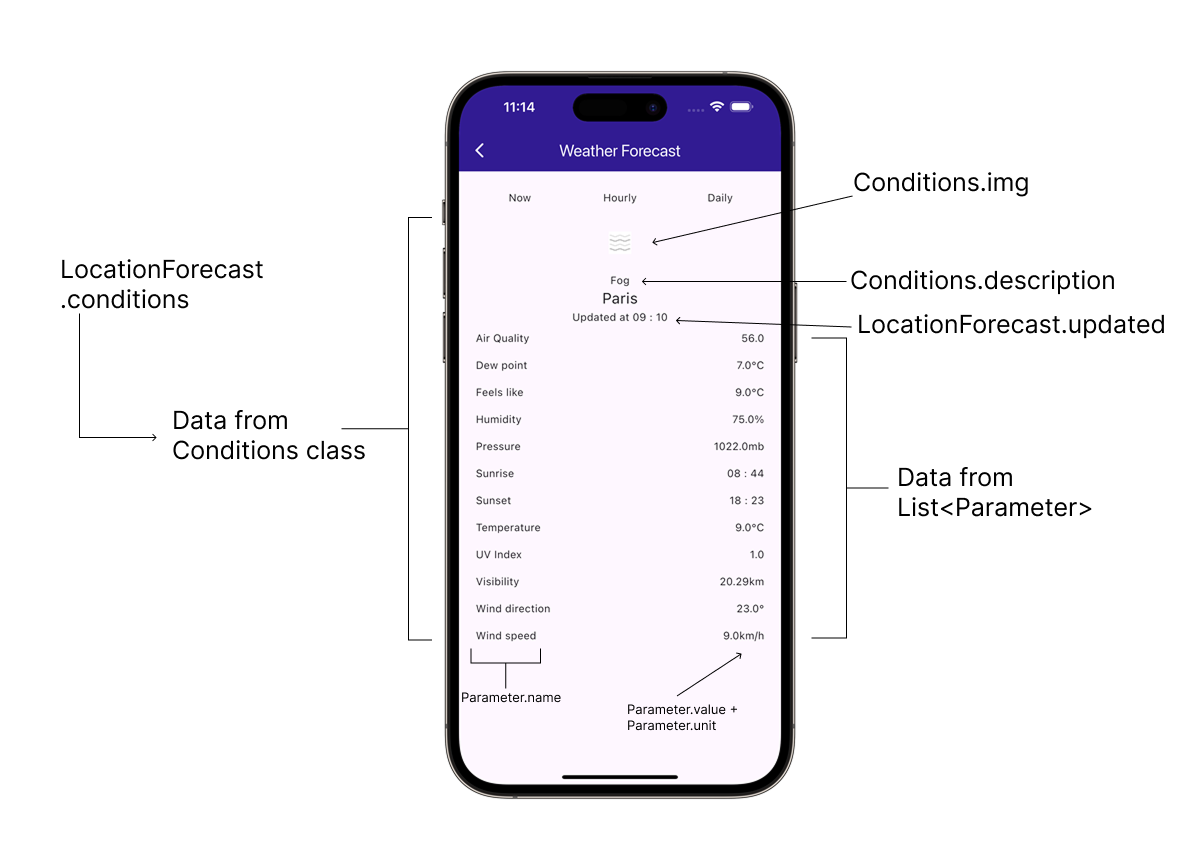
Conditions class
This class is responsible for retaining weather conditions for a given timestamp.
| Property | Type | Description |
|---|---|---|
type | String? | For possible values see add ref[PredefinedParameterTypeValues] |
timestamp | Time? | Timestamp for condition (UTC) |
image | Image? | Image representation |
description | String? | Description translated according to the current SDK language |
daylight | EDaylight | Daylight condition |
parameters | WeatherParameterList? | Parameter list |
PredefinedParameterTypeValues
This class contains the common values for Parameter.type and Conditions.type.
| Property | Description | Unit |
|---|---|---|
airQuality | 'AirQuality' | - |
dewPoint | 'DewPoint' | °C |
feelsLike | 'FeelsLike' | °C |
humidity | 'Humidity' | % |
pressure | 'Pressure' | mb |
sunRise | 'Sunrise' | - |
sunSet | 'Sunset' | - |
temperature | 'Temperature' | °C |
uv | 'UV' | - |
visibility | 'Visibility' | km |
windDirection | 'WindDirection' | ° |
windSpeed | 'WindSpeed' | km/h |
temperatureLow | 'TemperatureLow' | °C |
temperatureHigh | 'TemperatureHigh' | °C |
The WeatherService may return data with varying property types, depending on data availability. A response might include only a subset of the values listed above.
WeatherParameter class
Class responsible for containing weather parameter data.
| Property | Type | Description |
|---|---|---|
type | String? | For possible values see add ref[PredefinedParameterTypeValues] |
value | Double | Value |
name | String? | Name translated according to the current SDK language |
unit | String? | Unit |
Usage Example
Here's how to use these classes in Kotlin:
- Kotlin
- Java
// Initialize WeatherService
val weatherService = WeatherService()

// Define coordinates for the location
val coordinates = Coordinates().apply {
    latitude = 48.864716  // Paris latitude
    longitude = 2.349014  // Paris longitude
}
val coordinatesList = CoordinatesList().apply { add(coordinates) }

// Get current weather forecast
weatherService.getCurrent(coordinatesList, onCompleted = { results, error, message ->
    if (error == GemError.NoError) {
        results.firstOrNull()?.let { locationForecast ->
            // Access forecast update timestamp
            val updated = locationForecast.updated

            // Access geographic location
            val location = locationForecast.coordinates

            // Access forecast data
            locationForecast.forecast?.forEach { condition ->
                // Access condition properties
                val type = condition.type
                val timestamp = condition.timestamp
                val description = condition.description
                val daylight = condition.daylight
                val image = condition.image

                // Access weather parameters
                condition.parameters?.forEach { parameter ->
                    val paramType = parameter.type
                    val paramValue = parameter.value
                    val paramName = parameter.name
                    val paramUnit = parameter.unit

                    // Process parameter data based on type
                    when (paramType) {
                        "Temperature" -> {
                            // Handle temperature data
                        }
                        "Humidity" -> {
                            // Handle humidity data
                        }
                        // Handle other parameter types...
                    }
                }
            }
        }
    } else {
        // Handle error
        Log.e("WeatherService", "Error getting weather: $message")
    }
})
// Initialize WeatherService
WeatherService weatherService = new WeatherService();

// Define coordinates for the location
Coordinates coordinates = new Coordinates();
coordinates.setLatitude(48.864716);  // Paris latitude
coordinates.setLongitude(2.349014);  // Paris longitude

CoordinatesList coordinatesList = new CoordinatesList();
coordinatesList.add(coordinates);

// Get current weather forecast
weatherService.getCurrent(coordinatesList, (results, error, message) -> {
    if (error == GemError.NoError) {
        if (!results.isEmpty()) {
            LocationForecast locationForecast = results.get(0);

            // Access forecast update timestamp
            Time updated = locationForecast.getUpdated();

            // Access geographic location
            Coordinates location = locationForecast.getCoordinates();

            // Access forecast data
            ConditionsList forecast = locationForecast.getForecast();
            if (forecast != null) {
                for (Conditions condition : forecast) {
                    // Access condition properties
                    String type = condition.getType();
                    Time timestamp = condition.getTimestamp();
                    String description = condition.getDescription();
                    EDaylight daylight = condition.getDaylight();
                    Image image = condition.getImage();

                    // Access weather parameters
                    WeatherParameterList parameters = condition.getParameters();
                    if (parameters != null) {
                        for (WeatherParameter parameter : parameters) {
                            String paramType = parameter.getType();
                            double paramValue = parameter.getValue();
                            String paramName = parameter.getName();
                            String paramUnit = parameter.getUnit();

                            // Process parameter data based on type
                            if ("Temperature".equals(paramType)) {
                                // Handle temperature data
                            } else if ("Humidity".equals(paramType)) {
                                // Handle humidity data
                            }
                            // Handle other parameter types...
                        }
                    }
                }
            }
        }
    } else {
        // Handle error
        Log.e("WeatherService", "Error getting weather: " + message);
    }
});