Recorder
The Recorder module is a comprehensive tool designed for managing sensor data recording in the Android SDK.
The Recorder supports a wide range of configurable parameters through the RecorderConfiguration, allowing developers to tailor recording behavior to specific application needs. Features include:
- Customizable storage options: Define log directories, manage disk space, and specify the duration of recordings.
- Data type selection: Specify which data types (e.g., video, audio, or sensor data) to record.
- Video and audio options: Set video resolution, enable/disable audio recording, and manage chunk durations. It's possible to record only sensor data, sensor data + video, sensor data + audio or sensor data + video + audio.
The Recorder provides comprehensive methods to control the recording lifecycle:
- Start and stop recordings.
- Runtime configuration updates for recording parameters.
- Listener management for recording events and status changes.
- Status monitoring to track the current recording state.
- User data injection for adding custom metadata during recording.
- Automatic restarts for continuous recording with chunked durations.
The Recorder supports various transportation modes (e.g., car, pedestrian, bike), enabling detailed analysis and classification of recordings based on context.
To prevent overwhelming the device's storage, the Recorder allows for setting disk space limits and automatically manages logs based on specified retention thresholds.
Initialize the Recorder
The Recorder cannot be directly instantiated. Instead, the produce method is used to obtain a configured Recorder instance.
- Kotlin
- Java
import com.magiclane.sdk.dashcam.*
import com.magiclane.sdk.sensordatasource.*
import com.magiclane.sdk.sensordatasource.enums.EDataType
import com.magiclane.sdk.core.enums.EResolution
import com.magiclane.sdk.core.Parameter
import com.magiclane.sdk.core.ParameterList
import android.util.Log

val dataSource = DataSourceFactory.produceLive()
if (dataSource == null) {
    Log.e(TAG, "The datasource could not be created")
    return
}

val recorderConfiguration = RecorderConfiguration(
    logsDir = tracksPath,
    dataSource = dataSource,
    types = arrayListOf(EDataType.Position)
)

val recorder = Recorder.produce(recorderConfiguration)
if (recorder == null) {
    Log.e(TAG, "Recorder could not be created")
    return
}
import com.magiclane.sdk.dashcam.*;
import com.magiclane.sdk.sensordatasource.*;
import com.magiclane.sdk.sensordatasource.enums.EDataType;
import com.magiclane.sdk.core.enums.EResolution;
import com.magiclane.sdk.core.Parameter;
import com.magiclane.sdk.core.ParameterList;
import android.util.Log;

DataSource dataSource = DataSourceFactory.produceLive();
if (dataSource == null) {
    Log.e(TAG, "The datasource could not be created");
    return;
}

ArrayList<EDataType> types = new ArrayList<>(Arrays.asList(EDataType.Position));
RecorderConfiguration recorderConfiguration = new RecorderConfiguration(
    tracksPath,
    dataSource,
    types
);

Recorder recorder = Recorder.produce(recorderConfiguration);
if (recorder == null) {
    Log.e(TAG, "Recorder could not be created");
    return;
}
If the dataSource, logsDir and types parameters are not populated with valid data, the startRecording method will return GemError.General and no data will be recorded.
Configure the RecorderConfiguration
| Recorder configuration attribute | Description |
|---|---|
| logsDir | The directory used to keep the logs |
| dataSource | The source providing the data to be recorded |
| types | The data types that will be recorded (recordedTypes in constructor) |
| continuousRecording | Whether the recording should continue automatically when chunk time achieved |
| chunkDurationSeconds | The chunk duration time in seconds |
| enableAudio | This flag will be used to determine if audio is needed to be recorded or not |
| videoQuality | The video quality (EResolution enum) |
| keepMinimumSeconds | Will not delete any record if this threshold is not reached |
| deleteOlderThanKeepMin | Older logs that exceeds minimum kept seconds threshold should be deleted |
| diskSpaceLimitMb | When reached, it will stop the recording |
If the log duration is shorter than a minimum threshold, the stopRecording method of Recorder will not save the recording and will return GemError.General.
The GemError.General result might be returned if the application has been sent to background without making the required configuration. See the record while app is in background section below.
Always ensure that the EDataType values passed to the types parameter are supported by the target platform.
The Android file system provides external storage paths for saving recordings. The following snippet shows how to obtain a valid folder path:
- Kotlin
- Java
import android.content.Context
import java.io.File

fun getTracksPath(context: Context): String {
    val rootDir = context.getExternalFilesDir(null)
    val tracksDir = File(rootDir, "Data/Tracks")

    if (!tracksDir.exists()) {
        tracksDir.mkdirs()
    }

    return tracksDir.absolutePath
}
import android.content.Context;
import java.io.File;

public String getTracksPath(Context context) {
    File rootDir = context.getExternalFilesDir(null);
    File tracksDir = new File(rootDir, "Data/Tracks");

    if (!tracksDir.exists()) {
        tracksDir.mkdirs();
    }

    return tracksDir.getAbsolutePath();
}
The videoQuality parameter is based on the EResolution enum defined below. Each value represents a standard video resolution that affects recording quality and storage requirements.
Camera Resolutions
| EResolution Enum Value | Description | Dimensions (pixels) |
|---|---|---|
EResolution.Unknown | No resolution set. | - |
EResolution.SD480p | Standard Definition | 640 × 480 |
EResolution.HD720p | High Definition | 1280 × 720 |
EResolution.FullHD1080p | Full HD | 1920 × 1080 |
EResolution.WQHD1440p | Wide Quad HD | 2560 × 1440 |
EResolution.UHD4K2160p | Ultra HD (4K) | 3840 × 2160 |
EResolution.UHD8K4320p | Ultra HD (8K) | 7680 × 4320 |
The actual disk usage depends on platform and encoding settings, but here are rough size estimates used internally by the SDK for calculating space requirements:
| Resolution | Approx. Bytes/sec | Approx. MB/min |
|---|---|---|
sd480p | 210,000 | ~12 MB/min |
hd720p | 629,760 | ~37 MB/min |
fullHD1080p | 3,774,874 | ~130 MB/min |
Note: 1 MB = 1,048,576 bytes (binary MB). These are estimates and may vary slightly by platform and encoding settings.
Note: These values are used to pre-check disk availability when
chunkDurationSecondsis set.
Recording lifecycle
-
Starting the Recorder:
- Call the
startRecordingmethod to initiate recording. The recorder transitions to therecordingstate.
- Call the
-
Chunked Recordings:
- If a chunk duration is set in the configuration, the recording automatically stops when the duration is reached. A new recording will begin seamlessly if continuous recording is enabled, ensuring uninterrupted data capture.
-
Stopping the Recorder:
- The
stopRecordingmethod halts recording, and the system ensures logs meet the configured minimum duration before saving them as .gm files insidelogsDir.
- The
How to use the Recorder
The following sections will present some use cases for the recorder, demonstrating its functionality in different scenarios.
- Kotlin
- Java
val tracksPath = getTracksPath(this)
val dataSource = DataSourceFactory.produceLive()

if (dataSource == null) {
    Log.e(TAG, "The datasource could not be created")
    return
}

val recorderConfiguration = RecorderConfiguration(
    logsDir = tracksPath,
    dataSource = dataSource,
    types = arrayListOf(EDataType.Position)
)

// Create recorder based on configuration
val recorder = Recorder.produce(recorderConfiguration)

if (recorder == null) {
    Log.e(TAG, "Recorder could not be created")
    return
}

val errorStart = recorder.startRecording()
if (errorStart != GemError.NoError) {
    Log.e(TAG, "Error starting recording: $errorStart")
}

// Other code

val errorStop = recorder.stopRecording()
if (errorStop != GemError.NoError) {
    Log.e(TAG, "Error stopping recording: $errorStop")
}
String tracksPath = getTracksPath(this);
DataSource dataSource = DataSourceFactory.produceLive();

if (dataSource == null) {
    Log.e(TAG, "The datasource could not be created");
    return;
}

ArrayList<EDataType> types = new ArrayList<>(Arrays.asList(EDataType.Position));
RecorderConfiguration recorderConfiguration = new RecorderConfiguration(
    tracksPath,
    dataSource,
    types
);

// Create recorder based on configuration
Recorder recorder = Recorder.produce(recorderConfiguration);

if (recorder == null) {
    Log.e(TAG, "Recorder could not be created");
    return;
}

GemError errorStart = recorder.startRecording();
if (errorStart != GemError.NoError) {
    Log.e(TAG, "Error starting recording: " + errorStart);
}

// Other code

GemError errorStop = recorder.stopRecording();
if (errorStop != GemError.NoError) {
    Log.e(TAG, "Error stopping recording: " + errorStop);
}
The Recorder will only save data explicitly defined in the types list, any other data will be ignored.
The startRecording and stopRecording methods should be called appropriately to ensure proper execution. Otherwise it may lead to unexpected behavior.
Don't forget to request permission for location usage before starting a recorder.
Recorder Permissions
To use the recorder with camera, microphone, and optionally location or external media access, you need to declare the appropriate permissions in your AndroidManifest.xml.
By default, recordings can be saved in your app's internal storage. This requires only camera, audio, and location permissions. However, if you want to save recordings to the device's gallery, Downloads folder, or any public/external storage, you'll also need additional media permissions.
<!-- Required for camera recording -->
<uses-permission android:name="android.permission.CAMERA" />

<!-- Required for audio recording -->
<uses-permission android:name="android.permission.RECORD_AUDIO" />

<!-- Required if your recording setup uses location data -->
<uses-permission android:name="android.permission.ACCESS_FINE_LOCATION" />
<uses-permission android:name="android.permission.ACCESS_COARSE_LOCATION" />

<!-- Required if saving to public folders or accessing gallery content -->
<uses-permission android:name="android.permission.READ_MEDIA_IMAGES" /> <!-- Android 13+ -->
<uses-permission android:name="android.permission.READ_EXTERNAL_STORAGE" />
These permissions should be placed inside the
<manifest>block of yourandroid/app/src/main/AndroidManifest.xml.
Runtime permission requests are also required on Android 6.0+ (API 23+). Use
ActivityCompat.requestPermissions()to request permissions at runtime.
More info: Android Manifest permissions
Record audio
The recorder also supports audio recording. To enable this functionality, set the enableAudio parameter in the RecorderConfiguration to true and invoke the startAudioRecording method from the Recorder class. To stop the audio recording, use the stopAudioRecording method. The following code snippet illustrates this process:
- Kotlin
- Java
val recorderConfiguration = RecorderConfiguration(
    logsDir = tracksPath,
    dataSource = dataSource,
    types = arrayListOf(EDataType.Position)
)

// Enable audio in configuration
recorderConfiguration.enableAudio = true

// Create recorder based on configuration
val recorder = Recorder.produce(recorderConfiguration)

if (recorder == null) {
    Log.e(TAG, "Recorder could not be created")
    return
}

val errorStart = recorder.startRecording()
if (errorStart != GemError.NoError) {
    Log.e(TAG, "Error starting recording: $errorStart")
}

// At any moment enable audio recording
recorder.startAudioRecording()

// Other code

// At any moment stop audio recording
recorder.stopAudioRecording()

val errorStop = recorder.stopRecording()
if (errorStop != GemError.NoError) {
    Log.e(TAG, "Error stopping recording: $errorStop")
}
ArrayList<EDataType> types = new ArrayList<>(Arrays.asList(EDataType.Position));
RecorderConfiguration recorderConfiguration = new RecorderConfiguration(
    tracksPath,
    dataSource,
    types
);

// Enable audio in configuration
recorderConfiguration.setEnableAudio(true);

// Create recorder based on configuration
Recorder recorder = Recorder.produce(recorderConfiguration);

if (recorder == null) {
    Log.e(TAG, "Recorder could not be created");
    return;
}

GemError errorStart = recorder.startRecording();
if (errorStart != GemError.NoError) {
    Log.e(TAG, "Error starting recording: " + errorStart);
}

// At any moment enable audio recording
recorder.startAudioRecording();

// Other code

// At any moment stop audio recording
recorder.stopAudioRecording();

GemError errorStop = recorder.stopRecording();
if (errorStop != GemError.NoError) {
    Log.e(TAG, "Error stopping recording: " + errorStop);
}
The audio recording will result in a log file of type .mp4. This file also contains the binary data of a .gm file, but it is accessible by system players.
Don't forget to request permission for microphone usage if you set the enableAudio parameter to true.
Record video
The recorder also supports video recording. To enable this functionality, add EDataType.Camera to the types and set the videoQuality parameter in the RecorderConfiguration to your desired resolution, we recommend using EResolution.HD720p. The video recording starts at the call of the startRecording method and stops at the stopRecording method. The following code snippet illustrates this process:
- Kotlin
- Java
val recorderConfiguration = RecorderConfiguration(
    logsDir = tracksPath,
    dataSource = dataSource,
    types = arrayListOf(EDataType.Position, EDataType.Camera)
)

// Set video quality
recorderConfiguration.videoQuality = EResolution.HD720p

// Create recorder based on configuration
val recorder = Recorder.produce(recorderConfiguration)

if (recorder == null) {
    Log.e(TAG, "Recorder could not be created")
    return
}

val errorStart = recorder.startRecording()
if (errorStart != GemError.NoError) {
    Log.e(TAG, "Error starting recording: $errorStart")
}

// Other code

val errorStop = recorder.stopRecording()
if (errorStop != GemError.NoError) {
    Log.e(TAG, "Error stopping recording: $errorStop")
}
ArrayList<EDataType> types = new ArrayList<>(Arrays.asList(EDataType.Position, EDataType.Camera));
RecorderConfiguration recorderConfiguration = new RecorderConfiguration(
    tracksPath,
    dataSource,
    types
);

// Set video quality
recorderConfiguration.setVideoQuality(EResolution.HD720p);

// Create recorder based on configuration
Recorder recorder = Recorder.produce(recorderConfiguration);

if (recorder == null) {
    Log.e(TAG, "Recorder could not be created");
    return;
}

GemError errorStart = recorder.startRecording();
if (errorStart != GemError.NoError) {
    Log.e(TAG, "Error starting recording: " + errorStart);
}

// Other code

GemError errorStop = recorder.stopRecording();
if (errorStop != GemError.NoError) {
    Log.e(TAG, "Error stopping recording: " + errorStop);
}
The camera recording will result in a log file of type .mp4. This file also contains the binary data of a .gm file, but it is accessible by system players.
Don't forget to request permission for camera usage if you add the EDataType.Camera parameter to types.
chunkDurationWhen chunkDuration is set, the SDK will check available disk space before starting the recording.
If there isn't enough space to store an entire chunk (based on the selected resolution), the recorder will not start and will return GemError.noDiskSpace.
Make sure to estimate required storage ahead of time. See Camera Resolutions for expected sizes.
Record multimedia
To record a combination of audio, video and sensors you can do that by setting up the RecorderConfiguration with all the desired functionalities. The following code snippet illustrates this process:
- Kotlin
- Java
val recorderConfiguration = RecorderConfiguration(
    logsDir = tracksPath,
    dataSource = dataSource,
    types = arrayListOf(EDataType.Position, EDataType.Camera)
)

// Set video quality and enable audio
recorderConfiguration.videoQuality = EResolution.HD720p
recorderConfiguration.enableAudio = true

// Create recorder based on configuration
val recorder = Recorder.produce(recorderConfiguration)

if (recorder == null) {
    Log.e(TAG, "Recorder could not be created")
    return
}

val errorStart = recorder.startRecording()
if (errorStart != GemError.NoError) {
    Log.e(TAG, "Error starting recording: $errorStart")
}

// At any moment enable audio recording
recorder.startAudioRecording()

// Other code

// At any moment stop audio recording
recorder.stopAudioRecording()

val errorStop = recorder.stopRecording()
if (errorStop != GemError.NoError) {
    Log.e(TAG, "Error stopping recording: $errorStop")
}
ArrayList<EDataType> types = new ArrayList<>(Arrays.asList(EDataType.Position, EDataType.Camera));
RecorderConfiguration recorderConfiguration = new RecorderConfiguration(
    tracksPath,
    dataSource,
    types
);

// Set video quality and enable audio
recorderConfiguration.setVideoQuality(EResolution.HD720p);
recorderConfiguration.setEnableAudio(true);

// Create recorder based on configuration
Recorder recorder = Recorder.produce(recorderConfiguration);

if (recorder == null) {
    Log.e(TAG, "Recorder could not be created");
    return;
}

GemError errorStart = recorder.startRecording();
if (errorStart != GemError.NoError) {
    Log.e(TAG, "Error starting recording: " + errorStart);
}

// At any moment enable audio recording
recorder.startAudioRecording();

// Other code

// At any moment stop audio recording
recorder.stopAudioRecording();

GemError errorStop = recorder.stopRecording();
if (errorStop != GemError.NoError) {
    Log.e(TAG, "Error stopping recording: " + errorStop);
}
The audio recording will result in a log file of type .mp4. This file also contains the binary data of a .gm file, but it is accessible by system players.
Don't forget to request permission for camera and microphone usage if you set the enableAudio parameter to true and add the EDataType.Camera parameter to types.
Don't forget to request permission for camera and microphone usage if you set the enableAudio parameter to true and add the EDataType.Camera parameter to types.
Runtime Configuration Updates
The Recorder supports updating certain configuration parameters during runtime without stopping the recording:
- Kotlin
- Java
val recorder = Recorder.produce(recorderConfiguration)
if (recorder == null) {
    Log.e(TAG, "Recorder could not be created")
    return
}

// Update disk space limit during runtime (in MB)
recorder.setDiskSpaceLimit(500)

// Update minimum keep duration during runtime (in seconds)
recorder.setKeepMinimumSeconds(60)

// Update chunk duration during runtime (in seconds)
recorder.setChunkDurationInSeconds(120)

// Enable/disable continuous recording during runtime
recorder.setContinuousRecording(true)
Recorder recorder = Recorder.produce(recorderConfiguration);
if (recorder == null) {
    Log.e(TAG, "Recorder could not be created");
    return;
}

// Update disk space limit during runtime (in MB)
recorder.setDiskSpaceLimit(500);

// Update minimum keep duration during runtime (in seconds)
recorder.setKeepMinimumSeconds(60);

// Update chunk duration during runtime (in seconds)
recorder.setChunkDurationInSeconds(120);

// Enable/disable continuous recording during runtime
recorder.setContinuousRecording(true);
These methods allow you to dynamically adjust recording behavior based on changing conditions, such as available storage space or user preferences.
Runtime configuration changes take effect immediately and apply to the current and subsequent recordings.
Audio Recording Status
You can check whether audio recording is currently active using the isAudioRecording method:
- Kotlin
- Java
val recorder = Recorder.produce(recorderConfiguration)
if (recorder == null) {
    Log.e(TAG, "Recorder could not be created")
    return
}

// Start recording
recorder.startRecording()

// Start audio recording
recorder.startAudioRecording()

// Check if audio recording is active
if (recorder.isAudioRecording()) {
    Log.d(TAG, "Audio recording is currently active")
} else {
    Log.d(TAG, "Audio recording is not active")
}
Recorder recorder = Recorder.produce(recorderConfiguration);
if (recorder == null) {
    Log.e(TAG, "Recorder could not be created");
    return;
}

// Start recording
recorder.startRecording();

// Start audio recording
recorder.startAudioRecording();

// Check if audio recording is active
if (recorder.isAudioRecording()) {
    Log.d(TAG, "Audio recording is currently active");
} else {
    Log.d(TAG, "Audio recording is not active");
}
Recorder Status and Configuration
You can access the current recorder status and configuration at any time:
- Kotlin
- Java
val recorder = Recorder.produce(recorderConfiguration)
if (recorder == null) {
    Log.e(TAG, "Recorder could not be created")
    return
}

// Get current recording status
val currentStatus = recorder.status
Log.d(TAG, "Current recorder status: $currentStatus")

// Get current configuration
val currentConfig = recorder.configuration
Log.d(TAG, "Current configuration: $currentConfig")
Recorder recorder = Recorder.produce(recorderConfiguration);
if (recorder == null) {
    Log.e(TAG, "Recorder could not be created");
    return;
}

// Get current recording status
Object currentStatus = recorder.getStatus();
Log.d(TAG, "Current recorder status: " + currentStatus);

// Get current configuration
RecorderConfiguration currentConfig = recorder.getConfiguration();
Log.d(TAG, "Current configuration: " + currentConfig);
Adding User Data
The Recorder allows you to add custom user data to recordings, which can be useful for marking specific events or adding contextual information:
- Kotlin
- Java
val recorder = Recorder.produce(recorderConfiguration)
if (recorder == null) {
    Log.e(TAG, "Recorder could not be created")
    return
}

recorder.startRecording()

// Add user data at any point during recording
val userData = "Important event occurred at intersection"
recorder.addUserData(userData)

// You can add multiple data points throughout the recording
recorder.addUserData("Speed bump detected")
recorder.addUserData("Traffic light: red")
Recorder recorder = Recorder.produce(recorderConfiguration);
if (recorder == null) {
    Log.e(TAG, "Recorder could not be created");
    return;
}

recorder.startRecording();

// Add user data at any point during recording
String userData = "Important event occurred at intersection";
recorder.addUserData(userData);

// You can add multiple data points throughout the recording
recorder.addUserData("Speed bump detected");
recorder.addUserData("Traffic light: red");
User data is embedded in the .gm file and can be retrieved when processing the recorded logs.
Recorder Event Listeners
The Recorder supports event listeners for monitoring recording status changes and receiving notifications:
- Kotlin
- Java
// Define a listener interface (this would typically be provided by the SDK)
val recordingListener = object : RecordingEventListener {
    override fun onRecordingStarted() {
        Log.d(TAG, "Recording started")
    }

    override fun onRecordingStopped() {
        Log.d(TAG, "Recording stopped")
    }

    override fun onChunkCompleted(chunkPath: String) {
        Log.d(TAG, "Chunk completed: $chunkPath")
    }

    override fun onError(error: String) {
        Log.e(TAG, "Recording error: $error")
    }
}

val recorder = Recorder.produce(recorderConfiguration)
if (recorder == null) {
    Log.e(TAG, "Recorder could not be created")
    return
}

// Add listener
recorder.addListener(recordingListener)

// Start recording
recorder.startRecording()

// Remove listener when no longer needed
recorder.removeListener(recordingListener)
// Define a listener interface (this would typically be provided by the SDK)
RecordingEventListener recordingListener = new RecordingEventListener() {
    @Override
    public void onRecordingStarted() {
        Log.d(TAG, "Recording started");
    }

    @Override
    public void onRecordingStopped() {
        Log.d(TAG, "Recording stopped");
    }

    @Override
    public void onChunkCompleted(String chunkPath) {
        Log.d(TAG, "Chunk completed: " + chunkPath);
    }

    @Override
    public void onError(String error) {
        Log.e(TAG, "Recording error: " + error);
    }
};

Recorder recorder = Recorder.produce(recorderConfiguration);
if (recorder == null) {
    Log.e(TAG, "Recorder could not be created");
    return;
}

// Add listener
recorder.addListener(recordingListener);

// Start recording
recorder.startRecording();

// Remove listener when no longer needed
recorder.removeListener(recordingListener);
Use listeners to update your UI, handle errors, or trigger actions when recording events occur.
Background Location Recording
To enable location recording while the app is in background, the allowsBackgroundLocationUpdates flag must be enabled on the PositionSensorConfiguration of the data source. You must also update the Android platform-specific configuration files.
Android Example
- Kotlin
- Java
val tracksPath = getTracksPath(this)

// Create the live data source
val dataSource = DataSourceFactory.produceLive()
if (dataSource == null) {
    Log.e(TAG, "The datasource could not be created")
    return
}

// Enable background location updates
val config = dataSource.getPreferences(EDataType.Position) ?: arrayListOf()
config.add(Parameter("allowsBackgroundLocationUpdates", "true"))
val result = dataSource.setPreferences(EDataType.Position, config)
if (result != 0) {
    Log.e(TAG, "Failed to set background location preferences: $result")
}

// Create the recorder with config
val recorderConfiguration = RecorderConfiguration(
    logsDir = tracksPath,
    dataSource = dataSource,
    types = arrayListOf(EDataType.Position)
)

val recorder = Recorder.produce(recorderConfiguration)
if (recorder == null) {
    Log.e(TAG, "Recorder could not be created")
    return
}

// Start recording
val errorStart = recorder.startRecording()
if (errorStart != GemError.NoError) {
    Log.e(TAG, "Error starting recording: $errorStart")
}
String tracksPath = getTracksPath(this);

// Create the live data source
DataSource dataSource = DataSourceFactory.produceLive();
if (dataSource == null) {
    Log.e(TAG, "The datasource could not be created");
    return;
}

// Enable background location updates
ArrayList<Parameter> config = dataSource.getPreferences(EDataType.Position);
if (config == null) {
    config = new ArrayList<>();
}
config.add(new Parameter("allowsBackgroundLocationUpdates", "true"));
int result = dataSource.setPreferences(EDataType.Position, config);
if (result != 0) {
    Log.e(TAG, "Failed to set background location preferences: " + result);
}

// Create the recorder with config
ArrayList<EDataType> types = new ArrayList<>(Arrays.asList(EDataType.Position));
RecorderConfiguration recorderConfiguration = new RecorderConfiguration(
    tracksPath,
    dataSource,
    types
);

Recorder recorder = Recorder.produce(recorderConfiguration);
if (recorder == null) {
    Log.e(TAG, "Recorder could not be created");
    return;
}

// Start recording
GemError errorStart = recorder.startRecording();
if (errorStart != GemError.NoError) {
    Log.e(TAG, "Error starting recording: " + errorStart);
}
Android Manifest
Add the following permissions to your android/app/src/main/AndroidManifest.xml:
<!-- Foreground location -->
<uses-permission android:name="android.permission.ACCESS_FINE_LOCATION" />
<uses-permission android:name="android.permission.ACCESS_COARSE_LOCATION" />

<!-- Background location (required for Android 10+) -->
<uses-permission android:name="android.permission.ACCESS_BACKGROUND_LOCATION" />
To record while the app is in background, ensure the device/battery settings allow background activity.
Runtime Permission
On Android 6.0+ (API 23+), background location requires runtime permissions. Use ActivityCompat.requestPermissions() to request permissions:
- Kotlin
- Java
import androidx.core.app.ActivityCompat
import android.Manifest

// Request background location permission
ActivityCompat.requestPermissions(
    this,
    arrayOf(Manifest.permission.ACCESS_BACKGROUND_LOCATION),
    REQUEST_BACKGROUND_LOCATION_CODE
)
import androidx.core.app.ActivityCompat;
import android.Manifest;

// Request background location permission
ActivityCompat.requestPermissions(
    this,
    new String[]{Manifest.permission.ACCESS_BACKGROUND_LOCATION},
    REQUEST_BACKGROUND_LOCATION_CODE
);
If the allowsBackgroundLocationUpdates flag is not enabled and the app is backgrounded during recording, calling stopRecording may result in GemError.general.
Related
Recorder Bookmarks and Metadata
The SDK utilizes the proprietary .gm file format for recordings, offering several advantages over standard file types:
- Supports multiple data types, including acceleration, rotation, and more.
- Allows embedding custom user data in binary format.
- Enables automatic storage management by the SDK to optimize space usage.
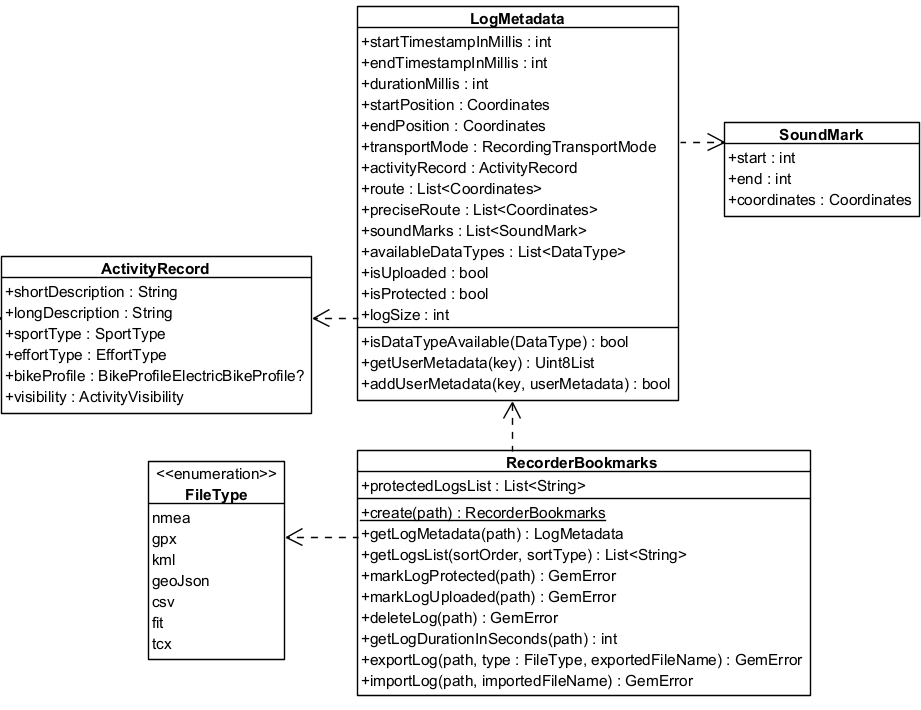
Recordings are saved as .gm or .mp4 files by the Recorder. The RecorderBookmarks class provides functionality for managing recordings, including exporting .gm or .mp4 files to other formats such as .gpx, as well as importing external formats and converting them to .gm for seamless SDK integration.
Additionally, the LogMetadata class serves as an object-oriented representation of a .gm or .mp4 file, offering features such as retrieving start and end timestamps, coordinates, and path details at varying levels of precision.
The RecorderBookmarks class for enhanced log management:
- Export and Import Logs: Convert logs to/from different formats such as GPX, NMEA, and KML.
- Log Metadata: Retrieve details like start and end timestamps, transport mode and size.
In the following class diagram you can see the main classes used by the RecorderBookmarks and the relationships between them:
Export logs
- Kotlin
- Java
// Create recorderBookmarks
// It loads all .gm and .mp4 files at logsDir
val bookmarks = RecorderBookmarks.produce(tracksPath)

if (bookmarks == null) {
    Log.e(TAG, "Bookmarks could not be created")
    return
}

// Get list of logs
val logList = bookmarks.logsList

// Export last recording with a given album name
// Assumes the logList is not empty
if (logList.isNotEmpty()) {
    val exportResult = bookmarks.exportLog(
        logFile = logList.last(),
        albumName = "My_Album_Name"
    ) { resultCode, message ->
        // Completion callback
        if (resultCode == 0) {
            Log.d(TAG, "Export successful: $message")
        } else {
            Log.e(TAG, "Export failed with code $resultCode: $message")
        }
    }

    // Check immediate return value
    if (exportResult != 0) {
        Log.e(TAG, "Export failed to start with code: $exportResult")
    }
}
// Create recorderBookmarks
// It loads all .gm and .mp4 files at logsDir
RecorderBookmarks bookmarks = RecorderBookmarks.produce(tracksPath);

if (bookmarks == null) {
    Log.e(TAG, "Bookmarks could not be created");
    return;
}

// Get list of logs
List<String> logList = bookmarks.getLogsList();

// Export last recording with a given album name
// Assumes the logList is not empty
if (!logList.isEmpty()) {
    int exportResult = bookmarks.exportLog(
        logList.get(logList.size() - 1),
        "My_Album_Name",
        (resultCode, message) -> {
            // Completion callback
            if (resultCode == 0) {
                Log.d(TAG, "Export successful: " + message);
            } else {
                Log.e(TAG, "Export failed with code " + resultCode + ": " + message);
            }
        }
    );

    // Check immediate return value
    if (exportResult != 0) {
        Log.e(TAG, "Export failed to start with code: " + exportResult);
    }
}
The resulting file will be exported to the specified album. The completion callback provides the final result of the export operation.
Exporting a .gm file to other formats may result in data loss, depending on the data types supported by each format.
The exported file will be in the same directory as the original log file.
The exported file will be in the same directory as the original log file.
Log Management Operations
The RecorderBookmarks class provides additional methods for managing recordings:
- Kotlin
- Java
val bookmarks = RecorderBookmarks.produce(tracksPath)
if (bookmarks == null) {
    Log.e(TAG, "Bookmarks could not be created")
    return
}

val logList = bookmarks.logsList
if (logList.isNotEmpty()) {
    val logFile = logList.first()

    // Mark a log as protected (prevents automatic deletion)
    val protectResult = bookmarks.markLogProtected(logFile, true)
    if (protectResult == 0) {
        Log.d(TAG, "Log marked as protected")
    }

    // Mark a log as uploaded
    val uploadedResult = bookmarks.markLogUploaded(logFile, true)
    if (uploadedResult == 0) {
        Log.d(TAG, "Log marked as uploaded")
    }

    // Delete a specific log
    val deleteResult = bookmarks.deleteLog(logFile)
    if (deleteResult == 0) {
        Log.d(TAG, "Log deleted successfully")
    } else {
        Log.e(TAG, "Failed to delete log: $deleteResult")
    }
}
RecorderBookmarks bookmarks = RecorderBookmarks.produce(tracksPath);
if (bookmarks == null) {
    Log.e(TAG, "Bookmarks could not be created");
    return;
}

List<String> logList = bookmarks.getLogsList();
if (!logList.isEmpty()) {
    String logFile = logList.get(0);

    // Mark a log as protected (prevents automatic deletion)
    int protectResult = bookmarks.markLogProtected(logFile, true);
    if (protectResult == 0) {
        Log.d(TAG, "Log marked as protected");
    }

    // Mark a log as uploaded
    int uploadedResult = bookmarks.markLogUploaded(logFile, true);
    if (uploadedResult == 0) {
        Log.d(TAG, "Log marked as uploaded");
    }

    // Delete a specific log
    int deleteResult = bookmarks.deleteLog(logFile);
    if (deleteResult == 0) {
        Log.d(TAG, "Log deleted successfully");
    } else {
        Log.e(TAG, "Failed to delete log: " + deleteResult);
    }
}
Protected logs will not be automatically deleted by the SDK's storage management system, even when disk space limits are reached.
Be careful when using deleteLog as it permanently removes the recording file from storage.
Access metadata
Each log contains metadata accessible through the LogMetadata class.
- Kotlin
- Java
val bookmarks = RecorderBookmarks.produce(logsDir)
if (bookmarks != null) {
    val logList = bookmarks.logsList
    if (!logList.isNullOrEmpty()) {
        val logMetadata = bookmarks.getMetadata(logList.last())
    }
}
RecorderBookmarks bookmarks = RecorderBookmarks.produce(logsDir);
if (bookmarks != null) {
    List<String> logList = bookmarks.getLogsList();
    if (logList != null && !logList.isEmpty()) {
        LogMetadata logMetadata = bookmarks.getMetadata(logList.get(logList.size() - 1));
    }
}
The getMetadata method will return null if the log file does not exist inside the logsDir directory or if the log file is not a valid .gm file.
The metadata within a LogMetadata object contains:
- startPosition / endPosition: Geographic coordinates for the log's beginning and end.
- route: A list of route coordinates from the recorded log.
- startTimestampInMillis / endTimestampInMillis: Timestamp of the first/last sensor data.
- durationMillis: Log duration.
- isProtected(): Check if a log file is protected. Protected logs will not be automatically deleted.
- isUploaded(): Check if log file was uploaded.
- logSize: Get the log size in bytes.
- isDataTypeAvailable(type): Verify if a data type is produced by the log file.
- soundMarks: A list of recorded soundmarks.
- availableDataTypes: List of the available data types in this log.
To visualize the recorded route, a Path object can be constructed using the route coordinates from the LogMetadata. This path can then be displayed on a map. For more details, refer to the documentation on the path entity and display paths.
Some features mentioned in other documentation versions (such as custom user metadata, activity records, and log metrics) are not available in the current Android SDK implementation.
Record while app is in background
The recording might fail with error code GemError.General when calling stopRecording if the app is sent to the background during the recording.
Enable allowsBackgroundLocationUpdates on the PositionSensorConfiguration associated to the data source before instantiating the Recorder:
In the app's manifest file add the ACCESS_BACKGROUND_LOCATION permission.
- Kotlin
- Java
val dataSource = DataSourceFactory.produceLive()
if (dataSource == null) {
    Log.e(TAG, "The datasource could not be created")
    return
}

val sensorConfiguration = dataSource.getPreferences(EDataType.Position) ?: arrayListOf()
sensorConfiguration.add(Parameter("allowsBackgroundLocationUpdates", "true"))
val result = dataSource.setPreferences(EDataType.Position, sensorConfiguration)
if (result != 0) {
    Log.e(TAG, "Failed to set background location preferences: $result")
}

val recorderConfiguration = RecorderConfiguration(
    logsDir = logsDir,
    dataSource = dataSource,
    types = arrayListOf(EDataType.Position)
)

val recorder = Recorder.produce(recorderConfiguration)
DataSource dataSource = DataSourceFactory.produceLive();
if (dataSource == null) {
    Log.e(TAG, "The datasource could not be created");
    return;
}

ArrayList<Parameter> sensorConfiguration = dataSource.getPreferences(EDataType.Position);
if (sensorConfiguration == null) {
    sensorConfiguration = new ArrayList<>();
}
sensorConfiguration.add(new Parameter("allowsBackgroundLocationUpdates", "true"));
int result = dataSource.setPreferences(EDataType.Position, sensorConfiguration);
if (result != 0) {
    Log.e(TAG, "Failed to set background location preferences: " + result);
}

ArrayList<EDataType> types = new ArrayList<>(Arrays.asList(EDataType.Position));
RecorderConfiguration recorderConfiguration = new RecorderConfiguration(
    logsDir,
    dataSource,
    types
);

Recorder recorder = Recorder.produce(recorderConfiguration);