Display route instructions
Instructions are represented as arrows on the map and can be displayed by using MapView.centerOnRouteInstruction(instruction, zoomLevel, xy, animation, viewAngle). To obtain a route's instructions, see the Route structure section. The following example iterates through all instructions of a route and displays each one by centering:
- Kotlin
- Java
    val routeInstruction = route.instructions[0]
    mapView.centerOnRouteInstruction(
        instruction = routeInstruction,
        zoomLevel = 75,
        xy = null, // Use default center position
        animation = Animation(EAnimation.Linear, 1000), // 1 second animation
        viewAngle = Double.MAX_VALUE // Use default view angle
    )
    RouteInstruction routeInstruction = route.getInstructions().get(0);
    mapView.centerOnRouteInstruction(
        routeInstruction,
        75,                                          // zoomLevel
        null,                                        // Use default center position
        new Animation(EAnimation.Linear, 1000),      // 1 second animation
        Double.MAX_VALUE                             // Use default view angle
    );
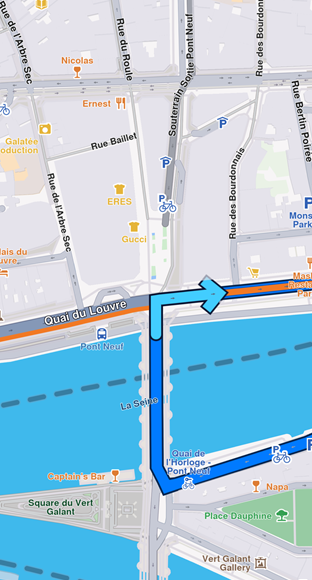
Turn right arrow instruction
The route instruction arrow is automatically cleared when a new route instruction is centered on or when the route is cleared using mapView.hideRoutes().