
Voice Downloading

Last updated: June 19, 2026 | 6 minutes read

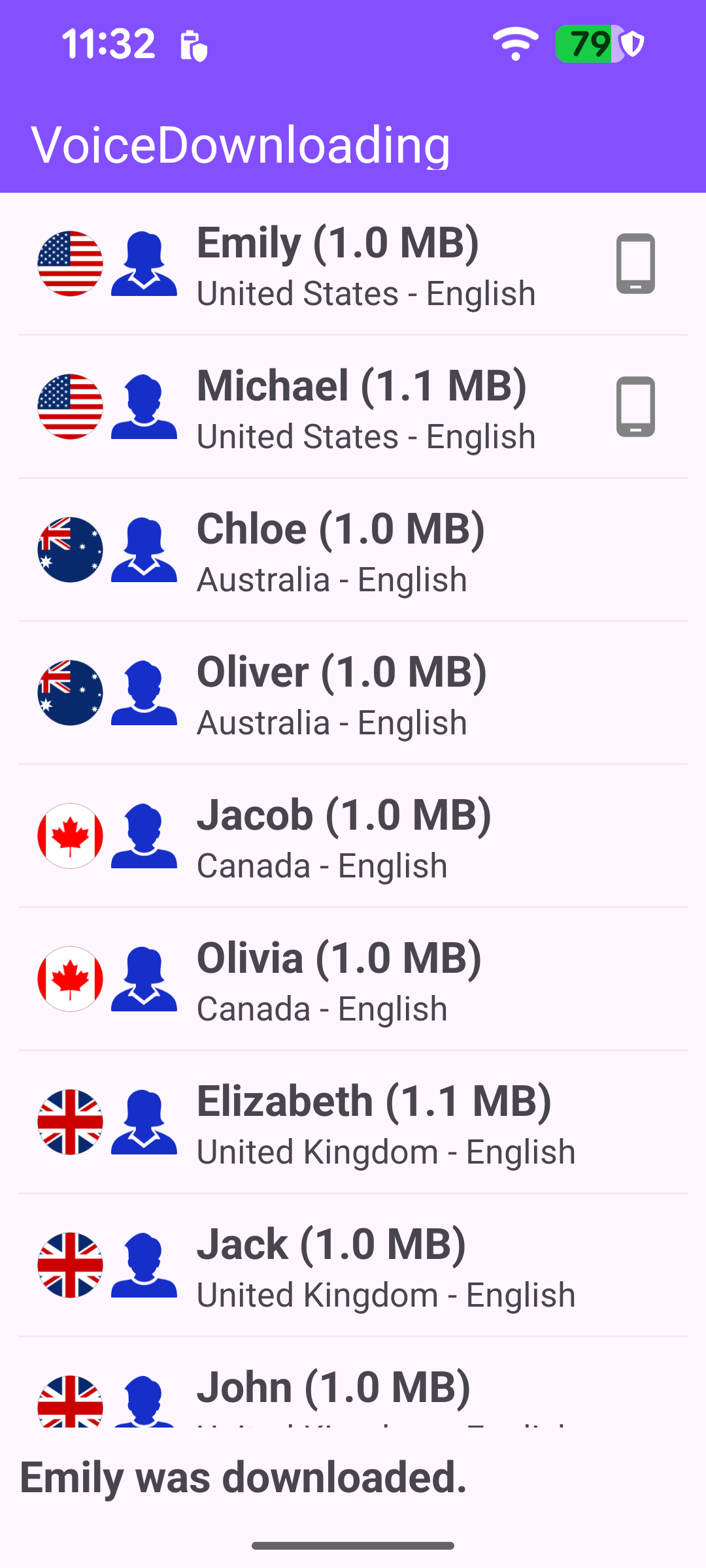
This example lists every navigation-instruction human voice available on the Magic Lane servers and downloads one. Each row shows the voice's country flag, name and size, the country and native language, a gender icon, and a status indicator: a phone icon once the voice has been downloaded and is available locally on the device, or a progress ring while it downloads. To keep the example self-contained it automatically downloads the first voice in the catalog as soon as the list arrives.

Catalog of downloadable voices

Connecting and verifying authorization

The voice catalog lives on the server, so the app needs an internet connection and a valid app token before it can be requested. On the first successful connection the example verifies the app authorization; the catalog is only loaded once that check passes. Both the connection callback and the token-rejection callback are registered together, and the connection callback clears itself so the verification runs only once per session.

MainActivity.ktView on Github
private fun registerSdkListeners() {
SdkSettings.onApiTokenRejected = { showInvalidTokenDialog() }

// Verify the app token on the first successful internet connection.
// Self-clearing so it fires only once per session.
SdkSettings.onConnectionStatusUpdated = { isConnected ->
if (isConnected) {
SdkSettings.onConnectionStatusUpdated = {}
SdkSettings.appAuthorization?.let {
showStatusMessage(getString(R.string.status_checking_token_validity))
SdkCall.execute { SdkSettings.verifyAppAuthorization(it, checkAuthorizationListener) }
} ?: showInvalidTokenDialog()
}
}
}

verifyAppAuthorization reports its result through checkAuthorizationListener. On success the catalog is loaded; otherwise an invalid-token dialog is shown.

MainActivity.ktView on Github
// Fires once after verifyAppAuthorization completes.
private val checkAuthorizationListener = ProgressListener.create(
onCompleted = { errorCode, _ ->
if (errorCode != GemError.NoError) {
showInvalidTokenDialog()
} else {
// Authorization confirmed - safe to load the voices catalog.
loadVoicesCatalog()
}
},
)

Requesting the voices catalog

The catalog is fetched through a ContentStore. (In a production MVVM app the store would normally live in the repository layer and be injected into a ViewModel; here it is kept in the activity for brevity.) asyncGetStoreContentList requests the list of HumanVoice items asynchronously and returns an immediate error code - if it fails up front (for example, no network) the listener never fires, so that case is reported directly.

MainActivity.ktView on Github
private fun loadVoicesCatalog() = SdkCall.execute {
val error = contentStore.asyncGetStoreContentList(EContentType.HumanVoice, progressListener)
if (error != GemError.NoError) {
// asyncGetStoreContentList can fail immediately (e.g. no network) before the listener fires.
Util.postOnMain {
showStatusMessage(
getString(
R.string.status_voices_catalog_download_error,
SdkCall.runSynced { GemError.getMessage(error, this) },
),
)
}
}
}

When the request finishes, progressListener.onCompleted fires. On success the retrieved list is read back from the content store with getStoreContentList, the first voice is queued for download, and the list is displayed.

MainActivity.ktView on Github
// Tracks async retrieval of the voices catalog from the content store.
private val progressListener = ProgressListener.create(
onStarted = {
binding.progressBar.visibility = View.VISIBLE
showStatusMessage(getString(R.string.status_downloading_voices_catalog))
},
onCompleted = { errorCode, _ ->
binding.progressBar.visibility = View.GONE

when (errorCode) {
GemError.NoError -> SdkCall.execute {
val voicesList = contentStore.getStoreContentList(EContentType.HumanVoice)?.first
// Kick off a download for the first available voice, if any.
voicesList?.firstOrNull()?.let { downloadFirstVoice(it) }
Util.postOnMain { displayList(voicesList) }
}
else -> showStatusMessage(
getString(
R.string.status_voices_catalog_download_error,
SdkCall.runSynced { GemError.getMessage(errorCode, this) },
),
)
}
},
)

Downloading a voice

downloadFirstVoice starts an asynchronous download for a ContentStoreItem. The per-download ProgressListener updates the status text and refreshes the first row on each progress tick and on completion, so the row's progress ring and phone icon stay in sync.

The important detail is the return value of asyncDownload: it returns immediately and the code branches on it. NoError means the download started and the progress listener takes over; UpToDate means the voice is already on the device (nothing to download); any other value is a real error.

MainActivity.ktView on Github
private fun downloadFirstVoice(voiceItem: ContentStoreItem) {
val itemName = voiceItem.name

// Progress callbacks run on the main thread; no explicit posting needed inside them.
val downloadProgressListener = ProgressListener.create(
onStarted = {
showStatusMessage(getString(R.string.status_downloading_item, itemName))
},
onProgress = {
binding.listView.adapter?.notifyItemChanged(0)
},
onCompleted = { errorCode, _ ->
binding.listView.adapter?.notifyItemChanged(0)
if (errorCode == GemError.NoError) {
showStatusMessage(getString(R.string.status_item_downloaded, itemName))
} else {
showStatusMessage(
getString(
R.string.status_item_download_error,
itemName,
SdkCall.runSynced { GemError.getMessage(errorCode, this) },
),
)
}
},
)

// asyncDownload returns immediately; NoError means the download started and
// downloadProgressListener will receive further callbacks.
val downloadError = voiceItem.asyncDownload(
downloadProgressListener,
GemSdk.EDataSavePolicy.UseDefault,
true,
)

when (downloadError) {
GemError.NoError -> { /* download started - progress handled by downloadProgressListener */ }
GemError.UpToDate -> Util.postOnMain {
showStatusMessage(getString(R.string.status_item_already_downloaded, itemName))
}
else -> Util.postOnMain {
showStatusMessage(
getString(
R.string.status_download_item_error,
SdkCall.runSynced { GemError.getMessage(downloadError, this) },
),
)
}
}
}

Displaying the list

The voices are shown in a RecyclerView driven by CustomAdapter. displayList simply attaches the adapter once the catalog is available.

MainActivity.ktView on Github
private fun displayList(voicesList: ArrayList<ContentStoreItem>?) {
voicesList?.let { binding.listView.adapter = CustomAdapter(it) }
}

Each ContentStoreItem carries the metadata a row needs. onBindViewHolder renders the voice name and size, resolves the country name and native language from the item's parameters, picks the gender icon, fetches the country flag (cached per ISO code), and reflects the download status - a phone icon when Completed, or a progress bar bound to downloadProgress while DownloadRunning.

MainActivity.ktView on Github
override fun onBindViewHolder(viewHolder: ViewHolder, position: Int) {
val item = dataSet[position]
viewHolder.binding.apply {
text.text = SdkCall.execute {
"${item.name} (${"%.1f MB".format(item.totalSize / 1_048_576.0)})"
}
description.text = SdkCall.execute {
"${getCountryName(item)} - ${getParameter(item, "native_language")}"
}
icon.setImageBitmap(SdkCall.execute { getFlagBitmap(item) })
genderIcon.setImageResource(
if (SdkCall.execute { getParameter(item, "gender").lowercase() } == "male") {
R.drawable.male
} else {
R.drawable.female
},
)

statusIcon.visibility = View.GONE
itemProgressBar.visibility = View.INVISIBLE
when (SdkCall.execute { item.status }) {
EContentStoreItemStatus.Completed -> {
statusIcon.visibility = View.VISIBLE
itemProgressBar.visibility = View.INVISIBLE
}
EContentStoreItemStatus.DownloadRunning -> {
itemProgressBar.visibility = View.VISIBLE
itemProgressBar.progress = SdkCall.execute { item.downloadProgress } ?: 0
}
else -> return // item not yet tracked; skip update
}
}
}

The flag bitmap is obtained from MapDetails().getCountryFlag(isoCode) and cached in a map keyed by ISO country code, so it is fetched only once per country rather than on every bind.
MainActivity.ktView on Github
private fun getFlagBitmap(item: ContentStoreItem): Bitmap? {
val isoCode = item.countryCodes?.firstOrNull() ?: return null
if (!flagBitmapsMap.containsKey(isoCode)) {
val size = resources.getDimension(R.dimen.icon_size).toInt()
flagBitmapsMap[isoCode] = MapDetails().getCountryFlag(isoCode)?.asBitmap(size, size)
}
return flagBitmapsMap[isoCode]
}