
Truck Profile

Last updated: June 19, 2026 | 6 minutes read

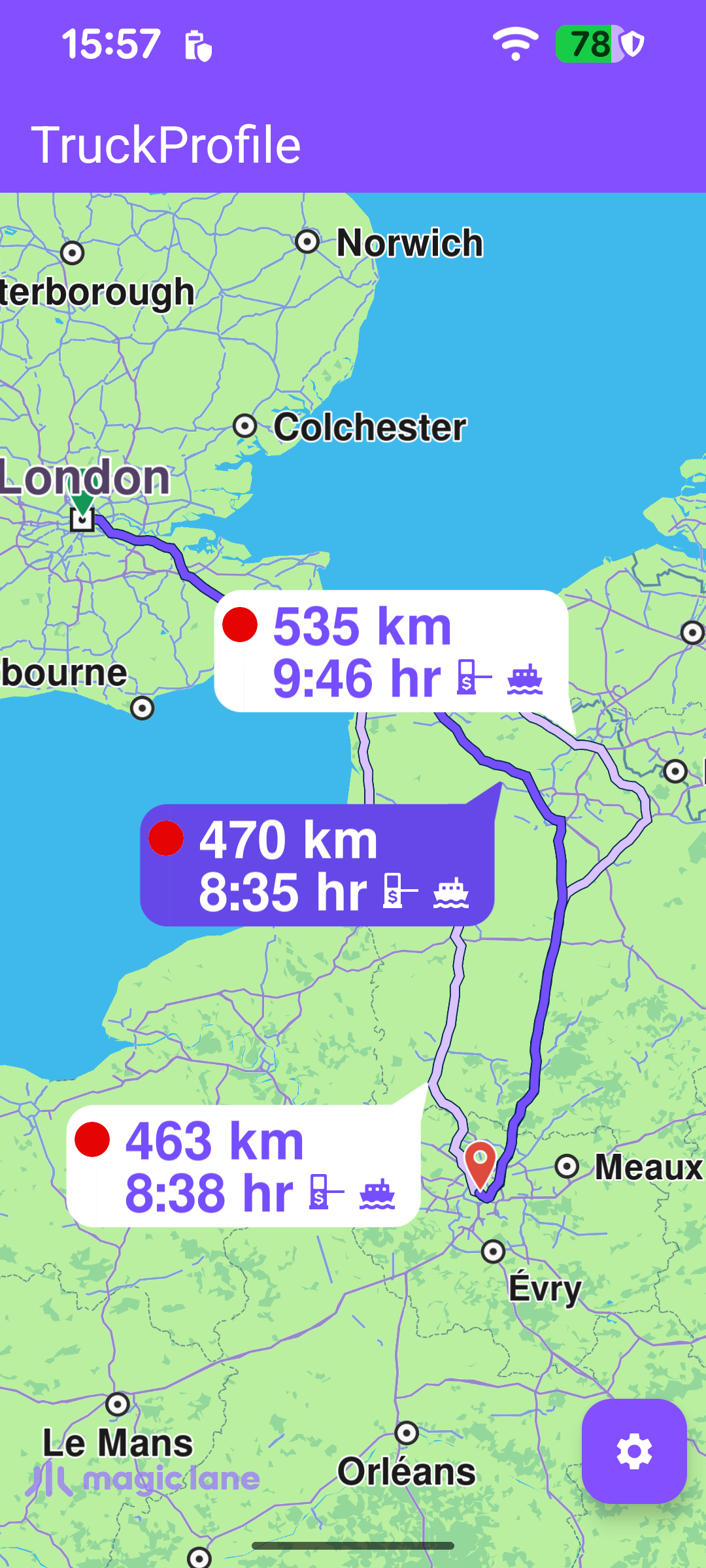
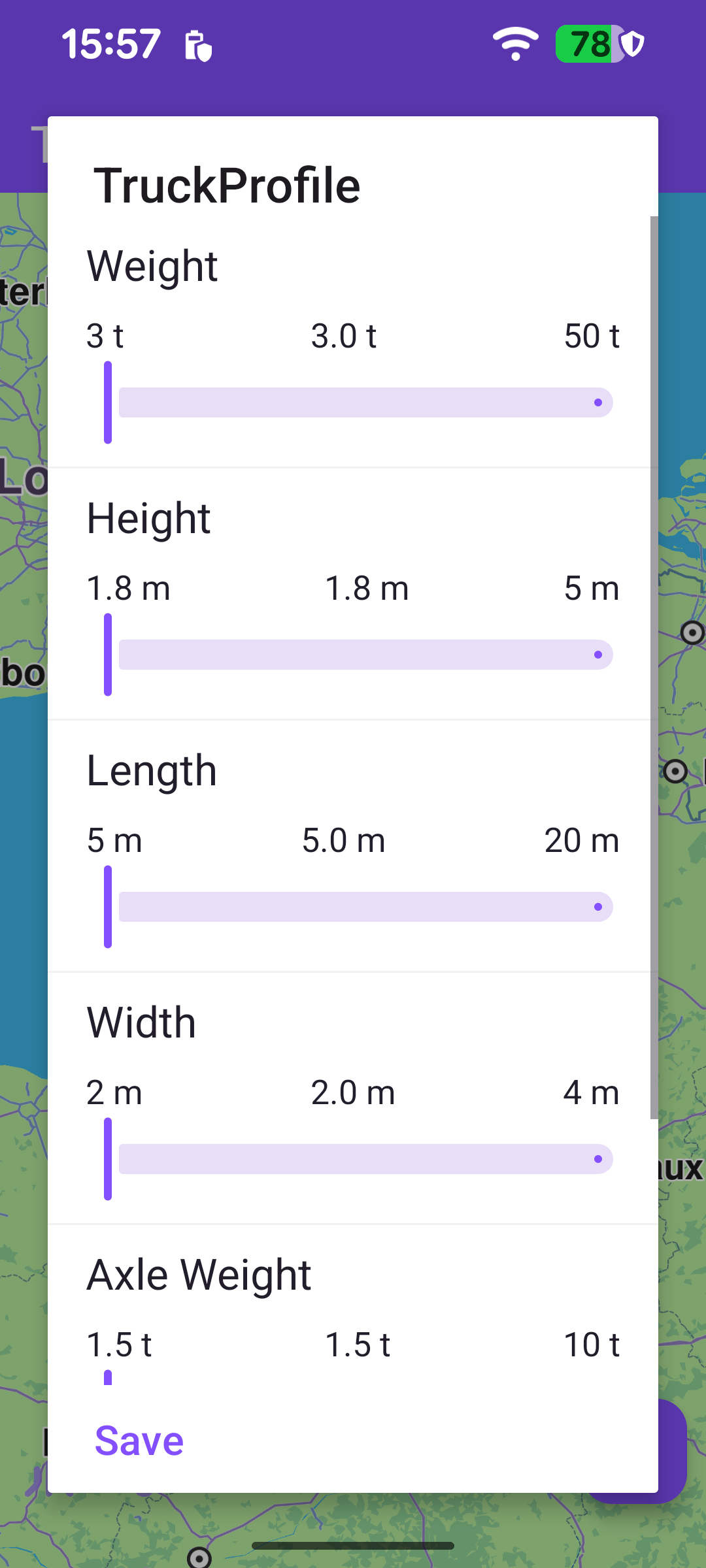
This example computes a route for a truck. The route respects the lorry transport mode and a truck profile - the vehicle's mass, height, length, width, axle load and maximum speed - so the result avoids roads the truck cannot legally or physically use (low bridges, weight-limited roads, narrow streets, and similar). The computed alternatives are drawn on the map with distance/time bubbles, and a settings panel lets the user change the truck's characteristics and recompute.

Alternative truck routes
Truck profile settings panel

Computing the truck route

A RoutingService is created once. Its onStarted / onCompleted callbacks toggle the progress bar and handle the result.

MainActivity.ktView on Github
private val routingService = RoutingService(
onStarted = {
binding.progressBar.isVisible = true
},

onCompleted = { routes, errorCode, _ ->
binding.progressBar.isVisible = false
when (errorCode) {
GemError.NoError -> {
routesList = routes
adapter.notifyItemRangeChanged(0, routesList.size)
SdkCall.execute {
binding.gemSurfaceView.mapView?.presentRoutes(
routes = routes,
displayBubble = true,
animation = Animation(EAnimation.Linear, ROUTE_ANIMATION_MS),
edgeAreaInsets = getEdgeAreaInsets(),
)
}

binding.settingsButton.isVisible = true
EspressoIdlingResource.decrement()
}

else -> {
if (errorCode != GemError.Cancel) {
showDialog(/* routing error message */)
EspressoIdlingResource.decrement()
}
}
}
},
)

On success the routes (there may be several alternatives between departure and destination) are drawn with presentRoutes; displayBubble = true adds the distance/time bubble seen on each route, and edgeAreaInsets fits them clear of the toolbar and system bars. The settings button is then revealed so the truck profile can be edited.

Once the worldwide road map is downloaded and up to date, the departure/destination waypoints and a default truck profile are set up, and the route is calculated. Two things make the routing truck-aware: setting preferences.transportMode to ERouteTransportMode.Lorry, and assigning preferences.truckProfile. The trip runs from London to Paris.

MainActivity.ktView on Github
SdkSettings.onWorldwideRoadMapSupportStatus = { status ->
if (status == EOffboardListenerStatus.UpToDate) {
SdkSettings.onWorldwideRoadMapSupportStatus = {}
SdkCall.execute {
waypoints = arrayListOf(
Landmark("London", 51.5073204, -0.1276475),
Landmark("Paris", 48.8566932, 2.3514616),
)

// Initialize with a default truck profile; user can change it via the settings dialog.
preferencesTruckProfile = TruckProfile(
massKg = (3 * ETruckProfileUnitConverters.Weight.unit).toInt(),
heightCm = (1.8 * ETruckProfileUnitConverters.Height.unit).toInt(),
lengthCm = (5 * ETruckProfileUnitConverters.Length.unit).toInt(),
widthCm = (2 * ETruckProfileUnitConverters.Width.unit).toInt(),
axleLoadKg = (1.5 * ETruckProfileUnitConverters.AxleWeight.unit).toInt(),
maxSpeedMs = 60 * ETruckProfileUnitConverters.MaxSpeed.unit.toDouble(),
)

routingService.preferences.transportMode = ERouteTransportMode.Lorry
routingService.preferences.truckProfile = preferencesTruckProfile

val errorCode = routingService.calculateRoute(waypoints)
if (errorCode != GemError.NoError) {
val errorMessage =
getString(R.string.routing_calculation_error, GemError.getMessage(errorCode, this))
runOnAliveUi { showDialog(errorMessage) { finish() } }
}
}
}
}

calculateRoute returns synchronously whether the calculation could be started; on a start failure onCompleted never fires, so that case is reported in a dialog here.

Truck profile and units

TruckProfile is expressed in the SDK's native units - kilograms, centimetres and metres per second - while the UI works in tonnes, metres and km/h. The example centralizes the conversion factors in an ETruckProfileUnitConverters enum, and each editable setting in ETruckProfileSettings knows both its converter and how to read its raw value back from a TruckProfile. Multiplying a display value by converter.unit gives the native value; dividing does the reverse.

MainActivity.ktView on Github
/** Multiplier to convert from the display unit to the SDK native unit (e.g. tonnes → kg = 1000). */
enum class ETruckProfileUnitConverters(val unit: Float) {
Weight(1000f), // tonnes → kilograms
Height(100f), // metres → centimetres
Length(100f), // metres → centimetres
Width(100f), // metres → centimetres
AxleWeight(1000f), // tonnes → kilograms
MaxSpeed(0.27778f), // km/h → m/s
}

enum class ETruckProfileSettings(
val converter: ETruckProfileUnitConverters,
/** Reads the corresponding raw value from a TruckProfile (in SDK native units). */
val getValue: (TruckProfile) -> Number,
) {
Weight(ETruckProfileUnitConverters.Weight, { it.mass }),
Height(ETruckProfileUnitConverters.Height, { it.height }),
Length(ETruckProfileUnitConverters.Length, { it.length }),
Width(ETruckProfileUnitConverters.Width, { it.width }),
AxleWeight(ETruckProfileUnitConverters.AxleWeight, { it.axleLoad }),
MaxSpeed(ETruckProfileUnitConverters.MaxSpeed, { it.maxSpeed }),
}

Selecting a route on the map

Once the map view exists, a touch listener lets the user pick one of the alternatives. The touch point is forwarded to the map as cursorScreenPosition, and cursorSelectionRoutes returns the routes under it. The first hit becomes the main route (drawn highlighted), and the camera re-centers on the whole set with centerOnRoutes.

MainActivity.ktView on Github
binding.gemSurfaceView.onDefaultMapViewCreated = {
updateFocusViewport()
binding.gemSurfaceView.mapView?.onTouch = { xy ->
SdkCall.execute {
binding.gemSurfaceView.mapView?.cursorScreenPosition = xy
val routes = binding.gemSurfaceView.mapView?.cursorSelectionRoutes
if (!routes.isNullOrEmpty()) {
val route = routes[0]
binding.gemSurfaceView.mapView?.apply {
preferences?.routes?.mainRoute = route
centerOnRoutes(
routesList,
animation = Animation(EAnimation.Linear, ROUTE_ANIMATION_MS),
viewRc = getRouteViewRect(),
)
}
}
}
}
}

Editing the truck profile

Tapping the settings button opens a dialog backed by a RecyclerView. Each row is a labelled slider for one truck attribute (weight, height, length, width, axle weight, maximum speed), seeded with default ranges by getInitialDataSet.

MainActivity.ktView on Github
private fun getInitialDataSet(): List<TruckProfileSettingsModel> = buildList {
add(
TruckProfileSettingsModel(
title = getString(R.string.weight), type = ESeekBarValuesType.DoubleType,
minValueText = "3 t", currentValueText = "3.0 t", maxValueText = "50 t",
minDoubleValue = 3.0f, currentDoubleValue = 3.0f, maxDoubleValue = 50.0f,
unit = "t",
),
)
// ... height, length, width, axle weight, and an int-valued max speed slider
}

When the dialog is shown, each slider is initialized from the current preferencesTruckProfile: the adapter reads the raw value with the setting's getValue and converts it to the display unit by dividing by converter.unit.

MainActivity.ktView on Github
val setting = ETruckProfileSettings.entries[position]
SdkCall.execute {
// Convert from SDK native unit to display unit (e.g. kg → t, cm → m, m/s → km/h).
val actualVal = setting.getValue(preferencesTruckProfile).toFloat() / setting.converter.unit
seekBar.value = actualVal
// ... update the row's value label
}

Applying changes and recomputing

The dialog's Save button calls onSaveButtonClicked, which reads each slider, converts the display values back to native units, builds a new TruckProfile, assigns it to the routing preferences (again with transportMode = Lorry), clears the previously drawn routes, and recomputes. The new route then arrives through the same onCompleted callback and is presented as before.
MainActivity.ktView on Github
private fun onSaveButtonClicked() {
EspressoIdlingResource.increment()
val dataSet = adapter.dataSet

// Read display values and convert to SDK native units using each setting's converter.
val weight = (dataSet[ETruckProfileSettings.Weight.ordinal].currentDoubleValue * ETruckProfileSettings.Weight.converter.unit).toInt()
val height = (dataSet[ETruckProfileSettings.Height.ordinal].currentDoubleValue * ETruckProfileSettings.Height.converter.unit).toInt()
val length = (dataSet[ETruckProfileSettings.Length.ordinal].currentDoubleValue * ETruckProfileSettings.Length.converter.unit).toInt()
val width = (dataSet[ETruckProfileSettings.Width.ordinal].currentDoubleValue * ETruckProfileSettings.Width.converter.unit).toInt()
val axleWeight = (dataSet[ETruckProfileSettings.AxleWeight.ordinal].currentDoubleValue * ETruckProfileSettings.AxleWeight.converter.unit).toInt()
// MaxSpeed uses an int slider (km/h), convert to m/s.
val maxSpeed = dataSet[ETruckProfileSettings.MaxSpeed.ordinal].currentIntValue * ETruckProfileSettings.MaxSpeed.converter.unit.toDouble()

SdkCall.execute {
routingService.apply {
preferences.transportMode = ERouteTransportMode.Lorry
preferencesTruckProfile = TruckProfile(
massKg = weight,
heightCm = height,
lengthCm = length,
widthCm = width,
axleLoadKg = axleWeight,
maxSpeedMs = maxSpeed,
)
preferences.truckProfile = preferencesTruckProfile
binding.gemSurfaceView.mapView?.preferences?.routes?.clear()

val errorCode = calculateRoute(waypoints)
if (errorCode != GemError.NoError) {
val errorMessage =
getString(R.string.routing_calculation_error, GemError.getMessage(errorCode, this@MainActivity))
runOnAliveUi { showDialog(errorMessage) { finish() } }
}
}
}
}