
Route Navigation

Last updated: June 19, 2026 | 9 minutes read

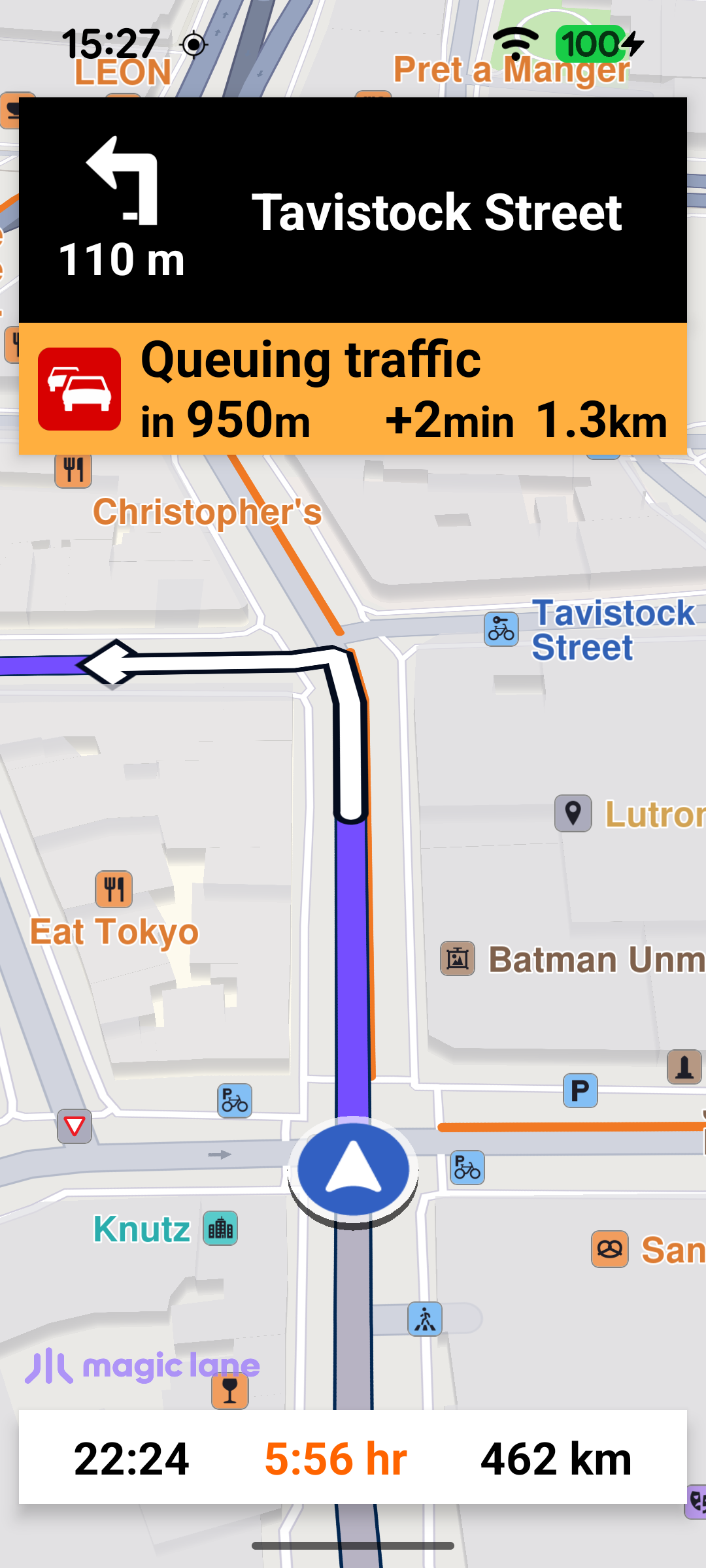
This example performs real turn-by-turn navigation along a route rendered on an interactive map, from the device's current position to a fixed destination (Paris). While navigating, the screen shows three panels driven by live navigation updates:

  • a top panel with the next-turn icon, the distance to the turn and the next street name (or a signpost / road-code shield when available);
  • a traffic panel that appears when a traffic event lies ahead, showing its description, the distance to it and the delay it adds;
  • a bottom panel with the estimated time of arrival, the remaining travel time and the remaining distance.

The camera follows the current position, and a floating button re-enters follow mode after the user pans the map away.

Turn-by-turn navigation

MainActivity retains a single NavigationService and a NavigationListener. The listener receives the stream of navigation events: when navigation starts, when the next instruction changes, when the status changes (waiting for a route, waiting for GPS, running…), when the destination is reached, on errors, and when a voice instruction should be played. The navRoute helper fetches the route currently being navigated, which the UI uses to read estimated time of arrival, remaining time and distance.

MainActivity.ktView on Github
// Define a navigation service from which we will start the navigation.
private val navigationService = NavigationService()

private val navRoute: Route?
get() = navigationService.getNavigationRoute(navigationListener)

private val navigationListener: NavigationListener = NavigationListener.create(
onNavigationStarted = {
SdkCall.execute {
binding.gemSurfaceView.mapView?.let { mapView ->
navRoute?.let { route ->
mapView.presentRoute(route)
}

mapView.followPosition()
}
}
applyCameraFocus()
endOfSectionBmp = ContextCompat.getDrawable(this@MainActivity, R.drawable.end_of_traffic_section)
?.toBitmap(navigationImageSize, navigationImageSize)
binding.apply {
setNavigationPanelsVisible(isVisible = true)
}
},
onNavigationInstructionUpdated = { instr -> updateNavigationInstruction(instr) },
onDestinationReached = { onNavigationEnded() },
onNotifyStatusChange = { status ->
navigationStatus = status
refreshStatusMessage()
},
onNavigationError = { error -> onNavigationEnded(error) },
onNavigationSound = { sound ->
SdkCall.execute {
SoundPlayingService.play(sound, playingListener, soundPreference)
}
},
canPlayNavigationSound = true,
)

A separate ProgressListener tracks the route-calculation progress and toggles the progress bar. It only shows the bar the first time, so the indicator does not flash on every route recalculation during the trip.

MainActivity.ktView on Github
private val routingProgressListener = ProgressListener.create(
onStarted = {
if (firstTime) {
binding.progressBar.visibility = View.VISIBLE
firstTime = false
}
},

onCompleted = { _, _ ->
binding.progressBar.visibility = View.GONE
},

postOnMain = true,
)

Starting navigation when everything is ready

Navigation can only start once several conditions are met: the worldwide road map must be downloaded and up to date, location services must be enabled, the runtime location permissions must be granted, and a first valid GPS position must be available. These steps are chained together.

When the road map reaches EOffboardListenerStatus.UpToDate, the listener clears itself and checks the location status; if location is enabled it requests the permissions.

MainActivity.ktView on Github
SdkSettings.onWorldwideRoadMapSupportStatus = { status ->
if (status == EOffboardListenerStatus.UpToDate) {
SdkSettings.onWorldwideRoadMapSupportStatus = {}

if (checkLocationStatus()) {
requestPermissions()
}
}
}

Once the permissions are granted, the app waits for the first valid improved position before starting. If a valid position is already available it starts immediately; otherwise it subscribes a PositionListener and starts as soon as the first valid position arrives, then removes itself.

MainActivity.ktView on Github
private fun waitForValidImprovedPositionAndStartNavigation() {
if (PositionService.improvedPosition?.isValid() == true) {
startNavigation()
return
}

lateinit var positionListener: PositionListener
positionListener = PositionListener { position ->
if (!position.isValid()) return@PositionListener

PositionService.removeListener(positionListener)
startNavigation()
}

// Wait for first valid improved position before starting navigation.
PositionService.addListener(positionListener, EDataType.ImprovedPosition)
}

startNavigation defines the destination, cancels any navigation already in progress, and calls navigationService.startNavigation with the navigation and routing-progress listeners. The call returns synchronously whether navigation could be started; on failure the error is reported in a dialog.

MainActivity.ktView on Github
private fun startNavigation() {
val destination = Landmark("Paris", 48.8566932, 2.3514616)

// Cancel any navigation in progress.
navigationService.cancelNavigation(navigationListener)
// Start the new navigation.
val error = navigationService.startNavigation(
destination,
navigationListener,
routingProgressListener,
)

if (error != GemError.NoError) {
runOnUiThread {
showDialog(
getString(R.string.route_navigation_error, SdkCall.runSynced { GemError.getMessage(error, this) }),
)
}
}
}

Presenting the route and following the position

When navigation starts (the onNavigationStarted callback above), the route is drawn on the map with presentRoute, the camera enters follow mode with followPosition, and the navigation panels are made visible. Entering follow mode hides the follow GPS button - it is only needed when the camera is not following the current position.

The follow GPS button is wired up earlier, when the default map view is created. onDefaultMapViewCreated waits for a first valid position and then calls enableGPSButton on the main thread.

MainActivity.ktView on Github
binding.gemSurfaceView.onDefaultMapViewCreated = {
updateFocusViewport()

lateinit var positionListener: PositionListener
if (PositionService.position?.isValid() == true) {
Util.postOnMain { enableGPSButton() }
} else {
positionListener = PositionListener {
if (!it.isValid()) return@PositionListener

PositionService.removeListener(positionListener)
Util.postOnMain { enableGPSButton() }
}
PositionService.addListener(positionListener, EDataType.Position)
}
}

enableGPSButton sets up the follow-mode transitions: when the user pans away from the current position the button reappears and the panels are hidden; tapping the button calls followPosition to re-center and resume following.

MainActivity.ktView on Github
private fun enableGPSButton() {
// Set actions for entering/ exiting following position mode.
binding.apply {
gemSurfaceView.mapView?.apply {
onExitFollowingPosition = {
followGpsButton.visibility = View.VISIBLE
setNavigationPanelsVisible(isVisible = false)
}

onEnterFollowingPosition = {
followGpsButton.visibility = View.GONE

val navigationIsActive = SdkCall.execute { navigationService.isNavigationActive() } ?: false
if (navigationIsActive) {
setNavigationPanelsVisible(isVisible = true)
}
}

// Set on click action for the GPS button.
followGpsButton.setOnClickListener {
SdkCall.execute { followPosition() }
}
}
}
}

Updating the instruction panel

Each time the SDK reports a new instruction through onNavigationInstructionUpdated, updateNavigationInstruction refreshes the top panel. The displayable values are gathered on the SDK thread by collectNavigationUiData: the next street name (or turn instruction), the next-turn icon, the distance to the turn, and the estimated time of arrival / remaining travel time (RTT) / remaining travel distance (RTD) read from the navigated route. It also resolves a signpost image, falling back to a road-code shield when there is no signpost. The remaining travel time is colored orange or red according to the traffic severity; if it stays black there is no traffic delay on the route.

MainActivity.ktView on Github
private fun collectNavigationUiData(instruction: NavigationInstruction, availableWidth: Int): NavigationUiData {
val instructionText =
instruction.nextStreetName?.takeIf { it.isNotEmpty() } ?: instruction.nextTurnInstruction.orEmpty()

var hasSameTurnImage = false
val instructionIcon = getNextTurnImage(instruction, turnImageSize, turnImageSize) { isSame ->
hasSameTurnImage = isSame
}

val trafficDelayInMinutes = navRoute?.let {
GemUtil.getTrafficEventsDelay(it, true) / 60
} ?: 0
val (etaText, rttText, rtdText) = navRoute?.let {
Triple(it.getEta(), it.getRtt(), it.getRtd())
} ?: Triple("", "", "")

val signPostBitmap = getSignpostImage(instruction, availableWidth, signPostImageSize)
val roadCodeBitmap = if (signPostBitmap == null) {
getRoadCodeImage(instruction, availableWidth, navigationImageSize)
} else {
null
}

return NavigationUiData(
instructionText = instructionText,
instructionIcon = instructionIcon,
hasSameTurnImage = hasSameTurnImage,
instructionDistance = instruction.getDistanceInMeters(),
etaText = etaText,
rttText = rttText,
rttColor = getTrafficColor(trafficDelayInMinutes),
rtdText = rtdText,
signPostBitmap = signPostBitmap,
roadCodeBitmap = roadCodeBitmap,
)
}

The next-turn icon is rendered from the instruction's abstract geometry image with GemUtilImages.asBitmap, using a white-fill/black-outline style. To avoid redrawing the same icon on every update, the image UID is cached and the bitmap is skipped when it has not changed.

MainActivity.ktView on Github
private fun getNextTurnImage(
navInstr: NavigationInstruction,
width: Int,
height: Int,
onSameImage: (Boolean) -> Unit = {},
): Bitmap? {
if (!navInstr.hasNextTurnInfo()) return null

if ((navInstr.nextTurnDetails?.abstractGeometryImage?.uid ?: 0) == lastTurnImageId) {
onSameImage(true)
return null
}

val image = navInstr.nextTurnDetails?.abstractGeometryImage
if (image != null) {
lastTurnImageId = image.uid
}

// Active turn icon: white fill with black outline; inactive: grey fill and outline.
val aInner = Rgba(255, 255, 255, 255)
val aOuter = Rgba(0, 0, 0, 255)
val iInner = Rgba(128, 128, 128, 255)
val iOuter = Rgba(128, 128, 128, 255)

return GemUtilImages.asBitmap(image, width, height, aInner, aOuter, iInner, iOuter)
}

The traffic panel

After updating the instruction, updateNavigationInstruction also refreshes the traffic panel via updateTrafficPanel. It looks for the nearest traffic event ahead on the route that adds a delay; if none is found (or the top panel is hidden) the panel is hidden. getTrafficEvent walks the route's traffic events and computes, from the remaining travel distance, whether each event is still ahead or whether the driver is already inside it - which determines whether the panel shows the distance to the event or the distance remaining inside it.

MainActivity.ktView on Github
private fun getTrafficEvent(navInstr: NavigationInstruction, route: Route): RouteTrafficEvent? = SdkCall.execute {
if (navInstr.navigationStatus != ENavigationStatus.Running) return@execute null
val trafficEventsList = route.trafficEvents ?: return@execute null

val remainingTravelDistance = navInstr.remainingTravelTimeDistance?.totalDistance ?: 0

for (event in trafficEventsList) {
if (event.delay != 0) {
val distToDest = event.distanceToDestination
// Positive value means the event is ahead; negative means we have already passed
// the start of the event and are potentially inside it.
distToTrafficEvent = remainingTravelDistance - distToDest

insideTrafficEvent = false

if (distToTrafficEvent <= 0) {
// How many metres of the event still remain in front of us.
remainingDistInsideTrafficEvent = event.length - (distToDest - remainingTravelDistance)
if (remainingDistInsideTrafficEvent >= 0) {
insideTrafficEvent = true
}
}

if ((distToTrafficEvent >= 0) || (remainingDistInsideTrafficEvent >= 0)) {
return@execute event
}
}
}

return@execute null
}

Ending navigation

When the destination is reached (onDestinationReached) or an error occurs (onNavigationError), onNavigationEnded hides the navigation panels and the route, showing a dialog only for genuine errors (not for a normal cancellation).
MainActivity.ktView on Github
private fun onNavigationEnded(errorCode: ErrorCode = GemError.NoError) {
runOnUiThread {
if ((errorCode != GemError.NoError) && (errorCode != GemError.Cancel)) {
val message = SdkCall.runSynced { GemError.getMessage(errorCode, this) } ?: ""
if (message.isNotEmpty()) {
showDialog(message)
}
}
setNavigationPanelsVisible(isVisible = false)
}

SdkCall.execute {
binding.gemSurfaceView.mapView?.hideRoutes()
}
}