Lane Instructions
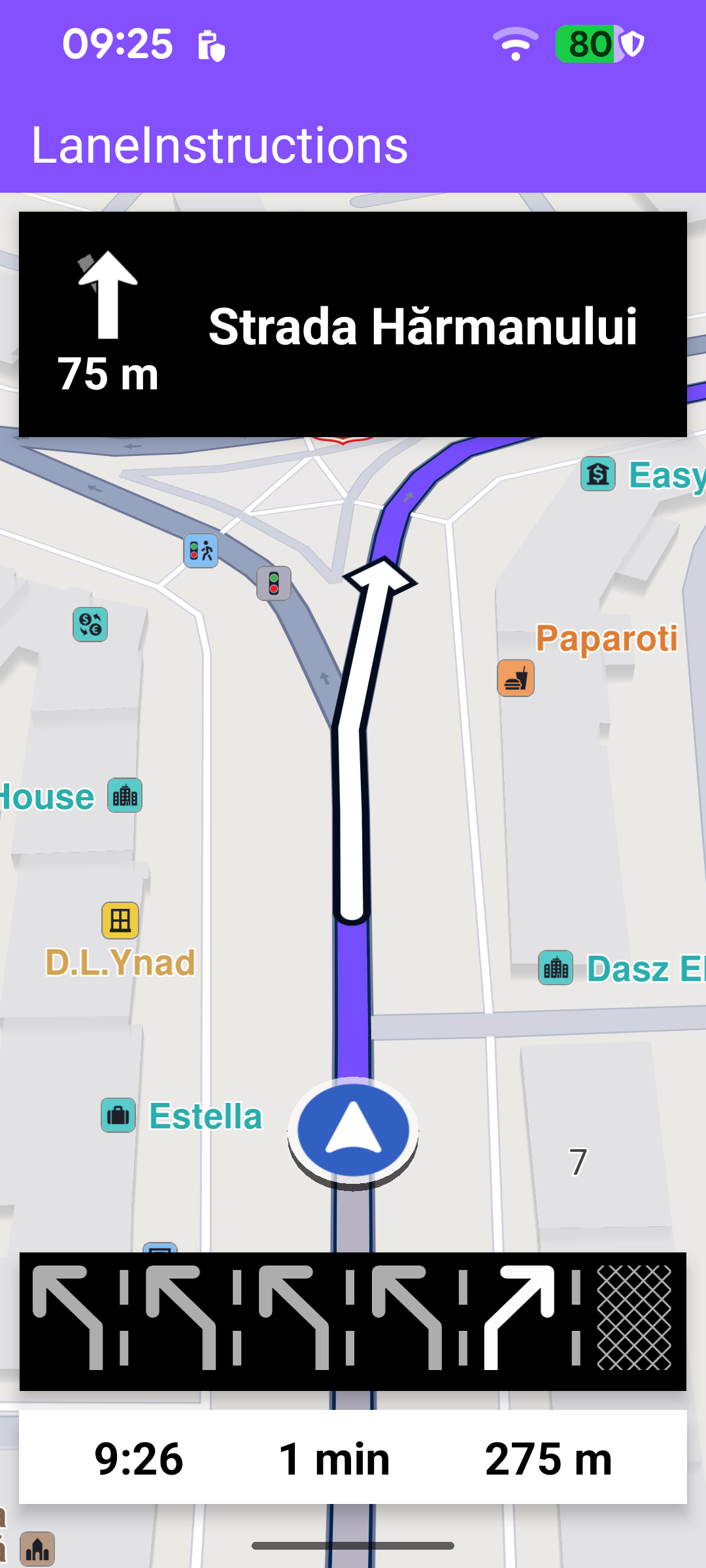
This example adds a lane guidance panel to a simulated turn-by-turn navigation. Whenever the route approaches a bifurcation - a junction, exit or fork where the road splits into several lanes - a strip of lane icons appears at the bottom of the viewport, with the lane(s) you should take highlighted. It builds on the Route Simulation example: the top panel shows the next-turn icon, distance and street name, the bottom panel shows the estimated time of arrival, remaining travel time and remaining travel distance, and the lane panel is placed above the bottom panel.
Because the position is simulated, there is no need to request location permissions, enable location services, or wait for a valid GPS fix before starting.
Navigation service and listener
MainActivity retains a single NavigationService and a NavigationListener. The listener receives the stream of navigation events: when the simulation starts, when the next instruction changes, when the status changes, when the destination is reached, on errors, and when a voice instruction should be played. The navRoute helper returns the route currently being simulated, which the UI uses to read the estimated time of arrival, remaining time and distance.
A separate ProgressListener toggles the progress bar while the route is being calculated and reports any routing failure in a dialog.
Starting the simulation
The simulation is started once the worldwide road map is downloaded and up to date. Unlike real navigation, there is no permission or GPS gating - the road-map listener clears itself and calls startSimulation directly.
startSimulation defines the departure and destination waypoints and calls navigationService.startSimulation with the navigation and routing-progress listeners. The call returns synchronously whether the simulation could be started; on failure the error is reported in a dialog. Here the simulated trip runs along a short route in Brașov, Romania, chosen because it crosses a multi-lane junction that exercises the lane panel.
Rendering the lane instructions
Each time the SDK reports a new instruction through onNavigationInstructionUpdated, the values needed by the UI are gathered on the SDK thread by toUiState. The key piece for this example is laneImage: every NavigationInstruction exposes an optional laneImage that describes the lanes of the upcoming bifurcation. It is null when no lane split is near, so the lane panel naturally appears only when there is guidance to show.
laneImage.asBitmap rasterizes the lanes into a bitmap sized to the available screen width. The activeColor argument paints the recommended lane(s) - the ones you should follow for the next turn - in white, while the remaining lanes stay dimmed.
renderInstructionUi then applies the snapshot to the views on the UI thread. The lane panel is shown only when a lane bitmap exists and the turn information (not a status message such as "Calculating…") is on screen. When a bitmap is present the ImageView is resized to match it so the lanes are rendered at their native dimensions.
The width passed to asBitmap (availableWidth) is recomputed for each orientation: in portrait the lane panel spans on the entire map width, while in landscape it is centered in the free map area to the right of the docked navigation panels.
Presenting the route and following the position
When the simulation starts (the onNavigationStarted callback above), the route is drawn on the map with presentRoute, the camera enters follow mode with followPosition, and the navigation panels are made visible. enableGPSButton wires the follow button and the follow-mode transitions: when the user pans away from the simulated position the button reappears and the panels are hidden; tapping the button calls followPosition to re-center and resume following. The active-state check here uses navigationService.isSimulationActive() rather than the real-navigation equivalent.
Ending the simulation
When the destination is reached (onDestinationReached) or an error occurs (onNavigationError), onNavigationEnded hides the navigation panels, disables the follow button and removes the route, showing a dialog only for genuine errors (not for a normal cancellation).