
External Position Source Navigation

Last updated: June 19, 2026 | 7 minutes read

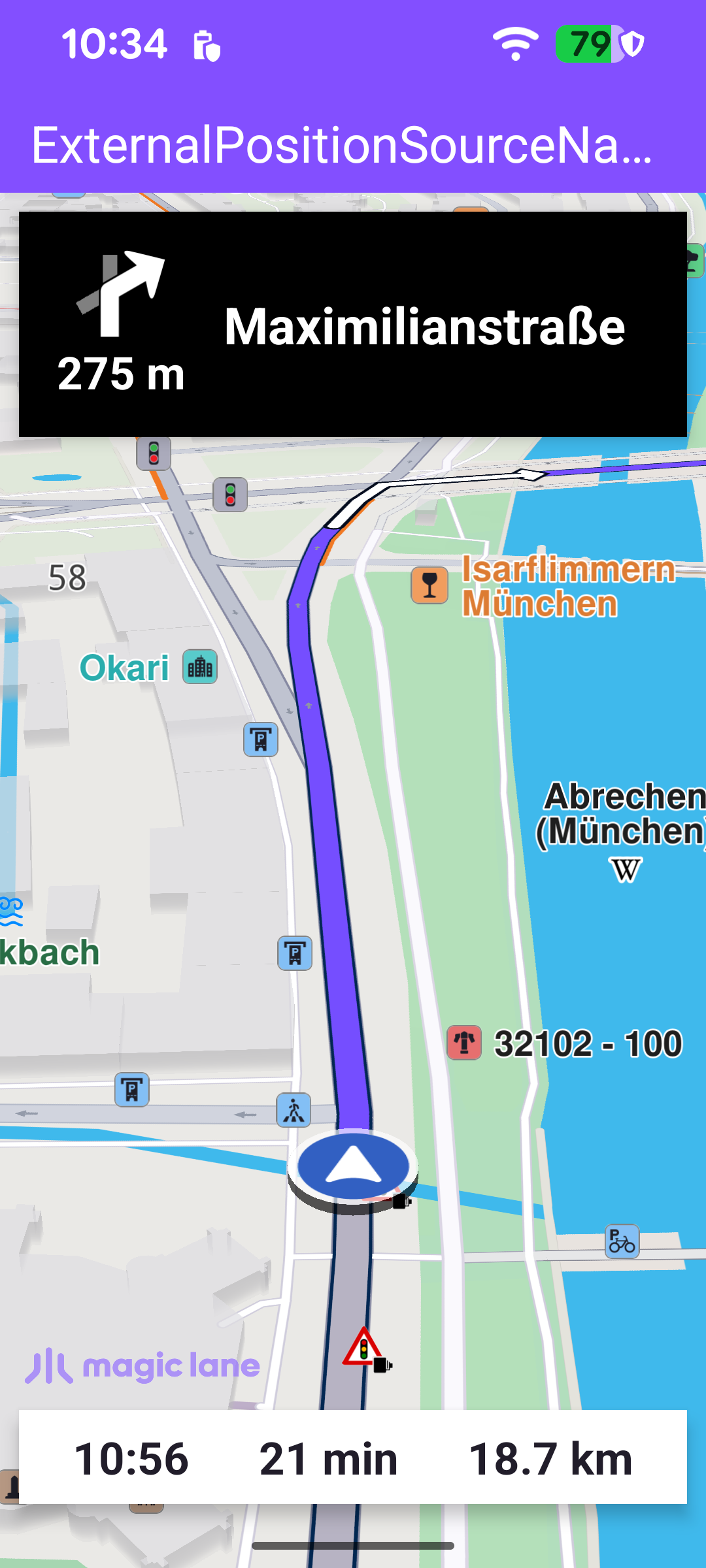
This example runs a real turn-by-turn navigation whose position fixes come from an external data source instead of the device GPS. This is the integration point for any position provider that is not the built-in receiver - a connected external GPS unit, or a recorded track replayed for testing. The on-screen experience is the same as the Route Simulation example - a top panel with the next-turn icon, distance and street name, and a bottom panel with the estimated time of arrival, remaining travel time and remaining travel distance - but each position is pushed into the SDK by the app.

Unlike the simulation example, this is a genuine navigation: navigationService.startNavigation is used (not startSimulation), and the positions that drive it are supplied through a PositionService data source. Here a fixed array of coordinates is fed at one-second intervals to stand in for a live feed.

Navigation driven by an external position source

The position track and destination

The coordinates to be replayed and the navigation destination are declared in the companion object. In a real integration the positions would arrive from the backend or hardware feed; here a static array near Munich is used so the example is self-contained.

MainActivity.ktView on Github
companion object {
val positions = arrayOf(
Pair(48.133931, 11.582914),
Pair(48.134015, 11.583203),
Pair(48.134057, 11.583348),
// ...
)
val destination = Pair(48.17192581, 11.80789822)
}

MainActivity retains a single NavigationService and a NavigationListener. The listener receives the stream of navigation events: when navigation starts, when the next instruction changes, when the status changes, when the destination is reached, on errors, and when a voice instruction should be played. The navRoute helper returns the active route, which the UI uses to read the estimated time of arrival, remaining time and distance.

MainActivity.ktView on Github
private val navigationListener: NavigationListener = NavigationListener.create(
onNavigationStarted = {
isNavigationStarted = true

SdkCall.execute {
binding.gemSurfaceView.mapView?.let { mapView ->
navRoute?.let { route -> mapView.presentRoute(route) }
enableGPSButton()
mapView.followPosition()
EspressoIdlingResource.decrement()
}
}

applyCameraFocus()
setNavigationPanelsVisible(isVisible = true)
},
onNavigationInstructionUpdated = { instr -> updateNavigationInstruction(instr) },
onDestinationReached = { onNavigationEnded() },
onNotifyStatusChange = { status ->
navigationStatus = status
refreshStatusMessage()
},
onNavigationError = { error -> onNavigationEnded(error) },
onNavigationSound = { sound ->
SdkCall.execute {
SoundPlayingService.play(sound, playingListener, soundPreference)
}
},
canPlayNavigationSound = true,
)

A separate ProgressListener shows a spinner while the route is being calculated, before navigation actually begins.

Setting up the external position source

Once the worldwide road map is downloaded and up to date, startNavigation is called. It builds the external data source, wires it to PositionService, starts navigation on the first valid fix, and then begins pushing positions.

MainActivity.ktView on Github
private fun startNavigation() = SdkCall.execute {
val externalDataSource: ExternalDataSource? =
DataSourceFactory.produceExternal(arrayListOf(EDataType.Position))
externalDataSource?.start()

positionListener = PositionListener { position: PositionData ->
if (position.isValid()) {
val error = navigationService.startNavigation(
Landmark("Poing", destination.first, destination.second),
navigationListener,
routingProgressListener,
)
if (error != GemError.NoError) {
val message = SdkCall.runSynced { GemError.getMessage(error, this@MainActivity) } ?: ""
runOnUiThread {
showDialog(getString(R.string.start_navigation_error, message))
}
}
PositionService.removeListener(positionListener)
}
}

PositionService.dataSource = externalDataSource
PositionService.addListener(positionListener)

var index = 0
externalDataSource?.let { dataSource ->
timer = fixedRateTimer("timer", false, 0L, 1000) {
SdkCall.execute {
val externalPosition = PositionData.produce(
System.currentTimeMillis(),
positions[index].first,
positions[index].second,
-1.0,
positions.getBearing(index),
positions.getSpeed(index),
)
externalPosition?.let { pos -> dataSource.pushData(pos) }
}
index++
if (index == positions.size) index = 0
}
}
}

Breaking it down:

Producing the data source. DataSourceFactory.produceExternal(arrayListOf(EDataType.Position)) declares that this source will emit data of type Position. After start() succeeds it is handed to PositionService via PositionService.dataSource, so the SDK reads positions from it rather than from the device GPS.

MainActivity.ktView on Github
val externalDataSource: ExternalDataSource? =
DataSourceFactory.produceExternal(arrayListOf(EDataType.Position))
externalDataSource?.start()

positionListener = PositionListener { position: PositionData ->
if (position.isValid()) {
navigationService.startNavigation(
Landmark("Poing", destination.first, destination.second),
navigationListener,
routingProgressListener,
)
PositionService.removeListener(positionListener)
}
}

PositionService.dataSource = externalDataSource
PositionService.addListener(positionListener)

Starting navigation on the first fix. A PositionListener is registered on PositionService. When the first valid position arrives, it starts navigation toward the destination landmark and then removes itself, so navigation is started exactly once.

Feeding positions. A fixed-rate timer pushes a new PositionData into the data source every second, looping back to the start of the array when it reaches the end. PositionData.produce requires at least an acquisition timestamp, latitude and longitude; the bearing and speed are supplied as well so the map cursor rotates and animates realistically.

MainActivity.ktView on Github
var index = 0
externalDataSource?.let { dataSource ->
timer = fixedRateTimer("timer", false, 0L, 1000) {
SdkCall.execute {
val externalPosition = PositionData.produce(
System.currentTimeMillis(),
positions[index].first,
positions[index].second,
-1.0,
positions.getBearing(index),
positions.getSpeed(index),
)
externalPosition?.let { pos -> dataSource.pushData(pos) }
}
index++
if (index == positions.size) index = 0
}
}

Deriving bearing and speed

A live feed usually carries bearing and speed, but the static array only has coordinates, so they are computed from consecutive points. getBearing applies the standard initial-bearing formula between the previous and current point; the first point has no predecessor and returns -1.0.

MainActivity.ktView on Github
/**
* Bearing formula: β = atan2(X, Y) where X and Y are quantities derived from the two coordinates.
* @return bearing in degrees between the point at [index] and the previous point,
* or -1.0 if there is no previous point.
*/
fun Array<Pair<Double, Double>>.getBearing(index: Int): Double {
if ((index > 0) && (index < size)) {
val x = cos(this[index].first) * sin(this[index].second - this[index - 1].second)
val y = cos(this[index - 1].first) * sin(this[index].first) -
sin(this[index - 1].first) * cos(this[index].first) *
cos(this[index].second - this[index - 1].second)
return (atan2(x, y) * 180) / Math.PI
}
return -1.0
}

getSpeed approximates speed as the great-circle distance between the previous and current point (covered in one second), using getDistanceOnGeoid to compute the metric distance between two coordinates.

MainActivity.ktView on Github
/**
* @return speed equal to the distance between the point at [index] and the previous point,
* or -1.0 if there is no previous point.
*/
fun Array<Pair<Double, Double>>.getSpeed(index: Int): Double {
if ((index > 0) && (index < size)) {
return this[index - 1].getDistanceOnGeoid(this[index])
}
return -1.0
}

/**
* Mathematical formula for calculating real distance between 2 coordinates.
* @return real distance in metres between two geographical points
*/
fun Pair<Double, Double>.getDistanceOnGeoid(to: Pair<Double, Double>): Double {
val (latitude1, longitude1) = this
val (latitude2, longitude2) = to
val lat1 = latitude1 * Math.PI / 180.0
val lon1 = longitude1 * Math.PI / 180.0
val lat2 = latitude2 * Math.PI / 180.0
val lon2 = longitude2 * Math.PI / 180.0

val r = 6378100.0
val rho1 = r * cos(lat1)
val z1 = r * sin(lat1)
val x1 = rho1 * cos(lon1)
val y1 = rho1 * sin(lon1)
val rho2 = r * cos(lat2)
val z2 = r * sin(lat2)
val x2 = rho2 * cos(lon2)
val y2 = rho2 * sin(lon2)

val dot = (x1 * x2 + y1 * y2 + z1 * z2)
val cosTheta = dot / (r * r)
val theta = acos(cosTheta)
return r * theta
}

Cleaning up

The position-feed timer holds native SDK resources, so it must be stopped when the activity is destroyed. onDestroy cancels the timer, clears the SDK listeners and releases the SDK.
MainActivity.ktView on Github
override fun onDestroy() {
super.onDestroy()
timer?.cancel()
timer = null
clearSdkListeners()
// Release the SDK.
GemSdk.release()
exitProcess(0)
}