
Driver Behavior

Last updated: June 19, 2026 | 3 minutes read

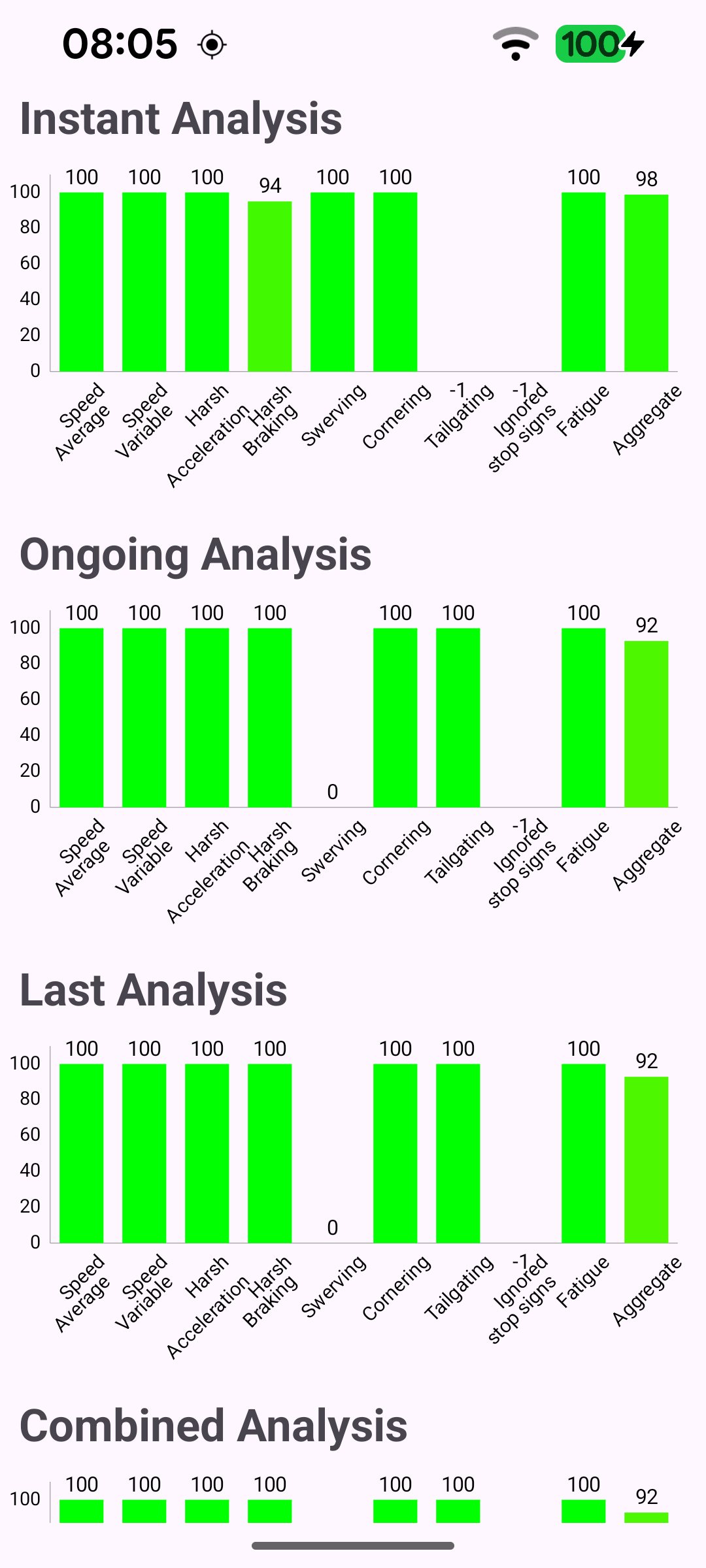
This example analyzes how a vehicle is being driven and displays the resulting driver behaviour scores as live bar charts. Using the device sensors as a live data source, it continuously evaluates metrics such as average and variable speed, harsh acceleration and braking, swerving, cornering, tailgating, ignored stop signs and fatigue, together with an aggregate score. The scores are shown across four charts - Instant, Ongoing, Last and Combined analysis - and each bar is color-coded from red (poor) to green (good) and refreshed every second.

Driver behaviour scores shown as live bar charts

Producing the driver behaviour analysis

The analysis only starts once the worldwide road map is ready. A live DataSource is produced from the device sensors, a DriverBehaviour instance is produced from it, and startAnalysis begins evaluating the driving. A repeating timer then refreshes the charts once per second.

MainActivity.ktView on Github
SdkSettings.onWorldwideRoadMapSupportStatus = { status ->
if (status == EOffboardListenerStatus.UpToDate) {
SdkCall.execute {
dataSource = DataSourceFactory.produceLive()
dataSource?.let { driverBehaviour = DriverBehaviour.produce(it, false) }
driverBehaviour?.startAnalysis()
}

// Refresh chart data every second from a background timer thread.
timer = fixedRateTimer("timer", false, 0L, 1000) {
displayDriverBehaviorInfo()
}

// Show the charts and hide the loading spinner on the main thread.
runOnAliveUi {
binding.progressBar.visibility = View.GONE
binding.chartScrollView.visibility = View.VISIBLE
}

// One-shot listener - clear after the first UpToDate signal.
SdkSettings.onWorldwideRoadMapSupportStatus = {}
}
}

Reading the driving scores

Every tick, the latest scores are read from the DriverBehaviour instance. The SDK exposes four flavours of DrivingScores: the instantaneous scores, the ongoing analysis, the last completed analysis, and a combined analysis computed over an arbitrary time interval.

MainActivity.ktView on Github
SdkCall.execute {
instantDrivingScores = driverBehaviour?.instantaneousScores
ongoingDrivingScores = driverBehaviour?.ongoingAnalysis?.drivingScores
lastDrivingScores = driverBehaviour?.lastAnalysis?.drivingScores
combinedDrivingScore = driverBehaviour?.getCombinedAnalysis(
Time().apply { longValue = 1640988000000 },
Time().apply { longValue = System.currentTimeMillis() },
)?.drivingScores
}

Mapping scores to chart bars

Each DrivingScores object is turned into a list of BarEntry values - one bar per metric - which feeds the chart. The order matches the chart labels (Speed Average, Speed Variable, Harsh Acceleration, Harsh Braking, Swerving, Cornering, Tailgating, Ignored stop signs, Fatigue, Aggregate).

MainActivity.ktView on Github
private fun createBarEntriesList(drivingScores: DrivingScores): MutableList<BarEntry> {
val barEntries = mutableListOf<BarEntry>()

SdkCall.execute {
barEntries.apply {
add(BarEntry(0f, drivingScores.speedAverageRiskScore.toFloat()))
add(BarEntry(1f, drivingScores.speedVariableRiskScore.toFloat()))
add(BarEntry(2f, drivingScores.harshAccelerationScore.toFloat()))
add(BarEntry(3f, drivingScores.harshBrakingScore.toFloat()))
add(BarEntry(4f, drivingScores.swervingScore.toFloat()))
add(BarEntry(5f, drivingScores.corneringScore.toFloat()))
add(BarEntry(6f, drivingScores.tailgatingScore.toFloat()))
add(BarEntry(7f, drivingScores.ignoredStopSignsScore.toFloat()))
add(BarEntry(8f, drivingScores.fatigueScore.toFloat()))
add(BarEntry(9f, drivingScores.aggregateScore.toFloat()))
}
}

return barEntries
}

Color-coding the bars

Each bar is shaded on a red-to-green gradient according to its score percentage, so low scores stand out in red and high scores in green.

MainActivity.ktView on Github
private class DriverBehaviorBarDataSet(barEntries: List<BarEntry>, label: String) : BarDataSet(barEntries, label) {

override fun getColor(index: Int): Int {
val percent = entries[index].y * 0.01f
return ArgbEvaluator().evaluate(percent, Color.RED, Color.GREEN) as Int
}

override fun getEntryIndex(e: BarEntry?): Int = super.getEntryIndex(e)
}

Releasing the analysis

When the activity is destroyed, the timer is cancelled and the analysis, driver behaviour instance and data source are all released to free the underlying sensor resources.
MainActivity.ktView on Github
override fun onDestroy() {
super.onDestroy()

timer?.cancel()
clearSdkListeners()

SdkCall.execute {
driverBehaviour?.stopAnalysis()
driverBehaviour?.release()
dataSource?.release()
}

GemSdk.release()
exitProcess(0)
}