
Downloaded Onboard Map Simulation

Last updated: June 19, 2026 | 6 minutes read

This example simulates turn-by-turn navigation along a computed route using a map that has already been downloaded and stored on the device - the route is calculated locally, from the onboard map, with no online connection involved. It is a variant of the Route Simulation example: the on-screen experience is the same - a top panel with the next-turn icon, distance and street name (or next turn instruction, if the street name is not available), and a bottom panel with the estimated time of arrival, remaining travel time and remaining travel distance - but the underlying map and routing data come from a pre-bundled onboard map instead of online services.

The onboard map is shipped with the app under assets/offlinemaps/ - here, the pre-downloaded Luxembourg map. Because the position is simulated and the map is local, there is no need for an active internet connection before starting. The simulated trip here runs from Luxembourg to Mersch, which both lie within that map.
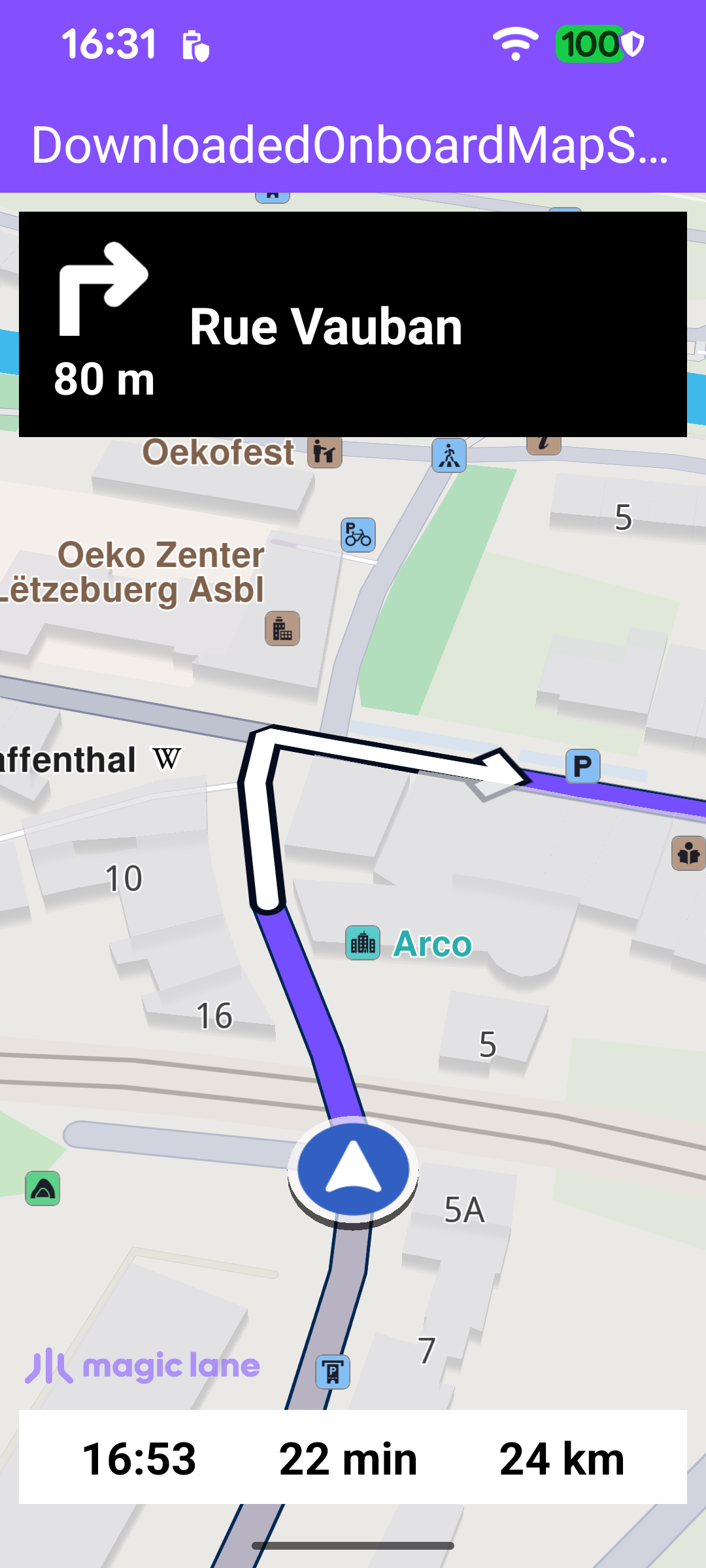
Simulated navigation on a downloaded onboard map

MainActivity retains a single NavigationService and a NavigationListener. The listener receives the stream of navigation events: when the simulation starts, when the next instruction changes, when the destination is reached, on errors, and when a voice instruction should be played. The navRoute helper returns the route currently being simulated, which the UI uses to read the estimated time of arrival, remaining time and distance.

MainActivity.ktView on Github
private val navigationListener: NavigationListener = NavigationListener.create(
onNavigationStarted = {
SdkCall.execute {
binding.gemSurfaceView.mapView?.let { mapView ->
navRoute?.let { route -> mapView.presentRoute(route) }
enableGPSButton()
mapView.followPosition()
}
}
applyCameraFocus()
setNavigationPanelsVisible(isVisible = true)
},
onNavigationInstructionUpdated = { instr -> updateNavigationInstruction(instr) },
onDestinationReached = { onNavigationEnded() },
onNavigationError = { error -> onNavigationEnded(error) },
onNavigationSound = { sound ->
SdkCall.execute {
SoundPlayingService.play(sound, playingListener, soundPreference)
}
},
canPlayNavigationSound = true,
)

Starting the simulation

Once the default map view is created, the simulation is started directly - there is no need to wait for an online road map to become available, because the onboard map is already present on the device.

MainActivity.ktView on Github
binding.gemSurfaceView.onDefaultMapViewCreated = {
updateFocusViewport()
startSimulation()
}

startSimulation defines the departure and destination waypoints and calls navigationService.startSimulation with the navigation and routing-progress listeners. The call returns synchronously whether the simulation could be started; on failure the error is reported in a dialog. Both waypoints sit inside the bundled onboard map area, so the route is computed entirely from local data.

MainActivity.ktView on Github
private fun startSimulation() = SdkCall.runSynced {
val waypoints = arrayListOf(
Landmark("Luxembourg", 49.61588784436375, 6.135843869736401),
Landmark("Mersch", 49.74785494642988, 6.103323786692679),
)
val error = navigationService.startSimulation(waypoints, navigationListener, routingProgressListener)
if (error != GemError.NoError) {
runOnUiThread {
showDialog(
getString(
R.string.failed_to_start_simulation,
SdkCall.runSynced { GemError.getMessage(error, this) },
),
)
}
}
}

Presenting the route and following the position

When the simulation starts (the onNavigationStarted callback above), the route is drawn on the map with presentRoute, the camera enters follow mode with followPosition, and the navigation panels are made visible. enableGPSButton wires the follow button and the follow-mode transitions: when the user pans away from the simulated position the button reappears and the panels are hidden; tapping the button calls followPosition to re-center and resume following. The active-state check uses navigationService.isSimulationActive().

MainActivity.ktView on Github
private fun enableGPSButton() {
binding.apply {
gemSurfaceView.mapView?.apply {
// Panning away from the GPS position hides the nav panels to expose the map.
onExitFollowingPosition = {
followGpsButton.isVisible = true
setNavigationPanelsVisible(isVisible = false)
}

// Re-entering GPS follow restores the nav panels if simulation is still running.
onEnterFollowingPosition = {
followGpsButton.isVisible = false
val simulationIsActive = SdkCall.execute { navigationService.isSimulationActive() } ?: false
if (simulationIsActive) {
setNavigationPanelsVisible(isVisible = true)
}
}

followGpsButton.setOnClickListener {
SdkCall.execute { followPosition() }
}
}
}
}

Updating the instruction panel

Each time the SDK reports a new instruction through onNavigationInstructionUpdated, updateNavigationInstruction refreshes the panels in a single SDK read pass. It gathers the next street name (or turn instruction), the next-turn icon, the distance to the turn, and the estimated time of arrival (ETA), remaining travel time (RTT) and remaining travel distance (RTD) read from the simulated route, then posts them to the views.

MainActivity.ktView on Github
private fun updateNavigationInstruction(instr: NavigationInstruction) {
val data = SdkCall.execute {
InstructionUiData(
text = instr.nextStreetName?.takeIf { it.isNotEmpty() } ?: instr.nextTurnInstruction.orEmpty(),
icon = instr.nextTurnImage?.asBitmap(100, 100),
distance = instr.getDistanceInMeters(),
eta = navRoute?.getEta() ?: "",
rtt = navRoute?.getRtt() ?: "",
rtd = navRoute?.getRtd() ?: "",
)
} ?: return

binding.apply {
navInstruction.text = data.text
navInstructionIcon.setImageBitmap(data.icon)
navInstructionDistance.text = data.distance
eta.text = data.eta
rtt.text = data.rtt
rtd.text = data.rtd
}
EspressoIdlingResource.decrement()
}

The ETA, remaining travel time and remaining travel distance are derived from the route's timeDistance.

MainActivity.ktView on Github
private fun Route.getEta(): String {
val etaNumber = this.getTimeDistance(true)?.totalTime ?: 0
val time = Time()
time.setLocalTime()
time.longValue += etaNumber * 1000
return String.format(Locale.getDefault(), getString(R.string.time_format_hh_mm), time.hour, time.minute)
}

private fun Route.getRtt(): String {
return GemUtil.getTimeText(
this.getTimeDistance(true)?.totalTime ?: 0,
).let { pair ->
pair.first + " " + pair.second
}
}

private fun Route.getRtd(): String {
return GemUtil.getDistText(
this.getTimeDistance(true)?.totalDistance ?: 0,
EUnitSystem.Metric,
).let { pair ->
pair.first + " " + pair.second
}
}

Ending the simulation

When the destination is reached (onDestinationReached) or an error occurs (onNavigationError), onNavigationEnded hides the navigation panels, disables the follow button and removes the route, showing a dialog only for genuine errors (not for a normal cancellation).

MainActivity.ktView on Github
private fun onNavigationEnded(errorCode: ErrorCode = GemError.NoError) {
runOnUiThread {
if (errorCode != GemError.NoError && errorCode != GemError.Cancel) {
val message = SdkCall.runSynced { GemError.getMessage(errorCode, this) }
if (message?.isNotEmpty() == true) {
showDialog(message)
}
}
setNavigationPanelsVisible(isVisible = false)
disableGPSButton()
}

SdkCall.execute {
binding.gemSurfaceView.mapView?.hideRoutes()
}
}